KIM-1 · Volume 9
KIM-1 — Volume 9 — Building a KIM-1 Replica
The PAL-2 kit from four small boxes to a KIM prompt: the parts and what each replaces on the 1976 board, the soldering order, the switch settings, the first press of RS, the User Manual's first program and a teleprinter session over USB, how to give the replica back its cassette interface, and the purist's alternative
9.1 About This Volume
Volume 8 surveyed the KIM-1 replicas available in October 2026 and chose the PAL-2 (PAL-II) designed by Liu Ganning as the one to build: the only complete kit in stock, with two RIOT chips, the original memory map, the unmodified monitor on a real NMOS 6502, and a layout that follows the 1976 board. This volume is the build: what is in the kit and how each part maps onto the original, the soldering order, the switch settings, first power and the first reset, the User Manual’s first program, a teleprinter session over USB, the memory switches, and the cassette interface the PAL-2 leaves out.
It is written as a procedure. It draws on the kit maker’s PAL-II User Manual (version 1.0, 30 December 2024; mirror at retro.hansotten.nl) and schematic, on Hans Otten’s notes from building his own (PAL-2 page), on Jan Rydval’s build log of October 2026 (blog.jaxtax.eu), and on the original KIM-1 User Manual (1976; scan at bitsavers), whose procedures the PAL-2 manual tells the builder to follow. The builder’s own account will go where the text carries a marker.
9.2 Buying the Kit
On 28 October 2026 the PAL-2 kit was listed on Tindie by the seller “kim1” (Liu Ganning, trading as KJXZZ, Shenzhen) at US$265.02, with “Only 4 left in stock” (Tindie listing). The listing says a USB-C USB-to-TTL adapter is included; a USB cable is not. Stock is small and the listing should be re-read on the day of ordering.
The rest of the bill is modest:
Table 1 — The rest of the bill is modest
| Item | Notes | Cost (estimate, Oct 2026) |
|---|---|---|
| PAL-2 kit | everything for the board, including chips and keypad cover | US$265.02 + shipping |
| USB cable, USB-A to USB-C | to the included adapter; see the warning under Serial below | a few dollars |
| 5 V supply (optional) | only if not powering from the adapter | a few dollars |
| PAL-1 Cassette Interface board (optional) | to restore cassette load and save | US$27 (3 in stock) |
9.3 What Is in the Box
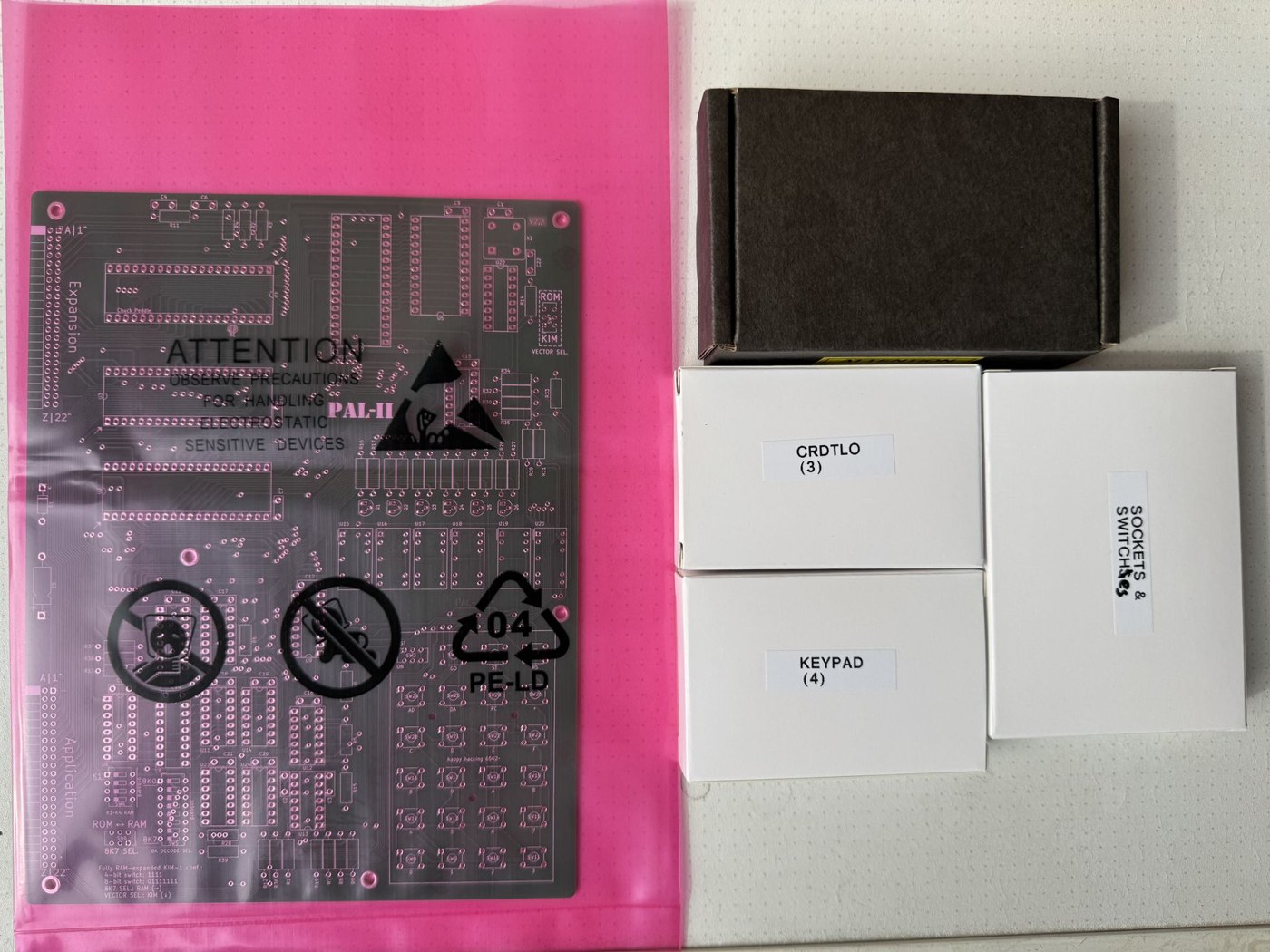
The kit arrives as a printed circuit board in an anti-static bag and four boxes: chips, sockets and switches, passive components, and the keypad. Printed copies of the schematic, the bill of materials and the parts layout come with it. The PAL-II User Manual’s Appendix A lists the parts; the right-hand column of this table relates each to the original board described in Volume 3:
Table 2 — The kit arrives as a printed circuit board in an anti-static bag and four boxes: chips, sockets and switches, passive components, and the keypad. Printed copies of the schematic, the bill of materials and the parts layout come with it. The PAL-II User Manual's Appendix A lists the parts; the right-hand column of this table relates each to the original board described in Volume 3
| Ref. | Part | Does the job of, on the KIM-1 |
|---|---|---|
| U1 | 6502 microprocessor | U1, the same chip |
| U2, U3 | 6532 RAM-I/O-timer (“-02” and “-03”) | the two 6530s’ ports, timers and RAM |
| U5 | 28C16 EEPROM, pre-programmed | the two 6530s’ ROMs (the monitor) |
| U7 | 628128 static RAM, 128 K × 8 | the eight 6102s, plus all expansion memory |
| U4 | 74LS138 decoder | address decoding (with U6) |
| U6, U8, U9 | 74LS145 decoders | address decoding, and the keypad/display decoder |
| U13 | 556 dual timer | the ST/RS debouncer, as on the original |
| U10–U12, U14, U21–U24 | 74LS04, 74LS00, 74LS06, 74LS38, 74LS133 | glue logic, single-step, serial |
| U15–U20 | FJ3101DH red seven-segment LED, common anode | the six digits |
| Q1–Q6 | 2N4403 PNP | the digit drivers |
| D1 | 1N4735A 6.2 V zener | serial input protection |
| X1 | 1 MHz oscillator module | the 1 MHz crystal |
| SW1, SW2, SW8–SW28 | 23 push-buttons with legend keycaps | the keypad |
| SW3 | SPDT slide switch, 4 mm stem | the SST switch |
| SW6, SW7 | SPDT slide switches | vector select; 8K7 RAM/ROM select (new) |
| SW4, SW5 | 4-way and 8-way DIP switches | memory configuration (new) |
| J1, J2 | 2 × 22 pin headers, 2.54 mm, right-angle | the Expansion and Application edge connectors |
| — | 18 IC sockets, 3 M2 screws, SLA keypad cover, MOS sticker | — |
The passive parts are six 3.3 kΩ, two 47 kΩ, nineteen 1 kΩ, six 220 Ω and seven 680 Ω resistors; eighteen 0.1 µF, two 0.22 µF and one 220 pF capacitors; and one 1 µF electrolytic. Two details in the bill are errors worth knowing about. The manual describes the 28C16 as “256Kb (32K x 8)”, but a 28C16 holds 2 K × 8, exactly the two 6530 ROMs. The Tindie text describes the RAM both as “65K bytes” and as “32K”. The chip is 128 K × 8, of which the switches can map almost the whole 64 K address space.
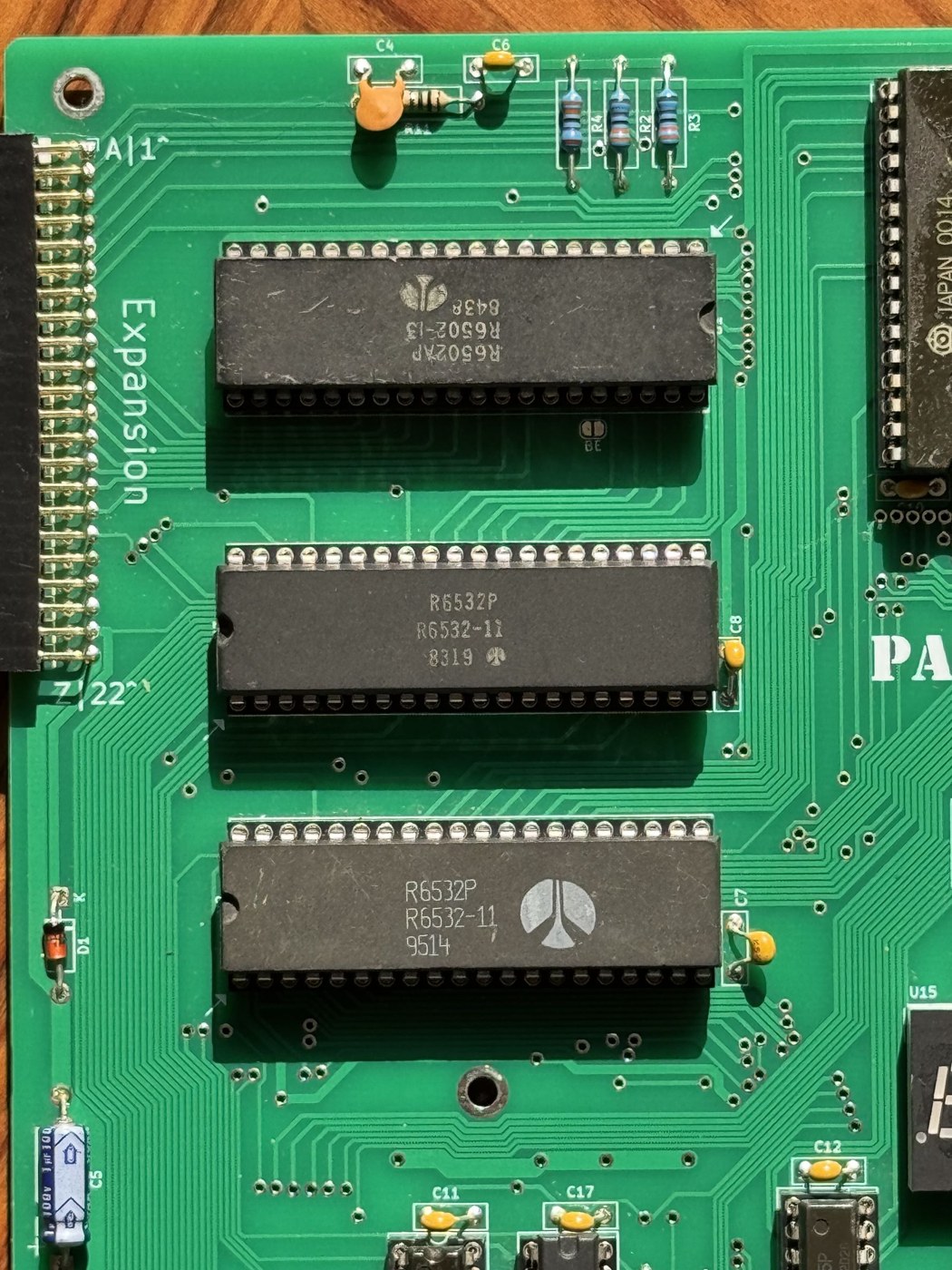
The large chips deserve care on arrival. The manual warns: “Your PAL-II kit includes recycled vintage, hard to find ICs. Although all such ICs are tested before package, but they are more sensitive/fragile than modern chip. Please handle with care with these chips. Always discharge before touching your PAL-II kit and carefully deal with chip’s leg when fitting it in socket.” Straighten bent legs gently with flat pliers, one row at a time, before pressing a chip into its socket.
9.4 Tools
A fine-tipped temperature-controlled soldering iron, 0.7–0.8 mm rosin-cored solder, flush cutters, a multimeter, an anti-static wrist strap or at least a habit of touching earthed metal first, a magnifier for inspecting joints, and a PH1 cross-head screwdriver for the keypad cover. A desoldering pump or braid is worth having for the one joint that goes wrong. Nothing in the kit is surface-mount.
9.5 Soldering Order
The manual gives the order, which is the usual one for a through-hole kit: lowest parts first, so the board lies flat on the bench while each is soldered, and the static-sensitive chips last.
“Resistors -> Diode -> DIP switches -> IC sockets -> Pin header connectors -> Oscillator -> Capacitors -> LEDs -> Transistors -> Switches (keypad and selectors) -> Keycaps and Keypad Cover”
Hans Otten’s summary of his own build is shorter: “Just followed the interactive BOM, passive components first, ICs last.” The parts layout in Appendix B of the manual, or the maker’s online interactive bill of materials, shows where each part goes. (The interactive version, hosted at pal2.aibs.ws, refused connections on 28 October 2026; the printed layout in the kit serves the same purpose.)
9.5.1 Resistors and the diode
Fit the resistors by value, checking each with the meter rather than trusting colour bands under artificial light. Bend the leads to the hole spacing, push the resistor flat against the board, solder one lead, check it is still flat, solder the other, and trim. The six 220 Ω resistors (R16, R18, R20, R22, R24, R26) and the seven 680 Ω resistors (R29–R35) sit in the display area and are in plain view on the finished board; their alignment is what the eye sees first.
D1, the 6.2 V zener, is the one polarised part in this group. Its band goes to the bar on the silkscreen.
9.5.2 DIP switches, sockets and headers
The two DIP switches, SW4 (four positions) and SW5 (eight), go in next, the right way round per their silkscreen. Then the eighteen IC sockets. Each socket’s notch must match the notch on the silkscreen, because it is what will later tell the builder which way the chip goes. Hans Otten’s advice is to “check twice!” The usual technique is to solder two diagonal corner pins, check that the socket is flat against the board, then solder the rest.
The two 2 × 22 right-angle pin headers, J1 (Expansion) and J2 (Application), go along the left edge. They carry the KIM-1’s original pin names, with the numbered row and the lettered row as on the edge connectors of 1976 (Volume 3). Solder one pin at each end first and check that the header is square to the board edge before soldering the other forty-two.
9.5.3 Oscillator, capacitors, LEDs, transistors
The 1 MHz oscillator module has one square corner that matches the silkscreen. The ceramic capacitors are not polarised; C5, the 1 µF electrolytic, is, and its negative stripe goes to the side marked on the board.
The six LED digits are common-anode FJ3101DH displays. Each must go in with its decimal point at the bottom right. Seat all six before soldering any, then lay a straight edge along their tops so that the row is level. Like the resistors in front of it, the display is in plain view.
The six 2N4403 PNP transistors drive the digits. Their flat faces match the silkscreen outlines.
9.5.4 Switches, keycaps and the keypad cover
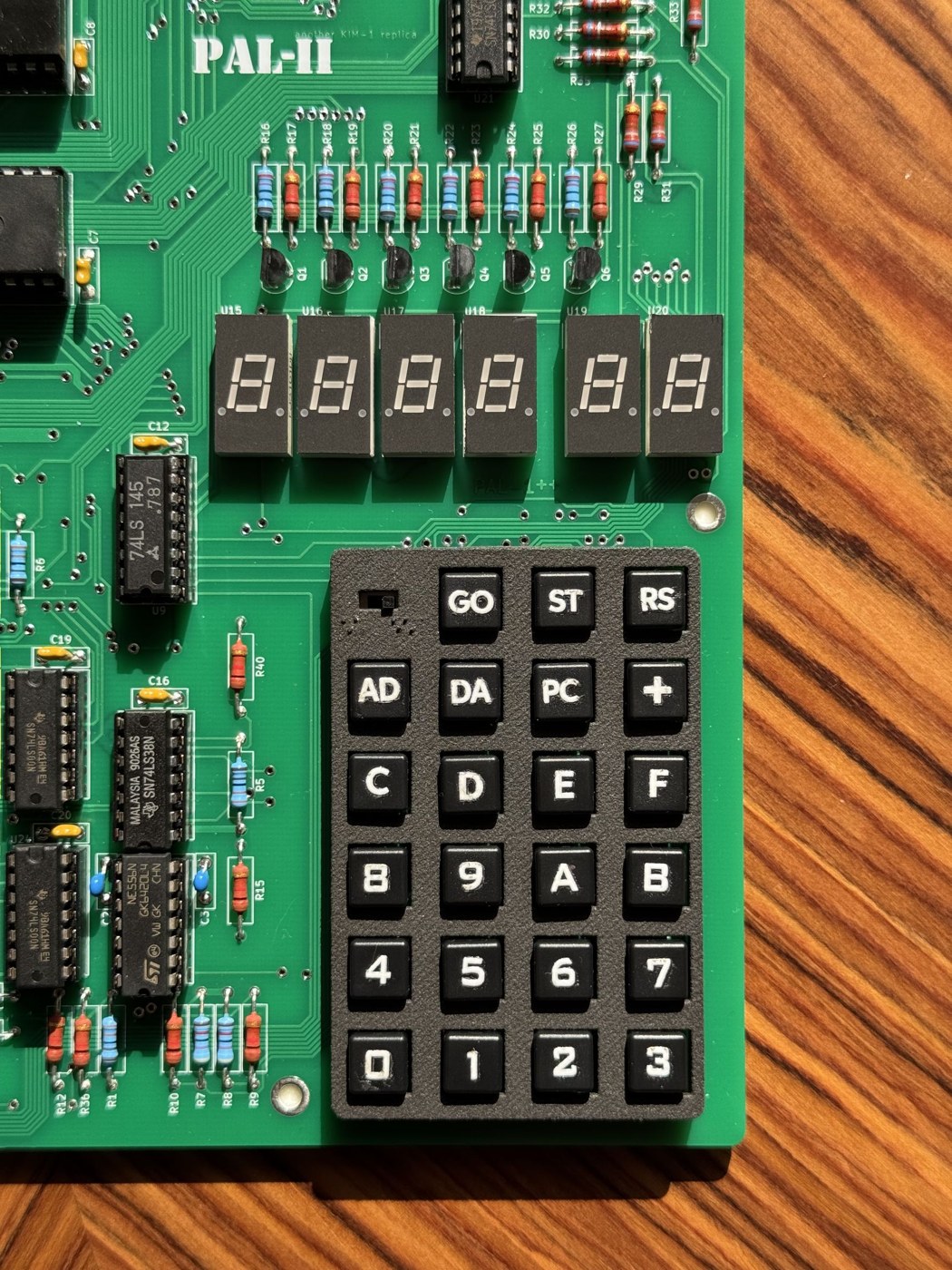
The 23 keypad switches go in with every switch fully seated, since a tilted switch will bind under the cover. Then the three slide switches. Hans Otten points out the one trap: the SST switch (SW3) has a taller slider than the vector-select and 8K7-select switches (SW6, SW7), because it has to reach through the keypad cover. Mixing them up leaves the SST switch unreachable.
The keycaps press on with their legends upright. The black keypad cover is held by three small screws, and the manual is specific about them, because overtightening cracks the screw seats in the cover:
“We recommend using a PH1 SCREWDRIVER to tighten the three keypad cover screws. Please take care not to overtighten these screws to avoid cracking the screw seats. A safer approach is to rotate the screws 90 degrees at a time, check the distance between the screw head and the PCB, and repeat this process until the screw head makes contact with the PCB, at which point you should stop.”
9.5.5 Inspection, then chips
Before any chip goes in, inspect the whole underside under magnification for bridges between adjacent pads and for dull, balled or cracked joints, and reflow any that look doubtful. With the meter on resistance, check that there is no short between +5 V and ground: Application pin A to pin 1. The manual’s first-boot instructions assume “the short circuit and cold soldering check” has been passed.
Then insert the chips, each with its notch towards the socket’s notch, the 6502 and two 6532s last. The two 6532s are interchangeable electrically but the board labels them “-02” (U2) and “-03” (U3) after the 6530s they stand in for.
9.6 Switch Settings
The manual’s Figure 1 gives the default configuration for the first boot:
Table 3 — The manual's Figure 1 gives the default configuration for the first boot
| Switch | Setting | Meaning |
|---|---|---|
| Vector selector (SW6) | down | interrupt and reset vectors from the KIM-1 monitor |
| 8K7 selector (SW7) | right | the top 8 K block as RAM |
| K1–K4 RAM (SW4) | 1, 1, 1, 1 | RAM fitted in the four expansion blocks, 0400–13FF |
| 8K decoder (SW5) | 0, 1, 1, 1, 1, 1, 1, 1 | 8K0 off, so the KIM-1’s own 8 K is decoded as on the original; the seven higher 8 K blocks are RAM |
| SST (SW3) | right | the slide switch as on the KIM-1 |
The silkscreen beside the switches labels this “Fully RAM-expanded KIM-1” — a KIM-1 with every expansion block filled. Switching K1–K4 off should leave only the original kilobyte below 1400; Hans Otten’s PAL-2 page explains each switch. The decoder switch for 8K0 must stay off in any KIM-1 configuration, because that block holds the monitor, the RIOTs and the original RAM.
9.7 First Power
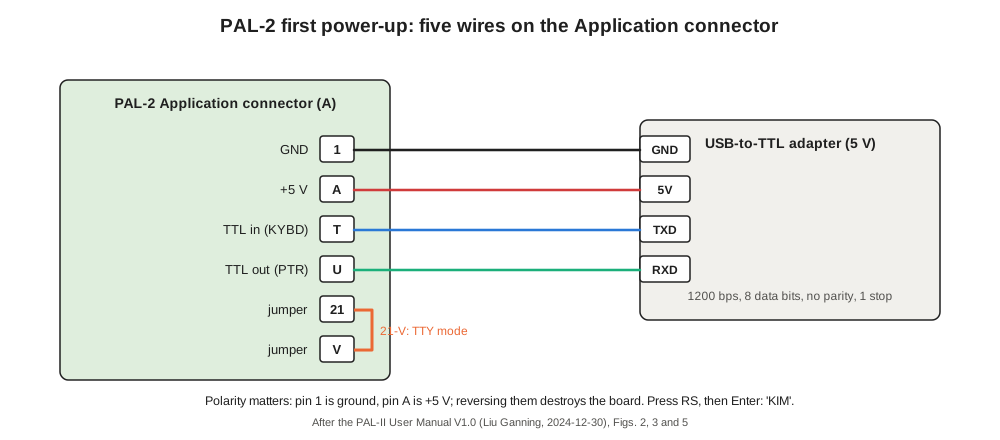
The PAL-2 runs on 5 V only, applied to the Application connector exactly as on the 1976 board: ground on pin 1, +5 V on pin A. The manual recommends powering it from the USB-to-TTL adapter, which supplies 5 V and the serial link through one cable. Polarity is the most dangerous mistake in the whole build. Hans Otten, who uses Dupont jumper wires, warns that “reversing these pins will mean the dead of the PAL-2!” Check the two wires twice before plugging in.
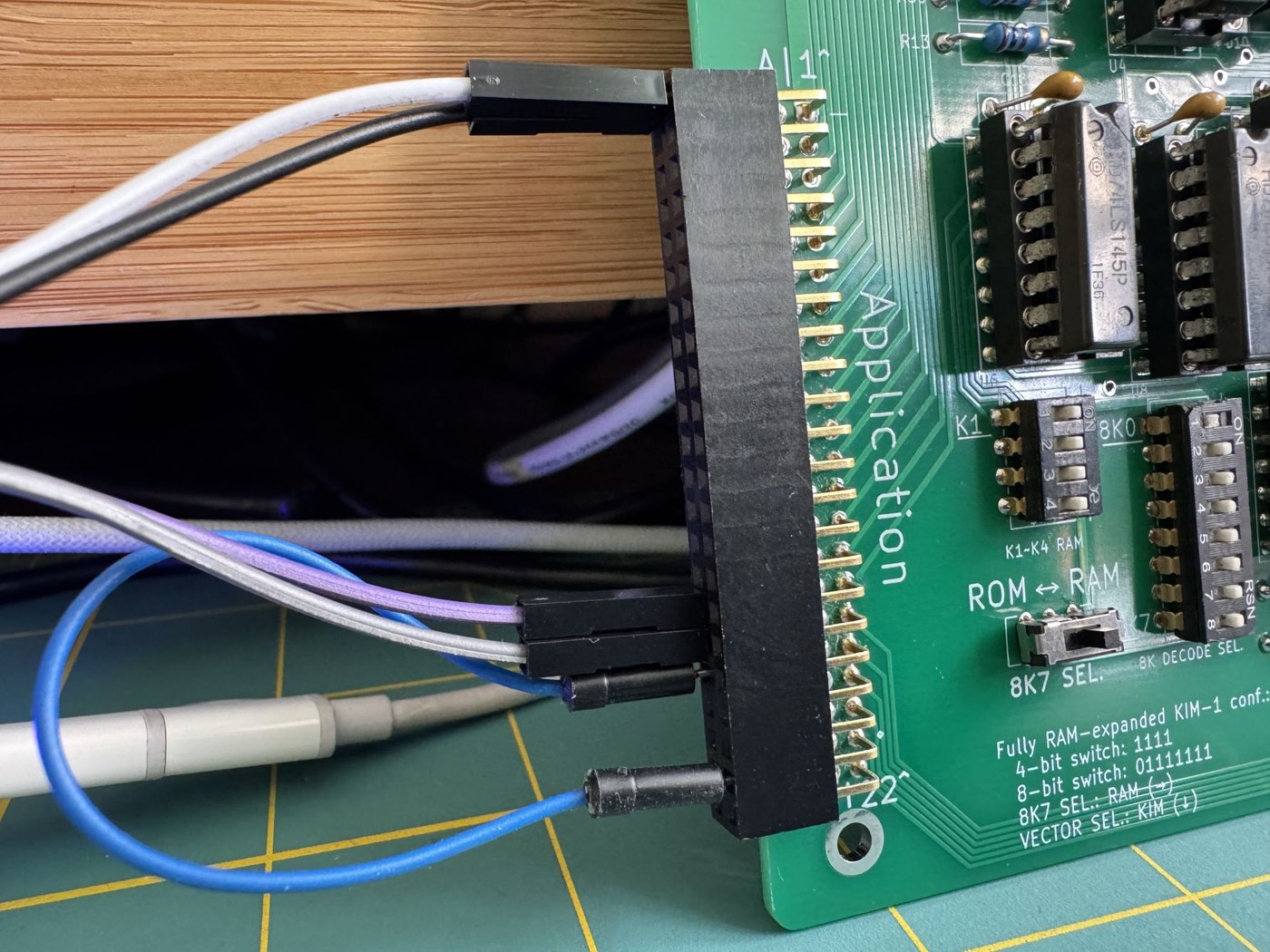
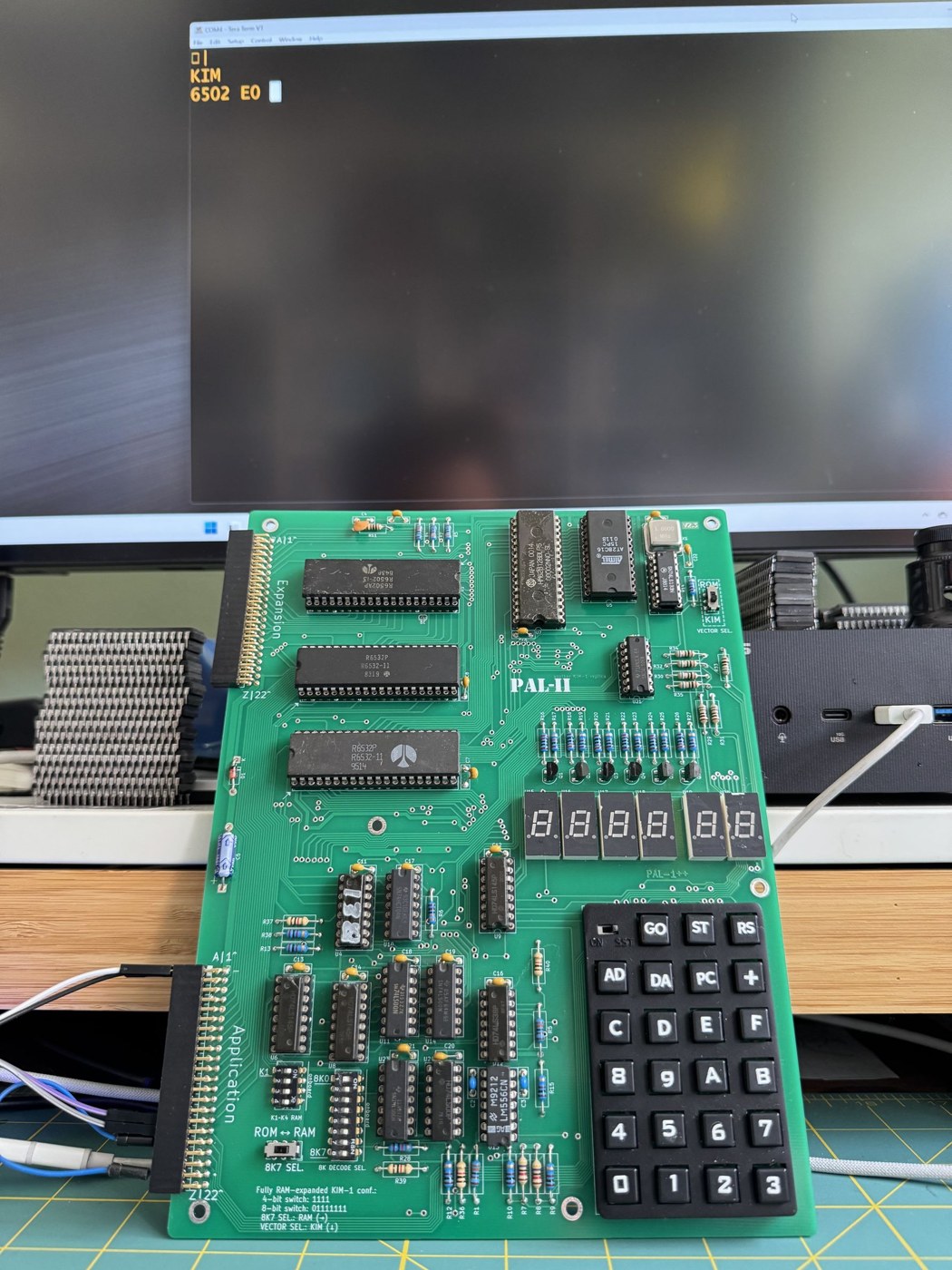
For the very first test, leave the 21–V jumper off, so that the board starts in keypad mode. Apply power. The display stays dark, which is correct: like the original, the PAL-2 has no power-on reset. Press RS. The manual’s test is the KIM-1 manual’s: “You should see the LED display digits light as your first check that the system is operational.” Jan Rydval’s build log records the usual first scare, a dark display that one press of RS cured.
If RS does not light the display, the checks are the original manual’s Appendix C, adapted: measure 5 V between pins A and 1 at the board; check that every chip is fully seated and the right way round; check that no key is stuck down; check the DIP switches against the table above; and inspect the joints around the 74LS145s and the display transistors.
9.8 The First Program
Two rituals from 1976 apply unchanged. First, set the vectors, so that ST, SST and BRK return to the monitor (Volume 4):
AD 1 7 F A DA 0 0 + 1 C AD 1 7 F E DA 0 0 + 1 C
Second, clear decimal mode: AD 0 0 F 1 DA 0 0.
The PAL-2 manual’s own “first program” is a cross-reference: “Please follow chapter 2.4 Let’s try a simple program on page 9 of the KIM-1 User’s Manual.” That is the program Volume 4 walks through. Key AD 0 0 0 2 DA and the fourteen bytes 18 A5 00 65 01 85 FA A9 00 85 FB 4C 4F 1C, pressing + between each pair; check them with AD 0 0 0 2 and the + key; store 02 at 0000 and 03 at 0001; then AD 0 0 0 2 GO. A working board shows 0005 65, the sum in the address field, exactly as the series’ simulator does in Volume 4. With FF and FF it shows 00FE.
Then test the stepping hardware, which is the part of the board most often wrong on clones. With the program still in memory, select 0002, move SST to on, and press GO repeatedly. The display should step 0003, 0005, 0007, 0009, 000B, 000D, skipping the operand bytes. A board that runs programs at full speed but will not step has a fault in the SST logic or a missing NMI vector. (On the Micro-KIM, the same symptom with a CMOS 65C02 fitted came from a timing glitch, Volume 8; the PAL-2 uses an NMOS 6502.)
Finally test ST: run the tone program from Volume 4, or any loop, and press ST. The display should relight with an address inside the loop.
9.9 Serial: The Teleprinter over USB
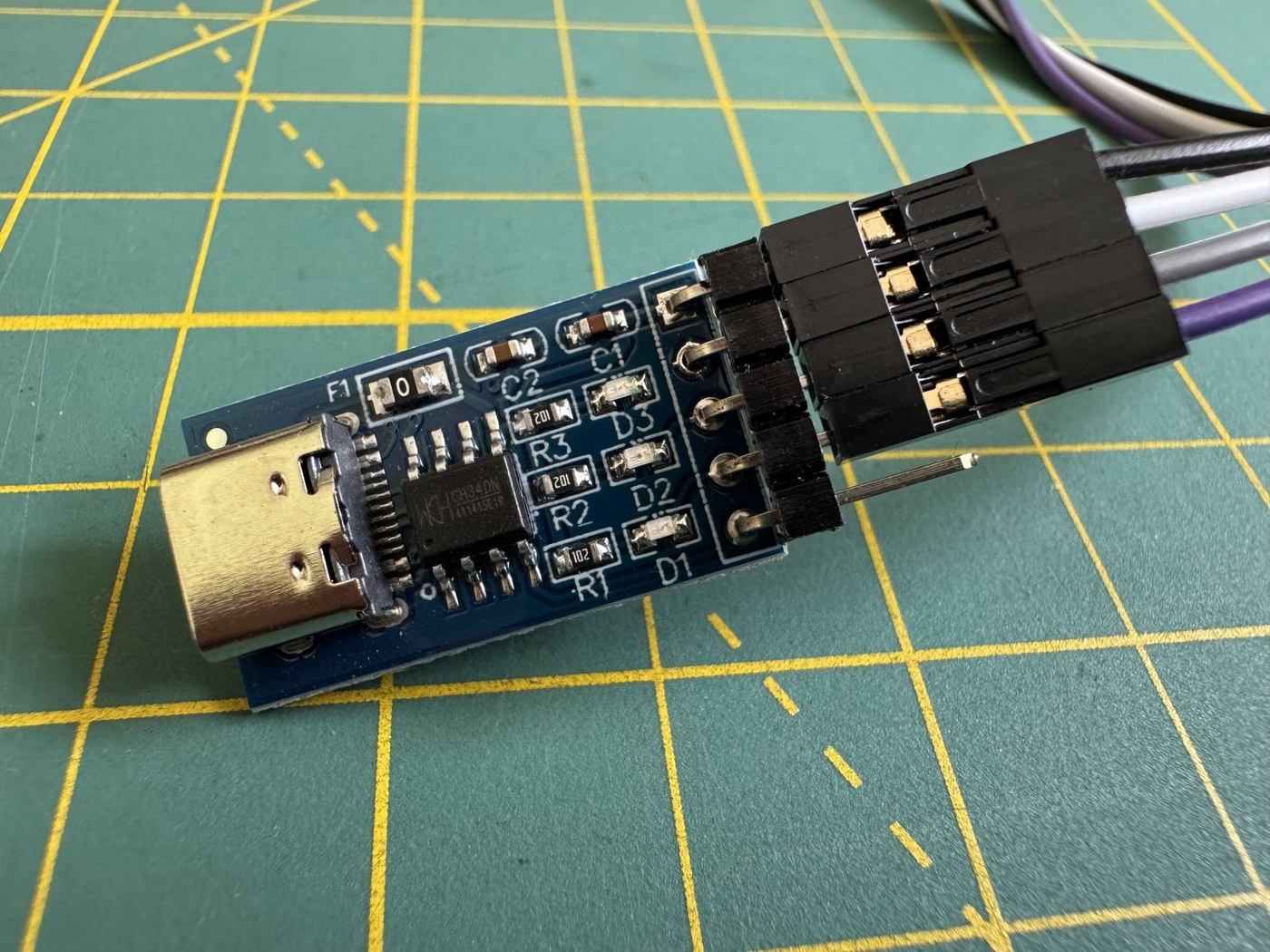
The original KIM-1 talked to a Teletype through a 20 mA current loop. The PAL-2 replaces the loop with logic-level (TTL) serial for a USB-to-TTL adapter, so a modern computer running a terminal program stands in for the teleprinter. The connections, from the manual’s Figure 5:
Table 4 — The original KIM-1 talked to a Teletype through a 20 mA current loop. The PAL-2 replaces the loop with logic-level (TTL) serial for a USB-to-TTL adapter, so a modern computer running a terminal program stands in for the teleprinter. The connections, from the manual's Figure 5
| PAL-2 Application pin | Signal | Adapter pin |
|---|---|---|
| 1 | ground | GND |
| A | +5 V | 5V |
| T | TTL in (the KIM’s “keyboard”) | TXD |
| U | TTL out (the KIM’s “printer”) | RXD |
| 21 to V | jumper: teleprinter mode | — |
If the board is powered separately, the adapter’s ground must still be joined to pin 1. The terminal is set to 1200 bit/s, 8 data bits, no parity, 1 stop bit, no flow control. With the 21–V jumper in place, press RS on the board and then Enter on the computer. As on the original, the monitor measures the line speed from that first character: “This step is most important since the PAL-II system adjusts automatically to the bit rate of the serial communication and requires this first key depression to establish this rate.” The terminal should print:
KIMfollowed by an address and its contents. The display goes dark, because the monitor is now in teleprinter mode. From here the commands are those of Volume 4: an address and SPACE to open it, a byte and . to store it, RETURN and LINE FEED to step, G to run, Q to list in paper-tape format, L to load. “Please note that the KIM-I monitor only accept UPPERCASE commands”, the manual adds, so Caps Lock should be on.
Two practical problems recur in builders’ reports. Jan Rydval found that “Three of five boards failed on a direct USB-C connection” because the cheap adapters omit the pull-down resistors a USB-C host checks before supplying power; a USB-A to USB-C cable avoids the problem. And the monitor reads serial input by timing bits in software, so a file pasted or sent at full speed loses characters. The cure is a delay after each character and a longer one after each line (the PAL-1 manual suggests 5 ms and 100 ms), or Rydval’s kimload tool, which waits for the echo of each character.
9.10 Giving It Back a Cassette Interface
The PAL-2 omits the KIM-1’s cassette circuit. The original’s tape routines are still in the monitor ROM at 1800 and 1873, and they still toggle PB7 of the -02 RIOT and time pulses on its input (Volume 4), so the missing part is only the analogue circuit: the output network and the 565 phase-locked loop and 311 comparator that turn tones back into pulses.
Hans Otten restored it on his PAL-2 with one patch wire and the PAL-1’s add-on Cassette Interface board (v1.2, US$27 on Tindie, three in stock on 28 October 2026), which has its own 12 V supply for the phase-locked loop. His notes describe a wire from PB7 of the system RIOT (at U12D pin 11) to the Application connector, and the cassette board’s PLL TEST output taken to its TAPE input, and suggest leaving R9 off the cassette board. Builders should follow his page and the cassette board’s own documentation rather than this summary. A tape made this way can be checked against the format in Volume 4, and against the WAV file of a KIM-1 recording that the series’ simulator can produce.
9.11 Acceptance Tests
A finished board earns the name KIM-1 when it passes the tests an original would:
- Display and keypad. RS lights the display. Every hex key shifts its digit into the address and the data. AD, DA, +, PC and GO do what Volume 4 describes. The First Book of KIM’s Mini-program D shows each key’s code on the display.
- RAM. Every location in the configured memory holds 00, FF, 55 and AA. A memory-test program from Hans Otten’s KIM-1 software pages does this automatically.
- SST and ST. Stepping skips operand bytes; ST stops a runaway loop.
- The user port. With an LED and resistor on PA0, the manual’s tone program from Volume 4 makes it flicker, and selecting 1700 on the keypad shows the port’s inputs changing as pins are grounded.
- Timer. Selecting 1704 shows the user timer counting.
- Teleprinter. RS and Enter give
KIM;Qlists memory in paper-tape format, andLloads it back. - Software. Programs from The First Book of KIM run as printed, and so does Microchess.
9.12 The Purist’s Alternative
The PAL-2 is a faithful clone, but not a copy. A builder who wants the board of 1976 itself, curved tracks and edge fingers included, can build Eduardo Casino’s Rev D replica (github.com/eduardocasino/kim-1) with his dual 6530-to-6532 adapter and keypad replica. It is a different kind of project. There is no kit: the boards are ordered from a PCB maker using his files, or obtained secondhand (in February 2026 Hans Van Slooten offered three spare sets on the pal6502 group at about $50), and every part is sourced individually, including eight 2102-type static RAMs, two 6532s, a 6502, the 565 and 311 for the cassette, and the original’s TTL. Casino’s notes warn that some obsolete parts are expensive and that counterfeits circulate. The reward is a board that original KIM-1 expansion cards plug straight into, and that looks like the photographs in Volume 3.
9.13 Summary
Built, the PAL-2 gives back almost everything the KIM-1 had: the same processor, the same monitor at the same addresses, the same keypad commands, the same user port at 1700, the same rituals of RS and the vectors at 17FA. It adds memory and replaces the Teletype with a USB cable. With one patch wire and an add-on board it can read and write cassettes too. Volume 10 programs it, or the simulator, from a single lit segment to a game.
Next — Volume 10: Programming the KIM-1 — From Lit Segments to Games. Driving the six digits directly, a counter in decimal mode, a clock kept by the 6530’s interval timer and an interrupt, the keypad, and a complete number-guessing game, every program assembled and run in the series’ simulator with its display shown.
Comments (0)