KIM-1 · Volume 10
KIM-1 — Volume 10 — Programming the KIM-1 — From Lit Segments to Games
Five programs that climb from the hardware upwards: spelling a word by switching segments on and off, a decimal counter on the monitor's display routine, a clock kept by the 6530's interval timer and an interrupt, Jim Butterfield's adding machine on the keypad, and a complete number-guessing game, each assembled and run in the series' simulator with its display shown
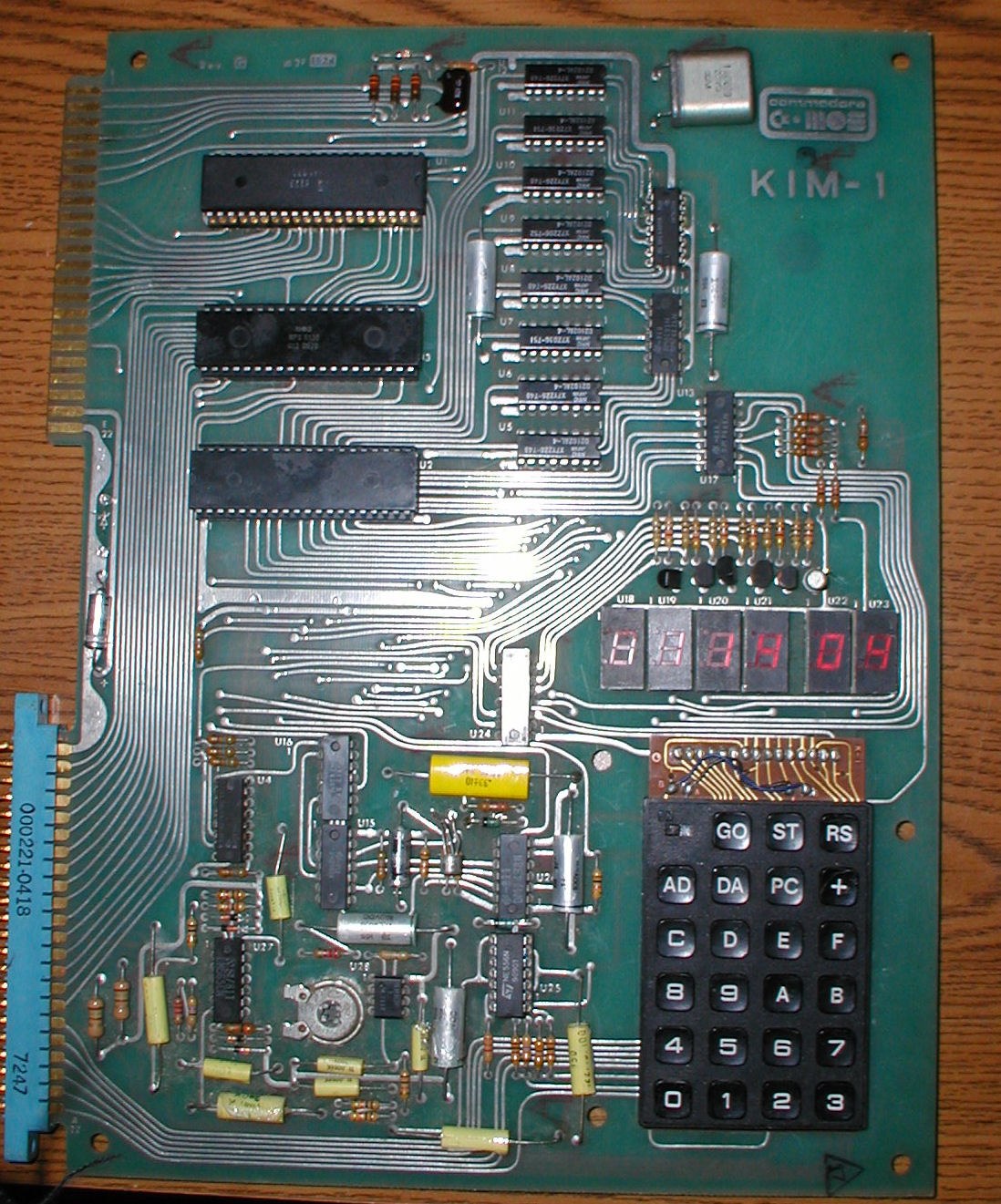
10.1 About This Volume
Volume 4 showed how to key in, run and step a program using the monitor. This volume writes programs. It climbs from the bottom up. First it lights the display directly, segment by segment, with no help from the monitor. Then it uses the monitor’s display routine to show numbers, uses the 6530’s interval timer and an interrupt to keep time, reads the keypad, and finally puts all of it together in a game.
Every program was assembled with the series’ 6502 assembler and run in the series’ KIM-1 simulator, 03-outputs/tools/kim1_sim.py. The listings are the assembler’s output, so every byte is computed, not copied by hand, and every display shown is what the simulator’s model of the LEDs showed while the program ran. (Volume 3 describes what the simulator models; it runs the 6502 at the KIM-1’s 1 MHz, counted cycle by cycle.) The scripts that run them are in 03-outputs/tools/kim1_examples.py, and its complete output, including some runs not reproduced here, is examples_output.txt. All the programs fit in the KIM-1’s original kilobyte and run at 0200, the usual starting point in The First Book of KIM.
Each listing is shown as it would be keyed in: address, bytes, label, instruction and comment. Lines without an address define names. The $ before a number marks hexadecimal. Before running any of them on a real KIM-1 or a replica, set the vectors and clear decimal mode as in Volume 4.
10.2 Lighting Segments Directly
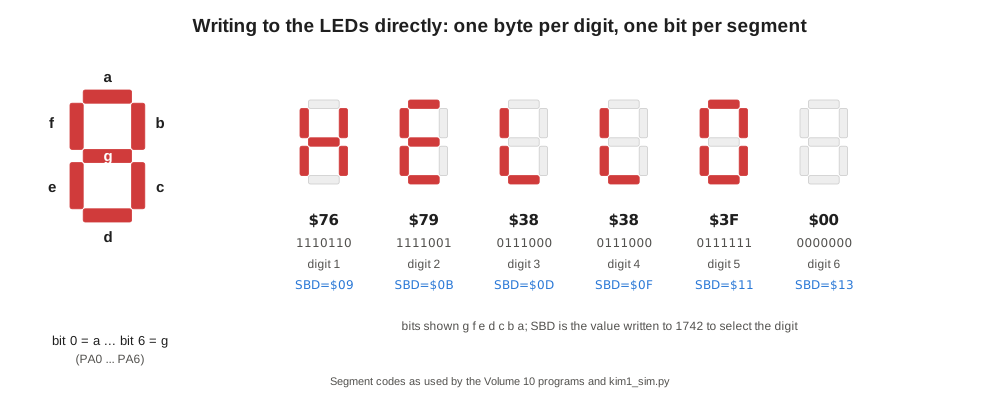
The monitor’s display routine can show only hexadecimal digits. Anything else — letters, symbols, a moving spaceship — has to be drawn by the program itself. Volume 3 explained the hardware: port A of the 6530-002 at 1740 drives the seven segments of all six digits at once, and port B at 1742 drives a 74145 decoder that switches on one digit at a time. A program that wants the display lit must do what the monitor does: select a digit, put its pattern on the segments, wait, and move to the next, over and over.
The segment pattern is one byte, one bit per segment: bit 0 is the top bar, a, then clockwise b, c, d, e, f, and bit 6 is the middle bar, g. The letters of HELLO are therefore:
Table 1 — The segment pattern is one byte, one bit per segment: bit 0 is the top bar, a, then clockwise b, c, d, e, f, and bit 6 is the middle bar, g. The letters of HELLO are therefore
| Letter | Segments lit | Byte |
|---|---|---|
| H | b c e f g | 76 |
| E | a d e f g | 79 |
| L | d e f | 38 |
| O | a b c d e f | 3F |
The digit is selected by writing twice its 74145 number plus one to port B: 09 for the first digit (decoder output 4), 0B for the second, up to 13 for the sixth. The “plus one” keeps PB0, the teleprinter’s output line, at its idle level, as the monitor’s own routine does. This program spells HELLO:
                       SAD = $1740
                       PADD = $1741
                       SBD = $1742
                       CNT = $00
0200  A9 7F     START  LDA #$7F       ; PA0-PA6 drive the segments
0202  8D 41 17         STA PADD
0205  A0 00     FRAME  LDY #0         ; character index 0-5
0207  A2 09            LDX #$09       ; 74145 code 4 (digit 1) on PB1-PB4
0209  A9 00     DIGIT  LDA #0
020B  8D 40 17         STA SAD        ; segments off while switching digit
020E  8E 42 17         STX SBD        ; select the digit
0211  B9 29 02         LDA MSG,Y
0214  8D 40 17         STA SAD        ; light its segments
0217  A9 78            LDA #120       ; hold it for about 1 ms
0219  85 00            STA CNT
021B  C6 00     WAIT   DEC CNT
021D  D0 FC            BNE WAIT
021F  E8               INX            ; next digit code (+2: PB0 is the TTY line)
0220  E8               INX
0221  C8               INY
0222  C0 06            CPY #6
0224  D0 E3            BNE DIGIT
0226  4C 05 02         JMP FRAME
0229  76 79 38  MSG    .byte $76,$79,$38,$38,$3F,$00
      38 3F 00
Run in the simulator, the display shows:
     _             _
|_| |_  |   |     | |
| | |_  |_  |_    |_|
Three details matter. Writing 7F to the port-A direction register (1741) makes PA0–PA6 outputs; without it the segment writes go nowhere. The segments are switched off before the next digit is selected; otherwise the previous digit’s pattern would flash briefly on the new digit as a faint “ghost”. And the hold time sets the brightness and the flicker. The simulator measures one full pass over the six digits at 5,964 cycles, about 6 ms, so the display is refreshed about 168 times a second and each digit is lit about a sixth of the time. Shorten the wait and the program has more time for other work but the digits dim; lengthen it much beyond 2 ms and the display flickers visibly.
The hold loop counts with DEC on a page-zero cell because both index registers are in use. Its two instructions take 5 and 3 cycles, so 120 passes take about 960 µs. Writing the loop this way, and adding up its cycles, is the commonest timing technique on the KIM-1.
10.3 Counting with SCANDS and Decimal Mode
For numbers, the monitor’s SCANDS routine at 1F1F does all of the above. It lights the six digits once with the bytes at 00FB, 00FA and 00F9 and returns (Volume 4). This program counts up in decimal on all six digits, adding one each time it has lit the display:
                       POINTL = $FA
                       POINTH = $FB
                       INH = $F9
0200  A9 00     START  LDA #0
0202  85 FB            STA POINTH
0204  85 FA            STA POINTL
0206  85 F9            STA INH
0208  20 1F 1F  SHOW   JSR $1F1F      ; SCANDS: one pass of the display
020B  F8               SED            ; decimal arithmetic
020C  18               CLC
020D  A5 F9            LDA INH        ; add one to the six-digit count
020F  69 01            ADC #1
0211  85 F9            STA INH
0213  A5 FA            LDA POINTL
0215  69 00            ADC #0
0217  85 FA            STA POINTL
0219  A5 FB            LDA POINTH
021B  69 00            ADC #0
021D  85 FB            STA POINTH
021F  D8               CLD            ; GETKEY and SCANDS want binary mode
0220  4C 08 02         JMP SHOW
SED switches the 6502’s adder to binary-coded decimal, so each byte holds two decimal digits and 09 + 1 gives 10, not 0A. The carry passes from byte to byte through the ADC #0 instructions, making a six-digit decimal counter in nine instructions. The program clears decimal mode again before it calls SCANDS. Leaving it on is a classic KIM-1 bug, because the monitor’s key routine uses ADC too (Volume 4 shows what happens to the F key).
After a tenth of a second the simulator shows 0000 28, and after one second:
 _   _   _   _     _   _
| | | | | |  _|    _|  _|
|_| |_| |_| |_     _|  _|
0002 33: the loop ran 233 times in the first second, so one pass of SCANDS and the counting code takes about 4.3 ms. That figure is the display routine’s cost, which every program that uses it pays on every pass. The simulator’s SCANDS takes about as long as the original’s, whose listing holds each digit for a 500-cycle delay; the exact count on a real board will differ slightly.
10.4 Keeping Time: the Interval Timer and an Interrupt
The user’s 6530-003 has an interval timer (Volume 3) that can count up to 255 steps of 1, 8, 64 or 1,024 microseconds and then raise an interrupt. Wired to the processor, it lets a program keep time while doing something else, here lighting the display. The wiring is one jumper on the board: PB7 of the 6530-003, pin 15 of the Application connector, to IRQ, pin 4 of the Expansion connector, as Appendix H of the User Manual describes. The simulator has the same jumper as an option.
A second does not divide evenly into the timer’s ranges with a single count, but it does into 125 intervals of 8,000 µs, and 8,000 µs is 125 counts of the divide-by-64 prescaler. The program therefore asks for an interrupt every 8 ms and counts 125 of them to a second:
                       POINTL = $FA
                       POINTH = $FB
                       INH = $F9
                       TICKS = $00
                       IRQV = $17FE
                       TIMER = $170E  ; 6530-003 timer, divide by 64, interrupt enabled
0200  D8               CLD
0201  78               SEI
0202  A9 00            LDA #0
0204  85 FB            STA POINTH     ; hours
0206  85 FA            STA POINTL     ; minutes
0208  85 F9            STA INH        ; seconds
020A  A9 7D            LDA #125
020C  85 00            STA TICKS      ; 125 interrupts of 8 ms make one second
020E  A9 24            LDA #$24
0210  8D FE 17         STA IRQV
0213  A9 02            LDA #$02
0215  8D FF 17         STA IRQV+1
0218  A9 7C            LDA #124       ; 125 counts of 64 us = 8000 us
021A  8D 0E 17         STA TIMER
021D  58               CLI
021E  20 1F 1F  SHOW   JSR $1F1F      ; SCANDS forever; the interrupt keeps time
0221  4C 1E 02         JMP SHOW
0224  48        ISR    PHA
0225  A9 7C            LDA #124       ; restart the 8 ms interval at once
0227  8D 0E 17         STA TIMER
022A  C6 00            DEC TICKS
022C  D0 2B            BNE DONE
022E  A9 7D            LDA #125
0230  85 00            STA TICKS
0232  F8               SED
0233  18               CLC
0234  A5 F9            LDA INH
0236  69 01            ADC #1         ; seconds
0238  C9 60            CMP #$60
023A  90 1A            BCC SECS
023C  A5 FA            LDA POINTL
023E  69 00            ADC #0         ; carry is set: adds 1 to minutes
0240  C9 60            CMP #$60
0242  90 0E            BCC MINS
0244  A5 FB            LDA POINTH
0246  69 00            ADC #0         ; hours
0248  C9 24            CMP #$24
024A  90 02            BCC HRS
024C  A9 00            LDA #0
024E  85 FB     HRS    STA POINTH
0250  A9 00            LDA #0
0252  85 FA     MINS   STA POINTL
0254  A9 00            LDA #0
0256  85 F9     SECS   STA INH
0258  D8               CLD
0259  68        DONE   PLA
025A  40               RTI
The program takes over the IRQ vector at 17FE, pointing it at its own handler, ISR, at 0224, so while it runs BRK no longer returns to the monitor. Writing to 170E both sets the divide-by-64 prescaler and enables the interrupt, because the address chooses both (Volume 3). The handler’s first act is to restart the timer, which also clears its interrupt flag. It then counts down TICKS and, every 125th time, adds a second in decimal, carrying into minutes and hours. The comparison against 60 works on BCD values because the decimal byte 60 is the hexadecimal byte 60. The handler saves only the accumulator; the 6502 saves the status register itself, and RTI restores both it and the program counter. The main program is just the SCANDS loop, so the display shows hours, minutes and seconds.
The simulator runs it with the PB7-to-IRQ jumper fitted. After ten seconds of simulated time it shows 0000 09; after a minute, 0000 59; after 125 seconds:
 _   _   _   _     _
| | | | | |  _|   | | |_|
|_| |_| |_| |_    |_|   |
0002 04: two minutes four seconds, one second behind. Timing the seconds in the simulator shows each one lasting 1.0045 to 1.0056 s: the clock runs about half a percent slow, and the reason is instructive. The timer is restarted by the handler, not by the hardware, so each 8 ms interval is lengthened by the time the processor takes to notice the interrupt, save its state and reach the STA TIMER: the end of the current instruction, seven cycles to enter the handler, and nine more for PHA and LDA. About 40 extra microseconds every 8 ms is half a percent. On a real KIM-1 the error has the same cause. There are two cures. The first is to shorten the count to allow for the latency, which leaves a smaller error that varies with the instruction interrupted. The second, better cure uses the property of the 6530 timer described in Appendix H: after reaching zero it carries on counting down from FF at one count per microsecond, so the handler can read how late it is and subtract that from the next count.
The same program shows how to run two jobs at once on a processor that has no operating system. The display loop runs whenever the interrupt is not, and the interrupt takes a few dozen microseconds out of every eight thousand.
10.5 Reading the Keypad: an Adding Machine
The monitor’s GETKEY routine at 1F6A returns the code of the key held down: 00–0F for the hex keys, 10 AD, 11 DA, 12 +, 13 GO, 14 PC, and 15 for none (Volume 4). It returns the key that is down now, so a program that calls it in a loop sees the same key hundreds of times while a finger rests on it. Every keypad program has to turn that into single presses.
Jim Butterfield’s Addition, the first of the recreational programs in The First Book of KIM, shows the standard way in 94 bytes. “KIM becomes a six digit adder. ‘GO’ clears the total so you can start over. Then enter a number and hit the plus key to add it to the previous total” (The First Book of KIM, 1977; its programs “may be used or copied without restriction”, with credit to the author). Its main loop starts:
0200  20 1F 1F  START  JSR SCANDS     ; light display
0203  20 6A 1F         JSR GETKEY     ; read keyboard
0206  C5 60            CMP PREV       ; same as last time?
0208  F0 F6            BEQ START      ; yes, skip
020A  85 60            STA PREV       ; no, save new key
The program keeps the last code it saw in PREV and acts only when the code changes. Releasing a key returns 15, which counts as a change, so pressing the same digit twice works. Digits are shifted into the display four bits at a time, rolling the oldest digit out of the left. The + key adds the three display bytes to a three-byte total, in decimal mode, with ADC through the index register.
The book adds a note to its listings that “these dumps were taken from actual running programs. So, if there is a discrepancy between the listing and the dump, the listing is most probably in error.” The series’ simulator assembles Butterfield’s listing and checks it byte for byte against the book’s dump as part of its self-test; the two agree. Loaded from the dump and run, with the keys pressed and released one at a time:
Table 2 — The book adds a note to its listings that "these dumps were taken from actual running programs. So, if there is a discrepancy between the listing and the dump, the listing is most probably in error." The series' simulator assembles Butterfield's listing and checks it byte for byte against the book's dump as part of its self-test; the two agree. Loaded from the dump and run, with the keys pressed and released one at a time
| Keys | Display |
|---|---|
| GO | 0000 00 |
| 1 9 7 6 | 0019 76 |
| + | 0019 76 (total 1976) |
| 2 4 5 | 0002 45 |
| + | 0022 21 |
| 5 0 0 0 | 0050 00 |
| + | 0072 21 |
1976 + 245 + 5000 = 7221. The book leaves overflow, subtraction and multiplication to the reader: “maybe you would like to try your hand at adding these.”
10.6 A Game: Hi-Lo
The last program puts the pieces together in the commonest kind of KIM-1 game, the guessing game. The machine picks a number from 00 to 99; the player types a guess and presses +; the display answers HI or LO; the player tries again until it says GOOD. The display shows the number of tries on the left, then the guess, then the answer:
                       PADD = $1741
                       SAD = $1740
                       SBD = $1742
                       TABLE = $1FE7  ; the monitor's hex-to-segment table
                       SECRET = $00
                       GUESS = $01
                       TRIES = $02
                       CNT = $03
                       KEY = $04
                       BUF = $10      ; six segment patterns, left to right
0200  D8        START  CLD
0201  A9 00            LDA #0
0203  85 01            STA GUESS
0205  85 02            STA TRIES
0207  A2 05            LDX #5
0209  BD EC 02  INIT   LDA TITLE,X    ; show HI-LO
020C  95 10            STA BUF,X
020E  CA               DEX
020F  10 F8            BPL INIT
0211  20 C0 02  WAIT1  JSR DISP       ; while waiting for the first key...
0214  F8               SED
0215  18               CLC
0216  A5 00            LDA SECRET     ; ...run a decimal counter 00-99
0218  69 01            ADC #1
021A  85 00            STA SECRET
021C  D8               CLD
021D  20 B0 02         JSR KEY_
0220  C9 15            CMP #$15
0222  F0 ED            BEQ WAIT1
0224  D0 0A            BNE GOT
0226  20 C0 02  LOOP   JSR DISP
0229  20 B0 02         JSR KEY_
022C  C9 15            CMP #$15
022E  F0 F6            BEQ LOOP
0230  C9 10     GOT    CMP #$10       ; a digit?
0232  90 0A            BCC DIGIT
0234  C9 12            CMP #$12       ; the + key?
0236  F0 22            BEQ JUDGE
0238  C9 13            CMP #$13       ; GO starts again
023A  F0 C4            BEQ START
023C  D0 E8            BNE LOOP
023E  C9 0A     DIGIT  CMP #$0A       ; decimal digits only
0240  B0 E4            BCS LOOP
0242  85 04            STA KEY
0244  A5 01            LDA GUESS
0246  0A               ASL A
0247  0A               ASL A
0248  0A               ASL A
0249  0A               ASL A
024A  05 04            ORA KEY
024C  85 01            STA GUESS
024E  A9 00            LDA #0
0250  85 14            STA BUF+4
0252  85 15            STA BUF+5
0254  20 90 02         JSR NUMS
0257  4C 26 02         JMP LOOP
025A  F8        JUDGE  SED
025B  A5 02            LDA TRIES
025D  18               CLC
025E  69 01            ADC #1
0260  85 02            STA TRIES
0262  D8               CLD
0263  20 90 02         JSR NUMS
0266  A5 01            LDA GUESS
0268  C5 00            CMP SECRET
026A  F0 17            BEQ WIN
026C  90 06            BCC LOW
026E  A9 76            LDA #$76       ; H
0270  A2 30            LDX #$30       ; I
0272  D0 04            BNE SAY
0274  A9 38     LOW    LDA #$38       ; L
0276  A2 3F            LDX #$3F       ; O
0278  85 14     SAY    STA BUF+4
027A  86 15            STX BUF+5
027C  A9 00            LDA #0
027E  85 01            STA GUESS
0280  4C 26 02         JMP LOOP
0283  A2 03     WIN    LDX #3
0285  BD F2 02  WIN1   LDA GOOD,X
0288  95 12            STA BUF+2,X
028A  CA               DEX
028B  10 F8            BPL WIN1
028D  4C 26 02         JMP LOOP
0290  A5 02     NUMS   LDA TRIES      ; tries, then guess, as hex digits
0292  A2 00            LDX #0
0294  20 99 02         JSR PAIR
0297  A5 01            LDA GUESS
0299  48        PAIR   PHA
029A  4A               LSR A
029B  4A               LSR A
029C  4A               LSR A
029D  4A               LSR A
029E  A8               TAY
029F  B9 E7 1F         LDA TABLE,Y
02A2  95 10            STA BUF,X
02A4  E8               INX
02A5  68               PLA
02A6  29 0F            AND #$0F
02A8  A8               TAY
02A9  B9 E7 1F         LDA TABLE,Y
02AC  95 10            STA BUF,X
02AE  E8               INX
02AF  60               RTS
02B0  20 40 1F  KEY_   JSR $1F40      ; KEYIN: make PA0-PA6 inputs again
02B3  20 6A 1F         JSR $1F6A      ; GETKEY
02B6  C5 05            CMP KEY+1      ; same as last time?
02B8  F0 03            BEQ SAME
02BA  85 05            STA KEY+1
02BC  60               RTS
02BD  A9 15     SAME   LDA #$15       ; a held key counts once
02BF  60               RTS
02C0  A9 7F     DISP   LDA #$7F       ; one pass over the six digits
02C2  8D 41 17         STA PADD
02C5  A0 00            LDY #0
02C7  A2 09            LDX #$09
02C9  A9 00     DIG    LDA #0
02CB  8D 40 17         STA SAD
02CE  8E 42 17         STX SBD
02D1  B9 10 00         LDA BUF,Y
02D4  8D 40 17         STA SAD
02D7  A9 64            LDA #100
02D9  85 03            STA CNT
02DB  C6 03     DW     DEC CNT
02DD  D0 FC            BNE DW
02DF  E8               INX
02E0  E8               INX
02E1  C8               INY
02E2  C0 06            CPY #6
02E4  D0 E3            BNE DIG
02E6  A9 00            LDA #0
02E8  8D 40 17         STA SAD
02EB  60               RTS
02EC  76 30 40  TITLE  .byte $76,$30,$40,$38,$3F,$00
      38 3F 00
02F2  3D 3F 3F  GOOD   .byte $3D,$3F,$3F,$5E
      5E
The game is 246 bytes, 0200–02F5, and every technique in it has appeared above.
- The display is a six-byte buffer of segment patterns at 0010–0015, drawn by DISP, a subroutine version of the HELLO loop. Letters go into the buffer as patterns: H 76, I 30, L 38, O 3F, a dash 40, and G, O, O, d (3D, 3F, 3F, 5E) for GOOD. Numbers go in through the monitor’s own segment table at 1FE7, which holds the patterns for 0–F. The First Book of KIM’s games borrow it the same way. (The simulator, which contains no ROM, computes that table from its segment font.)
- The keypad is read through KEY_, which calls KEYIN first. DISP has left port A as outputs, and without KEYIN, GETKEY would read the segment pattern instead of the keys (Volume 3). KEY_ then applies Butterfield’s rule: a code equal to the last one is reported as “no key”, so a held key counts once.
- The random number comes from the player. Until the first key is pressed, the program adds one to SECRET in decimal on every pass of the display, about 140 times a second in the simulator, so the number it holds when the player’s finger lands is unpredictable to the player. The first key also counts as the first digit of the first guess.
- The comparison works on BCD numbers as on binary ones, because decimal digits packed into a byte keep their order:
CMPsets the carry if GUESS ≥ SECRET.
In the simulator, with the first key pressed after 1.23 seconds and a scripted player who halves the range each time, the game opens with HI-LO on the display and ends seven guesses later:
                   _
|_| |    _  |     | |
| | |       |_    |_|
guess 49: 01 49 HI guess 45: 05 45 HI
guess 24: 02 24 LO guess 43: 06 43 LO
guess 36: 03 36 LO guess 44: 07 GOOd
guess 42: 04 42 LOand the final display:
 _   _   _   _     _
| |   | |   | |   | |  _|
|_|   | |_| |_|   |_| |_|
Seven tries, GOOd. A binary search finds any number from 00 to 99 in at most seven guesses, which is why a player who knows the trick never needs more.
10.7 Going Further

The five programs cover most of what KIM-1 programs did with the board’s own hardware. Two more directions were open to owners, and both work on a replica.
The first is the user port. The fifteen lines of the 6530-003 at 1700–1703 are the ones that drove relays, motors and robot sensors (Volume 6). The User Manual’s Chapter 5 program, a tone generator on PA0 controlled by seven switches, is the model: Volume 4 shows its timing measured in the simulator to the microsecond. Joined with the interval timer, the same port can play tunes.
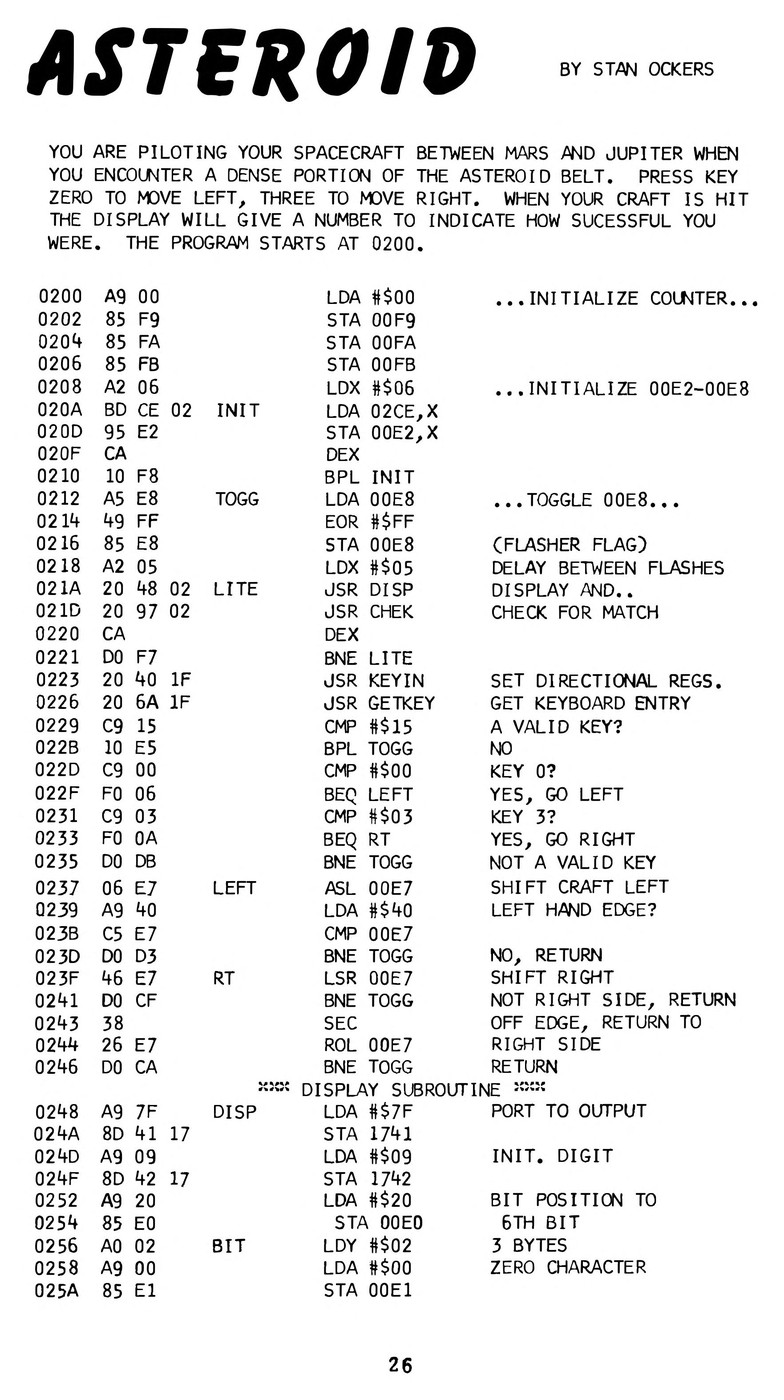
The second is more memory and a terminal. With expansion RAM and the monitor’s teleprinter mode, a KIM-1 could run assemblers, editors and languages, among them Microsoft’s BASIC and Tom Pittman’s Tiny BASIC (Volume 5). Those programs left the six digits behind. The programs in this volume did not, and the ingenuity that went into making six digits and twenty-three keys into games — Asteroid, Lunar Lander, Wumpus, Microchess — is much of what people remember about the KIM-1.
Next — Volume 11: Learning Machine Code on a KIM-1. What it was like to learn machine code on six LEDs and a keypad in the 1970s: the manual’s first program, hand assembly and branch offsets, the single-step switch, and where the habits led.
Comments (0)