KIM-1 · Volume 11
KIM-1 — Volume 11 — Learning Machine Code on a KIM-1
Where I first learned machine code and assembly, what a KIM-1 asked of anyone learning that way — hexadecimal, opcodes looked up by hand, branch offsets counted on paper, single-stepping through a program one instruction at a time — and how it led on to a Heathkit trainer, the family Apple-1 and a robot
11.1 About This Volume
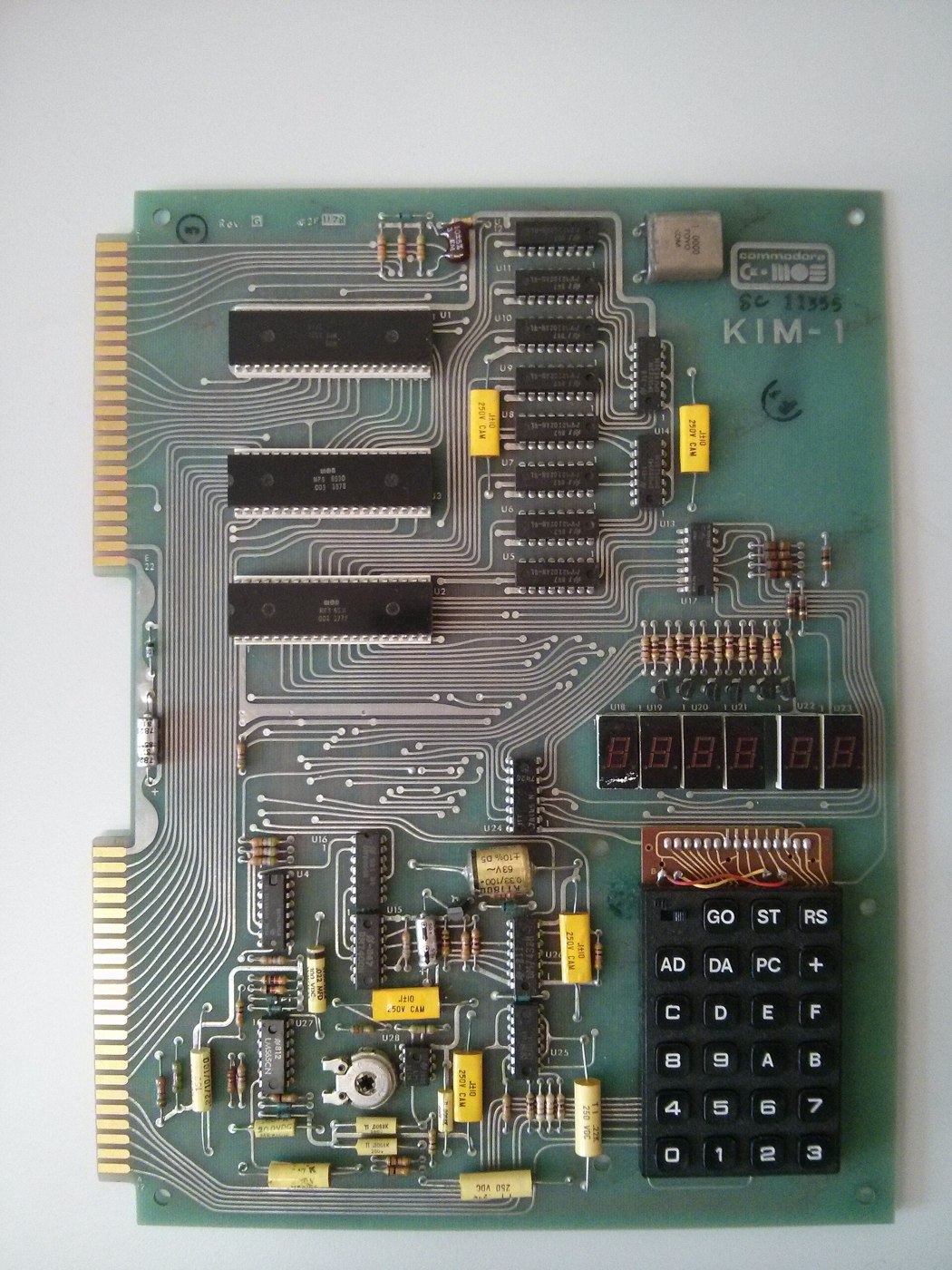
The KIM-1 is where I first learned to program in machine code and assembly language, in the 1970s. This last volume of the series is about that kind of learning. It sets out, in plain terms, what a KIM-1 asked of a beginner: no language, no screen and no keyboard, only a hexadecimal keypad, six digits and a manual; programs written on paper, translated into numbers by hand, keyed in a byte at a time and watched one instruction at a time. It then follows the thread on to the other machines I learned on in the same years — a Heathkit ET-3400 microprocessor trainer and my family’s Apple-1 — and to the robot the KIM was used for.
Most of what follows is written as a reference, because it describes what learning on a KIM involved for anyone who did it. Where it is my own experience, it says “I”, and only where I have actually said what happened. Where my own account belongs but has not yet been written, the text carries a marker. The method itself — how the keypad works, how the monitor runs and stops a program, how the 6502’s instructions become bytes — is covered in detail in Volume 4 (the monitor) and Volume 10 (programs, run in the series’ simulator); this volume is about the experience of learning it.
11.2 Where I Learned
In my own words, from the notes behind this series: “The KIM-1 and Heathkit digital trainer were where I first learned to code in machine code and assembly back in the 1970s and it is when we bought our first Apple 1. I learned to write BASIC and assembly on this. The Apple and KIM both had 6502 microprocessors while the Heathkit had an 6800 I believe.”
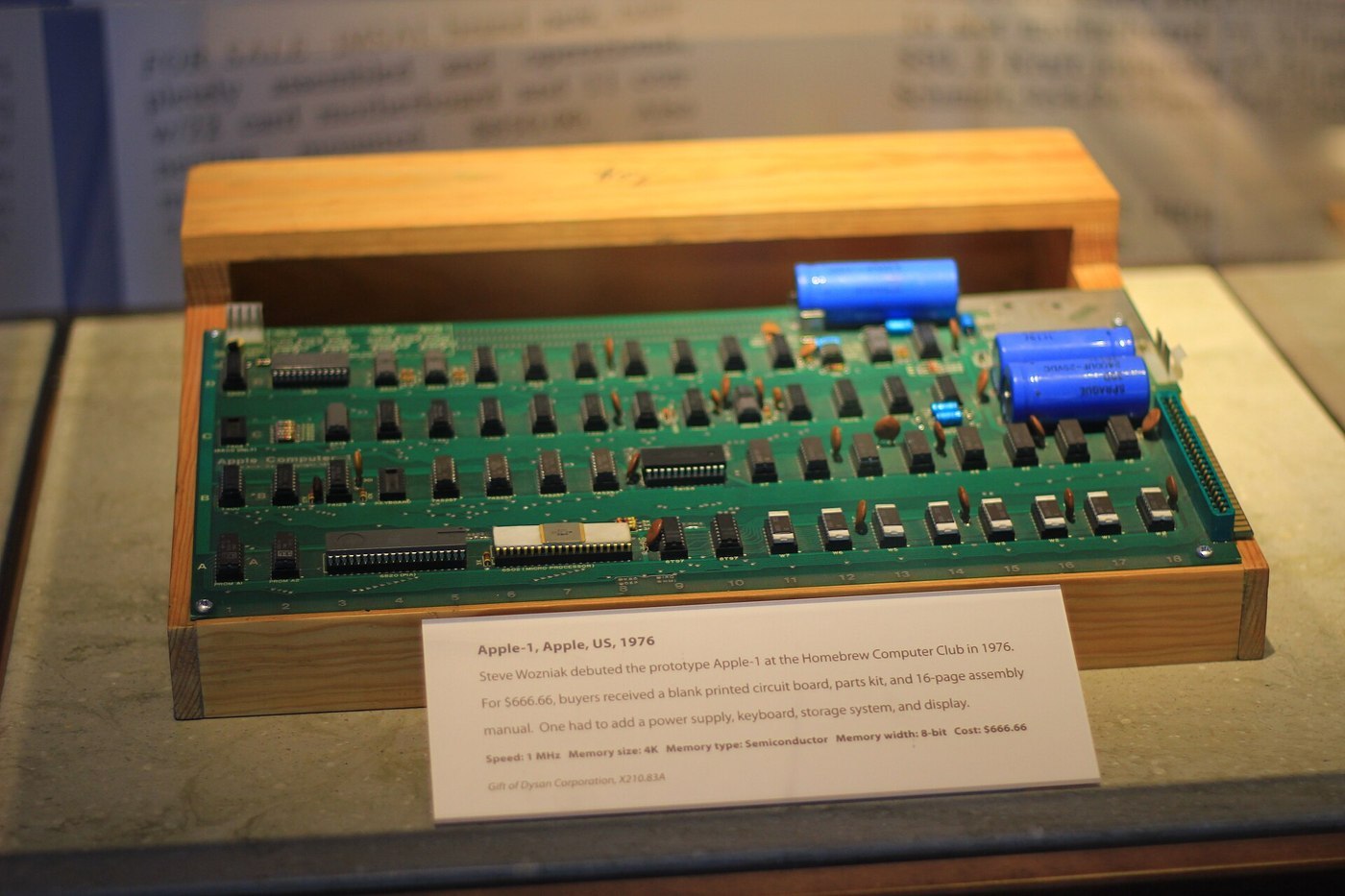
That is the outline. The KIM-1 and the Heathkit trainer are where I learned machine code and assembly. The Heathkit trainer was an ET-3400, which I still have, and I went through Heath’s entire microprocessor course on it. The family bought an Apple-1 in the same years, and I learned BASIC and assembly on it. And, in my words, “The KIM was used for my robot (it’s here on the site).”
The rest of this volume explains what that learning consisted of, for anyone who never saw a KIM, and leaves room for the particulars.
11.3 What a KIM Asked of a Beginner
11.3.1 Nothing between you and the processor
A beginner who sits down at a modern computer starts at the top of a tall stack: an operating system, a programming language, an editor, error messages written in English. A beginner who sat down at a KIM-1 started at the bottom. When the board was reset, its monitor program showed four hexadecimal digits of address and two of data, and waited. There was no language to type in and no prompt to answer. Everything the KIM did, it did because someone had put the right numbers in the right memory locations.
So the first things to learn were not programming in the usual sense. They were:
- Hexadecimal. Every address and every byte on the KIM is shown in base 16, 0 to 9 and A to F. Each hex digit is four bits, so two digits make a byte and four make an address. The keypad has one key per hex digit.
- The memory map. Which addresses were RAM the program could use (the first kilobyte, 0000 to 03FF), which held the 6530s’ small RAM and I/O ports, and which were the monitor in ROM, not to be written to.
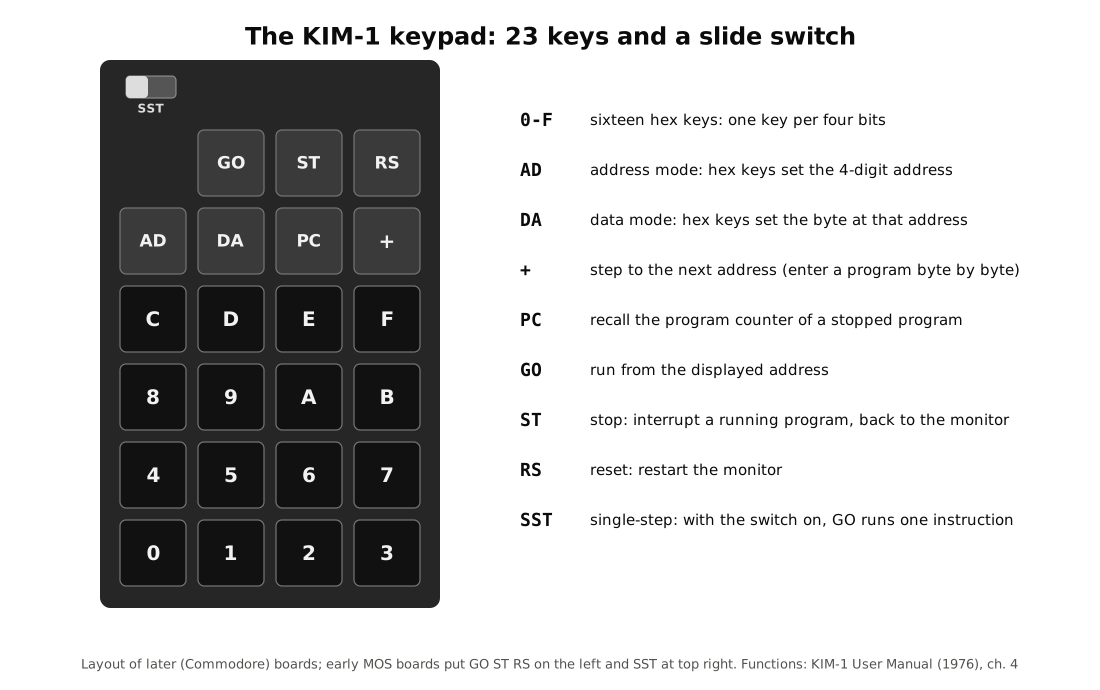
- The keypad’s modes. AD to choose an address, DA to change data, + to step on, GO to run, ST to stop, RS to reset, PC to find where a stopped program had got to, and the SST switch for single-stepping.
11.3.2 The first program in the manual
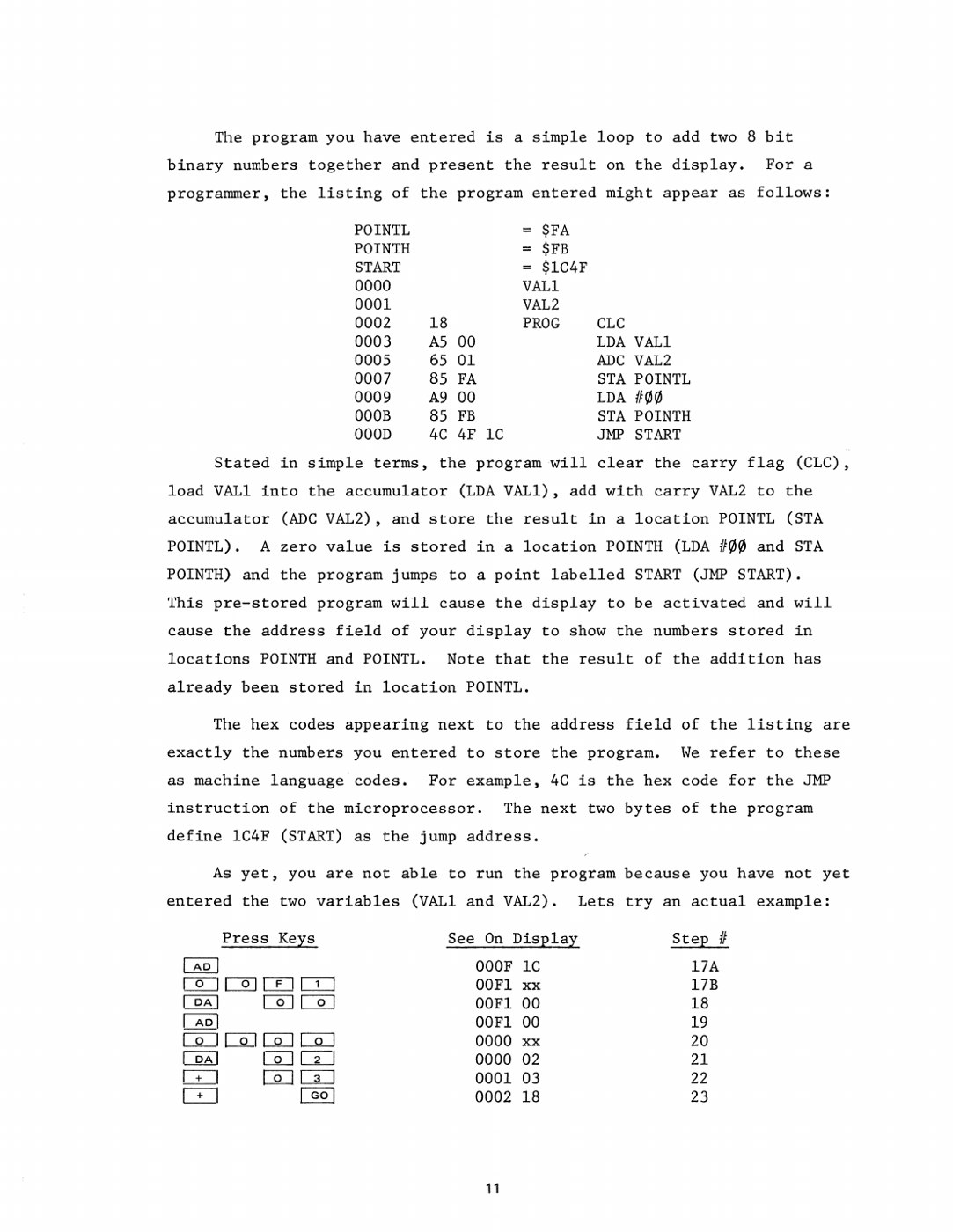
MOS’s KIM-1 User Manual (August 1976; scan at bitsavers) teaches all of this with one short example in section 2.4, “Lets try a simple program”. The owner is told to make sure the SST switch is off, press AD, key the address 0002, press DA, and then key in a sequence of bytes, pressing + after each pair: 18, A5, 00, 65, 01, 85, FA, A9, 00, 85, FB, 4C, 4F, 1C. Only afterwards does the manual explain what has been entered:
“The program you have entered is a simple loop to add two 8 bit binary numbers together and present the result on the display. For a programmer, the listing of the program entered might appear as follows:”
and it prints the program as an assembly-language listing:
0002  18         PROG  CLC
0003  A5 00            LDA VAL1
0005  65 01            ADC VAL2
0007  85 FA            STA POINTL
0009  A9 00            LDA #$00
000B  85 FB            STA POINTH
000D  4C 4F 1C         JMP START
“Stated in simple terms, the program will clear the carry flag (CLC), load VAL1 into the accumulator (LDA VAL1), add with carry VAL2 to the accumulator (ADC VAL2), and store the result in a location POINTL.” Storing a zero in POINTH and jumping back into the monitor at 1C4F makes the monitor show the result as if it were an address. “The hex codes appearing next to the address field of the listing are exactly the numbers you entered to store the program. We refer to these as machine language codes. For example, 4C is the hex code for the JMP instruction of the microprocessor.” The owner then keys two numbers into locations 0000 and 0001 and presses GO.
Run in the series’ simulator (03-outputs/tools/kim1_sim.py, which models the KIM-1’s hardware and reproduces the monitor’s documented behaviour), the program as printed behaves as the manual says. The bytes the simulator’s assembler produces from the listing are identical to the ones the manual tells the owner to key in. With 02 in location 0000, 03 in 0001 and 00 in 00F1 (binary mode), the display before GO shows the program’s first byte:
 _   _   _   _         _
| | | | | |  _|     | |_|
|_| |_| |_| |_      | |_|
and after GO, the sum has appeared in the address field, with the byte stored at that address (65, the ADC opcode at 0005) beside it:
 _   _   _   _     _   _
| | | | | | |_    |_  |_
|_| |_| |_|  _|   |_|  _|
The display reads 0005 65. The manual’s own second test, FF + FF, gives 00FE: the carry out of the eighth bit is lost, because only POINTL receives the result.
That single page contains most of what there was to learn. There is the instruction set (CLC, LDA, ADC, STA, JMP); the idea of an opcode, the byte that tells the processor what to do; the idea of an operand, the byte or bytes after it that say what to do it to; addressing modes, since LDA VAL1 (A5 00, load from address 0000) and LDA #$00 (A9 00, load the number zero) are the same instruction written two ways with two different opcodes; and the habit of returning to the monitor so that the result can be seen. Everything after that was practice.
11.4 Hand Assembly
11.4.1 Writing, looking up, placing, keying
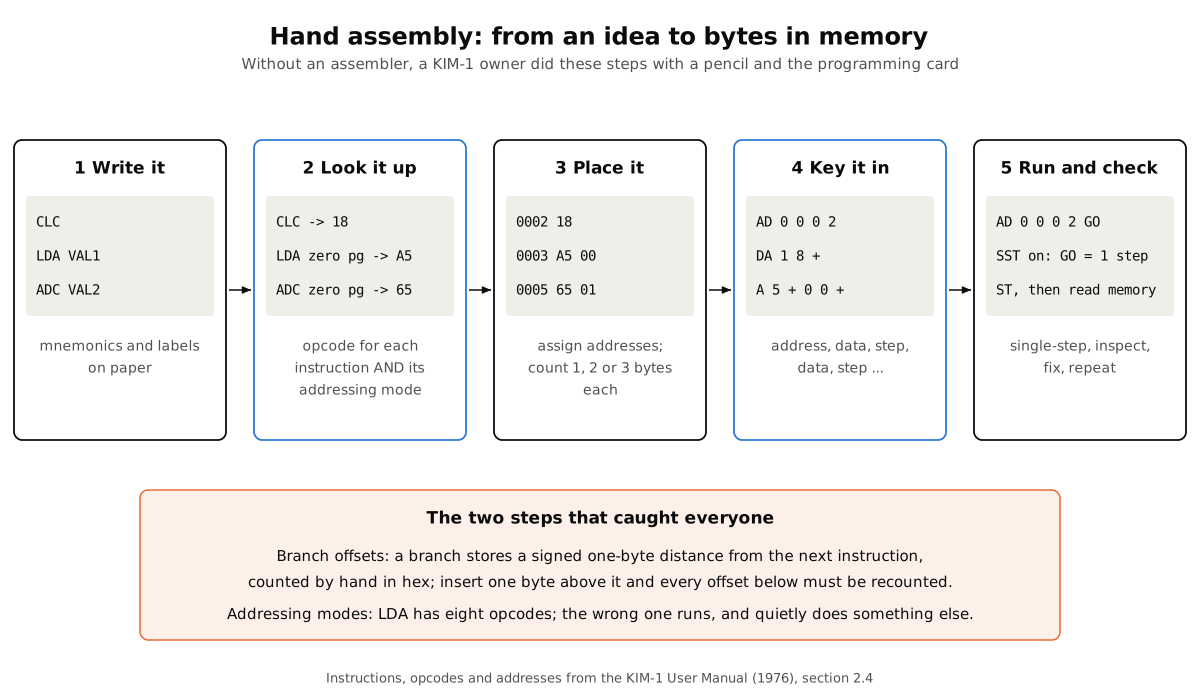
Without an assembler — and a basic KIM-1 had none — every program had to be hand-assembled. The process had five steps, and every KIM programmer went through them thousands of times.
- Write it. The program was written on paper in assembly language: mnemonics such as LDA and BNE, with labels for addresses and variables.
- Look it up. For each instruction, the programmer found its opcode on MOS’s programming card or in the Programming Manual — not just “LDA” but “LDA in zero-page mode”, which is A5, as opposed to A9 for an immediate value, AD for a full 16-bit address, and five more. Choosing the wrong mode gave a program that ran and quietly did something else.
- Place it. Each instruction took one, two or three bytes, and the programmer worked out the address of every one, writing them down the left side of the page as the manual’s listing does.
- Key it in. AD and the starting address, DA, then two hex digits and + for every byte.
- Run and check. GO to run; ST to stop; SST to step; then read memory back to see what had happened.
11.4.2 Branches, the hard part
The step that taught the most, and cost the most mistakes, was the branch. The 6502’s conditional branches — BEQ, BNE, BCC, BCS and the rest — do not store the address they jump to. They store a one-byte offset: a signed number from −128 to +127, counted from the address of the instruction after the branch. A backward branch is a negative number written in two’s complement, so a loop that jumps back eight bytes is stored as F8. Every branch had to be counted out by hand in hexadecimal, and every time an instruction was added or removed between a branch and its target, the offset had to be counted again. A miscounted offset sent the processor into the middle of an instruction, where the bytes meant something else entirely. The limit of −128 to +127 bytes also meant that a long loop could not branch back to its start directly; the usual cure was to branch on the opposite condition over a three-byte JMP, which can reach anywhere in memory. Tools to calculate offsets were among the first conveniences KIM owners wrote for themselves; Pyramid Data Systems’ XIM monitor advertised “relative branch calculation” among its commands (Volume 5).
A short loop shows the arithmetic. This one adds 3 to the accumulator five times, counting X down from 5, and then shows the total the same way the manual’s program does:
0200  A9 00            LDA #0
0202  A2 05            LDX #5         ; go round five times
0204  18        LOOP   CLC
0205  69 03            ADC #3         ; add 3 each time
0207  CA               DEX            ; one fewer to go
0208  D0 FA            BNE LOOP       ; back while X is not zero
020A  85 FA            STA POINTL     ; show the total in the address field
020C  A9 00            LDA #0
020E  85 FB            STA POINTH
0210  4C 4F 1C         JMP START
The branch is the two bytes D0 FA at 0208. The offset FA is −6 in two’s complement, counted from 020A, the address of the next instruction: 020A − 6 = 0204, which is LOOP. Assembled and run in the series’ simulator, the display shows 0200 A9 before GO and 000F 00 after it: 5 × 3 = 15, or 0F in hexadecimal. Adding one more instruction inside the loop would move LOOP one byte further back, and the offset would have to become F9.
11.4.3 Learning the processor’s mind
Hand assembly forced a beginner to learn things that later tools hide. The 6502 has only three registers a program can freely use — the accumulator A and the index registers X and Y — so every calculation is a choreography of loads, stores and transfers. Its zero page, the first 256 bytes of memory, can be reached with shorter and faster instructions, so variables go there; on a KIM, the monitor itself used the top of zero page (POINTL and POINTH at FA and FB, which the first program borrows). The status register holds the carry, zero, negative and overflow flags that every branch depends on, and the decimal-mode flag that turns the adder into a decimal calculator (Volume 2). The stack is one fixed page, 0100 to 01FF. None of this was optional knowledge on a KIM. It was the only way to make the board do anything.
11.5 Watching It Run
The KIM’s single most important feature for a learner was the SST switch. With it on, each press of GO ran one instruction and returned to the monitor, which showed the address of the next instruction. Between steps the programmer could look at any memory location — including the locations where the monitor had saved the processor’s registers when it stopped — and see exactly what the last instruction had done. A program that misbehaved could be walked through until the moment it went wrong. Bagnall records that “users appreciated this important feature, which greatly assisted in debugging” (On the Edge, ch. 1.5).
The ST key stopped a running program at once, even one stuck in an endless loop, because it was wired to the processor’s non-maskable interrupt — provided the owner had first stored the monitor’s address, 1C00, in the interrupt vector at 17FA and 17FB, as the manual instructs (“The ST key will operate correctly only if you store the correct interrupt vector at locations 17FA and 17FB”). Single-stepping depends on the same vector, so it was one of the first things a KIM owner learned to set after every power-up. RS always brought the monitor back, because the reset vector lives in ROM; but a runaway program could overwrite its own code and data in RAM, and the most common lesson of all was learned the first time one did: the work since the last tape save was gone. That made the cassette recorder the other essential tool. A KIM learner’s routine was write, assemble, key, save to tape, run — and only then debug.
11.6 From Machine Code to Assembly
The difference between machine code and assembly language is the difference between the bytes and the words. A KIM owner who hand-assembled was writing assembly on paper and machine code on the keypad. With more memory, the paper step could be done by the computer: assemblers for the KIM included MOS’s own resident assembler and text editor, ARESCO’s assemblers, Peter Jennings’s Micro-ADE and Commodore’s KIM-5 assembler ROM (Volume 5). With a terminal and an assembler, a programmer typed the mnemonics and labels and let the program work out the opcodes, the addresses and the branch offsets. Those who had done it by hand first tended to understand what the assembler was doing for them, and why.
11.7 What a Learner Worked From
A KIM learner in the late 1970s had a small and good library. In the box came MOS’s three manuals: the User Manual, with its first program and its chapter on the monitor; the Hardware Manual, which explained the 6502’s buses and timing and the 6530; and the Programming Manual, the reference for every instruction and addressing mode, written, Peddle said, so that “anybody could read it and do it”. The programming card, a folded sheet listing every opcode, lived beside the keypad, because every byte of a hand-assembled program was looked up on it.
Beyond the box, the community supplied the rest (Volume 5). KIM-1 User Notes printed routines, tricks and corrections every two months. The First Book of KIM opened with “A Beginner’s Guide to KIM Programming” and then gave dozens of complete, commented programs that could be keyed in, run, and taken apart — the way most people learned to write their own. BYTE, Kilobaud, Interface Age and Dr. Dobb’s Journal ran KIM projects and tutorials. From 1978 general 6502 books appeared, among them Rodnay Zaks’s Programming the 6502. Colleges and companies ran courses built on the board, from Rensselaer’s three-day seminar of 1976, which included a KIM-1 in the fee, to a 1977 course by Purdue and Oklahoma State faculty “based on KIM-1 hardware”.
The skills a learner built from these sources were concrete. They included converting between binary, hexadecimal and decimal without thinking; adding and subtracting in hex, with carries; writing negative numbers in two’s complement; masking and setting individual bits with AND and ORA, which is how a program talks to an I/O port; and keeping a written record of which memory each program used, because on a KIM nothing else kept track. They are the same skills a trainer like the ET-3400 was designed to teach.
11.8 The Heathkit ET-3400: a Second Processor
The other trainer I learned on was a Heathkit ET-3400, and I still have it. It came from the same idea as the KIM by a different route: Heath, the kit company of Benton Harbor, Michigan, introduced the ET-3400 in 1977 as part of its electronics courses, a microprocessor trainer with a hexadecimal keypad, six seven-segment LED digits, a small RAM and a monitor in ROM, and a breadboard area for building circuits around it. Its processor was not a 6502 but the Motorola 6800, the very chip that Peddle and his team had worked on before they left Motorola to make the 6502 (Volume 2). The two processors are cousins in spirit and strangers in detail: the 6800 has two accumulators, A and B, and a single 16-bit index register where the 6502 has one accumulator and two 8-bit index registers, and none of their opcodes are the same. Learning both meant learning the same ideas twice in two different vocabularies.
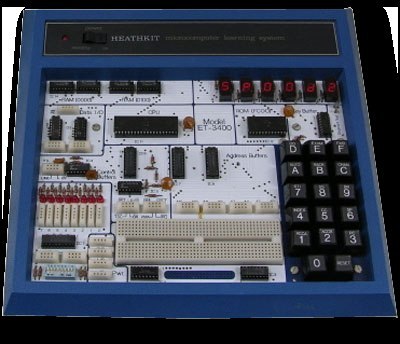
I went through the entire course that went with it, Heath’s EE-3401 microprocessor course. Afterwards, in about 1978 or 1979, I programmed a simple tickertape text program on it for my junior high school science class. (A tickertape program scrolls a message across the trainer’s six digits, a letter at a time.) The trainer and its course have their own dive on this site: the Heathkit ET-3400 Microprocessor Trainer.
11.9 The Family Apple-1: a Keyboard and a Screen
In the same years, my family bought its first Apple-1. It was a 6502 computer like the KIM — Steve Wozniak designed it around the 6502 after buying his first ones from Chuck Peddle at WESCON in 1975 (Volume 2) — but it was a different kind of machine to learn on: a keyboard instead of a hex keypad, a television screen instead of six digits, and Wozniak’s Integer BASIC loaded from cassette. On it I learned to write BASIC and assembly. My father still has that machine, with several other Apple I and Apple II computers, in his garage. Its story is told in the Apple-1 unit of this site, in Volume 12, “My Family’s Apple-1”.
11.10 The Robot
In my words: “The KIM was used for my robot (it’s here on the site).” The site’s KIM-1 robot dive is Tod Loofbourrow’s Mike/Microtron, and Volume 6 of this series describes how a KIM-1 runs a robot — the fifteen I/O lines of its spare 6530, the comparators that read a joystick, the relays that drive the motors and the counted on/off cycles that set their speed.
11.11 What Machine Code Teaches
The case for learning on a machine like the KIM-1 has not changed in fifty years, and the people who designed it made it themselves. Chuck Peddle’s summary was that “you could sit down and learn to program using my manuals” (quoted by Bagnall). The KIM did not hide anything, so it could not be used without understanding what a processor actually does: fetch a byte, decode it, move data between memory and a handful of registers, set flags, and branch on them. Everything else in computing — languages, operating systems, graphics, networks — is built from that, and someone who has keyed in a program a byte at a time knows it in a way that is hard to get any other way.
The skills carried forward directly. The 6502 a KIM owner learned was the processor of the Apple II, the Commodore PET, VIC-20 and 64, the Atari machines and the Nintendo Entertainment System. The habits — reading a data sheet, thinking in hexadecimal and in bits, setting a breakpoint and stepping through code, saving work before running it — are the habits of embedded programming and debugging to this day. And the KIM is still available to learn on: as an original board for the lucky, as a replica (Volumes 8 and 9), or as the simulator used in Volume 10, in which every program of this series runs.
The end of the series. This is the last of eleven volumes on the KIM-1. To start again from the beginning — the board, its makers and the whole story in miniature — return to Volume 1: KIM-1 — The Board That Taught a Generation Machine Code.
Comments (0)