KIM-1 · Volume 4
KIM-1 — Volume 4 — The KIM Monitor — Keying In, Stepping and Saving Programs
The two kilobytes of ROM that turned a bare board into a usable computer: how an owner entered a program byte by byte with AD, DA and +, ran and stopped it, read the registers, stepped through it one instruction at a time, borrowed the monitor's own routines, and saved the result on cassette or punched paper tape — with every example run in the series' simulator
4.1 About This Volume
Volume 3 described the KIM-1’s hardware. On its own that hardware can do nothing an owner can see: the display lights only when software scans it, the keypad is a matrix that software must read, and the cassette and teleprinter interfaces are a few transistors waiting for software to time their bits. That software is the KIM monitor, 2,048 bytes in the ROMs of the two 6530 chips. The First Book of KIM explains the name: “These programs are called the Monitor. In fact, the name KIM stands for Keyboard Input Monitor in recognition of the importance of these programs” (The First Book of KIM, 1977, “Beginner’s Guide”).
This volume is a guide to using it, in the order a new owner met it: switching on and setting the vectors; keying in, running and stopping a program; reading the registers; single-stepping; calling the monitor’s own routines from a program; saving to and loading from cassette; and running the whole machine from a teleprinter. The main sources are the KIM-1 User Manual (MOS Technology, August 1976; scan at bitsavers), whose Appendix I prints the monitor’s complete listing, and The First Book of KIM.
Every example was run in the series’ simulator, 03-outputs/tools/kim1_sim.py, and every display shown is its output. The simulator contains none of the monitor’s code. It reproduces the monitor’s documented behaviour on a model of the hardware, and its self-test checks that behaviour against the manual’s own worked examples. The scripts that produced this volume’s examples are in 03-outputs/tools/kim1_examples.py, with their full output in examples_output.txt.
4.2 Two Kilobytes in Two Chips
The monitor occupies the top two 1 K blocks of the KIM-1’s address space. The 6530-002 at 1C00–1FFF holds the main program: reset and interrupt handling, the keypad and display routines, and the teleprinter routines. The 6530-003 at 1800–1BFF holds the audio cassette routines. The listing dates the masks October 1975: “REV E” for the -002, “REV-D” for the -003 (User Manual, Appendix I).
The monitor’s state lives in two places. Seventeen bytes at the top of page zero, 00EF–00FF, hold the saved processor registers and its working cells, and the manual tells the owner that they “must never appear in the user generated application program” (3.2). A few bytes at the top of the 6530-002’s RAM, 17E7–17FF, hold the cassette parameters and the interrupt vectors. The cells an owner uses most are these:
Table 1 — The monitor's state lives in two places. Seventeen bytes at the top of page zero, 00EF–00FF, hold the saved processor registers and its working cells, and the manual tells the owner that they "must never appear in the user generated application program" (3.2). A few bytes at the top of the 6530-002's RAM, 17E7–17FF, hold the cassette parameters and the interrupt vectors. The cells an owner uses most are these
| Address | Name | Holds |
|---|---|---|
| 00EF / 00F0 | PCL / PCH | program counter at the last stop |
| 00F1 | P | status register (set to 00 to clear decimal mode) |
| 00F2 | SP | stack pointer |
| 00F3 | A | accumulator |
| 00F4 | Y | Y index register |
| 00F5 | X | X index register |
| 00F9 | INH | the two data digits shown by SCANDS |
| 00FA / 00FB | POINTL / POINTH | the “open” address, shown in the four address digits |
| 17F5–17F8 | SAL, SAH, EAL, EAH | cassette start address, and end address + 1 |
| 17F9 | ID | cassette record number |
| 17FA / 17FB | NMI vector | where ST and SST go: store 00, 1C |
| 17FE / 17FF | IRQ vector | where BRK goes: store 00, 1C |
4.3 Switching On

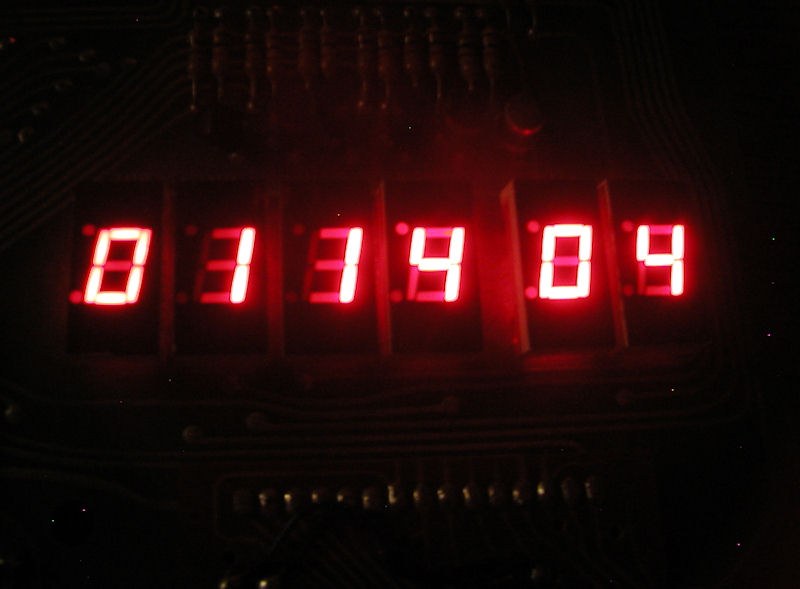
The board has no power-on reset, so the first key an owner presses is RS. The monitor sets the stack pointer to FF, configures the 6530-002’s ports, sets the keypad to address mode, and checks the teleprinter jumper (Volume 3). With no jumper fitted it starts scanning the display and keypad. The display shows an address and the byte stored there.
The second job is to set the vectors. The monitor’s NMI and IRQ handlers do nothing but jump through 17FA and 17FE, which are RAM and hold garbage after power-up. Until the owner stores the address of the monitor’s register-saving routine, 1C00, in both, the ST key and the single-step switch do not work and a BRK instruction sends the processor into random memory. The First Book of KIM gave the procedure before its first program:
“Set address 17FA to 00 / Set address 17FB to 1C / Set address 17FE to 00 / Set address 17FF to 1C. The first two locations are needed so that your SST switch and ST key will work right. The last two make the BRK (break) instruction behave properly. YOU MUST ALWAYS SET UP THESE LOCATIONS AS SOON AS YOU TURN ON YOUR KIM SYSTEM.”
On the keypad that is AD 1 7 F A DA 0 0 + 1 C AD 1 7 F E DA 0 0 + 1 C. The User Manual also advises storing 00 in 00F1 before running anything, because the value there is loaded into the processor’s status register when a program starts, and a stray 1 in the decimal-mode bit makes all arithmetic come out in BCD (4.2).
4.4 The Keypad Commands
The keypad has twenty-three keys and the SST switch. The User Manual lists their functions in Chapter 4:
Table 2 — The keypad has twenty-three keys and the SST switch. The User Manual lists their functions in Chapter 4
| Key | Action |
|---|---|
| 0–F | enter a hex digit into the address or the data, depending on the mode |
| AD | address mode: hex keys shift into the four address digits |
| DA | data mode: hex keys shift into the byte at the displayed address |
| + | step to the next address, keeping the mode |
| PC | bring back the program counter saved at the last stop |
| GO | run from the displayed address |
| ST | stop a running program (through NMI) |
| RS | reset |
| SST switch | single-step: with it on, GO runs one instruction |
The digits shift in from the right, so a mistake is corrected by typing more digits until the right number shows. As the manual puts it, “correcting an error is simply a matter of reentering the data until the correct numbers show on the display” (2.4). In data mode, each key press rewrites the byte in memory at once. Selecting an address in ROM, or one where no memory is fitted, shows its contents but cannot change them.
4.5 Keying In a Program
The User Manual’s first exercise, in section 2.4, adds two 8-bit numbers. The owner presses AD 0 0 0 2 DA and then the bytes 18, A5, 00, 65, 01, 85, FA, A9, 00, 85, FB, 4C, 4F, 1C, pressing + between each pair. The manual prints the display after every step, and the simulator’s self-test checks every one of them. This is the beginning of the simulator’s trace:
AD  -> 0000 00        (address mode; digits shift in from the right)
0   -> 0000 00
0   -> 0000 00
0   -> 0000 00
2   -> 0002 00
DA  -> 0002 00        (data mode)
1   -> 0002 01
8   -> 0002 18
+   -> 0003 00
A   -> 0003 0A
5   -> 0003 A5
...
C   -> 000F 1C
Only after the bytes are in does the manual show what they mean:
0002  18         PROG  CLC
0003  A5 00            LDA VAL1      ; VAL1 at 0000
0005  65 01            ADC VAL2      ; VAL2 at 0001
0007  85 FA            STA POINTL
0009  A9 00            LDA #$00
000B  85 FB            STA POINTH
000D  4C 4F 1C         JMP START
The program adds the bytes at 0000 and 0001 and stores the sum in POINTL, the low byte of the address the monitor displays, then clears POINTH and jumps to the monitor’s START at 1C4F. The monitor resumes as if the owner had selected address 00xx, where xx is the sum. With AD 0 0 F 1 DA 0 0 to clear decimal mode, 02 and 03 stored at 0000 and 0001, and AD 0 0 0 2 GO, the simulator shows:
 _   _   _   _     _   _
| | | | | | |_    |_  |_
|_| |_| |_|  _|   |_|  _|
The address field reads 0005, the sum. The data field shows 65, which is not part of the answer: it is simply the byte stored at address 0005, the opcode of the ADC instruction. The manual marks this field “xx” for that reason. Repeating with FF and FF gives 00FE: “The answer is correct because FF + FF = FE”, with the carry lost.
4.6 Running and Stopping
4.6.1 Three ways back to the monitor
A program runs from the displayed address when GO is pressed. The monitor loads the processor’s registers from their images at 00EF–00F5, pushes the start address and status onto the stack, and executes RTI. While the program runs, the display is dark, because nothing is scanning it.
There are three ways for the program to give control back:
- Jump to START (1C4F). The monitor resumes without saving anything and displays whatever address is in POINTL and POINTH. The User Manual’s first program does this.
- Execute
BRK(opcode 00). The 6502 treatsBRKas an interrupt through the IRQ vector. If 17FE holds 1C00, the monitor’s SAVE routine stores every register in its image cell and displays the stopped program counter. - Press ST. The NMI enters SAVE the same way, through 17FA.
The First Book of KIM opens with a four-instruction program that swaps the contents of 0010 and 0011 and stops with BRK:
0200  A5 10     START  LDA $10        ; address 10 to A
0202  A6 11            LDX $11        ; address 11 to X
0204  85 11            STA $11        ; A to address 11
0206  86 10            STX $10        ; X to address 10
0208  00               BRK            ; stop the program
The book promises that after GO, “The display will have changed to 020A xx. If the display shows any other address, something’s wrong.” With 47 and B2 placed in 0010 and 0011 and the vectors set, the simulator finishes with the display reading 020A 00 and the two bytes swapped to B2 and 47. The address is 020A, not 0209, because the 6502 saves the address of the BRK plus two. The book does not explain the extra byte; it is one of the details learned by stepping.
4.6.2 Stopping a runaway
The ST key is for programs that do not stop. The User Manual’s Chapter 5 example is a tone generator on the user port: it toggles PA0 of the 6530-003, reads seven switches on PA1–PA7, and waits in a delay loop whose length the switches set. It never ends:
0200  A9 01     INIT   LDA #$01       ; define I/O: PA0 output
0202  8D 01 17         STA PADD
0205  EE 00 17  START  INC PAD        ; toggle PA0
0208  AD 00 17  READ   LDA PAD        ; read switches
020B  49 FF            EOR #$FF       ; complement
020D  4A               LSR A          ; shift right one bit
020E  AA               TAX            ; count into X
020F  CA        DELAY  DEX
0210  10 FD            BPL DELAY
0212  30 F1            BMI START
The manual predicts what ST will show: “the KIM-1 display will relight. The display will show the address and data for the next instruction to be executed (probably 020F or 0210 since this is the delay loop where the program spends most of its running time)” (5.4). In the simulator, with all switches closed, the display is dark while the program runs, and after ST it reads 020F CA.
The same chapter derives the tone’s frequency from instruction timings: each half period is 23 + 5 × CNT microseconds, where CNT is the switch value, so the frequency is 10⁶ ÷ (46 + 10 × CNT) Hz. Measuring the interval between the program’s writes to PA0 in the simulator gives the same figures to the microsecond:
Table 3 — The same chapter derives the tone's frequency from instruction timings: each half period is 23 + 5 × CNT microseconds, where CNT is the switch value, so the frequency is 10⁶ ÷ (46 + 10 × CNT) Hz. Measuring the interval between the program's writes to PA0 in the simulator gives the same figures to the microsecond
| CNT | half period | frequency (measured) | manual’s formula |
|---|---|---|---|
| 0 | 23 µs | 21,739 Hz | 21,739 Hz |
| 10 | 73 µs | 6,849 Hz | 6,849 Hz |
| 50 | 273 µs | 1,832 Hz | 1,832 Hz |
| 127 | 658 µs | 760 Hz | 760 Hz |
“If your seven selector switches all are open, you will probably hear no sound from the speaker because the square wave frequency is too high,” the manual notes; 21.7 kHz is above most people’s hearing.
4.7 Reading the Registers
When the monitor saves a stopped program, it copies the processor’s registers into page zero, where the owner can examine them with AD and change them with DA. The manual lists the locations (4.1): PCL 00EF, PCH 00F0, P 00F1, SP 00F2, A 00F3, Y 00F4, X 00F5. The First Book of KIM explains why this matters: “these locations are not the actual registers, just copies made for your convenience. But it’s a great convenience, for it allows you to see everything that’s going on inside the microprocessor.” Because GO reloads the registers from the same cells, a changed value takes effect when the program resumes. The book suggests using this to cut a long loop short by lowering X.
After inspecting registers the owner’s display is somewhere in page zero. The PC key copies the saved program counter back into the display — “You now may continue program execution from that point by pressing the GO key” (4.1).
4.8 Single-Stepping
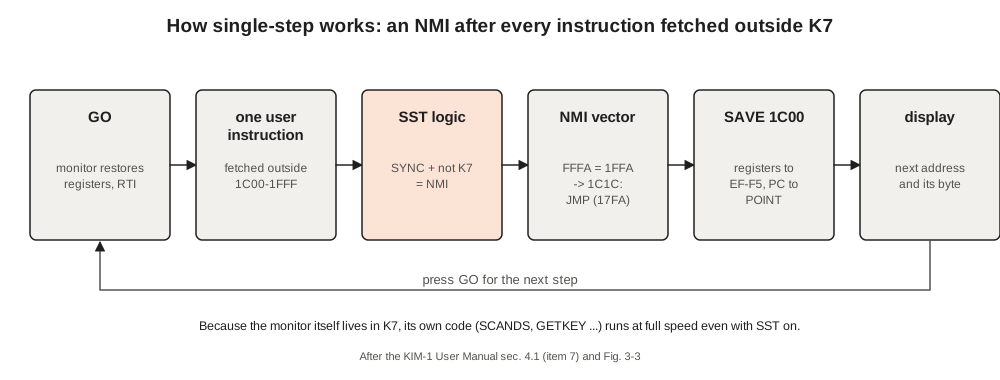
With the SST switch on, each press of GO runs one instruction. The display then shows the address of the next instruction and its first byte. The hardware described in Volume 3 makes this work: an opcode fetched from outside the monitor’s ROM triggers an NMI, which the monitor handles exactly as it handles ST. “Note that in the course of stepping through a program, certain addresses will appear to be skipped. A program instruction will occupy one, two, or three bytes of memory depending upon the type of instruction” (4.1).
The User Manual’s Figure 5-6 steps through the tone program with all switches open and prints every display. Here is the simulator’s run of the same key sequence. Every display matches the manual’s figure (the manual leaves some data fields as “XX”):
AD 0 2 0 0  -> 0200 A9      select first instruction
SST         -> 0200 A9      SST on; all switches open
GO          -> 0202 8D      accumulator now loaded with 01
GO          -> 0205 EE      PADD now loaded
GO          -> 0208 AD      PA0 now toggled
GO          -> 020B 49      switch values now loaded
GO          -> 020D 4A      accumulator now complemented
GO          -> 020E AA      accumulator now shifted right
AD 0 0 F 3  -> 00F3 00      look at A
+           -> 00F4 00      Y
+           -> 00F5 00      X
PC          -> 020E AA      restore PC: TAX next
GO          -> 020F CA      A copied into X
AD 0 0 F 5  -> 00F5 00      X is 00
PC          -> 020F CA
GO          -> 0210 10      DEX done
AD 0 0 F 5  -> 00F5 FF      X is now FF, negative
PC          -> 0210 10
GO          -> 0212 30      no branch: result of DEX not positive
GO          -> 0205 EE      BMI taken, back to START
Two cautions from the books are worth keeping. The User Manual reminds owners that “SST mode also makes use of the NMI interrupt”, so the vector at 17FA must be set. The First Book of KIM adds: “The single-step feature doesn’t work too well on Monitor subroutines. That’s normal, and it’s not serious.” Stepping over a JSR into the monitor stops on the subroutine’s first instruction; the next GO runs the whole subroutine at full speed, because its code lies in the block the stepping logic ignores, and stops on the instruction after it.
The book’s last debugging tool is a BRK placed where a long program should pause. Mini-program B clears ten locations in a loop:
0200  A9 00     START  LDA #0
0202  A2 09            LDX #9
0204  95 30     LOOP   STA $30,X
0206  CA               DEX
0207  10 FB            BPL LOOP
0209  00               BRK
To stop at the branch rather than at the end, the book changes 0207 from 10 to 00 and runs it: “You’ll see 0209 00 on the display, which tells you that the halt at 0207 has worked.” The simulator shows the same 0209 00.
4.9 Borrowing the Monitor’s Routines
The monitor’s subroutines are available to any program through JSR. The User Manual does not list them, but the listing gives their addresses, and The First Book of KIM, the KIM-1/6502 User Notes and later toolchains such as cc65 (asminc/kim1.inc) made the important ones common knowledge:
Table 4 — The monitor's subroutines are available to any program through JSR. The User Manual does not list them, but the listing gives their addresses, and The First Book of KIM, the KIM-1/6502 User Notes and later toolchains such as cc65 (asminc/kim1.inc) made the important ones common knowledge
| Address | Name | Does |
|---|---|---|
| 1F1F | SCANDS | lights the display once with FB, FA, F9; returns A ≠ 0 if a key is down |
| 1F19 | SCAND | as SCANDS, but first copies the byte at (FA,FB) into F9 |
| 1F40 | KEYIN | makes port A inputs and tests for a key, without lighting the display |
| 1F6A | GETKEY | returns the key pressed: 00–0F hex, 10 AD, 11 DA, 12 +, 13 GO, 14 PC, 15 none |
| 1F63 | INCPT | adds one to POINTL/POINTH |
| 1EA0 | OUTCH | sends the character in A to the teleprinter |
| 1E5A | GETCH | waits for a character from the teleprinter |
| 1E3B | PRTBYT | prints A as two hex digits |
| 1E2F | CRLF | prints carriage return and line feed |
| 1C4F | START | re-enters the monitor (by JMP, not JSR) |
| 1800 / 1873 | DUMPT / LOADT | cassette save / load (by GO or JMP) |
SCANDS and GETKEY carry most of the KIM’s games. The First Book of KIM introduces them with two four-line programs. Mini-program C puts 00 into FB, FA and F9 and calls SCANDS in a loop; the display reads 0000 00 for as long as it runs. The book warns that “when you call this Monitor subroutine, the contents of your registers are wiped out”. Mini-program D adds GETKEY and stores the key code into all three display bytes:
0200  D8        START  CLD            ; clear decimal mode
0201  A9 00            LDA #0
0203  85 FB     STORE  STA $FB        ; POINTH
0205  85 FA            STA $FA        ; POINTL
0207  85 F9            STA $F9        ; INH
0209  20 1F 1F         JSR $1F1F      ; SCANDS: light display
020C  20 6A 1F         JSR $1F6A      ; GETKEY: test keys
020F  4C 03 02         JMP STORE
In the simulator the display reads 1515 15 with no key down, 0707 07 while 7 is held, 0C0C 0C for C and 1313 13 for GO. The keys missing from the list are ST, RS and the SST switch, which are wired to hardware rather than to the keypad matrix (Volume 3).
The book attaches two conditions to GETKEY. The first is to “open up the channel” by calling SCANDS or KEYIN first, because both leave port A set as inputs. The second is: “you must not be in Decimal Mode.” The book leaves the reason as an exercise: “Try running in decimal mode (change 0200 to SED, code F8). What happens? Is it serious? How about key F?” The reason is in the listing. GETKEY works out a key’s code as its column plus 7 for each row above it, using ADC #$07, and in decimal mode that addition is done in BCD. The simulator, which models the routine’s arithmetic on the modelled 6502, gives the answer:
Table 5 — The book attaches two conditions to GETKEY. The first is to "open up the channel" by calling SCANDS or KEYIN first, because both leave port A set as inputs. The second is: "you must not be in Decimal Mode." The book leaves the reason as an exercise: "Try running in decimal mode (change 0200 to SED, code F8). What happens? Is it serious? How about key F?" The reason is in the listing. GETKEY works out a key's code as its column plus 7 for each row above it, using ADC #$07, and in decimal mode that addition is done in BCD. The simulator, which models the routine's arithmetic on the modelled 6502, gives the answer
| Key | 6 | 7 | 9 | A | D | E | F | AD | PC |
|---|---|---|---|---|---|---|---|---|---|
| code in decimal mode | 06 | 07 | 09 | 10 | 13 | 14 | 15 | 16 | 20 |
Keys 0 to 9 are unaffected, but A becomes 10 and F becomes 15, the code for “no key”. In decimal mode the F key cannot be read at all.
4.10 Saving on Cassette
4.10.1 The procedure
To save a block of memory the owner stores five parameters and runs the dump routine at 1800 (User Manual, 4.2): 00 in 00F1 to clear decimal mode; a record number from 01 to FE in 17F9; the start address in 17F5–17F6; and the end address plus one in 17F7–17F8. With the recorder in record mode, AD 1 8 0 0 GO starts the save. “The display will be blanked for a period and then will relight showing 0000 xx. This means that the data block selected has been recorded.”
Loading reverses it: the record number in 17F9, then GO at 1873, then play the tape. The display relights at 0000 when a good record has been read, or “If the display relights with FFFF xx, the correct data block has been found but there has been an error detected during the read operation. If the tape continues to run and the display never relights, the system has not been successful in finding the data block.” Two record numbers are special. ID 00 loads the first record found, wherever it was saved from. ID FF also loads the first record but puts it at the address in 17F5–17F6, so a program can be moved.
4.10.2 The format
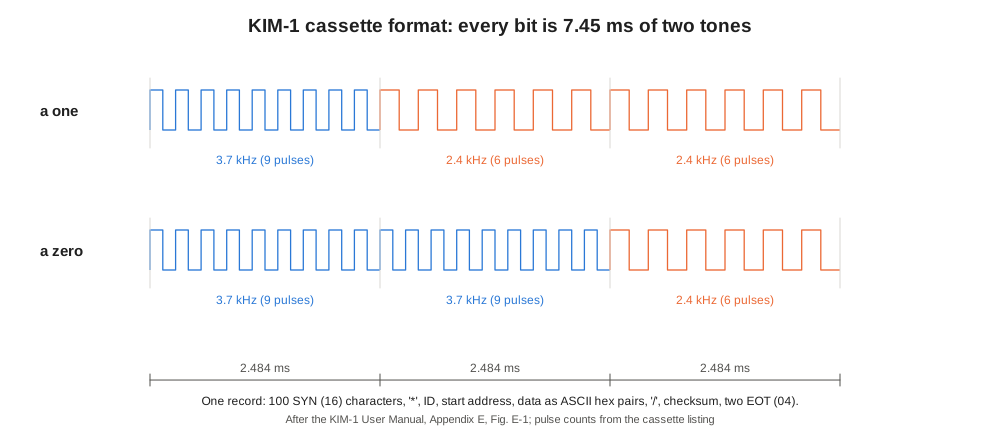
Appendix E gives the format. Each byte is sent as two ASCII hexadecimal characters, so the data travels as printable text. A record begins with a leader of one hundred SYN characters (16) and an asterisk, then the record number, the start address low and high, the data, a slash, a 16-bit checksum of the address and data, and two EOT characters (04). On tape, each character is eight bits, and each bit is two tones as shown in the figure. The phase-locked loop on the board turns the tones back into pulses, and the software measures their lengths.
Saving the tone program above (0200–0213, ID 01) in the simulator produces this character stream after the leader:
...<SYN><SYN><SYN><SYN>*010002A9018D0117EE0017AD001749FF4AAACA10FD30F1/4E08<EOT><EOT>01 is the record number, 0002 the start address (low byte first), then the twenty program bytes, then /, the checksum 084E sent low byte first as 4E08, and two EOT. The record is 154 characters, which at 8 bits of 7.452 ms each is 9.2 seconds of tape for twenty bytes of program. The leader dominates a short record; for long blocks the rate settles at two characters, about 119 ms, per byte, roughly eight bytes a second, so a full kilobyte takes a little over two minutes. Loading the stream into an empty simulated KIM returns 0000 and the twenty bytes; loading it with ID FF and 0300 in 17F5–17F6 puts the same bytes at 0300; changing one character in the middle returns FFFF.
The manual adds practical advice still recognisable to anyone who has used cassette storage. Several records can share one tape. Voice notes between records are ignored. Old recordings should not be overwritten, because “Variations in tape speed and block lengths can result in overlapping of recorded data which may be read incorrectly.” The troubleshooting appendix adds the commonest causes of failure: the +12 V supply (needed only for playback), the volume control “at half way point”, the tone control “set to High”, and 00F1 not cleared (Appendix C).
4.11 The Teleprinter Monitor
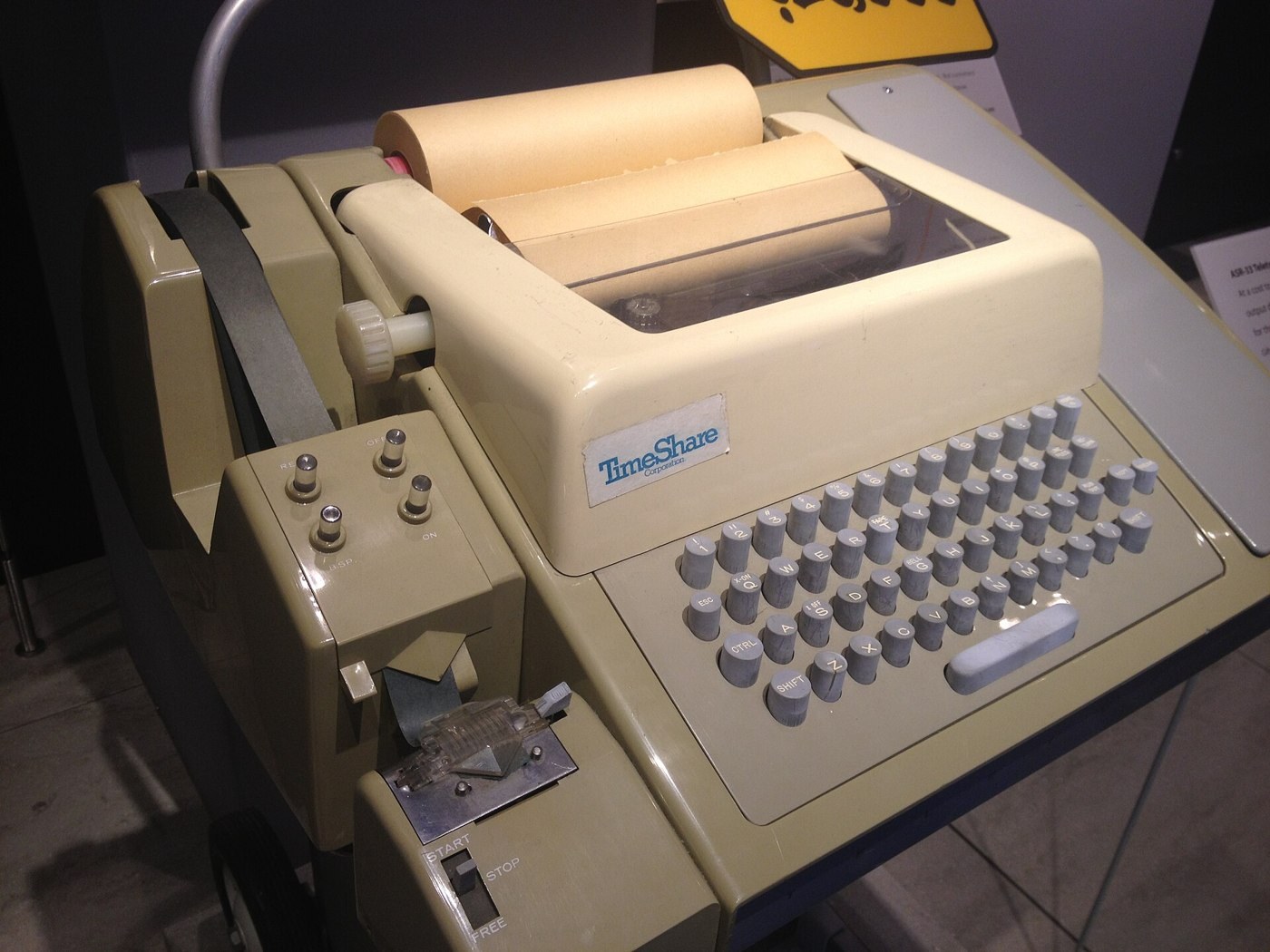
With the teleprinter jumper fitted, RS starts a different monitor in the same ROM. The owner presses RUBOUT, which the monitor uses to time the line speed (Volume 3), and the teleprinter prints KIM followed by the open address and its contents. The commands, listed in the monitor’s own source, are single characters (User Manual, 4.3 and Appendix I):
Table 6 — With the teleprinter jumper fitted, RS starts a different monitor in the same ROM. The owner presses RUBOUT, which the monitor uses to time the line speed (Volume 3), and the teleprinter prints KIM followed by the open address and its contents. The commands, listed in the monitor's own source, are single characters (User Manual, 4.3 and Appendix I)
| Type | Action |
|---|---|
| hex digits, then SPACE | open that address and print it with its contents |
hex digits, then . | store the byte in the open cell and open the next |
| RETURN | open the next address |
| LINE FEED | open the previous address |
G | run from the open address |
Q | punch (or list) from the open address up to the end address in 17F7–17F8 |
L | load a paper tape |
| RUBOUT | abandon and print KIM again |
Leading zeros are optional. Typing E SPACE opens 000E, and A . stores 0A. A short session in the simulator, with the tone program in memory, looks like this on the paper. The KIM-1 echoes each typed character, so the operator’s input appears on the same line as the machine’s reply; the line feed shows as a blank line:
KIM
0000 00 200
0200 A9
0201 01
0202 8D

0201 01 17F7
17F7 00 14.
17F8 00 02.
17F9 00 200
0200 A9 Q
;180200A9018D0117EE0017AD001749FF4AAACA10FD30F1000000000866
;0000010001
The operator opened 0200, stepped forward twice with RETURN and back once with LINE FEED, stored the end address 0214 in 17F7–17F8, reopened 0200 and typed Q. The output is the paper-tape format of Appendix F. Each record starts with a semicolon and a byte count; the KIM always punches records of 18 hex, 24 bytes, so this one runs to 0217 and includes four bytes beyond the end of the program. Then come the start address (0200), the data, and a four-digit checksum of everything after the semicolon (0866). The last record has a count of 00, carries the number of data records (0001) in place of an address, and ends with its own checksum, 0001. The same text, played back through the teleprinter’s reader after an L, loads the program again.
4.12 Inside the Monitor’s Keypad Loop
The listing shows how the keypad monitor behaves, and two of its habits are visible to anyone who uses one. First, it debounces in software. After seeing a key it scans the display twice more and acts only if the key is still down; then, after acting, it waits for the key to be released before accepting another. A key held down therefore acts once, unlike the repeating keys of a modern keyboard. Second, the hex keys work by shifting. Each key moves the existing four address digits, or the two data digits, one place to the left and puts the new digit at the right, which is why the display shows the trailing part of whatever was typed. The same shift is visible in teleprinter mode, where only the last four hex digits typed before a SPACE count.
The rest of the monitor is small. The display routine lights each of the six digits for about half a millisecond in turn and then tests for a key. The simulator times a full pass at about 4.2 ms, so a program that does nothing but call SCANDS can call it about 240 times a second. The teleprinter routines time each bit with a delay loop calibrated by the RUBOUT measurement, and the cassette routines time each tone pulse with the 6530-002’s interval timer. All of it fits in two kilobytes, with space left for the line “KIM”, the hex-to-segment table and the vectors.
Next — Volume 5: The KIM Community — The First Book of KIM, User Notes, Microchess and Focal. The people who took the monitor’s routines and made something of them: a newsletter, a book of games for six red digits, a chess program that started a software business, and the languages and clubs that grew up around one identical board.
Comments (0)