KIM-1 · Volume 3
KIM-1 — Volume 3 — The Board — 6502, Two 6530 RIOTs, a Keypad, Six LEDs, Cassette and Teletype
The KIM-1 chip by chip: a 6502 and its crystal, two custom 6530 combination chips that hold the monitor and do all the input and output, eight one-bit memory chips, one decoder that carves up the address space, and the trick by which seven port lines both light six digits and read twenty-three keys
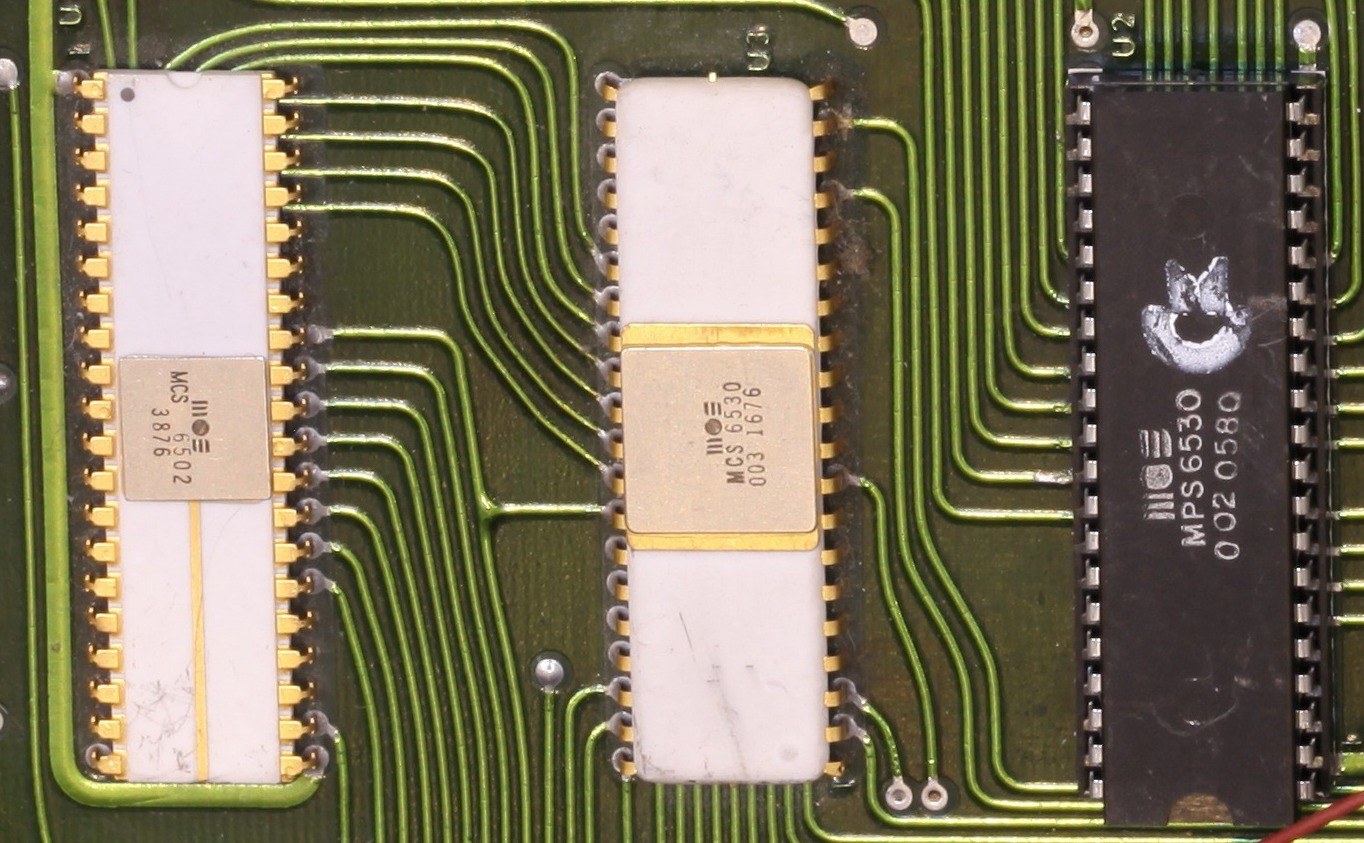
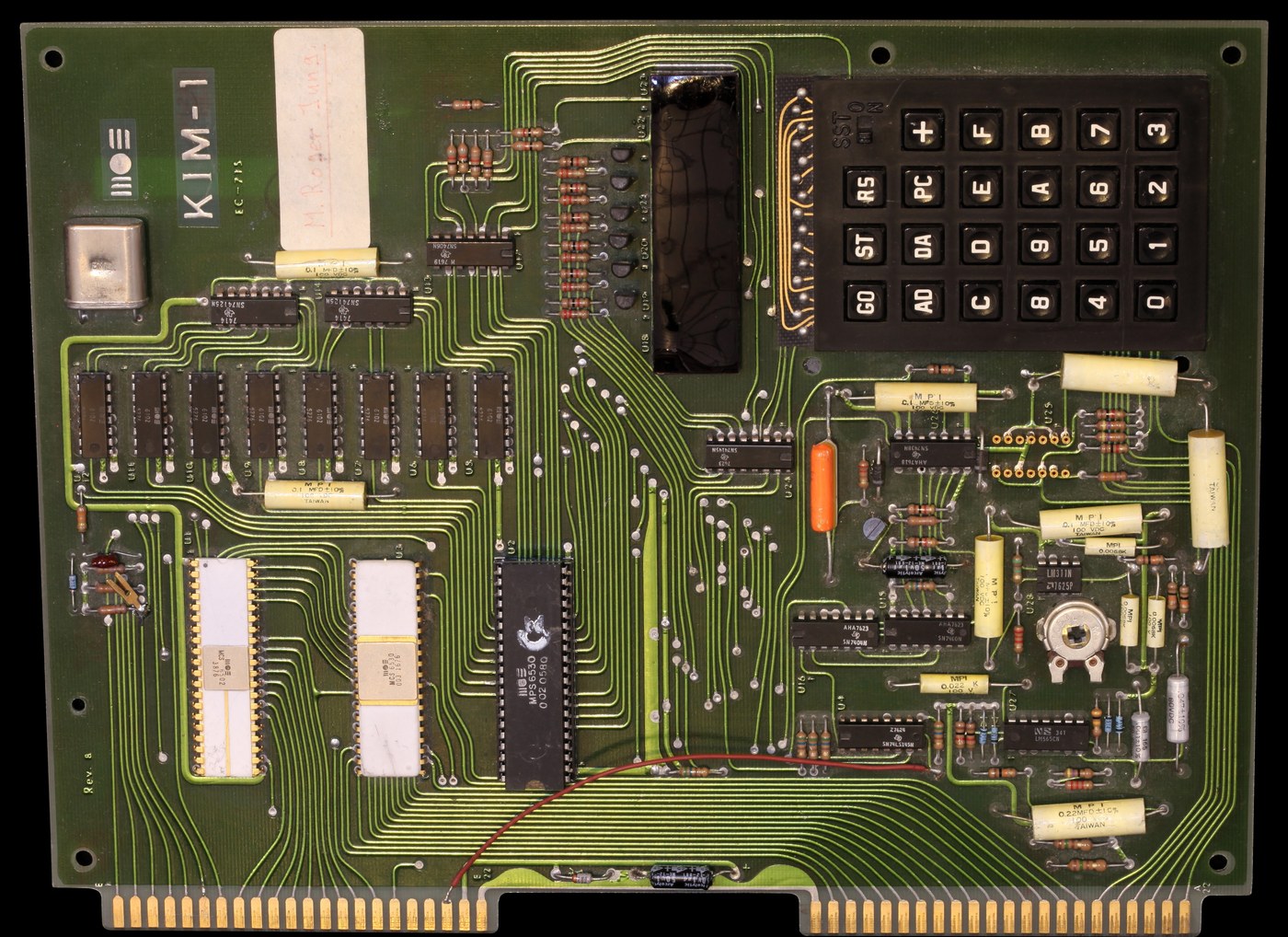
3.1 About This Volume
Volume 2 told how MOS Technology came to make a $25 microprocessor and a $245 board to sell it. This volume takes that board apart. It works from the KIM-1 User Manual (MOS Technology, publication 6500-15B, second edition, August 1976; scan at bitsavers), which included the parts list, the memory map and the full schematic, and from the monitor’s own program listing, printed in the manual’s Appendix I, which shows exactly how the software drives the hardware. Where the manual’s prose and its listing disagree, the listing is what the machine actually did.
The order follows the signal. First the processor and its clock, then the two custom chips that carry the built-in program and all of the board’s input and output, then the memory and the single decoder chip that decides which part of the board answers each address. Then the parts a user touches: the keypad and the display, which share one set of wires in a way worth understanding in detail, the cassette interface and the teleprinter interface. Last come the two edge connectors, power, and the few things on the board that surprise people who know later computers. Volume 4 covers the monitor program that runs on this hardware; Volume 10 programs the hardware directly.
3.2 The Board at a Glance
The KIM-1 is a single printed circuit board measuring about 8½ by 10¾ inches (the Computer History Museum’s catalogue gives 3/4 × 8 1/2 × 10 3/4 in). Every component is on one side. The User Manual’s parts list (Appendix A) is short enough to quote almost in full:
Table 1 — The KIM-1 is a single printed circuit board measuring about 8½ by 10¾ inches (the Computer History Museum's catalogue gives 3/4 × 8 1/2 × 10 3/4 in). Every component is on one side. The User Manual's parts list (Appendix A) is short enough to quote almost in full
| Ref. | Qty | Part |
|---|---|---|
| U1 | 1 | 6502 microprocessor |
| U2 | 1 | 6530-002 ROM/RAM/I/O chip (the monitor) |
| U3 | 1 | 6530-003 ROM/RAM/I/O chip (the cassette routines) |
| U5–U12 | 8 | 6102 static RAM, 1,024 × 1 bit |
| U18–U23 | 6 | seven-segment 0.3-inch red LED displays |
| U4 | 1 | 74LS145 BCD-to-decimal decoder (address decoding) |
| U24 | 1 | 74145 BCD-to-decimal decoder (keypad and display) |
| U25 | 1 | 556 dual timer (debouncing ST and RS) |
| U27, U28 | 2 | 565 phase-locked loop and 311 comparator (cassette input) |
| U13–U17, U26 | 6 | 74125, 7400, 7404, 7406, 7438 logic |
| Q1–Q7 | 7 | 2N5375 PNP (digit drivers) and one 2N5371 NPN |
| X1 | 1 | 1 MHz crystal |
| — | 1 | 24-key keyboard (23 keys and the SST slide switch) |
| — | 1 | 44-pin edge connector (Vector R644), fitted to the Application connector |
The box also held three books — the User Manual, the Hardware Manual and the Programming Manual — a programming card, a wall chart, a fold-out schematic and six rubber feet. There was no case and no power supply. The board was “completely operational, fully tested” (User Manual, ch. 1): a buyer connected two voltages, pressed RS and saw the display light.
3.3 The Processor and the Clock
3.3.1 The 6502 at 1 MHz
U1 is an NMOS 6502, MOS Technology’s own processor (Volume 2). It has an 8-bit data bus, a 16-bit address bus that reaches 65,536 locations, and three bus families that the manual names plainly: the address bus, the bidirectional data bus, and “a control bus [that] carries various timing and control signals” (User Manual, 3.1). The clock oscillator is inside the 6502 itself; the board supplies only the 1 MHz crystal. The 6502’s φ2 output, “used either alone, or gated with other control signals, is used as the system time base by all other system elements” (3.1). One clock cycle is one microsecond, so the instruction timings in the Programming Manual translate directly into time: an INC of a memory location takes 6 cycles and so 6 µs, a fact the manual uses in Chapter 5 to compute the pitch of a tone.
The KIM-1 uses the 6502’s two interrupt inputs for two different jobs. NMI, the non-maskable interrupt, is wired to the ST (stop) key and to the single-step logic. IRQ is left to the user and is also reached by the BRK instruction. The 6502 fetches its interrupt and reset addresses from the top six bytes of memory, FFFA to FFFF; how a board with only 8 K of decoded memory answers at those addresses is explained under Address decoding below.
3.3.2 The missing ROR
The earliest 6502s had a defect that a KIM-1 owner could meet. MOS’s first data sheets listed 55 instructions and promised a 56th, ROR (rotate right), for “chips starting in June 1976” (Volume 2). The instruction’s opcodes were not unused in the early parts; they did something wrong. A test of ROR A published on pagetable.com, run on a KIM-1 whose 6502 was made in week 51 of 1975 and found that it performed “a shift left (!!!) of the input value”, shifting in a zero rather than the carry and leaving the carry flag unchanged (pagetable.com, “Measuring the ROR Bug in the Early MOS 6502”). Few such chips survive, but any program that uses ROR (opcodes 6A, 66, 76, 6E and 7E) gives wrong answers on a board that has one. The series’ simulator models the corrected chip.
3.4 The Two 6530 RRIOTs
3.4.1 Four functions on one die
The heart of the KIM-1’s design is not the processor but the two MCS6530 chips beside it. MOS called the 6530 a ROM-RAM-I/O-Timer array, and it was soon nicknamed the RRIOT. Each one contains, in the words of the User Manual (Appendix H):
“a mask programmable 1024 x 8 ROM, a 64 x 8 static RAM, two software controlled 8 bit bi-directional data ports allowing direct interfacing between the microprocessor unit and peripheral devices, and a software programmable interval timer with interrupt, capable of timing in various intervals from 1 to 262,144 clock periods.”
The ROM is fixed at manufacture by a mask, so each different program needs a different chip. The KIM-1 carries two: the 6530-002, whose ROM holds the main monitor — keypad, display and teletype — and the 6530-003, whose ROM holds the cassette load and save routines. Together they make the 2,048-byte monitor described in Volume 4. The monitor listing dates them precisely: the -003 is “DATE: OCT 18, 1975 REV-D” and the -002 “DATE OCT 13, 1975 REV E” (User Manual, Appendix I).
Putting the ROM, a little RAM, the ports and a timer on one chip is what made the KIM-1 small. A board with separate ROMs, RAMs, port chips and a timer would have needed several more packages and more decoding. The cost was flexibility: a custom mask chip is cheap in volume and impossible to change. Fifty years later it is also the reason every KIM-1 replica has to substitute something for the 6530 (Volume 8).
3.4.2 The ports
Each 6530 has sixteen port lines, PA0–PA7 and PB0–PB7, but only fifteen are usable, because “PB6 was used as a chip select and is not available to the user” (Appendix H). Every line can be an input or an output, chosen bit by bit through a data direction register: “A ‘1’ written into the Data Direction Register sets up the corresponding peripheral buffer pin as an output.” When the processor reads a port it reads the pins themselves, except that for pins programmed as outputs it reads back the output register. Input pins sit at a logic 1 through an internal pull-up; PB7 has no pull-up, so that it can be wired-ORed with other interrupt sources. PA0 and PB0 can source 3 mA at 1.5 V, enough to drive a Darlington transistor directly.
Each chip’s four port registers appear as four consecutive addresses:
Table 2 — Each chip's four port registers appear as four consecutive addresses
| 6530-003 (user) | 6530-002 (system) | Register |
|---|---|---|
| 1700 | 1740 | port A data (PAD / SAD) |
| 1701 | 1741 | port A direction (PADD) |
| 1702 | 1742 | port B data (PBD / SBD) |
| 1703 | 1743 | port B direction (PBDD) |
The division of labour is the board’s organising idea. “The I/O pins provided on the 6530-002 are dedicated to interfacing with specific elements of the KIM-1 system including the keyboard, display, TTY interface circuit, and audio tape interface circuit. The 15 I/O pins on the 6530-003 are brought to a connector and are available for the user to control a specific application” (User Manual, 3.1). The user’s fifteen lines at 1700–1703 are the ones that drove relays, motors and robots (Volume 6).
3.4.3 The interval timer
The timer is an 8-bit down-counter fed through a prescaler. A program starts it by writing a count to one of four addresses; the address chooses the prescaler, and a fourth address bit chooses whether reaching zero raises an interrupt. For the user’s 6530-003 (Appendix H):
Table 3 — The timer is an 8-bit down-counter fed through a prescaler. A program starts it by writing a count to one of four addresses; the address chooses the prescaler, and a fourth address bit chooses whether reaching zero raises an interrupt. For the user's 6530-003 (Appendix H)
| Write to | Divide by | Interrupt |
|---|---|---|
| 1704 | 1 | disabled |
| 1705 | 8 | disabled |
| 1706 | 64 | disabled |
| 1707 | 1024 | disabled |
| 170C–170F | 1, 8, 64, 1024 | enabled |
With a count of up to 255 and a prescaler of up to 1,024, one interval can last about 262 ms. Reading 1707 returns a status byte whose bit 7 becomes 1 once the counter has passed zero; reading 1706 (or 170E) returns the current count. After zero the timer does not stop: “the divide rate is automatically set to 1 and the counter continues to count down at the clock rate starting at a count of FF”, so a program that looks late can still work out exactly how late it is. To make the timer interrupt the processor, the owner wires PB7 on the Application connector (pin 15) to IRQ or NMI on the Expansion connector. The 6530-002’s timer belongs to the monitor, which uses it to time the cassette tones. Volume 10 uses the user’s timer, with PB7 wired to IRQ, to keep a clock.
3.4.4 The two scraps of RAM
Each 6530 adds 64 bytes of RAM at 1780–17BF (the -003) and 17C0–17FF (the -002). The monitor keeps its own variables at the top of the second block, and the manual reserves 17E7–17FF for it. The most important of those cells are the vectors at 17FA–17FF. The monitor’s interrupt entry points jump through them, so a user’s program, or the user at the keypad, chooses where an NMI or an IRQ goes. Because this is RAM, the vectors are lost whenever power is removed, which is why every guide to the KIM-1 begins by telling the owner to store 00 1C at 17FA and 17FE (Volume 4).
3.5 Memory
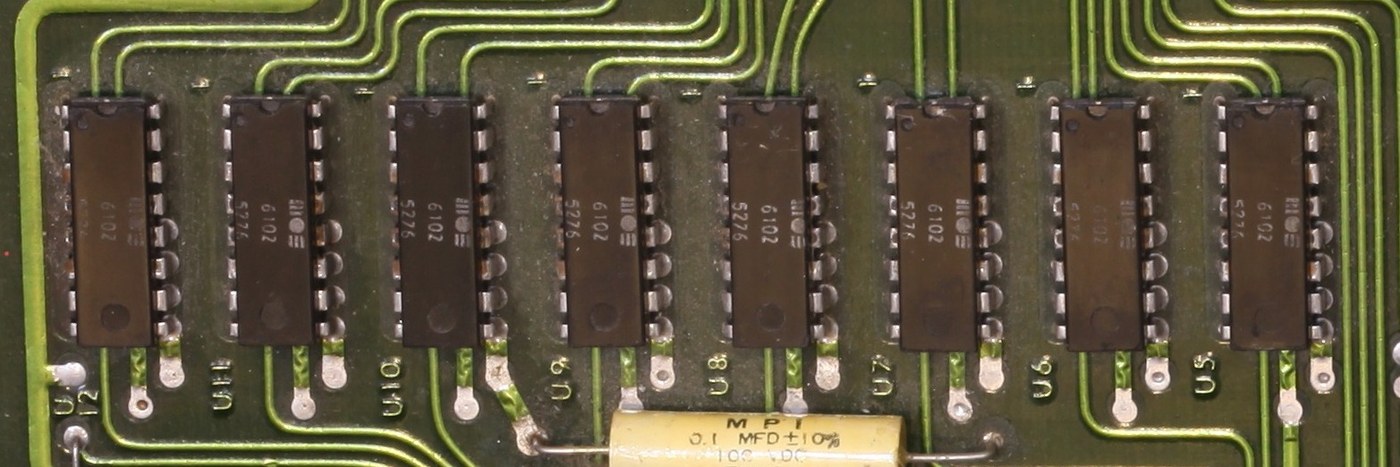
3.5.1 One kilobyte, eight chips
The user’s RAM is eight 6102 static memories (U5–U12), each holding 1,024 one-bit cells with a 500 ns access time (Appendix A). Each chip supplies one bit of the data bus, so all eight together make 1,024 bytes at addresses 0000–03FF. Static RAM needs no refreshing and no support circuitry, which suited a board meant to work the moment power was applied, but 1 K bits per chip was the density of the day. With the 6530s’ 128 bytes the board had 1,152 bytes of RAM in all, of which the monitor reserves 17 bytes in page zero (00EF–00FF) and a few in the 6530 RAM.
Two parts of the first kilobyte have special roles on any 6502. Page zero (0000–00FF) can be reached with one-byte addresses, which makes programs shorter and faster and is the only place the 6502’s indirect addressing can keep its pointers. Page one (0100–01FF) is the processor’s stack. The manual warns that the monitor may push up to eight bytes of its own onto the user’s stack when it handles an interrupt (User Manual, 3.2).
3.5.2 The memory map
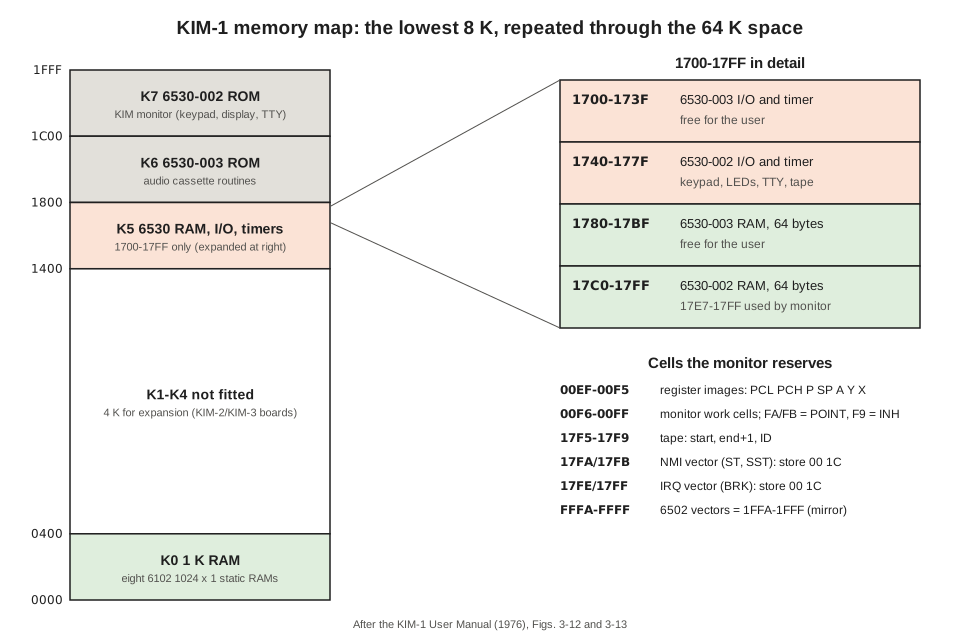
The manual’s memory map (Figs. 3-11 to 3-13) divides the lowest 8,192 addresses into eight 1 K blocks named after the decoder outputs that select them:
Table 4 — The manual's memory map (Figs. 3-11 to 3-13) divides the lowest 8,192 addresses into eight 1 K blocks named after the decoder outputs that select them
| Block | Addresses | Contents |
|---|---|---|
| K0 | 0000–03FF | 1 K user RAM (00EF–00FF reserved by the monitor) |
| K1–K4 | 0400–13FF | not fitted; available for expansion |
| K5 | 1400–17FF | 6530 I/O, timers and RAM at 1700–17FF |
| K6 | 1800–1BFF | 6530-003 ROM: cassette dump (1800) and load (1873) |
| K7 | 1C00–1FFF | 6530-002 ROM: the KIM monitor |
The user’s free memory is therefore page zero below 00EF, pages one to three, the -003’s ports and timer at 1700–173F, its 64 bytes of RAM at 1780–17BF, and the 44 bytes of -002 RAM at 17C0–17EB (User Manual, 3.2).
3.5.3 Address decoding
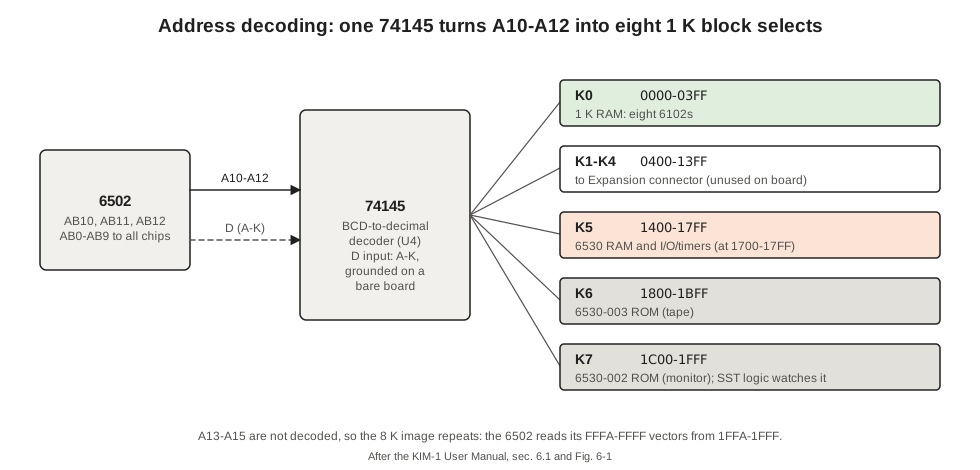
All of this is selected by one chip, U4, a 74LS145 BCD-to-decimal decoder. Its A, B and C inputs take address lines A10, A11 and A12; its eight outputs K0–K7 each enable one 1 K block. K0 enables the RAM, K5, K6 and K7 the two 6530s, and K1–K4 go to the Expansion connector as ready-made chip selects for an extra 4 K (User Manual, 6.1). Within K5 the 6530s decode the remaining address bits themselves.
The decoder’s fourth input, D, is the one wire every new owner had to deal with. It is brought out to pin K of the Application connector, and the manual’s first set-up instructions require a jumper from A-K to ground: “The jumper from pin A-K to Vss (Pin A-1) is essential for system operation” (2.3). As long as D is grounded, the decoder ignores A13, A14 and A15 completely, so the same 8 K appears eight times over in the 64 K space. That is how the 6502 finds its vectors: when it reads FFFA–FFFF, the decoder sees only the low thirteen address bits and the 6530-002 answers from 1FFA–1FFF, where the monitor’s ROM holds the addresses of its NMI, reset and IRQ entry points. An owner expanding beyond 8 K removes the jumper and drives D from a second decoder, and must then put a copy of the vectors at the real top of memory (User Manual, 6.2).
3.6 The Keypad and the Display
3.6.1 Seven wires, two jobs
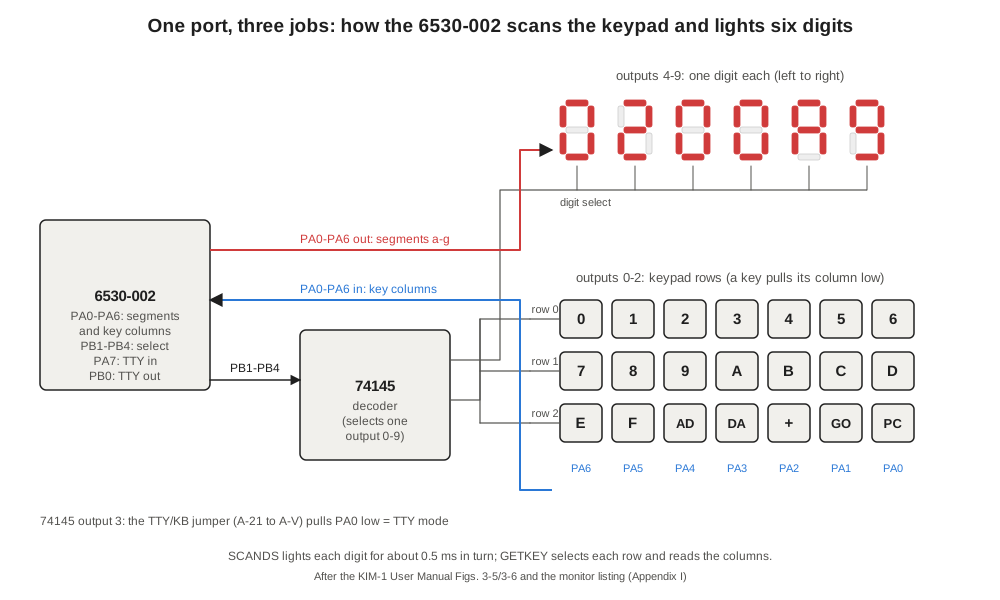
The six digits and the twenty-three keys are connected to the 6530-002 through only eleven port lines, and seven of those do two jobs. The arrangement is visible in the monitor listing and in the schematic (Figs. 3-5 and 3-6).
Four lines of port B, PB1–PB4, feed a second 74145 decoder (U24). Whatever four-bit number the processor writes there, the decoder pulls exactly one of its outputs low:
Table 5 — Four lines of port B, PB1–PB4, feed a second 74145 decoder (U24). Whatever four-bit number the processor writes there, the decoder pulls exactly one of its outputs low
| 74145 output | Selects |
|---|---|
| 0, 1, 2 | keypad rows 0, 1, 2 |
| 3 | the TTY/keyboard jumper |
| 4–9 | display digits 1–6, left to right |
Seven lines of port A, PA0–PA6, are connected both to the seven segments, a to g, of every digit and to the seven columns of the keypad.
To light a digit, the processor makes PA0–PA6 outputs, writes the segment pattern to port A, and writes the digit’s number to port B: bit 0 of port A is segment a, bit 6 is segment g. Because the number goes on PB1–PB4, the value written to port B is twice the decoder output plus one, keeping PB0 (the teleprinter’s output line) at its idle level. The monitor writes 09, 0B, 0D, 0F, 11 and 13 to select digits 1 to 6. Only one digit is lit at any moment. The monitor’s display routine lights each in turn for about half a millisecond. “Briefly” means exactly that, The First Book of KIM warned its readers: “The display lights for a split second. To get a steady display, you must repeat the JSR SCANDS command over and over again” (The First Book of KIM, 1977, Mini-program C). When the processor is busy with anything else the display goes dark, which is why a running program that does not call the display routine leaves the LEDs blank.
To read the keypad, the processor makes PA0–PA6 inputs and selects a row through the decoder. A pressed key in that row connects its column to the low row line, so the corresponding port-A bit reads 0; the pull-ups hold every other bit at 1. The monitor scans the three rows in turn. Its key-decoding arithmetic shows the assignment: PA6 is the first key of each row, PA0 the last, so row 0 holds the keys 0–6, row 1 the keys 7–D, and row 2 the keys E, F, AD, DA, +, GO and PC. The key code returned to a program is simply the position in that list: 00–0F for the hex keys, 10 for AD, 11 DA, 12 +, 13 GO, 14 PC, and 15 for “no key”. This is the electrical order; the physical keypad, a block four keys wide, arranges the same keys differently, and the arrangement changed between MOS and Commodore boards (Volume 11 shows the layout).
The scheme has a consequence a programmer meets at once. A program that has just lit the display has left port A as outputs, and the key routine then reads its own segment pattern instead of the keys. The First Book of KIM puts it as a rule: before calling the key routine “you must ‘open up the channel’ from the keyboard with either one of two subroutines: JSR SCANDS or JSR KEYIN” — both of which end by turning port A back into inputs (Mini-program D). Volume 4 covers these routines and Volume 10 drives the display directly.
3.6.2 Three keys that are not on the matrix
Two of the twenty-three keys and the slide switch are not scanned at all. RS drives the reset line of the 6502 and both 6530s directly. ST drives NMI. Both go through U25, a 556 dual timer, which debounces them (User Manual, 3.1, “the logic required to debounce the keys for system reset (RS key) and program stop (ST key)”).
The SST (single step) switch enables a small piece of gate logic (User Manual, Fig. 3-3). The 6502’s SYNC output goes high during every opcode fetch; with SST on, an opcode fetch from any address outside K7 — that is, outside the monitor’s ROM — triggers an NMI. The interrupted instruction finishes, the NMI sends the processor into the monitor, and the monitor displays the address of the next instruction. Pressing GO returns to the program for exactly one more instruction. Because the monitor itself lives in K7, its own code runs at full speed even with SST on, so a program can be stepped while still calling the monitor’s subroutines. Volume 4 shows a single-step session from the manual.
3.6.3 The LEDs
The six digits are 0.3-inch red seven-segment LEDs (U18–U23). Their segment lines are common to all six digits and driven from port A through resistors; each digit’s common connection is switched by one of the PNP transistors Q1–Q6 from the 74145. A digit is lit about one-sixth of the time while the monitor scans, which is why the display appears slightly dim in photographs and why it flickers in a photograph taken at a short exposure.
3.7 The Teleprinter Interface
The KIM-1 can be run from a teleprinter instead of its own keypad. The User Manual takes the Teletype Model 33 ASR as its example and requires the 20 mA current-loop connection and full-duplex operation (2.6). The hardware is minimal: the serial input arrives on PA7 of the 6530-002, the serial output leaves on PB0, and a few transistors and gates convert between logic levels and the current loop. Everything else is software. The monitor bit-bangs each character, timing every bit with a delay loop.
That software has one celebrated trick. It does not assume a speed. After a reset in teleprinter mode, the monitor waits for the user to press RUBOUT and times the start bit: “the program automatically performs a bit rate measurement and stores the correct value for use in receiving and decoding succeeding data transfers” (3.3). The manual promises that the board works with “a wide variety of data rates (10CPS, 15CPS, 30CPS, etc.)”. The price is that RUBOUT must be pressed after every reset.
The choice between teleprinter and keypad is made by a wire. Joining pins 21 and V of the Application connector connects decoder output 3 to PA0. At reset the monitor selects output 3 and reads PA0: low means a teleprinter is attached. The manual suggests a switch in place of the jumper for owners who use both (2.6).
3.8 The Cassette Interface
The cassette circuit records programs as two audio tones. On output, the monitor’s tape routines in the 6530-003 toggle PB7 of the 6530-002 using that chip’s interval timer; a resistor network gives two output levels, a line-level signal on pin P of the Application connector and a smaller microphone-level signal on pin M. Each bit lasts 7.45 ms, starting with a 3.7 kHz tone and ending with a 2.4 kHz tone; the point at which the tone changes encodes the bit (User Manual, Appendix E; Volume 4 has the format in full).
On input, the signal from the recorder’s earphone socket (pin L) goes to U27, a 565 phase-locked loop, which locks to whichever tone is present, and U28, a 311 comparator, which squares up the loop’s output into a logic level. The software then measures the length of each high pulse with the timer to decide whether it was a one or a zero. Because the loop tracks frequency rather than amplitude, the method is “relatively insensitive to amplitude and phase variations” (Appendix E). The loop’s free-running frequency, half way between the two tones, is set by a potentiometer, VR1. The manual’s first page of warnings tells the owner to leave it alone: “It should never be necessary for you to change the position of this potentiometer” (2.2). A calibration program at 1A6B in the -003 ROM outputs a steady tone at the centre frequency for anyone who has to.
The 565 needs +12 V, the only reason the board needs a second supply. Recording works without it; playback does not.
3.9 Connectors and Power
3.9.1 Two edge connectors
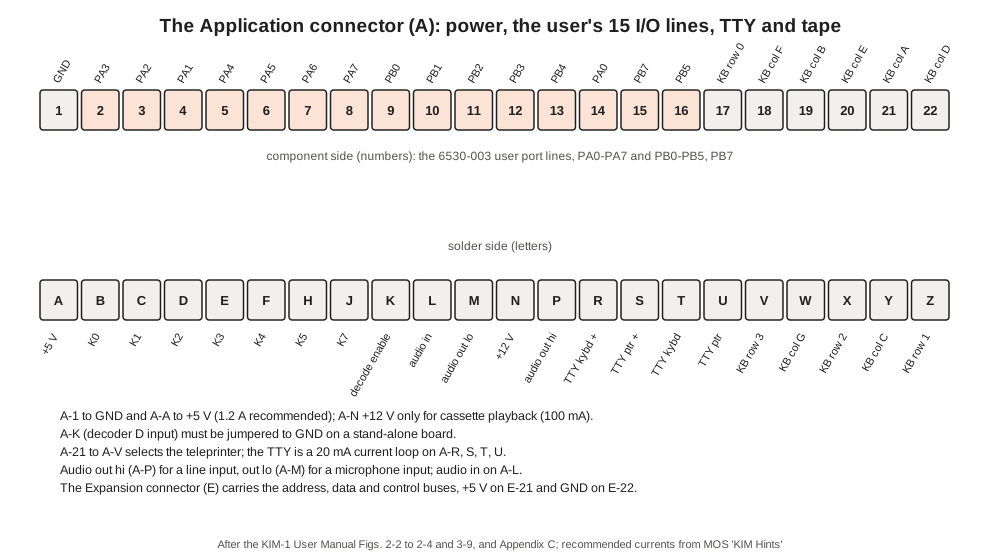
The board has two 44-contact edge connectors, 22 contacts on each face, both on the left as the board is normally placed. The lower one is the Application connector (A), and the board was shipped with a mating socket (a Vector R644) already fitted to it. The upper one is the Expansion connector (E) (User Manual, 2.3).
The Application connector carries everything an owner needs to make the board do something: power, the fifteen user I/O lines, the teleprinter loop, the cassette signals, the spare decoder outputs and lines from the keypad matrix, so that a remote keypad could be wired in parallel (pin list, zimmers.net):
Table 6 — The Application connector carries everything an owner needs to make the board do something: power, the fifteen user I/O lines, the teleprinter loop, the cassette signals, the spare decoder outputs and lines from the keypad matrix, so that a remote keypad could be wired in parallel ([pin list, zimmers.net](https://mirrors.archeobits.com/commodore/www.zimmers.net/cbmpics/cbm/kim1/pinouts.txt))
| Pins | Signals |
|---|---|
| 1 | ground |
| 2–8, 14 | PA0–PA7 of the 6530-003 (in the order PA3, PA2, PA1, PA4, PA5, PA6, PA7 on pins 2–8, PA0 on 14) |
| 9–13, 15, 16 | PB0–PB4, PB7, PB5 of the 6530-003 |
| A | +5 V |
| B–J | decoder outputs K0–K5 and K7 |
| K | decoder enable (jumper to ground) |
| L, M, P | audio in; audio out low (microphone level); audio out high (line level) |
| N | +12 V |
| R, S, T, U | teleprinter keyboard and printer loops |
| 17–22, V–Z | keypad matrix rows and columns |
The Expansion connector carries the 6502’s buses: the sixteen address lines, the eight data lines, φ1 and φ2, R/W, IRQ, NMI, RDY, SYNC, SO and reset, together with +5 V on E-21 and ground on E-22. MOS and other makers built memory boards, a motherboard and an S-100 adapter to plug into it (Volume 7).
3.9.2 Power
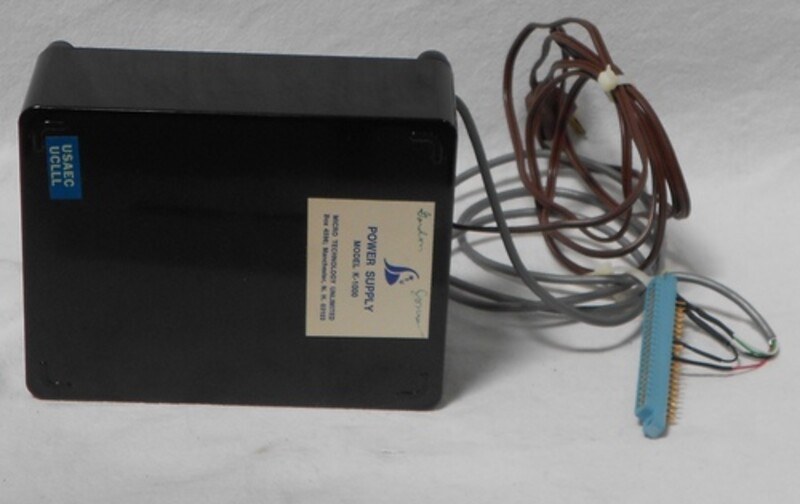
The board needs +5 V, connected between pin A (positive) and pin 1 (ground) of the Application connector, and +12 V on pin N for the cassette player. MOS’s support notes gave the recommended ratings as “1.2A +5V ±5%” and “100mA +12V ±5%”, adding that the board actually measured between 700 mA and 1 A on the 5 V line (MOS Technology, “KIM Hints”, via commodore.ca). The supply had to be regulated. Appendix D of the manual gave a schematic for a simple supply; companies such as Micro Technology Unlimited sold ready-made ones, and the KIM-4 motherboard later carried its own regulator.
There is no power-on reset circuit. After switching on, the owner presses RS; until then the display stays dark and the processor may be doing anything. The manual’s instruction is plain: “turn on your power supplies, and depress [RS]. You should see the LED display digits light as your first check that the system is operational” (2.3). The same habit carries over to the replicas (Volume 9).
3.10 Things That Surprise Modern Readers
A few features of the board follow directly from the hardware and catch people who know later machines.
- The vectors are in RAM. The hardware vectors at FFFA–FFFF point into the monitor, but the monitor passes NMI and IRQ on through 17FA and 17FE, which are RAM and come up random at power-on. Until the owner stores the address 1C00 there, the ST key and the single-step switch do nothing useful and
BRKsends the processor into garbage. The First Book of KIM put this in capitals: “YOU MUST ALWAYS SET UP THESE LOCATIONS AS SOON AS YOU TURN ON YOUR KIM SYSTEM” (Mini-program A). - I/O is memory. There are no input or output instructions; a port is read and written like any memory cell. The manual turns this into a debugging technique: with the keypad, select address 1700 and the display shows the state of the user port’s pins; type a value in data mode and it appears on the output pins (5.5).
- The ROM is readable. Selecting a ROM address on the keypad displays the byte stored there, and trying to change it has no effect. The First Book of KIM uses this as its first demonstration of the difference between RAM and ROM, with address 1C3A, which “will show the value 18, and that value never changes”.
- The display is dark while programs run. The LEDs are lit only by software that scans them. A program that does not, does not show anything.
3.11 How the Simulator Models the Board
The series’ simulator, 03-outputs/tools/kim1_sim.py, is built from this volume’s description: the mirrored 8 K map, the 6530 ports and timers of Appendix H, the 74145 row and digit decoder, and a display that records how long each segment is lit, so that a program driving the LEDs itself looks the same as one calling the monitor. The ROMs are not copied; the monitor is replaced by routines that do what its listing documents, through the same modelled ports. Volumes 4 and 10 show its output.
Next — Volume 4: The KIM Monitor — Keying In, Stepping and Saving Programs. The 2,048 bytes that make the board usable: entering a program with AD, DA and +, running and stopping it, reading the registers the monitor saves, single-stepping, the subroutines a program can borrow, and saving a program to cassette or paper tape.
Comments (0)