Apple-1 · Volume 8
Apple-1 — Volume 8 — Caring for an Original — Storage, Handling, Inspection and the Question of Power
What museums, conservators and the people who restore Apple-1s say about keeping a 1976 board alive — and why switching it on is the last step, not the first
8.1 About This Volume
Somewhere around eighty Apple-1 boards are known to survive from the two hundred or so that Apple built in 1976 and 1977 (Volume 6 has the census). A few live in museums. Most live with private owners — in safes, in display cases, and in places nobody would recommend: closets, basements, and garages. Some owners do not yet know what they have. A board that went into a cardboard box in 1978 may still be in it.
This volume is the practical guide to keeping such a board. It is written for the person who has one in front of them, or in a garage, and wants to know what to do next. The answer is mostly less than instinct suggests. The advice is drawn from museum conservation guidance — the Canadian Conservation Institute (CCI), the U.S. National Park Service’s Conserve O Gram series, the Library of Congress — and from the small group of people who actually evaluate and repair Apple-1s: Corey Cohen, who examines boards for the major auction houses; the Apple-1 Registry, founded by Mike Willegal and run since 2018 by Achim Baqué; and the restorers who document their work on the applefritter forum.
The volume runs in the order the work should be done, from documenting the board to the question of power, and ends with a one-page checklist. Where the advice is “have a specialist do this,” it means it.
8.2 What on the Board Is Fragile
Volume 3 describes the board as a computer. For care, it is better described as a set of materials, each with its own way of failing.
The printed circuit board. The glass-epoxy laminate is stable; its copper, solder and tinned leads are metals, and corrode. On many boards the solder mask on the back has begun to peel; one Bonhams lot essay remarks that its board “lacks the typical peeling that seems to exist on nearly all known Apple-1 boards” (Bonhams, sale 22964, lot 77).
The integrated circuits. Most are 7400-series TTL; the MOS parts — the 6502, the 6820 PIA, the dynamic RAMs, the Signetics shift registers and character generator — are vulnerable to static. All of them carry date codes, printed four-digit year-and-week stamps (a 6502 marked “1576” was made in the fifteenth week of 1976), and the date codes are the forensic record of the board’s originality. The Registry’s own parts appeal says it bluntly: “Every single IC counts” (Apple-1 Registry, wanted parts).
The sockets. Original boards have their chips in low-profile sockets (Bonhams, sale 25259, lot 2058). Sockets make chips removable, which is a mercy for a careful bring-up and a hazard for a careless one: socket contacts oxidise, and every removal risks a bent leg.
The power-supply section. The Apple-1 has no power supply in the modern sense. Two external transformers — the manual recommends a Stancor P-8380 or Triad F31-X for 8–10 V AC at 3 A, and a Stancor P-8667 or Triad F40-X for 28 V AC centre-tapped at 1 A (Apple-1 Operation Manual, 1976, Specifications) — feed raw AC into a Molex connector on the board. Rectification, filtering and regulation all happen on the board itself: the three large blue Sprague filter capacitors that collectors call the “Big Blues” (two of 2,400 µF at 25 V and one of 5,300 µF at 15 V, per restorer Uncle Bernie on applefritter), an LM323K +5 V regulator in a TO-3 can on its own heatsink, and three smaller regulators for +12 V, −12 V and −5 V. The manual’s schematic carries a warning in capitals: the regulator cases and heatsink tabs “ARE ALL AT DIFFERENT ELECTRICAL POTENTIALS … THEY MUST NOT BE SHORTED TOGETHER.” This section is where most damage at power-up begins (see “The Question of Power” below).
Everything that is not the board. Manual, schematics, cassettes, the cassette interface card, invoices, letters, keyboard, case: paper, tape, plastics and wood, each ageing differently, and increasingly where the value and the story lie (see “Provenance”).
8.3 First, Document — Before Touching Anything
The first act of care is a camera, not a screwdriver. A board that is photographed thoroughly before it is handled is a board whose state can always be proved later — to an insurer, to the Registry, to a buyer, or to the owner after an accident.
What the auction houses record in their condition reports is a good guide to what matters. From the lot essays cited in this volume: both sides of the board (“the nearly pristine state of the motherboard’s underside where modifications or prior modifications are typically visible,” Bonhams lot 77); the processor’s date code; the board’s silkscreen; whether the “Big Blue” capacitors are present; the socket type; whether the prototyping area is clean and unused (RR Auction lot, via 9to5Mac, 2018); and any number inked on the back.
A practical protocol, assembled from those reports:
- Photograph both faces square-on, under even, diffuse light, with a ruler in frame. Then photograph each quarter of each face, close enough to read the smallest marking.
- Photograph every chip’s markings: maker’s logo, part number and date code. Do this in place, so the photograph also proves which chip was in which socket.
- Photograph every capacitor, regulator and the transformer connector. Note any bulging, staining or crusting.
- Photograph the back in raking light to show rework, flux residue, cut traces and added wires.
- Photograph any handwriting. Some first-batch boards carry a handwritten number on the back in the form 01-00xx (Volume 6). The Registry’s position is that a photograph proves the number exists but cannot authenticate it: “Original Apple-1s and handwriting samples are needed. A photo is not enough” (Apple-1 Registry, serial numbers).
- Write down what is known: where the board came from, who owned it, when it was last powered (if ever), what was done to it, and by whom.
The photographs should be kept in two places, one of them away from the house.
8.4 Climate
Temperature and relative humidity (RH) decide how fast every material on the board ages. The museum guidance agrees on the essentials.
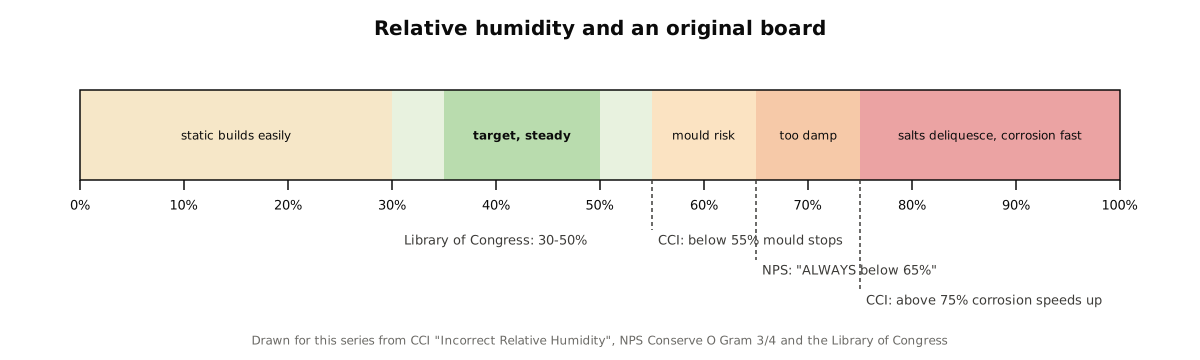
Humidity is the bigger enemy. The CCI’s guide to incorrect relative humidity notes that the film of water on any metal surface “grows rapidly above 75% RH,” and that above about 75% the ordinary salt left by fingerprints turns from “relatively harmless crystals” into “an aggressively corroding salt solution.” Its summary for metals: “the lower the RH the better, above 75% RH all corrosion speeds up a lot” (CCI, Incorrect Relative Humidity). Mould needs damp too, and the same guide notes that “any intermittent period at less than 55% will stop growth.” The National Park Service is firmer: “RH should ALWAYS be kept below 65%” (NPS Conserve O Gram 3/4). The Library of Congress’s advice for family heirlooms is “Keep RH between 30–50%” (Library of Congress, Preserve Your Family Heirlooms).
Cooler is better, steady is essential. The CCI’s rule of thumb for chemical ageing is that “each reduction of 5°C doubles the lifetime of the object” — which bears directly on electrolytic capacitors, foams, rubber feet and tape. But the most dangerous thing temperature can do is change quickly: “a temperature drop over 10°C will cause 100% RH and condensation” (CCI, Incorrect Temperature). A board that is cold and is then brought into a warm, humid room will collect dew on every surface. The fix is time: bring a cold board indoors sealed in its bag or box and leave it closed for several hours to reach room temperature before opening.
Too dry has a cost as well. Dry air is good for metals and bad for static. A heated house in winter can fall to “as low as 5% RH” (CCI), and at low humidity a person walking across a carpet can carry tens of kilovolts (see “Static and Handling”). The range that suits both is roughly 35–50% RH.
8.4.1 Why not the garage
The Library of Congress names the place directly: “avoid storage in attics, basements, garages.” The reasons are each documented separately:
- Daily and seasonal swings. A garage follows the weather. A cold night after a warm, humid day is exactly the 10 °C drop the CCI warns produces condensation, and it can happen many times a year.
- Humidity. Unconditioned garages routinely sit above 65% RH in humid seasons, which is mould territory, and they flood.
- Combustion gases and chemicals. Vehicles emit nitrogen oxides (CCI, Pollutants); fuel and solvents often share the space.
- Pests. The CCI’s classification of building envelopes puts “sheds, barns” at the bottom, and a garage is effectively a shed (next section).
If a board must stay where it is for now, the minimum is a sealed polyethylene or polypropylene box, off the floor and away from the outside wall, with an inexpensive temperature-and-humidity logger inside. The logger turns an assumption into data. If it shows swings past the ranges above, the board should move into the conditioned part of the house — a closet in an interior room, away from bathrooms, kitchens, exterior walls and the floor. The NPS asks for collections “at least four inches above the floor” and away from outside walls (COG 3/4). Bookshelves in a bedroom are a better museum than most garages.
8.5 Pests
The CCI’s pest guide has a sentence every owner of a garage-stored computer should read: “Rodents gnaw all the time on non-food items to deliberately wear and sharpen their constantly growing teeth.” Rodents also “urinate to form trail marks” and gather nest material (CCI, Pests). Shredded manuals and chewed wiring insulation are typical. Urine is the worse of the two for a circuit board: it is wet, salty and alkaline, and restorers report the corrosion it leaves on traces and component leads. That last point comes from restorers’ experience rather than from the museum literature, but it agrees with the CCI’s account of how salts behave on metals.
Mice pass through openings “as small as 1/4-inch diameter” (NPS Conserve O Gram 3/12); a cardboard box is not a barrier. The same guide warns of disease: a box with droppings in it is opened in a ventilated space, with gloves and a respirator mask.
The museum approach is called integrated pest management, and the CCI reduces it to a few steps: avoid attracting pests (no food, no nesting material such as paper and rags beside the collection), block them with pest-resistant containers, detect them early (“early warning — easier cure”) with sticky traps checked regularly, and respond. For a board, “block” means a rigid, close-fitting plastic box. For the manual and paperwork, it means an archival box inside a sealed plastic tub.
8.6 Materials: What to Wrap It In and What Never to Use
What touches a board for decades matters more than what touches it for a minute.
The NPS list of materials that must not be used for long-term storage includes “PVC (polyvinyl chloride),” “polyurethane foams” and “chloroprene (e.g. Neoprene®),” and its general rule is to “avoid plastics that have chlorine or sulfur containing compounds. Such plastics can off-gas volatile acids and harm collections.” The safe alternatives it names are “polyethylene (PE), polypropylene (PP), polystyrene, acrylic,” with polyethylene foams such as Ethafoam, Plastazote and Volara for cushioning (NPS Conserve O Gram 18/2). The CCI adds that flexible PVC sheds plasticiser that transfers onto whatever it touches, and that old polyurethane foams leave “viscous compounds” behind. Fresh wood, especially oak and cedar, gives off acetic and formic acid; a new plywood shelf or a cedar chest is a poor home for a circuit board (CCI, Pollutants).
Two specific hazards turn up again and again in old electronics:
- Black conductive foam. In the 1970s, chips were shipped and stored with their pins pushed into black, carbon-loaded foam. Decades later that foam crumbles, sticks and corrodes the pins it holds. One correspondent on the time-nuts mailing list found ICs stored in such foam since 1979 with pins “quite badly corroded, probably to the point where they won’t take solder” (time-nuts, 2008). Nothing from an original board — spare chips, the board itself — should be pressed into old foam, and any board that has been stored on foam should be inspected closely where the two met.
- Vinyl sleeves and “page protectors.” These are usually PVC. Manuals and invoices belong in polyester (Mylar) or polypropylene sleeves, or in acid-free folders.
Ordinary zip-top bags, by contrast, are polyethylene and harmless in themselves — but not static-protective.
8.7 Static and Handling
The Apple-1’s MOS chips have very high-impedance inputs, which a 1977 engineering paper calls the root of the problem: they render “these devices extremely vulnerable to damage induced by electrostatic potentials” (SAE 770228). A discharge too small to feel can weaken a gate so that it fails later.
How much charge a person carries depends heavily on humidity. A table from Mini-Circuits’ application note on electrostatic discharge gives about 35,000 V for walking on carpet at 10–20% RH and about 1,500 V at 65–90%; on vinyl tile, 12,000 V and 250 V (Mini-Circuits AN40-005). The dry winter house is the dangerous one.
The practice that follows is standard bench practice:
- Ground the person. A wrist strap clipped to a grounded mat or earth point; failing that, touch grounded metal first and do not walk about holding the board.
- Hold the board by its edges, never by chips, capacitors or heatsink.
- Gloves are for the metal, the strap is for the static. The NPS now prefers nitrile gloves over cotton because “nitrile gloves … provide superior protection for a broad variety of objects, including metals” against the oils and salts of skin (NPS Conserve O Gram 1/12). Nitrile is an insulator, so gloves should be worn with a wrist strap, not instead of one.
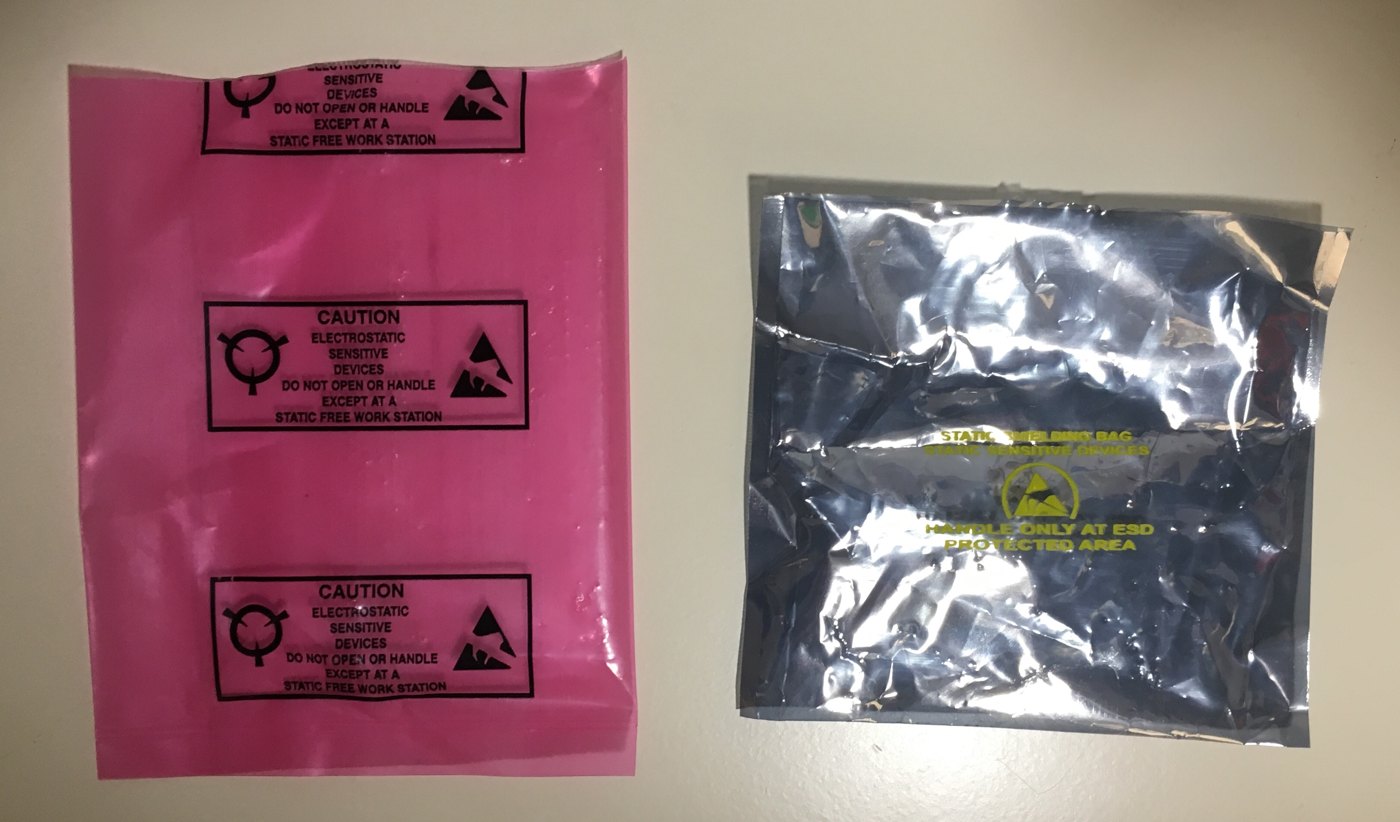
- Store in a shielding bag, not just an “anti-static” one. Pink polyethylene bags are dissipative: they do not charge themselves up when rubbed, but they do not stop an outside discharge. Metallised static-shielding bags, the translucent grey kind, have a metal layer that acts as a Faraday cage around the contents (Wikipedia, Antistatic bag). A shielding bag that is creased or punctured loses some of that protection, so it should be folded once and not crushed.
A shielding bag is not a climate enclosure and not a box. The arrangement that answers every section above at once is simple: the board in a static-shielding bag, the bag cushioned with polyethylene foam in a rigid polypropylene or archival box, the box on a shelf in a conditioned room, and a logger nearby.
8.8 Inspection Without Power
A great deal can be learned about a board without applying a single volt, and everything learned this way reduces the risk of the step that follows. A visual inspection under good light and a magnifier, with the board on a grounded mat, covers:
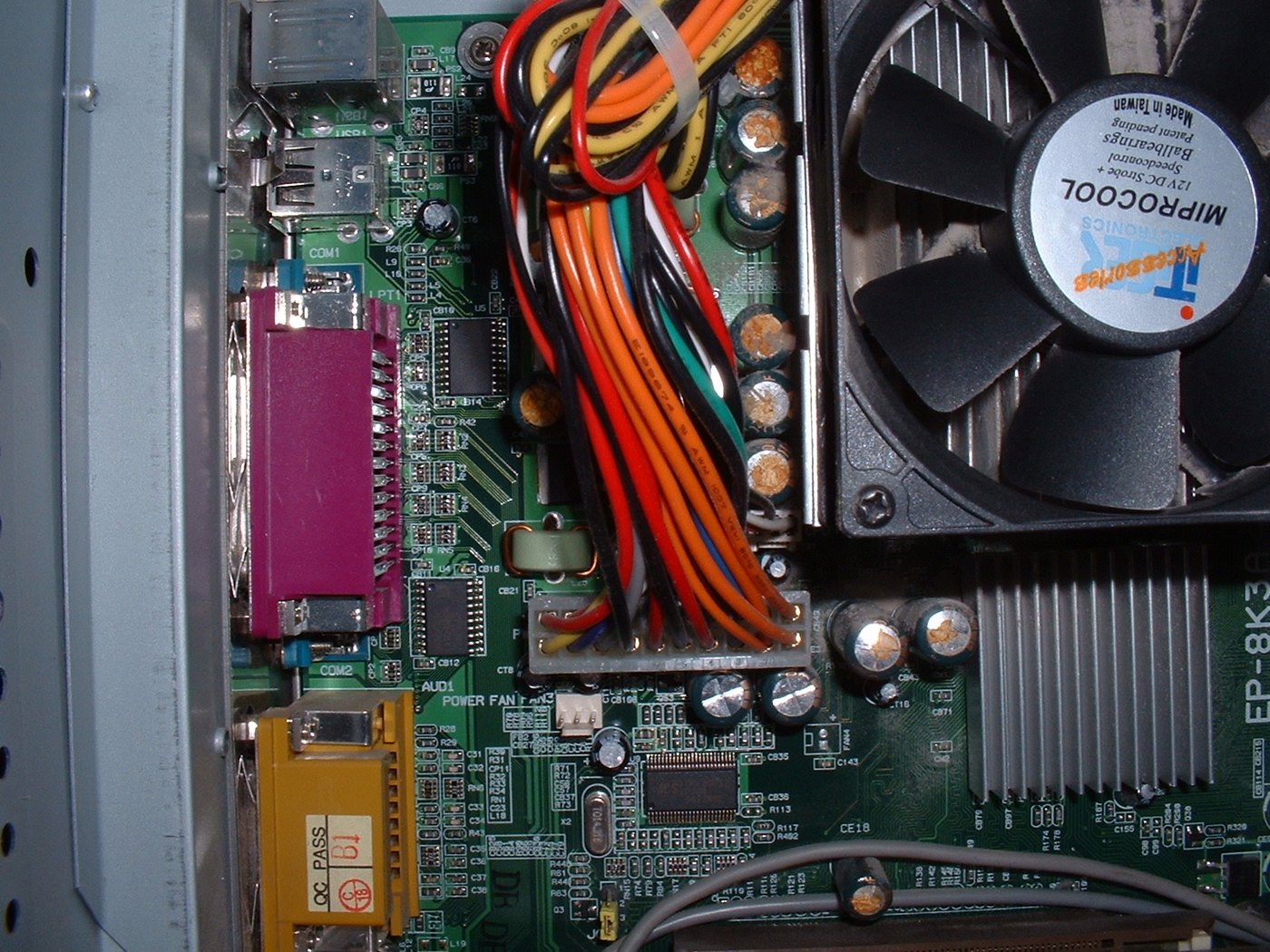
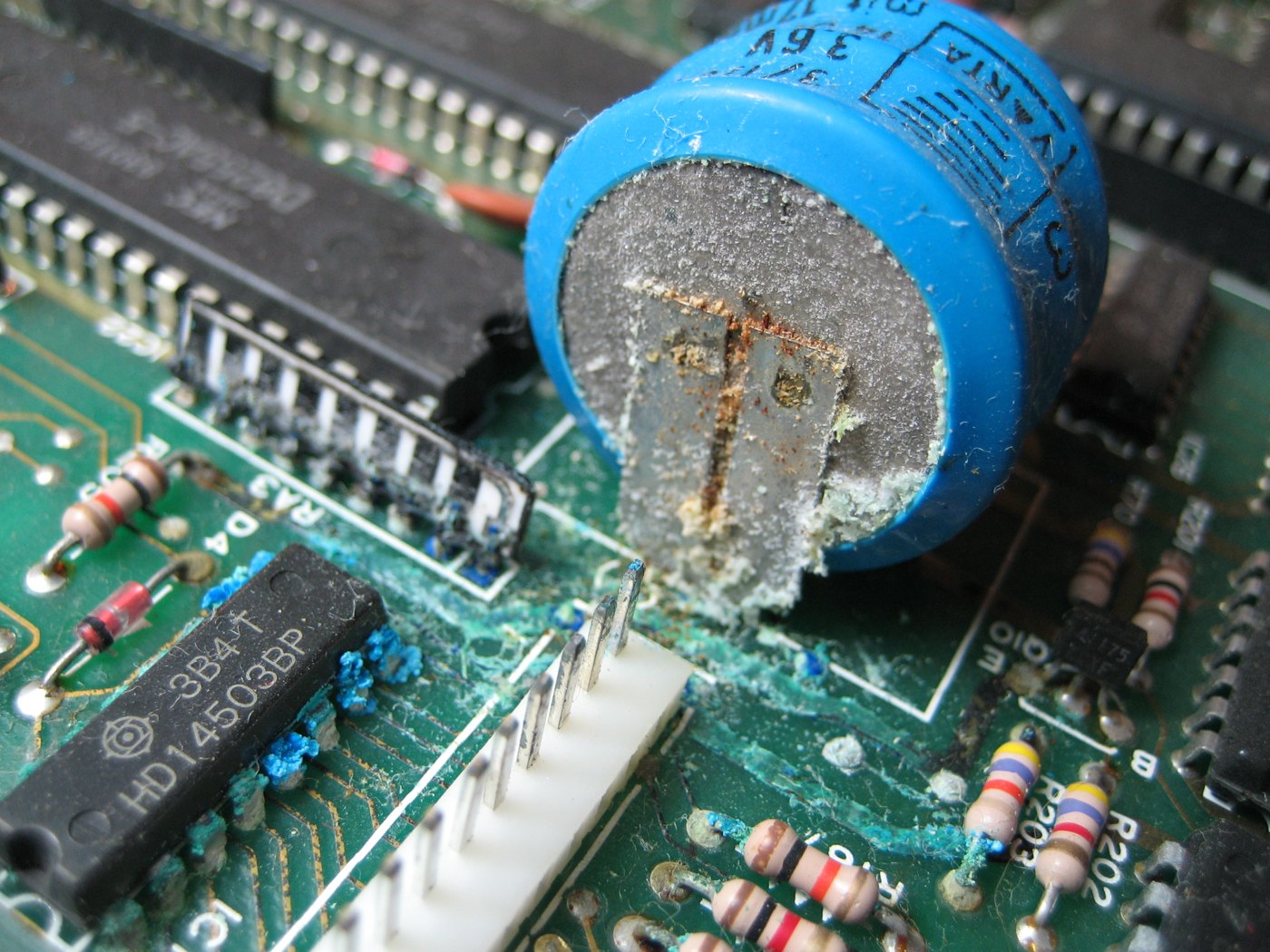
- Capacitors. The “Big Blues” and the small electrolytics: any bulging of the top or the base, any crusty or oily residue at the leads, any discoloured board beneath. Electrolytic capacitors that have sat unpowered for decades have a higher leakage current at first; restorers “reform” them by bringing them up to voltage slowly through a resistor (see below). A leaking capacitor is replaced, not reformed.
- Corrosion. Green or white deposits on leads, traces, socket pins or the edge connector; dark spots under the solder mask; the stains rodent urine leaves.
- Chips. Every chip present? Every chip seated fully, with no legs folded under? Every chip the right way round? This is not a theoretical worry. Christie’s 2015 condition report on the board it offered that year noted that “one of the chips are inserted incorrectly” and that “the status of the capacitors is unknown,” and the house said frankly that “neither of the electrics nor electronics have been tested” (SlashGear, 2015; Computerworld, 2015). A reversed chip on a powered board is usually a destroyed chip, and sometimes a damaged board.
- The regulators and heatsink. Are the regulators original, and have they been disturbed? Cohen’s comment on the board now at The Henry Ford was that “even the screws on the power regulators aren’t heat cycled” — a sign that nobody had ever had them off (as reported by Paul Fraser Collectibles; the wording comes from a search excerpt and could not be re-read on the page).
- Rework. Odd-looking joints, added wires, cut traces, parts in the prototyping area: not necessarily bad, but part of the board’s history and the photographs.
- The transformers, if present. Original transformers, and the wiring between them and the board’s Molex connector, are the most likely source of a catastrophic fault. One restorer documenting Registry board #89 on applefritter concluded that, at some point in its past, “someone shorted the transformer and blew two of the diodes” (applefritter, node 32301).
8.9 The Question of Power
Every owner eventually wants to see it run. The case for waiting is strong, and it is worth setting out before the case for going ahead.
8.9.1 Why not to power an untested original
Nobody knows what happened to it. A board with an unknown history may have a shorted capacitor, a cracked rectifier, a reversed or substituted chip, a bridged trace, or an earlier owner’s modification. Any one of those can turn first power into the last.
The supply puts raw power on the board. On an Apple-1 the transformers deliver AC straight to the board’s own rectifiers. If a filter capacitor or a regulator has failed short, or the transformer wiring is wrong, unregulated voltage can reach chips that tolerate a few tenths of a volt of excess. The manual itself warns, of the raw DC available at the edge connector, to “exercise great care in the handling of the raw DC, as no short-circuit protection is provided.”
The parts are not replaceable like for like. A 1976 6502 or 2513 that is destroyed can only be replaced by another old one, and the replacement changes the board. The Registry’s words — “Every single IC counts” — are about this. A surviving original is valued for being original.
The leading specialist sometimes says no. For the unique, possibly Jobs-finished “Celebration” board sold in 2016, Corey Cohen judged that it “has the potential to be ‘powered up’ with minor restoration, but has recommended against it to maintain the board’s unique configuration” (Charitybuzz lot, 2016). For a board whose importance lies in exactly what is on it, not running it is a legitimate conservation decision.
Museums of computing have argued about the same choice for decades. Doron Swade, former curator of computing at London’s Science Museum, framed it as a working machine with non-original parts against an authentic one that does not run (report on Swade’s argument). The Science Museum’s Ferranti Pegasus, demonstrated for years, had a fire in its power supply in July 2009 (CCS Resurrection 51).
8.9.2 Why owners and museums do run them
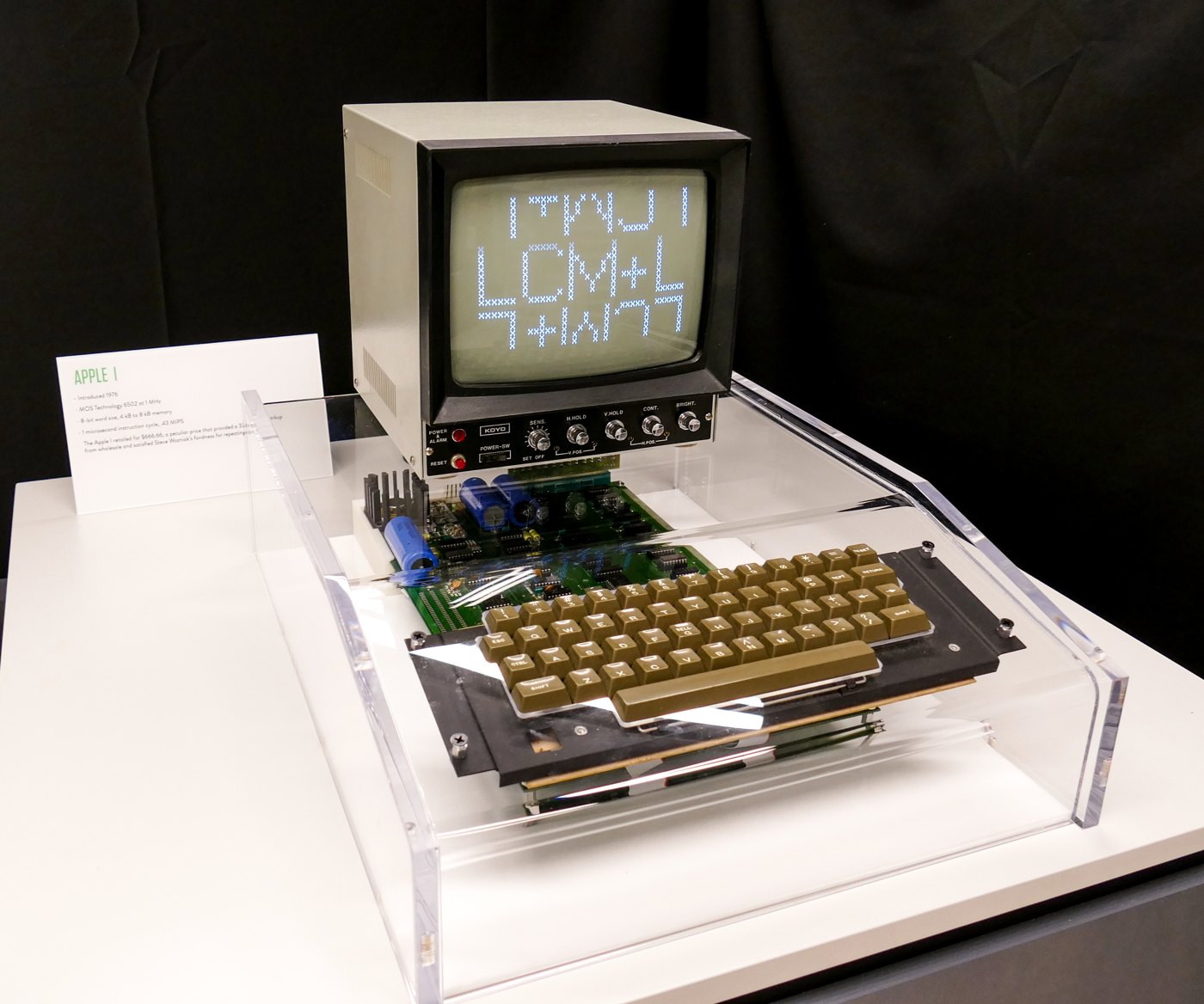
The other side is real too. The Apple-1 that The Henry Ford bought at Bonhams in 2014 was, in the museum’s words, “in excellent, unmodified condition—and is fully operational,” and the museum argued that its operability “lends it value as a complete, uncompromised artifact.” The same article put the number of working boards at the time at “Only 15 of the 64 known authentic Apple 1s” (The Henry Ford). A tested, working board fetches more at auction, and a condition report that says “operational as of” a date is now standard in the major sales (Bonhams lots 77 and 2058, above). The Living Computers Museum in Seattle displayed a working Apple-1 behind clear polycarbonate (this volume’s opening figure).
8.9.3 If it is to be powered: how specialists do it
The decision to power an original is the owner’s. The work should be done by someone who has done it before — in practice, one of a handful of Apple-1 specialists. What follows is not a recipe to follow at home. It is an outline of what a careful bring-up involves, so that an owner can recognise one and ask the right questions.
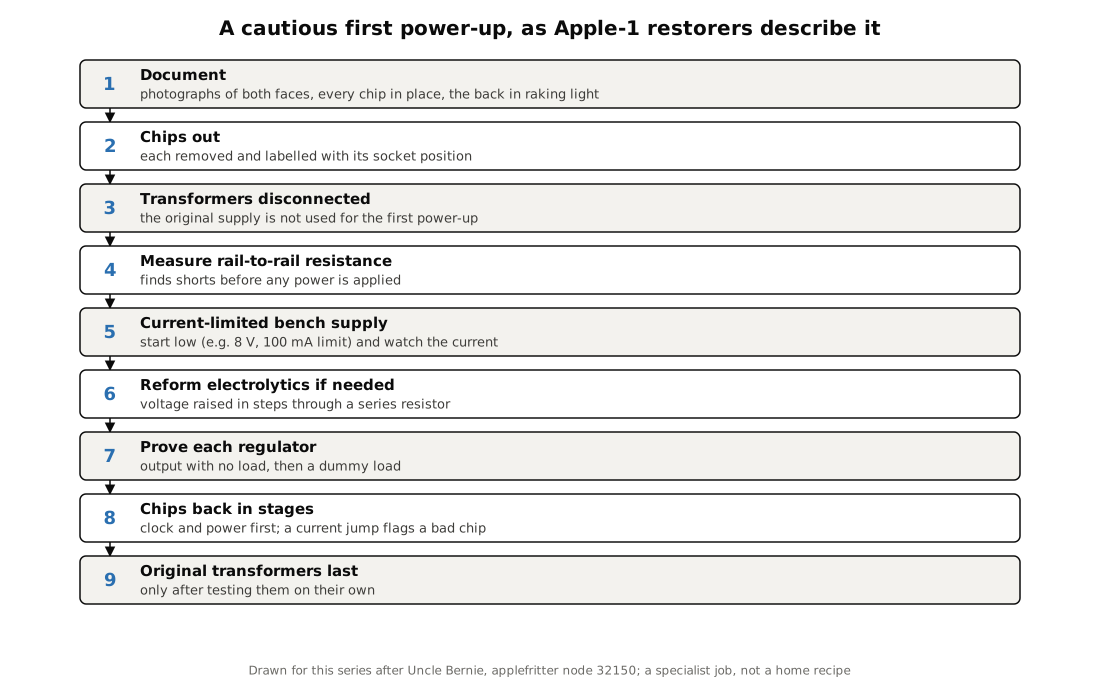
The method that restorers describe on applefritter, notably Uncle Bernie in a thread on Apple-1 power problems (applefritter, node 32150), works outward from the power supply, one stage at a time, never trusting the next stage until the last has been proved:
- Documentation complete (above), including chip positions.
- Remove the chips from their sockets, noting each position. The board is then copper, passives and regulators.
- Disconnect the transformers. They are not used for the first power-up.
- Measure resistance between all the power rails before applying anything: in Uncle Bernie’s words, “measure the resistance between all power rails before you put the regulators in.” A short shows up here at no cost.
- Feed the board from a current-limited bench supply, starting low. His advice: “Set it to a current limit of 100mA at a 8V output voltage before you connect it to the DUT,” and watch the current, because “Measuring the current is the key to the solution!” An empty-socket board that draws more than a few tens of milliamps on the +5 V rail has a short somewhere.
- Reform the electrolytics if needed, by raising the voltage in small steps through a series resistor (roughly 10 kΩ in his description) and watching leakage fall.
- Check each regulator’s output with no load, then with a dummy load.
- Re-insert the chips in stages, power section and clock first, checking current at each stage, so that a failed chip shows itself as a current jump rather than as smoke.
- Only then the original transformers, and only after they have been tested on their own.
The same thread warns that LM323K regulators with blue plastic around their legs are probably counterfeit: replacement parts bought today need checking as carefully as the board.
The Computer History Museum’s description of restoring its PDP-1 states the principle in a sentence: “The key principle was to ensure that all work undertaken was reversible,” and the first and most time-consuming step was the power supplies, so “that once power was applied it would not damage the computer’s circuitry” (CHM, PDP-1 restoration; quoted from the museum’s summary).
8.10 Originality, Repair and Value
Restoration changes a board, and the market measures the change. Corey Cohen’s condition grades, quoted in auction listings, show it: a board “restored to its original, operational state in June 2018 by Apple-1 expert Corey Cohen,” which “has not had any modifications to the physical board,” was rated 8.5 out of 10; another, on which “some board-level components have been replaced,” was rated 6.5 “based on condition and originality” (RR Auction lots as reported by 9to5Mac and RR’s own listing). The applefritter thread on Registry board #89 documents a restoration that replaced thirty-one components and removed four resistors an earlier owner had added, using “period-correct” Signetics parts appropriate to the board’s batch. The board works; it is also, now, thirty-one parts less original than it was.
The Registry leaves the choice to owners, noting both that a board in poor condition can often be brought back and that “the amount of replacement parts and rework may not be desirable” (Apple-1 Registry). Its parts appeal asks for “date- and period-correct parts,” with “New old stock (NOS) preferred, pulls ok,” and most logic dated 1974–76 (wanted parts).
Three rules follow from all of this:
- Every part removed is kept, bagged and labelled with its position and the date. A removed original is part of the board’s history and may one day go back.
- Every replacement is recorded — what, where, why, the replacement’s own markings and date code, and who did the work.
- Reversible beats irreversible. Socketed chips can be swapped back; a lifted trace cannot be un-lifted.
8.11 Provenance, the Registry and Insurance
A board’s history is part of what it is. The objects that have travelled with boards sold at auction include the original manual and schematics, cassette tapes, the Apple Cassette Interface, dealer paperwork, letters from the first owner, transformers, keyboards and monitors; The Henry Ford’s board came with “hardware, schematics, and a historical document collection.” They deserve the same care: paper in acid-free folders, tapes upright in their cases, all of it dark, since ultraviolet yellows “poor-quality plastic and paper” (CCI, Light).
The Apple-1 Registry (apple1registry.com) records surviving boards, their histories and their condition. Registration is the single most useful thing an owner can do for a board’s provenance, and the Registry states that “Everything can be treated confidentially.” What it can and cannot confirm is set out plainly on its serial-number page: “Some (not all!) Apple-1s of the 1st batch have a handwritten number on the back which is obviously a serial number”; “None of the 2nd batch (also called ‘NTI’ Apple-1) have a serial number.” (One Bonhams lot of 2018 described a board as second-batch NTI while also reporting an inked number on its reverse, which it called “a Byte Shop inventory number”; Volume 7 discusses how such numbers are read.)
The Library of Congress’s heirloom advice ends with a line that applies with special force here: “Appraise and insure all objects of significant monetary value, whether on display or in storage.” An ordinary household policy is unlikely to cover an object of this value without a specific rider or a specialist collectibles policy, and an insurer will want the photographs and the documentation described above.
8.12 The Apple IIs Beside It
Apple-1s are often found with early Apple IIs, which bring hazards the Apple-1 lacks. Their switching power supplies should be tested on their own, on a dummy load, and not brought up slowly on a variac as a linear supply can be. Many contain yellow RIFA mains-filter capacitors that crack with age and fail with smoke; collectors replace them before first power (applefritter, node 33594; University of Amsterdam Computer Museum). Apple II boards carry tantalum capacitors, whose characteristic failure is a short circuit that can overheat or ignite (KYOCERA AVX safety sheet); whether an original Apple-1 has any could not be confirmed (the community parts list calls its 22 µF parts electrolytic). Some later cards carried batteries, the commonest cause of severe corrosion in stored computers; the Apple-1 has none.
8.13 A One-Page Checklist
Table 1 — A One-Page Checklist
| Do now | Why |
|---|---|
| Photograph both faces, every chip marking, the back in raking light, any handwriting | Proves the board’s state; needed for insurance, the Registry and any repair |
| Move it out of the garage, attic and basement | Condensation, humidity, exhaust gases and rodents (CCI, NPS, Library of Congress) |
| Keep it at roughly 35–50% RH and a steady, cool room temperature; put a logger beside it | Corrosion speeds above 75% RH; mould stops below 55%; static rises below 30% |
| Static-shielding bag → polyethylene foam → rigid PP or archival box, off the floor | Shields from discharge, contact pollutants and pests |
| Throw away old black foam, PVC sleeves and polyurethane packing | They corrode pins and off-gas acids (NPS COG 18/2) |
| Wear a grounded wrist strap and nitrile gloves; hold by the edges | ESD and skin salts |
| Inspect under a magnifier, without power | Find reversed chips, leaking capacitors, corrosion and rework first |
| Do not connect the transformers and switch on | An untested board can be damaged in seconds |
| If power is wanted: a specialist, chips out, current-limited bench supply, staged bring-up | The method restorers use |
| Keep every removed part; record every replacement | Originality is the value |
| Register with the Apple-1 Registry; appraise and insure | Provenance and protection |
Next — Volume 9: The Replicas — Re-Making the Apple-1. From Vince Briel’s Replica 1 to period-parts reproductions built on copies of the original board: who makes Apple-1 replicas today, what is inside them, what they cost in October 2026, and how close each comes to the machine of 1976.
Comments (0)