Apple-1 · Volume 10
Apple-1 — Volume 10 — Building an Apple-1 Replica
The Replica 1 Plus from bare board to backslash, one stage and one test at a time — and the longer road of a board-for-board reproduction filled with 1976 chips
10.1 About This Volume
Volume 9 surveyed the Apple-1 replicas and ended with a choice. On 28 October 2026 the one complete Apple-1 kit on sale from an authorised maker, with every part, the ROM and a step-by-step manual, is the Replica 1 Plus, designed by Vince Briel and made under licence from him by ReActiveMicro at $135 for the kit. The board-for-board reproductions that carry the original’s shift-register video and dynamic memory are, on the same date, out of stock. This volume therefore builds the Replica 1 Plus in full, following its manual (Replica 1 Plus Users Manual, Briel Computers, June 2014, ReActiveMicro wiki), and then describes the reproduction route — what it takes to bring up a Mimeo-type board populated with 1970s chips — following Mike Willegal’s Apple 1 Mimeo Computer Assembly and Bring Up Guide (willegal.net), so that a builder who finds a reproduction board knows what lies ahead.
The method is the same in both: build in stages, and test at the end of each stage before going on, so that a fault shows up while there are only a few places it can be. Everything here is written as a procedure. Where the account of an actual build will go, the text carries a marker.
10.2 What to Buy
Prices are as shown on the sellers’ pages on 28 October 2026.
Table 1 — What to Buy
| Item | Source | Price | Notes |
|---|---|---|---|
| Replica 1 Plus kit | ReActiveMicro | $135.00 | Board, all parts, programmed ROM; assembled version $184.99 |
| Power | ReActiveMicro, or any 1 A USB supply | $10.00 | The board is powered through its mini-USB connector |
| Keyboard | Any PS/2 keyboard; ReActiveMicro USB-to-PS/2 adapter | $6.00 | Or an ASCII keyboard (see “Keyboards”) |
| Display | A composite-video monitor or television; or ReActiveMicro’s Mini AV2HDMI adapter | $45.00 for the adapter | NTSC; the manual says PAL is “not tested” |
| Tools | Fine-tip temperature-controlled soldering iron, solder, side cutters, fine pliers, a multimeter, a magnifier | — | The manual’s list: “Soldering iron, solder, wire cutters, needle nose pliers, and a multi-meter” |
All in, a builder with a keyboard and a television to hand can finish for well under $200. The manual is direct about the skill required: “This kit is not for beginners and Briel Computers assumes that you have some prior experience with soldering circuit boards. If you have never soldered circuit boards before or don’t feel you are ready, you should build other kits of a smaller, less complex nature before building your replica 1.”
10.3 The Kit, Part by Part
The parts list in the manual (p. 12) is short, and each part has an ancestor on the 1976 board (Volume 3).
Table 2 — The Kit, Part by Part
| Kit part | Does the job of, on an Apple-1 |
|---|---|
| 6502 (or 65C02) processor | The MOS 6502 at A7 — the same processor |
| 6821 PIA | The 6820 at A4 — the same registers at $D010–$D013 |
| 62256 32K static RAM | Sixteen MK4096 dynamic RAMs, refresh logic and multiplexers |
| 27C128 EPROM | The two 256 × 4 monitor PROMs — and the BASIC cassette, since BASIC is in ROM |
| Parallax P8X32A Propeller + 24LC256 EEPROM | The whole video terminal: seven 2504s, the 2519, the 2513, the clock driver and timing logic — and the keyboard interface |
| 74LS00, 74LS138 | The 74154 decoder and glue logic |
| 5 MHz crystal | The 14.31818 MHz crystal and timing chain (here, the Propeller’s clock) |
| FT232 USB module | The transformers and four regulators — and adds a serial port |
| 44-pin slot | The edge connector, for Apple-1 cards |
The manual sums it up: “Only 8 IC chips are now on the replica 1 plus the serial USB adapter.” Machined sockets are supplied for every chip, so no chip is soldered.
10.4 Before You Begin
- Workspace. A clear, well-lit bench with room for the board, the manual and a parts tray. The manual: “make sure you have proper working space and that you heat your iron before beginning the assembly.”
- Static. The 6502, 6821, RAM and Propeller are MOS parts. Keep them in their packaging until they are needed, and ground yourself before handling them (Volume 8 has the reasons and the method).
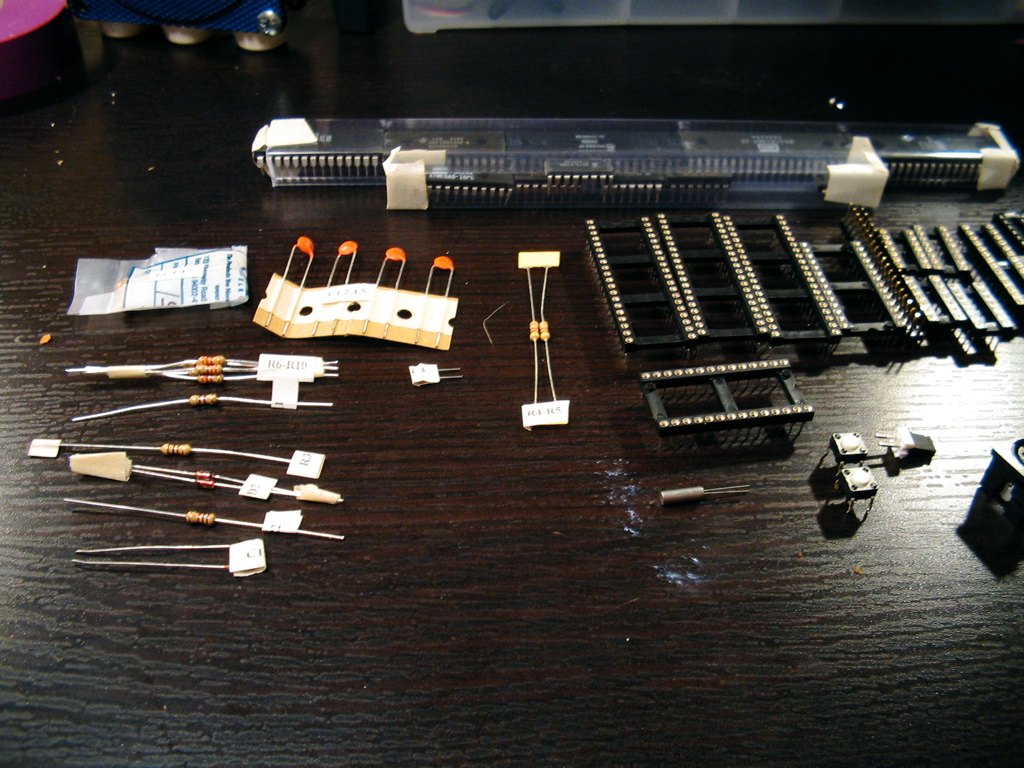
- Sort and count. Lay out every part and check it against the list. Identify resistors by their colour bands, and check doubtful ones with the multimeter before fitting them; the manual has a colour-code table.
- One general technique recurs throughout the manual: fit a part, hold it in place, turn the board over onto the bench so the bench holds the part, solder one pin, turn the board back and check the part is flat and square, and only then solder the rest. A part soldered crooked on all its pins is very hard to straighten.
10.5 Assembly
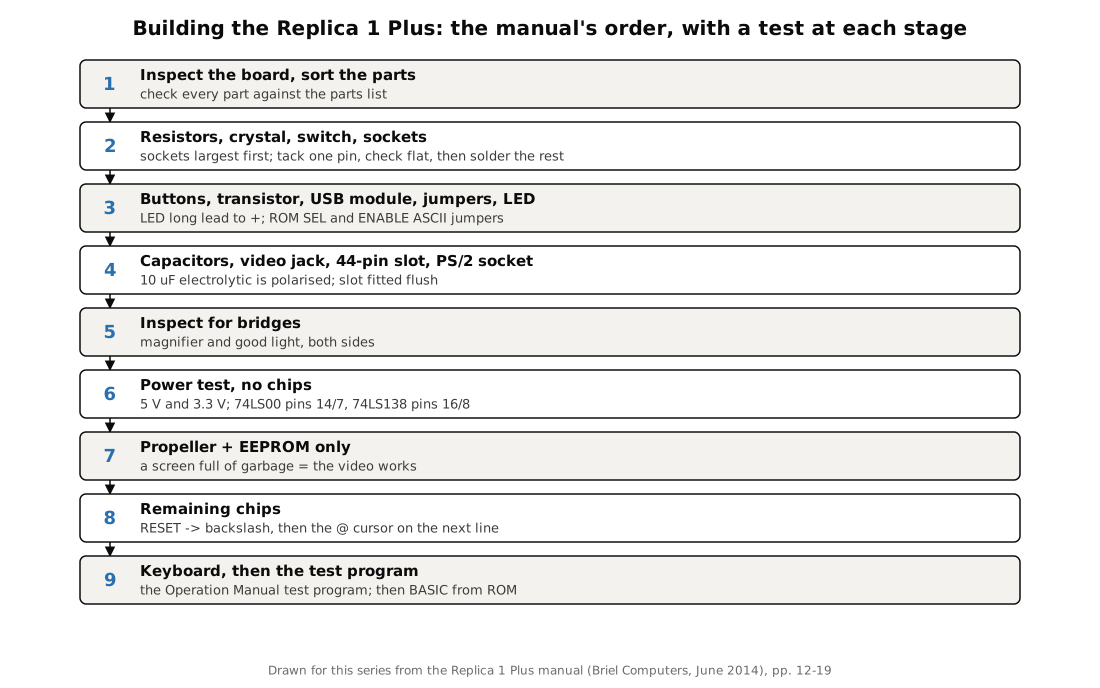
The manual’s fifteen steps fall naturally into four stages. Work through them in order; the order puts the lowest parts on first, so that the board lies flat on the bench for each one.
10.5.1 Stage 1: resistors, crystal, switch and sockets
- Resistors (Step 1). Bend the leads at 90 degrees close to the body, insert, bend the leads out slightly on the back to hold the part, solder, and trim.
- The 5 MHz crystal (Step 2), held flush with the board while it is soldered.
- The power switch (Step 3), with its lever facing out from the board edge. The manual’s caution applies to every multi-pin part: solder “making sure not to allow any solder to flow across to another pin. Check with a volt meter that no pins are touching.”
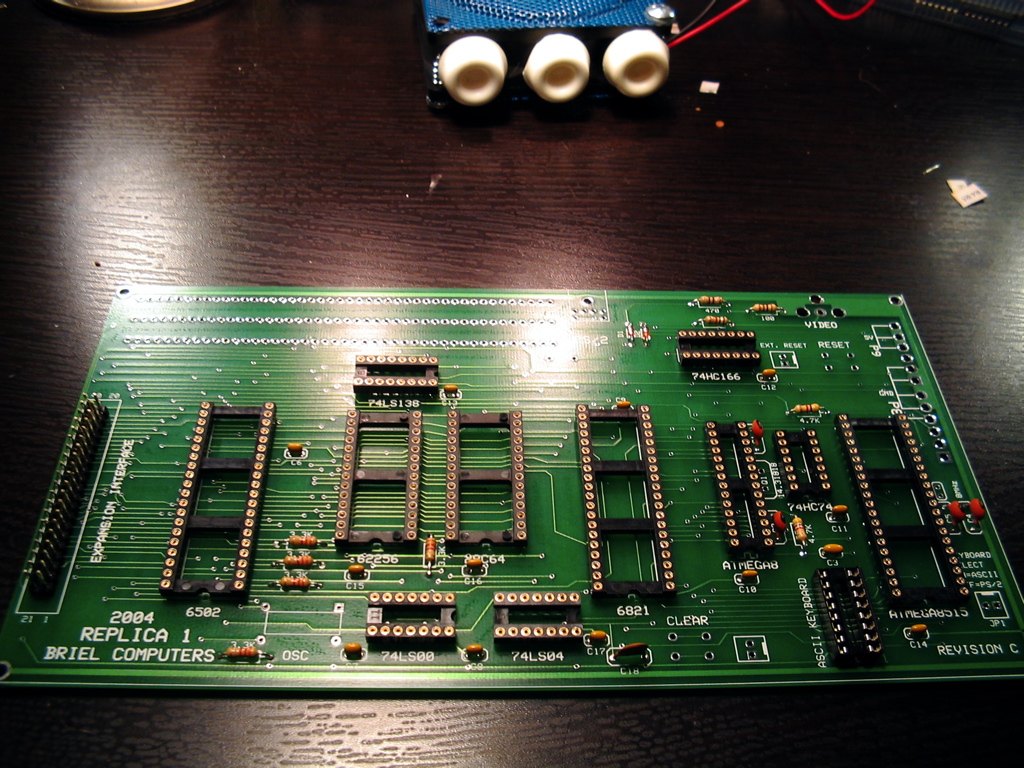
- Sockets (Step 4), largest first: the three 40-pin sockets, two 28-pin, the 16-pin, 14-pin and 8-pin. Match each socket’s notch to the outline on the board; as the manual reassures, “If you get this wrong, it is ok, it is just a socket,” but a matching notch is the reminder of which way the chip goes. Solder one corner pin, check that the socket is flush, then solder the rest.
10.5.2 Stage 2: controls, transistor, USB module, jumpers and LED
- The RESET and CLEAR buttons (Step 5) — the replica’s equivalent of the two pushbuttons an Apple-1 owner wired to the keyboard connector. Fold their tabs to hold them while soldering; they can shift, so check them afterwards.
- The 2N4401 transistor (Step 6), its flat face matching the flat on the outline.
- The USB module (Step 7). This is the one step that needs care with spacing. Solder only one pin of each of its two 9-pin headers to the module first; then sit the module and headers in the main board, adjust the headers until they fit, and only then solder them — first one pin, check flush, then the rest. “You have to be careful not to solder all the pins right away or the spacing may be incorrect.”
- Two 2-pin jumpers (Step 8): ROM SEL beside the EPROM, and ENABLE ASCII beside the keyboard connector.
- The LED (Step 9); the longer lead is the positive one.
10.5.3 Stage 3: capacitors and connectors
- Eight 0.1 µF capacitors, marked “104,” at C1–C8 (Step 10), and two 0.01 µF, marked “103” (Step 11). These are not polarised.
- The 10 µF electrolytic (Step 12). It is polarised; match the stripe to the outline.
- The RCA video jack (Step 13), with enough solder to fill the holes completely — it takes the strain of every cable plugged in.
- The 44-pin slot (Step 14). Match the “A” or “Z” marking on the connector to the board, solder one pin, check that it is flush, then do the other 43.
- The PS/2 connector (Step 15). “Use caution as the pins are fragile and the fit is very tight.” Check that every pin has come through before soldering.
10.5.4 Stage 4: inspection
Before any power is applied: “take a few minutes and look over your work. Check for solder spots that might not be good connections to the posts. Look for bridges where solder may have jumped over where it wasn’t supposed to go.” Under a magnifier, look at every joint on the back: each should be a smooth, concave fillet around the lead, not a ball sitting on top of the pad and not a bridge to its neighbour. Re-flow anything doubtful.
10.6 Testing in Stages
The Replica 1 Plus manual’s test procedure is a model of the staged approach, and it is worth following exactly.
Test 1 — power, no chips. With no ICs in the sockets, connect USB power and switch on. The LED should light. With the multimeter, check 5 V against ground, and 3.3 V against ground. Then check that 5 V is reaching the logic sockets: pins 14 and 7 of the 74LS00’s socket, and pins 16 and 8 of the 74LS138’s. “Once you are satisfied that the power is being distributed correctly, power off.”
Test 2 — the video, alone. Fit only the Propeller (P8X32A-D40) and its 24LC256 EEPROM, observing the notches, connect the video cable to the monitor, and switch on. The result to look for is “a screen full of garbage.” Odd as it sounds, that is success: the Propeller is running and generating a picture, and the screen memory has simply not been cleared. “If the video section is working properly, turn off the replica 1 and install the rest of the chips.”
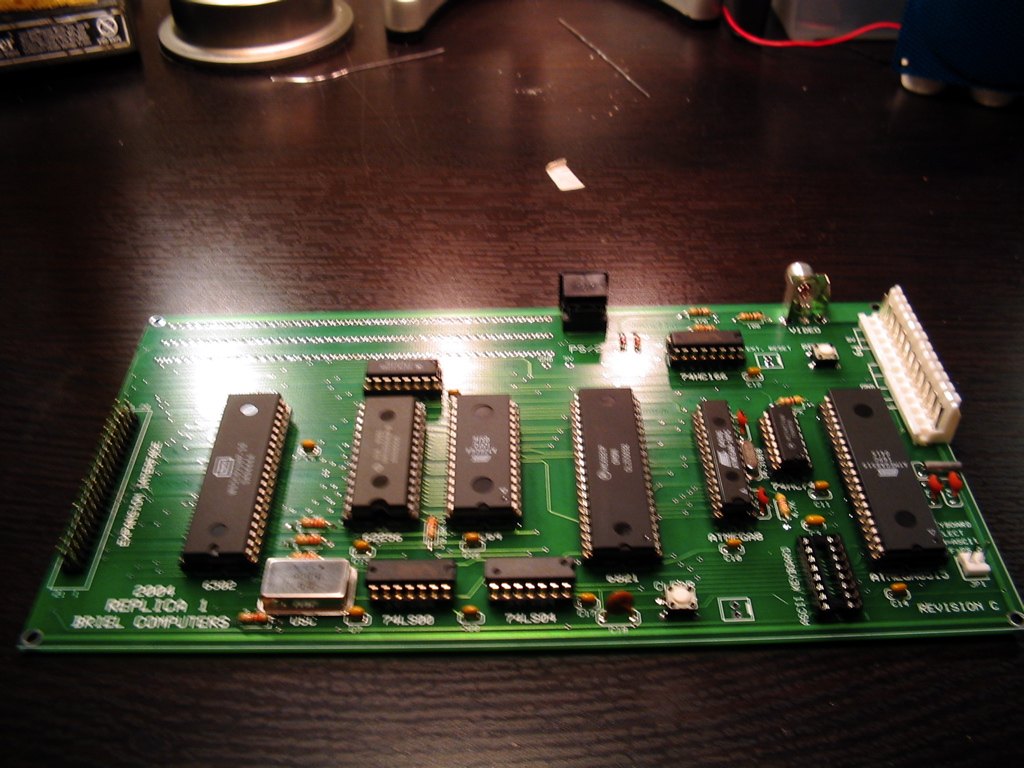
Test 3 — the computer. Fit the 6502, 6821, 62256, 27C128, 74LS00 and 74LS138. Switch on, wait a couple of seconds and press RESET. “If the circuit is working properly, you will get a ” backslash followed by the cursor ’@’ moving to the next line.” That backslash is the Woz Monitor’s prompt, exactly as on an Apple-1 (Volume 5).
Test 4 — the keyboard. Power off, connect the keyboard, power on and press RESET. Type FF00.FF0F and RETURN: the monitor should list sixteen bytes of its own ROM. Then run the Operation Manual’s test program:
0: A9 0 AA 20 EF FF E8 8A 4C 2 0
0.A
R
The screen should fill with an endless stream of the terminal’s 64 characters. RESET stops it. This is the program Apple gave its first customers to check their machines (Volume 5 explains it byte by byte; the series’ simulator shows the expected screen in Volume 5’s figure).
The manual’s closing caution applies at every stage: “Before plugging in the power supply, keyboard and video connector, thoroughly check over your work for errors.”
10.7 Keyboards and Displays
PS/2 keyboards work directly. Because the Apple-1 understands only upper case, the replica turns caps lock on by default; the manual notes that “caps lock is already on by default for you. The apple 1 only understands uppercase characters.” ReActiveMicro’s wiki records that some keyboards lose synchronisation until caps lock or control is pressed (ReActiveMicro wiki, Replica 1).
ASCII keyboards, including Apple II keyboards, connect through the ASCII connector with the ENABLE ASCII jumper fitted, but “you will need to supply your own −12V power for Apple II keyboards.” Pinouts matter. Willegal warns that the Replica 1 uses the Apple II keyboard pinout while the original Apple-1 and the Mimeo do not, and that “Connecting an Apple II keyboard directly to an Apple 1 (or visa versa) will fry the keyboard!” (willegal.net). Check the pinout of any keyboard against the board before connecting it.
Displays. The output is composite video. An old CRT monitor or television with a composite input shows it best. Many modern flat panels and capture devices are fussy about non-standard composite signals; an adapter such as the AV2HDMI is the usual workaround.
10.8 First Programs
With the board working, all three of the Replica 1 Plus’s built-in environments are a command away (manual, chapter 5; ReActiveMicro wiki):
- The Woz Monitor, after RESET. Everything in Volumes 5 and 11 applies: examine with an address, block-examine with a period, deposit with a colon, run with R.
- Apple (Integer) BASIC, with the ROM SEL jumper off: type
E000R. The>prompt appears. On an original this needed the cassette interface and thirty seconds of tape; here BASIC is in ROM. - Krusader, Ken Wessen’s resident assembler: type
F000R. - “Applesoft lite”, a cut-down Applesoft BASIC: fit the ROM SEL jumper and type
E000R; the prompt is then].
The USB connection also works as a serial terminal, which lets a PC send programs to the replica as if they were typed. Volume 11 begins with hand-assembled machine code typed into the monitor, and every one of its examples runs on the Replica 1 Plus as on an original.
10.9 When It Does Not Work
The staged tests narrow every fault down.
- No LED, or no 5 V at Test 1: the USB supply, the switch, or the USB module’s headers. Re-check the header joints.
- No picture at Test 2: the video cable and monitor input first; then the Propeller’s and EEPROM’s orientation and seating; then the crystal and the video jack’s joints.
- Picture but no backslash at Test 3: chip orientation (every notch), bent pins folded under a chip, the ROM SEL jumper, and solder bridges near the processor and RAM sockets.
- A periodic stray ”/” or other character: ReActiveMicro’s wiki attributes this to electrical noise, usually with a power supply that has an isolated ground.
- Keyboard dead or erratic: caps lock or control to resynchronise; the ENABLE ASCII jumper; for ASCII keyboards, the pinout and the −12 V supply.
The manual’s offer stands as the last resort: “The goal of Briel Computers is that ALL replica 1 kits get completed successfully. If you are having a problem, please feel free to ask for help.” Today that help is ReActiveMicro and the applefritter forum.
10.10 Adding Storage
The Replica 1 Plus has no cassette interface, but its 44-pin slot accepts Apple-1 cards. Two are practical in 2026. Uncle Bernie’s Gen2 cassette card — a reworked ACI with a better input stage — is reported to work in the Replica 1 Plus without modification (applefritter, node 32744); with it, the board loads and saves exactly as an Apple-1 did (C100R, then a range and W or R; Volume 5). Builders using it advise entering all four hex digits of each address, and not taking the audio from the same PC that powers the board over USB, to avoid a ground loop (applefritter, node 32048). The CFFA1 compact-flash card ($160 at ReActiveMicro on 28 October 2026) gives the Apple-1 bus a modern file store.
10.11 The Reproduction Route
A board-for-board reproduction is a different undertaking: some 220 components and 59 sockets on a 15.5-by-9-inch board, fifty-year-old chips of uncertain health, transformers wired to the mains by the builder, and a linear power supply that dissipates real heat. On 28 October 2026 no reproduction board is in stock (Volume 9). For the builder who obtains one, Willegal’s bring-up guide is the method, and its two opening cautions set the tone:
“This computer was designed by a hobbyist for hobbyist in the new hobby of personal computing. Safety standards were nonexistent or ignored. … Connection of the transformers to your house wiring is left to you.”
“There are many new old stock components in this kit that may fail prematurely and unexpectedly. Failure modes are unpredictable and may result in sparks and fire. Do not leave this computer running without someone present to monitor operation.”
10.11.1 The power supply
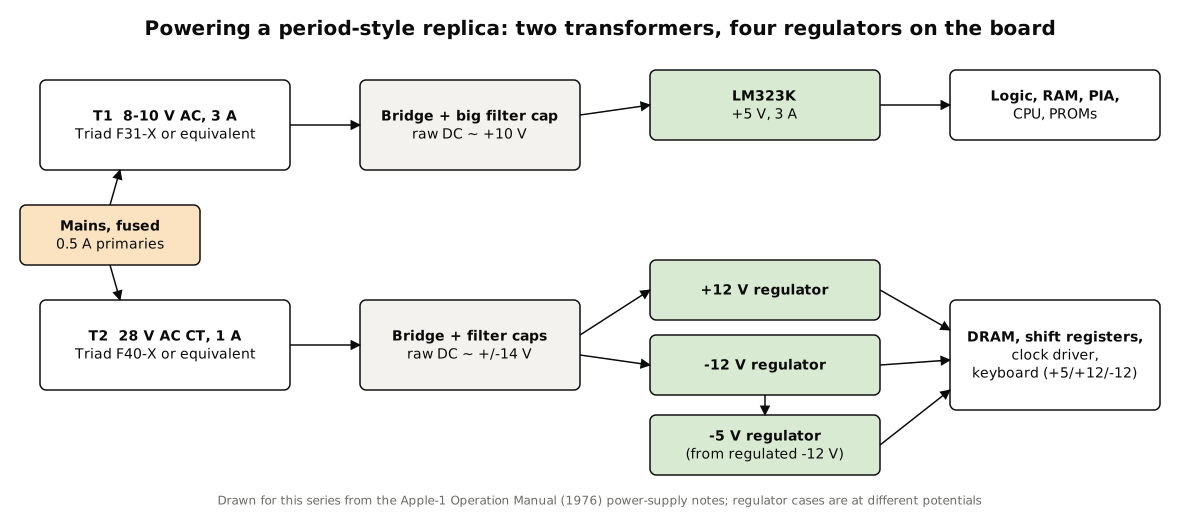
The Apple-1’s supply is two transformers and four on-board regulators (Volume 3). Willegal asks that the mains side — fuse, switch, transformers — be built into a “well ventilated enclosure,” with “both fuse and switch … on the ‘hot’ side of the 110V AC input,” “to make sure that no stray body parts touches any part of the 110V AC wiring.” Builders in 2025–26 also fuse each transformer’s primary separately rather than relying on the manual’s single fuse, use current Triad parts such as the VPP16-1900 and VPP28-1060 in place of the long-discontinued Stancors, or adapt a Mean Well PT-65 switching supply; Uncle Bernie no longer recommends feeding regulated DC directly into the board, because the on-board regulators can be damaged by reverse bias (applefritter, node 39574). And the LM323K, in a builder’s words from March 2026, “will need some air” (applefritter, node 39632).
10.11.2 Willegal’s order
- Check the bare board. Ohm-check every power net for a short to ground — unregulated +5, +12 and −12 V, and regulated +5, −5, +12 and −12 V — and repeat the check after every stage of soldering.
- Sockets, biggest first: the 40-pin sockets for the PIA and processor, the 24-pin for the 74154 and 2513, then the forty-odd 16-pin sockets (including the doubled positions where two 2504s or a 2504 and the clock driver share a location), the 14-pin sockets and the 8-pin for the 555. “Don’t try to do too much in one sitting. Soldering a couple of dozen sockets in an evening is plenty.”
- Bypass capacitors, rectifiers, connectors and the three small regulators — two face one way and the third the other, so check each against the guide’s photograph — then the large filter capacitors and the LM323K on its heatsink. Clean off flux (the guide notes that window cleaner helps).
- Power up with no chips. “Because this is a linear power supply, you can power up without populating the board with chips.” Check for any component hot enough to hurt to touch, and power down at once if there is one; then measure: the unregulated +5 V at the 5,300 µF capacitor should be roughly +10 V, the unregulated ±12 V at the 2,400 µF capacitors roughly ±20 V, and the regulated rails +5, −5, +12 and −12 V.
- The video section first. “The Apple 1 computer is essentially two complete systems, a microcomputer and a video display system.” Populate rows C and D and position B-2: the 2513, seven 2504s, the 2519, the DS0025, the 555 and the TTL. Power up: the expected “power up display” is a screen of flashing ”@” signs. Briefly short pin 12 of the keyboard socket (CLEAR SCREEN) to +5 V and the screen should clear. The guide warns that “Using a 74161A part in location D-8 may result in intermittent operation.”
- The computer section. Fit the bus buffers, the two PROMs (low nibble at A-1, high at A-2), the 6820, the 6502, the timing and decoding logic, and only one bank of DRAM, bank X. Make the solder jumpers for a 6502, for no DMA, bank X to block 0, PROMs to block F (Y) and PIA to block D (Z). Power up, clear, then reset by shorting keyboard pin 1 to ground: “After both clear and reset, you have a backslash and prompt at the top left corner of the screen.” Without a keyboard, random characters may appear because the PIA’s strobe input is floating.
- Keyboard, second bank, cassette card — the second DRAM bank jumpered to block E for BASIC (Volume 3).
10.11.3 What goes wrong
Uncle Bernie, who has brought up more of these boards than anyone, has published the common faults (applefritter, node 31950):
Table 3 — Uncle Bernie, who has brought up more of these boards than anyone, has published the common faults ([applefritter, node 31950](https://www.applefritter.com/node/31950))
| Symptom | Usual cause |
|---|---|
| Characters on screen repeated twice | A failed 2504 shift register, “more often than not with untested ICs” |
| Memory errors that stay with one bank | Ringing on the DRAM address lines; cured with six 390 Ω damping resistors |
| Random memory errors | Missing bypass capacitors |
| Marginal or temperature-dependent memory | The 74123 one-shot’s timing; Wozniak specified 480 ns, which may need hand-selected parts |
| Odd faults after substitution | Wrong logic family: 74LS will not do everywhere, and 74HC is unsuitable |
| A video fault traced in a 2024–25 build | A failed 22 µF capacitor on the 555 |
He recommends a long burn-in, not a quick check: “let it run for hours, and not just for a few seconds.” Counterfeit 6502s, DS0025s, 2504s, 2513s and 2519s are circulating, so any part that fails strangely should be suspected.
10.12 A Case
Apple sold no case, and owners built their own, most famously in koa wood. Replica builders do the same: wooden cases on the koa pattern, briefcases, or simply a clear acrylic base and cover over the board, which keeps fingers and dust off while leaving the work on view. Whatever the case, it needs ventilation over the regulators — essential on a reproduction, worthwhile on any board.
Next — Volume 11: Programming the Apple-1 — Monitor, BASIC and 6502 Assembly. Hand-assembled machine code typed into the Woz Monitor — a message, hex and decimal arithmetic, the sieve of Eratosthenes, the keyboard and the screen driven directly — every program run in the series’ simulator with its output shown; and Apple BASIC from the 1976 manual.
Comments (0)