Apple-1 · Volume 3
Apple-1 — Volume 3 — The Board — 6502, the 6820 PIA, a Video Terminal and 4K of DRAM
The Apple-1 chip by chip, from the crystal that times everything to the four regulators that power it
3.1 About This Volume
The Apple-1 is one printed circuit board, about 15 by 9 inches, carrying a microprocessor, its memory, a complete video terminal and a power supply’s regulators. Nothing else came in the box. This volume walks the board from end to end: the single crystal that times everything; the MOS Technology 6502 processor (and the Motorola 6800 it was designed to accept instead); the dynamic memory and the refresh that keeps it alive; the decoder that carves the address space into sixteen blocks; the 6820 interface adapter that connects keyboard and screen; the two tiny PROMs that hold the monitor; the shift-register video terminal, which is the most unusual thing on the board; the power section; and the edge connector and breadboard area that let owners extend it.
The memory figure needs care. The board has sockets for 8K, and Apple’s launch advertisement put “8K Bytes of RAM” in its headline, but the machine as sold for $666.66 carried 4K. The Operation Manual’s specification sheet is exact: “On-board RAM Capacity: 8K bytes (4K supplied)” (Apple-1 Operation Manual, 1976). The details are in “Memory” below.
The primary sources throughout are the Apple-1 Operation Manual (1976), with its three schematic sheets drawn by Ron Wayne and signed by Steve Wozniak as design engineer and Steve Jobs as project engineer; Apple’s October 1976 advertisement in Interface Age; Apple’s April 1977 price list; a part-by-position list of his own 1976 board posted by Wendell Sander, an early Apple engineer; and Wozniak’s own accounts.
3.2 A Computer and a Terminal on One Card
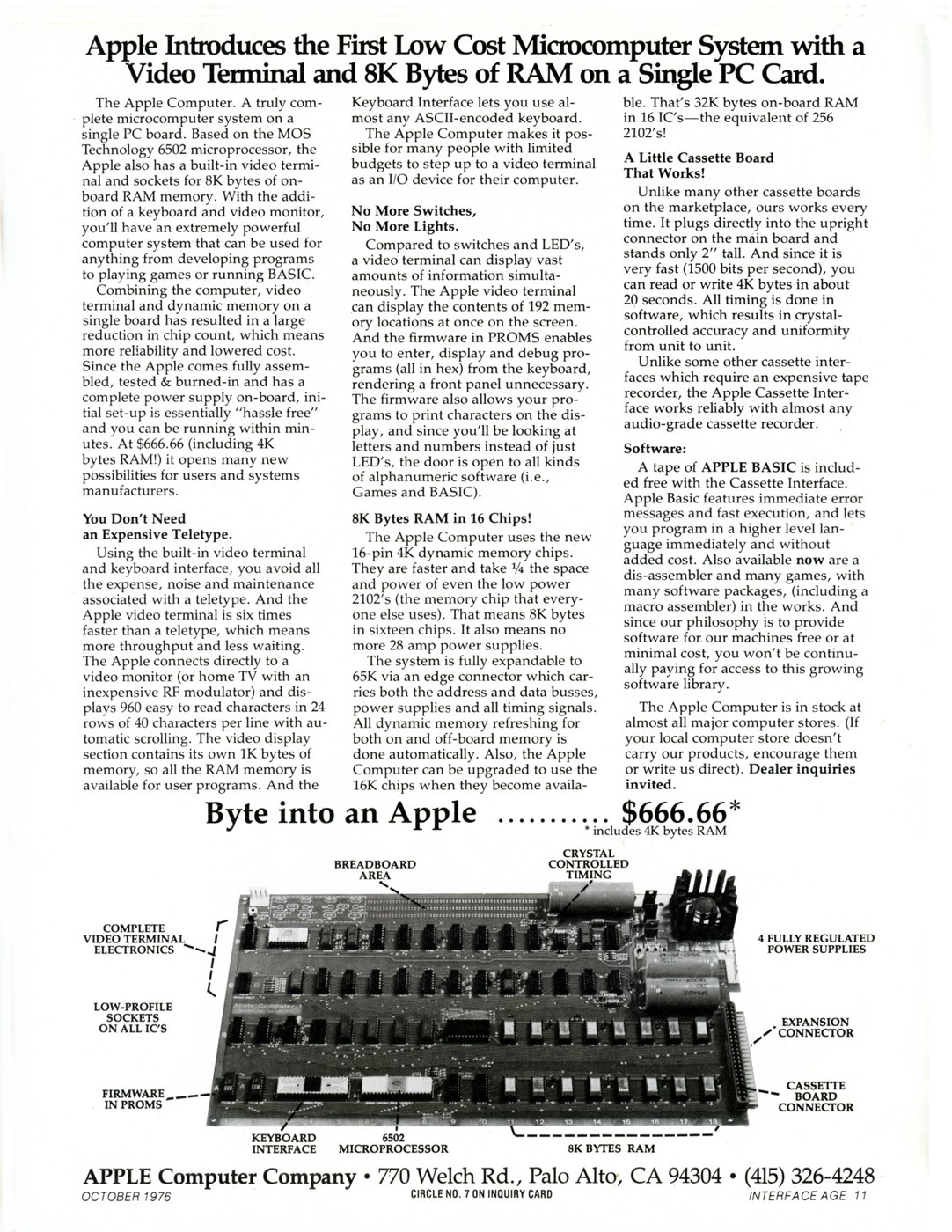
Apple’s first advertisement, in Interface Age for October 1976, made the board’s case in its headline: “Apple Introduces the First Low Cost Microcomputer System with a Video Terminal and 8K Bytes of RAM on a Single PC Card.” The body explained the point. Other hobby computers of 1975–76, the Altair 8800 and IMSAI 8080 among them, were a chassis of cards behind a front panel of switches and lights, and to type at them an owner needed a separate terminal or a Teletype. The Apple put the terminal on the same board as the computer: “Combining the computer, video terminal and dynamic memory on a single board has resulted in a large reduction in chip count” (advertisement, Interface Age, Oct. 1976).

What the buyer received was the board, “fully assembled, tested, and burned in,” in the Operation Manual’s words, with the mating Molex connectors for power and video. The owner supplied everything else: “An ASCII encoded keyboard, a video display monitor, and AC power sources.” There was no case, no keyboard, no power transformer and no monitor (Volume 1 has the full list, and Volume 4 the business story behind the price).
3.3 Reading the Board
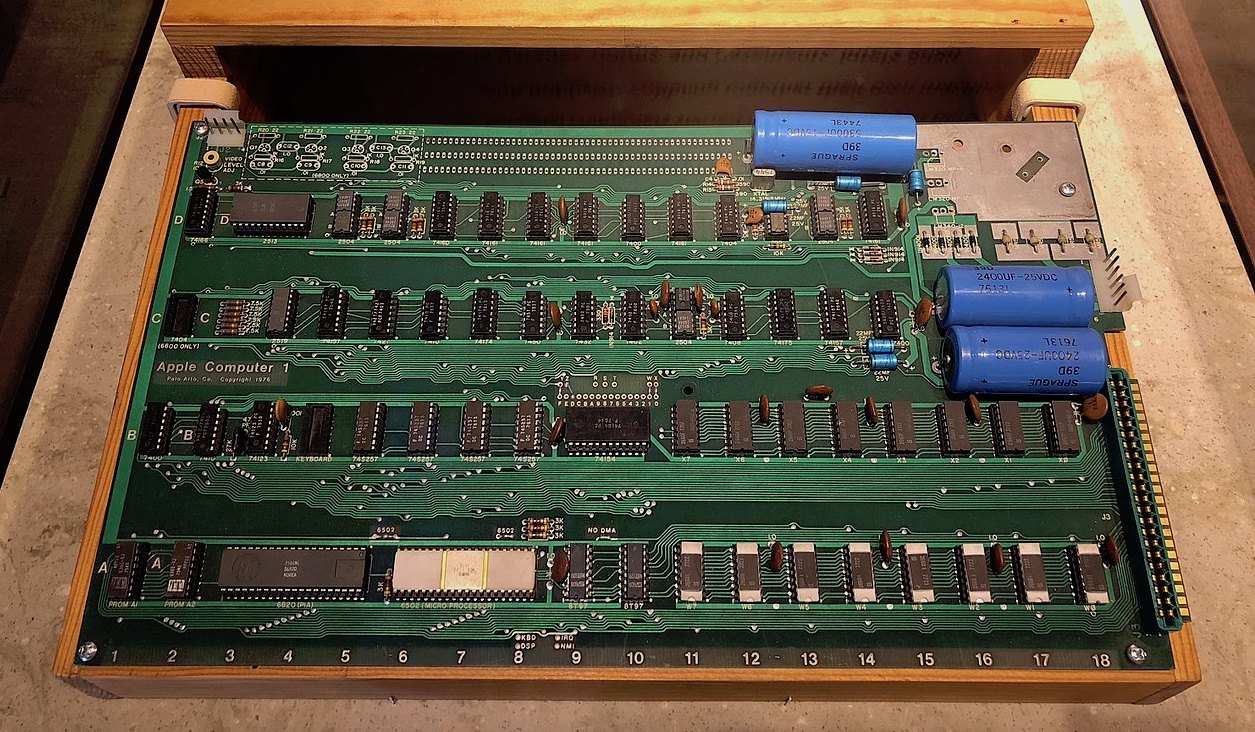
The board is laid out as a grid. Four rows of chips, lettered A to D from the edge nearest the user, run across eighteen numbered columns, and every chip position has a name such as A7 (the processor) or D2 (the character generator). The positions are printed on the silkscreen, so a part list, a schematic note or a restorer’s report can name a chip exactly. The printed circuit board layout itself is credited to Howard Cantin, a layout engineer at Atari, by the standard histories (Wikipedia’s Apple I article cites Butcher, 1990, and Moritz, 1984).
The silkscreen at the left end reads “Apple Computer 1 / Palo Alto, Ca. Copyright 1976.” Boards from the second production batch carry an additional “NTI” mark, generally taken to be the board fabricator’s; what the letters stand for could not be confirmed. Volumes 6 and 7 deal with the batches and what they mean for authentication.
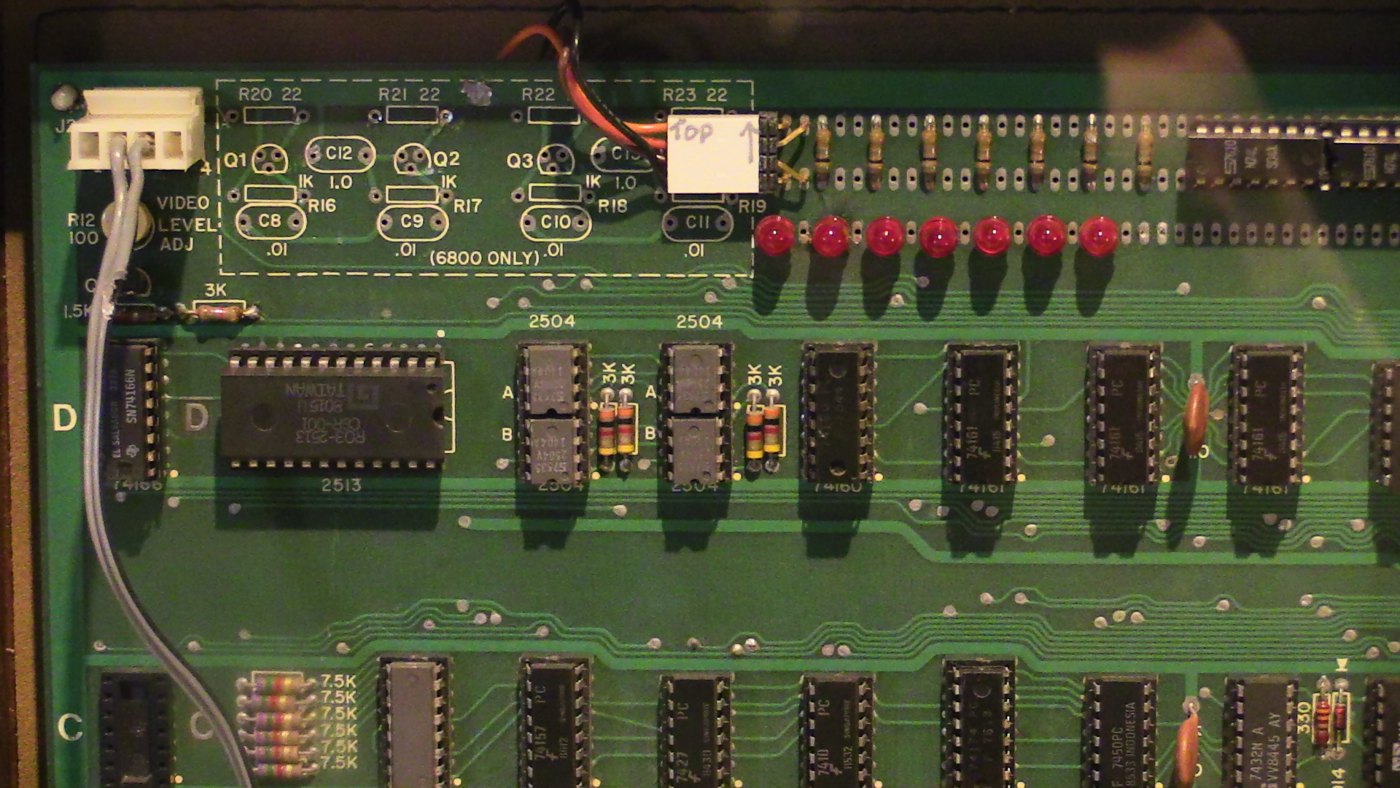
The layout follows function. Row A holds the processor, the interface adapter, the two monitor PROMs and the bus buffers. Rows A and B carry the sockets for sixteen memory chips and their address multiplexers. Rows C and D, at the far side, are the video terminal. The power section — filter capacitors, the +5 V regulator on its heatsink, and three smaller regulators — occupies the right-hand end, next to the power connector. A clear rectangle along the top edge is the breadboard area for owners’ own circuits.
How many chips? Wendell Sander’s list of his own factory board, bought in 1976 with 4K, comes to 53 integrated circuits plus four regulators; an 8K board adds eight more memory chips, for 61 (applefritter, “Apple 1 Board parts,” 2010). The often-quoted “about sixty chips” describes a fully populated board. Most are standard 7400-series TTL logic — gates, counters, multiplexers — many of them early Fairchild 9N-series parts. Sander noted that “at least two part sets were used across boards,” which is one reason the date codes on a surviving board’s chips are scrutinised so closely.
3.4 One Crystal
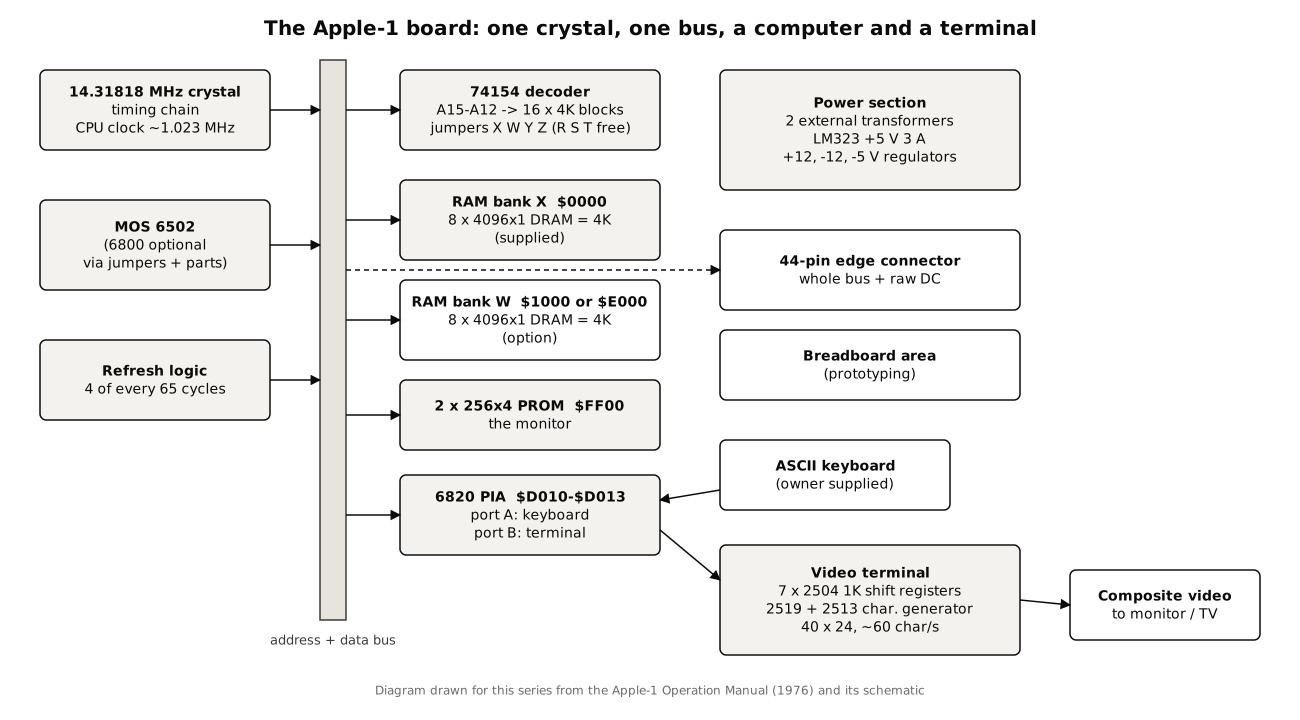
The Operation Manual makes a point of the board’s timing: “The entire system timing, including the microprocessor clock and all video signals, originates in a single crystal oscillator.” The crystal is 14.31818 MHz, four times the American colour-television subcarrier, a frequency chosen because cheap crystals for it were everywhere. Divided by 14 it gives the processor clock the manual specifies, “1.023 MHz.” Divided by 910 it gives the manual’s video line rate, “15734 Hz,” and from that the frame rate, “60.05 Hz.” (The divider chain is inferred from the specified frequencies, which agree to the last digit; it was not traced on the schematic for this volume.)
The manual also gives a second, lower figure: an “Effective Cycle Frequency (Including Refresh Waits)” of “0.960 MHz.” The difference is the dynamic memory’s refresh. In Section III the manual explains that “Four out of every 65 clock cycles is dedicated to memory refresh,” during which the processor’s clock is held: “Φ2 is inhibited during a refresh cycle, and the processor is held in Φ1.” Four cycles in 65 is about six per cent; 1.023 MHz less six per cent is 0.960 MHz. Refresh is invisible to programs except as a slightly slower machine, and the manual adds that it extends to memory added through the edge connector: “All refreshing of dynamic memory, including all ‘off-board’ expansion memory, is done automatically.”
3.5 The Processor: a 6502, or a 6800
The processor at position A7 is a MOS Technology 6502, in white ceramic on early boards (Sander’s is date-coded 1576, the fifteenth week of 1976). MOS Technology launched its family in the autumn of 1975 with an advertisement that read “Last Month We Introduced MCS6501 for $20 / This Month We Added The MCS6502 For $25,” inviting engineers to “try either product at WESCON/75” (MOS Technology advertisement, Sept. 1975). Wozniak remembers paying twenty dollars for his 6502 at that show (“the 6502 which I bought for $20,” in a 1996 email, Wozniak to Charles Turley); the list price for the 6502 was $25, and $20 was the price of the 6501. Either way, the processor cost a small fraction of an Intel 8080 or Motorola 6800 at the time, which is the reason the Apple-1 has it (Volume 2 tells the story).

The board was nevertheless designed to accept the Motorola 6800 as well. Wozniak’s first designs had been on paper for the 6800, and the schematic keeps the option. Its note 7 reads: “UNIT, AS SUPPLIED, INCLUDES A 6502 MICROPROCESSOR, AND SOLDER JUMPERS AT BOTH POINTS MARKED ‘6502’, AND HAS OMITTED ALL COMPONENTS SHOWN WITHIN THE DOTTED BOX. IF A 6800 IS SUBSTITUTED FOR THE 6502 IT IS NECESSARY TO INSTALL ALL COMPONENTS SHOWN, AND TO BREAK BOTH SOLDER BRIDGES NOTED ‘6502’.” The 6800’s “valid memory address” signal, which the 6502 does not have, is one of the things those extra parts supply; on a 6502 board its input is tied high. The silkscreen marks “6800 ONLY” beside the unused pads. The monitor PROM, written in 6502 code, would not run on a 6800, so a 6800 owner would have needed software of their own.
3.6 Memory
3.6.1 What was supplied
The memory chips are 16-pin dynamic RAMs, each holding 4,096 bits organised as 4,096 × 1. Eight of them make 4K bytes. The Operation Manual specifies “16-pin, 4K Dynamic, type 4096 (2104)” — the Mostek MK4096 or its Intel equivalent, the 2104 — and Sander’s board has Mostek MK4096-11s dated 1976. The manual’s introduction states the arrangement plainly: “The board has sockets for up to 8K bytes of the 16 pin, 4K type, RAM, and the system is fully expandable to 65K via the edge connector. The system uses dynamic memory (4K bytes supplied), although static memory may also be used.”
The advertisement’s own fine print agrees. The headline promises “8K Bytes of RAM,” but the price line reads “$666.66*,” with the asterisk explained as “includes 4K bytes RAM,” and the body text says the Apple has “sockets for 8K bytes of on-board RAM memory.” The photograph in the ad shows a fully populated board, its two rows of sixteen memory sockets labelled “8K BYTES RAM.” By April 1977 Apple’s price list offered both: “Single Board Computer (4K Bytes RAM)” at $475 and “(8K Bytes RAM)” at $575 (Apple price list, April 1977). The standard machine, then, was 4K; 8K was an option and a socket count.
3.6.2 Why these chips
The choice of memory was the board’s boldest decision, and Wozniak has explained it. The usual hobby memory of 1975 was the Intel 2102, a static RAM of 1,024 bits; an 8K-byte memory needed 64 of them and a substantial power supply. The new 4K-bit dynamic RAMs were denser and cheaper but needed refresh and address multiplexing. Wozniak first bought 22-pin AMI parts; then, he wrote, “Steve Jobs asked what did I think of the Intel dynamic RAMs. I told him I felt they were the best. Although they required more driving circuitry for Row and Column addressing … they were in a smaller package. I had for some time measured the worth of my IC designs in terms of how little board space they took, not how few chips” (Wozniak, 1996). Jobs persuaded an Intel representative to provide sixteen samples. The advertisement turned the decision into a selling point: the new chips “take ¼ the space and power of even the low power 2102’s (the memory chip that everyone else uses). That means 8K bytes in sixteen chips. It also means no more 28 amp power supplies.” It also promised that the board “can be upgraded to use the 16K chips when they become available. That’s 32K bytes on-board RAM in 16 IC’s — the equivalent of 256 2102’s!” Sander did exactly that to his own board around 1980.
The multiplexing that dynamic RAM requires is done by four 74S257 multiplexers at B5–B8, which present first the row and then the column half of the address to the chips; restorers note that their timing was tuned for those slow first-generation parts. The schematic’s note 13 adds that for direct memory access by another device the jumper marked DMA is broken and 74LS257s used in those positions.
3.6.3 Where the memory sits
The second 4K bank’s address is set by a jumper, and that jumper matters for BASIC. The board’s address decoding is described in the next section; in brief, the supplied 4K answers at $0000–$0FFF, and the second bank normally at $1000–$1FFF. Apple BASIC, however, loads from cassette into the “E” block, $E000–$EFFF. The cassette interface manual gives the instruction: “for running Apple Basic in the 2nd 4K band of on-board memory, it is necessary to break the solder jumper between ‘W’ and ‘1’ and then jumper ‘W’ to ‘E.’ This moves the 2nd 4K bank from the ‘1’ block to the ‘E’ block, which is where Apple Basic resides” (Apple Cassette Interface manual, 1976, as digitised in Mike Willegal’s ACI guide). So a BASIC-capable Apple-1 is an 8K machine with a hole in the middle of its memory: 4K at the bottom for the user’s program and variables, 4K near the top for BASIC itself (Volume 5).
3.7 Address Decoding: Sixteen Blocks and Some Jumpers
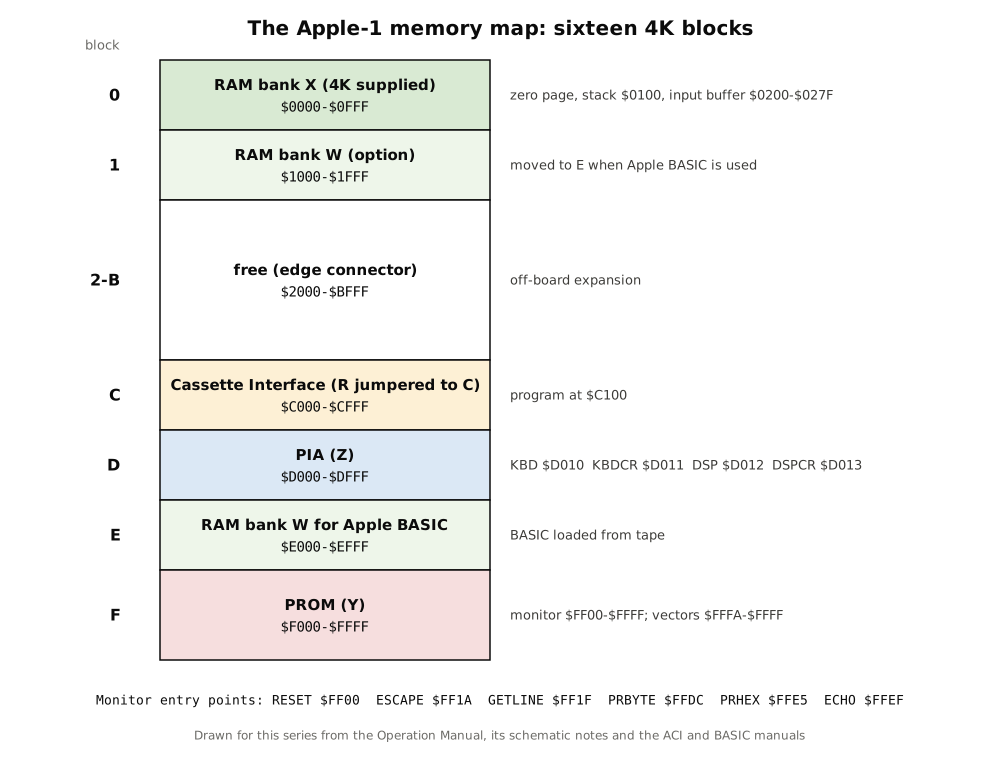
The 6502 addresses 64K bytes. The Apple-1 divides that space into sixteen blocks of 4K using a single 74154 four-to-sixteen decoder at B9, which looks at the top four address lines, A15–A12, and asserts one of sixteen block-select outputs. Which device answers in which block is set by short wire jumpers on the board. The schematic’s note 8 lists the factory setting: “UNIT IS SUPPLIED WITH: Y Jumpered to CSF, Z Jumpered to CSD, W Jumpered to CS1 and X Jumpered to CS0. R, S, and T, ARE USER SELECTABLE CHIP SELECTS, (4K BLOCKS).”
Translated: X is the first RAM bank, at block 0 ($0000); W the second, at block 1 ($1000); Z the interface adapter, in block D ($D000); and Y the monitor PROMs, in block F ($F000). R, S and T are spare selects for the owner’s own hardware. The Apple Cassette Interface, when it arrived, used one of them: its manual requires “a permanent jumper … between ‘R’ and ‘C’,” placing the cassette card in block C ($C000).
Decoding is deliberately minimal. A 256-byte PROM in a 4K block, or a four-register interface adapter in another, responds to more addresses than its documented ones. Programs use the documented addresses, and so does the series’ simulator, which mirrors the interface adapter’s registers through block D in the same way as MAME’s Apple-1 model but does not claim to know every echo on the real board.
3.8 The 6820: Keyboard In, Characters Out
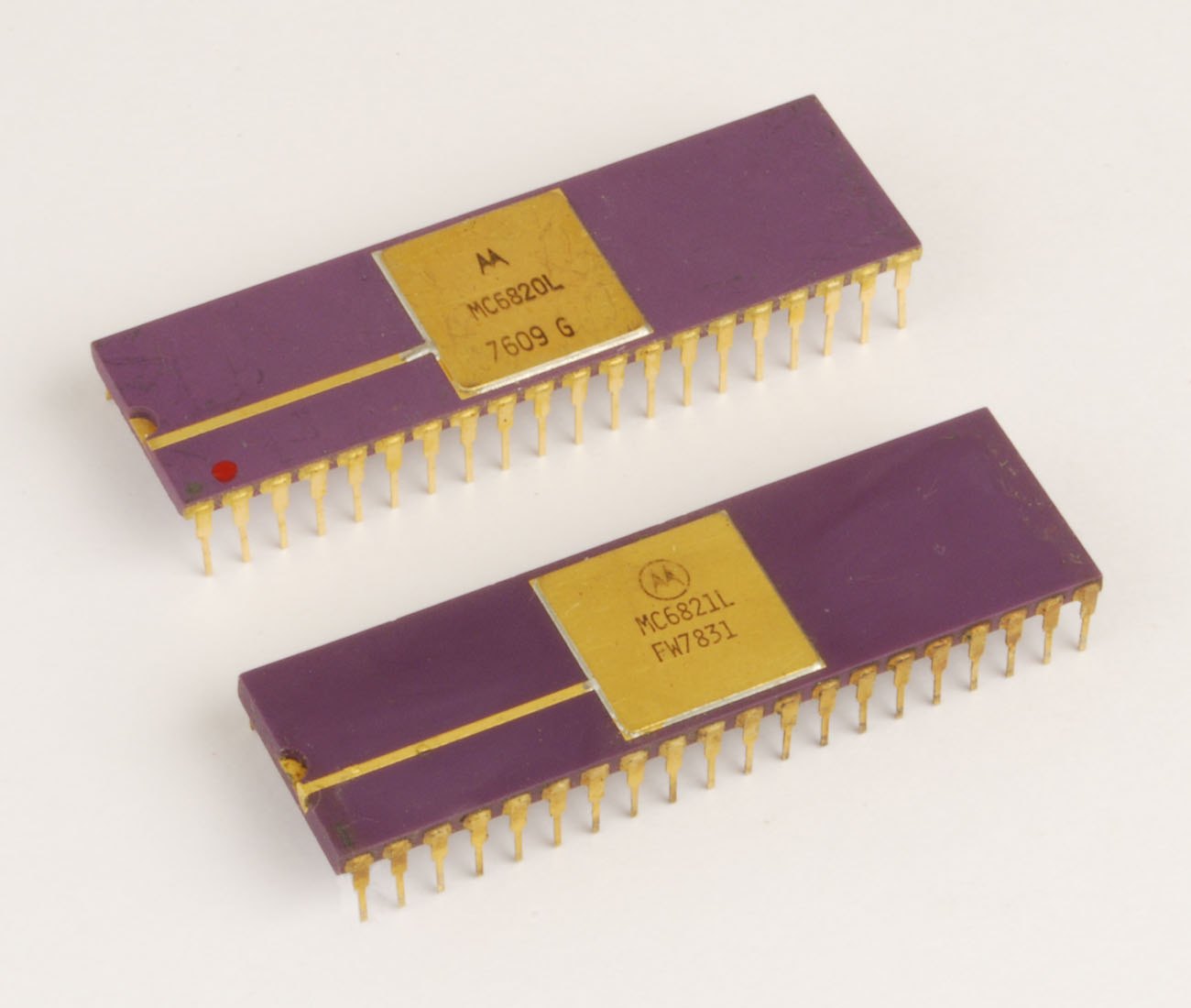
Between the processor and the outside world sits one chip, a Motorola-designed 6820 Peripheral Interface Adapter (PIA). Apple-1s carry the original 6820, usually from the second source AMI, not the later 6821 that replicas use; Sander’s board has “6820 AMI 7601,” and the Registry notes that only two known boards have the white ceramic version (Apple-1 Registry, unit 3). A PIA has two 8-bit ports, A and B, each with a data register, a data-direction register that sets each pin as input or output, and a control register that manages two handshake lines. The Apple-1 uses port A for the keyboard and port B for the display, and its four registers appear at:
Table 1 — Between the processor and the outside world sits one chip, a Motorola-designed 6820 Peripheral Interface Adapter (PIA). Apple-1s carry the original 6820, usually from the second source AMI, not the later 6821 that replicas use; Sander's board has "6820 AMI 7601," and the Registry notes that only two known boards have the white ceramic version ([Apple-1 Registry, unit 3](https://apple1registry.com/en/3.html)). A PIA has two 8-bit ports, A and B, each with a data register, a data-direction register that sets each pin as input or output, and a control register that manages two handshake lines. The Apple-1 uses port A for the keyboard and port B for the display, and its four registers appear at
| Address | Name in the monitor listing | Function |
|---|---|---|
| $D010 | KBD | keyboard data: the ASCII code of the last key |
| $D011 | KBD CR | keyboard control: bit 7 set when a key is waiting |
| $D012 | DSP | display data: bits 0–6 out to the terminal, bit 7 in from it |
| $D013 | DSP CR | display control |
The keyboard side. Any ASCII keyboard with positive-logic outputs connects through a 16-pin socket at B4: “inputs for seven DATA lines, one STROBE line, and two normally-open pushbutton switches, used for RESET (enter monitor), and CLEAR SCREEN.” The strobe, conditioned by a one-shot so that “The strobe can be either positive or negative, of long or short duration,” arrives on the PIA’s CA1 line and sets the flag in bit 7 of KBD CR. Reading KBD returns the character and clears the flag. The eighth data bit is tied high — the schematic says pin 15 “SHOULD BE JUMPERED TO Vcc (+5V), FOR NORMAL OPERATION WITH SUPPLIED SOFTWARE” — so every character arrives with bit 7 set: RETURN reads as $8D, “A” as $C1. The manual’s register summary puts it in five words: “KBD Data D010 High order bit equals 1.”
The display side. The processor writes a character to DSP. The low seven bits go to the terminal, and the PIA’s CB2 line, configured as an automatic handshake, tells the terminal a character is ready. The terminal answers on CB1 when it has taken it, and the same “busy” signal is wired back into bit 7 of DSP, an input. The monitor’s output routine therefore waits while bit 7 is set and writes when it is clear; its listing comments read “BIT DSP — DA bit (B7) cleared yet?” and “STA DSP — Output character. Sets DA.”
The manual contradicts itself on this point. Its register table in Section III says bit 7 of DSP is a “‘display ready’ input (1 equals ready, 0 equals busy)” — the opposite of what the monitor’s code does and of what restorers measure on real boards. The code is right: bit 7 = 1 means busy. Programs that follow the table instead of the code hang. (Volume 11 has a program that writes to the display directly, done the code’s way.)
Interrupts are wired but unused. The schematic notes that “KYBD & DSP ARE INTERRUPT OUTPUTS FROM PIA. POINTS LABELED ‘IRQ’, ‘NMI’ ARE INTERRUPT INPUTS FROM MICRO-PROCESSOR. FOR NORMAL OPERATION NO JUMPERS ARE REQUIRED.” An owner could jumper the keyboard to the processor’s IRQ line, but the monitor polls.
3.9 Two PROMs: 256 Bytes of Monitor
The entire resident software of the Apple-1 is 256 bytes, held in two bipolar PROMs at positions A1 and A2. Each PROM stores 256 four-bit words; one holds the low half of every byte and the other the high half. The schematic’s note 11 allows three types: “PROMS ARE 256 x 4, AND MAY BE ONE OF THE FOLLOWING TYPES: SIGNETICS 82S129, … INTEL/MMI 3601,” and Sander’s board has MMI 6301-1J parts. Wozniak explained the arrangement in 1996: “We didn’t have 256 byte PROMS, just 256x4 PROMS at that time.”
The PROMs answer at $FF00–$FFFF, so they also supply the 6502’s three vectors in the last six bytes: the listing gives NMI → $0F00, RESET → $FF00 and IRQ → $0000. The RESET vector sends the processor into the monitor when the RESET button on the keyboard connector is pressed. The IRQ vector pointing at $0000 has a curious consequence for the manual’s own test program, described in Volume 5. What the 256 bytes do — the “Woz Monitor” of later collectors, called simply the “6502 Hex Monitor” in the manual — is Volume 5’s subject.
3.10 The Video Terminal
The upper rows of the board are a complete character terminal, and it is the part of the design that most distinguishes the Apple-1 from its contemporaries.
3.10.1 What it does
The specification sheet gives the format: “40 characters/line, 24 lines; with automatic scrolling,” a “5x7” character matrix, and composite video “level adjustable between zero and +5Vpp” into 75 ohms. The advertisement filled in the user’s view: the terminal “displays 960 easy to read characters in 24 rows of 40 characters per line with automatic scrolling. The video display section contains its own 1K bytes of memory, so all the RAM memory is available for user programs.” Forty columns was a deliberate choice; as the manual notes, with an inexpensive RF modulator “all television receivers will have the necessary bandwidth to display the entire 40 characters.”
3.10.2 How it stores the screen
The screen memory is not RAM at all. It is a set of Signetics 2504 dynamic shift registers, each a single chain of 1,024 bits that circulates continuously. The specification sheet calls the display memory “Dynamic shift registers (1K x 7).” Seven 2504s sit on the board: six hold the six bits of each character (960 characters fit in a 1,024-bit loop), and a seventh carries a single marker bit that travels in step with the characters and marks the cursor’s position, as Ken Shirriff explains in his analysis of the circuit (righto.com, “Inside the Apple-1’s shift-register memory,” 2022). The chain is clocked in step with the video beam, so that the bits for each character arrive at the output just as the beam reaches its place on the screen. A Signetics 2519 static shift register holds the 40 characters of the current text row while its seven scan lines are drawn, and a 2513 character generator ROM turns each six-bit character code into the dots of a 5×7 matrix. In 1976, Shirriff notes, a 1-kilobit shift register cost about $9 and a 4-kilobit DRAM about $20; serial memory was the economical way to hold a screen.
3.10.3 What follows from shift-register memory
Everything about how the Apple-1 behaves as a terminal follows from this design.
- Characters are written where the cursor is, when the cursor comes round. A new character can be stored only at the moment the cursor position passes through the write logic, once per frame. Restorer Uncle Bernie puts it numerically: “The cursor signal appears once per TV ‘field’, which in the Apple-1 is every 16.67 milliseconds … So the maximum speed for screen output is 60 characters per second” (applefritter, 2025). This is why programs must wait on the busy bit, and it is the arithmetic behind the advertisement’s claim that “the Apple video terminal is six times faster than a teletype”: a Teletype printed ten characters a second.
- There is no cursor addressing. The cursor only advances. The only control code the terminal obeys is carriage return, which moves the cursor to the start of the next line; on the bottom line, the screen scrolls, which Shirriff notes is done by delaying the shift-register timing by one line rather than by moving data. Other control codes are ignored. A line wraps after 40 characters.
- There is no backspace and no clear-screen code. The monitor’s “backspace” moves its own buffer pointer and prints an underline; the wrong character stays on the screen. Clearing the screen is a hardware function, the CLEAR SCREEN button on the keyboard connector. The BASIC manual’s instructions begin with it: “Hit the ‘CLEAR SCREEN’ button which will clear the screen and display only the cursor (a flashing @ sign) in the upper left corner.”
- The cursor is a flashing ”@”. A 555 timer at D13 blinks it; the ”@” is simply the character with code zero in the 2513’s set.
- Upper case only. The 2513 holds 64 characters, the ASCII range $20–$5F: space, punctuation, digits, upper-case letters and a few symbols. Only six bits of each code are stored, and bit 7 is ignored entirely. What lower-case codes ($60–$7F) display as depends on exactly which six bits are latched; MAME’s Apple-1 driver, the most careful public model of the circuit, stores bits 0–4 and the inverse of bit 6, so lower case appears as upper case (MAME, apple1.cpp). This volume’s simulator follows MAME; it has not been checked against the schematic’s latch wiring.
The terminal’s own timing parts include a National DS0025 clock driver for the shift registers, which swing “from +5 volts to −11 volts” (Shirriff). These, and the 2504s themselves, are the parts restorers most often find failed. Sander’s parts list notes that one 2504 on his board failed and was replaced by Jobs under warranty.
3.11 The Power Section
The Apple-1 has no power supply of its own in the modern sense, but it does all of its own regulation. The specification sheet calls for “+5 Volts @ 3 amps, +/- 12 Volts @ 0.5 amps, and −5 Volts @ 0.5 amps,” made from “8 to 10 Volts AC (RMS) @ 3 amps” and “26 to 28 Volts AC (RMS) Center-Tapped, 1A,” and recommends the transformers: “Stancor # P-8380 or Triad F31-X” and “Stancor # P-8667 or Triad F40-X.” The two AC supplies enter at the Molex connector J1: “The 8 to 10 volts AC provides the raw AC for the +5 volt supply, while the 28 VCT supplies the raw AC for the +12 and −12 volt supplies, and the −5V supply is derived from the −12V regulated output.”
On the board, bridge rectifiers and large Sprague electrolytic filter capacitors (the “Big Blues,” visible as the blue cylinders at the right of every photograph) feed four regulators: an LM323 in a TO-3 can for +5 V at up to 3 A, on its own finned heatsink, and three TO-220 regulators for +12, −12 and −5 V, identified by restorers as an LM340-12, LM320-12 and LM320-5. The advertisement called these “4 FULLY REGULATED POWER SUPPLIES.” The manual says the board “requires no more than 1.5 amps DC from the +5V supply,” leaving the other 1.5 A for expansion. The schematic’s power sheet carries the warning quoted in Volume 8: the regulators’ cases and tabs “ARE ALL AT DIFFERENT ELECTRICAL POTENTIALS … THEY MUST NOT BE SHORTED TOGETHER, NOR TO THE HEATSINK OF THE LM323.”
The −5 V regulator is a known hot spot. It drops about seven volts from the regulated −12 V rail, and a failing shift register loads it further. Many owners in the 1970s added cooling of their own.
3.12 Room to Grow: Edge Connector, Breadboard Area and Cassette Slot
Section III of the manual, “How to Expand the Apple System,” describes three routes.
The 44-pin edge connector. “The system is fully expandable to 65K, with the entire data and address busses, clocks, control signals (i.e. IRQ, NMI, DMA, RDY, etc.), and power sources available at the connector. All address lines are TTL buffered, and data lines can drive ten equivalent capacitive loads.” Only +5 V is regulated at the connector; the other rails appear as raw DC of about ±14 V, and “If +12V, −12V, or −5V supplies are required, EXTERNAL REGULATORS MUST BE USED.” The manual adds a sober warning: “Exercise great care in the handling of the raw DC, as no short-circuit protection is provided.” The schematic sheets include a single-step circuit using the processor’s RDY line, and the manual refers owners to Apple “Tech Notes” for more.
The breadboard area. A field of plain holes along the top edge, “in which the user can add additional ‘on-board’ hardware (for example, extra PIA’s, ACIA’s, EROM’s, and so on).” The manual itself suggests building an upper-case-lock circuit there, because “The system monitor accepts only upper-case alpha (A–F, R).” Whether the breadboard area is “clean and unused” is now one of the first things an auction catalogue reports (Volume 8).
The cassette slot. An upright connector at the right end, labelled in the advertisement “CASSETTE BOARD CONNECTOR,” takes the two-inch Apple Cassette Interface card, the only peripheral Apple made for the machine (Volume 5).
3.13 Keyboard, Monitor and Case: the Owner’s Part
Apple sold none of them. “No keyboard was ever offered by Apple for the Apple-1!”, the Registry notes; many owners used Datanetics keyboards. Any composite monitor would do, or a television through an RF modulator. Cases were whatever owners built or bought; the best known, in koa wood, were made at Jobs’s request by Ralph Wigginton, according to the Registry (Apple-1 Registry, peripherals).
3.14 What the Board Explains
Almost every characteristic of the Apple-1 comes back to a decision visible on the board. It is cheap because the processor was a $25 part and the memory sixteen chips instead of sixty-four. It needs no Teletype because the terminal is on the board — and it displays slowly, in upper case, without cursor control, because that terminal is made of circulating shift registers. It runs BASIC only with 8K and a moved jumper because BASIC lives in block E. And it can be repaired, fifty years on, because every chip sits in a socket in a labelled grid and the manual printed the full schematic.
Next — Volume 4: The Byte Shop Order and the Birth of Apple Computer, 1976–77. Paul Terrell’s order for fifty assembled computers, the parts bought on credit, the boards built by hand, the price of $666.66, the second board run and the move to the Apple II.
Comments (0)