Apple-1 · Volume 5
Apple-1 — Volume 5 — The Woz Monitor, Integer BASIC and the Cassette Interface
Two hundred and fifty-six bytes of monitor, a 4K BASIC written by hand, and a two-inch card that stored programs as tones on an ordinary cassette — the Apple-1's software, how it worked and how owners used it
5.1 About This Volume
An Apple-1 owner in the autumn of 1976 switched on and saw a backslash. Behind it was a program of 256 bytes, the whole of the machine’s built-in software, which let its user examine memory, change it and run what was there — in hexadecimal, typed a line at a time. Within months there was more: a $75 card that saved and loaded programs on an ordinary cassette recorder, and a tape of Apple BASIC, a 4K interpreter Steve Wozniak had written by hand. This volume covers all three: the monitor, which collectors now call the Woz Monitor; the BASIC that became the Apple II’s Integer BASIC; and the Apple Cassette Interface (ACI).
The monitor section is unusually concrete because the series has a working model of it. apple1_sim.py (in Apple-1/03-outputs/tools/) runs the Apple-1’s memory map and terminal on a tested 6502 core, and reproduces the monitor’s documented behaviour without copying Apple’s ROM. Every monitor session printed in this volume was produced by that model, and its self-test runs every example in the Operation Manual. Doing so turned up three places where the manual’s printed examples disagree with the manual’s own program listing; they are noted where they arise.
BASIC is different. Running Apple BASIC requires Apple’s 4K BASIC image, which this series does not reproduce, and no clean-room re-creation of it was found that could be checked against the original. The BASIC examples below are therefore documented listings, quoted from Apple’s 1976 manual, and not run in the simulator.
5.2 The Monitor
5.2.1 What it is
The Operation Manual describes it in one sentence: “The Hex Monitor is a PROM program in locations FF00 to FFFF (hex) which uses the keyboard and display to perform the front panel functions of examining memory, and running programs” (Apple-1 Operation Manual, 1976, Section II). The manual never calls it the “Woz Monitor”; its listing is headed “6502 HEX MONITOR LISTING.” “Front panel functions” is the key phrase. On an Altair 8800 or IMSAI the same jobs were done with toggle switches and lights: set an address on the switches, deposit a byte, look at the lights. The Apple-1 has a keyboard and a screen instead, and 256 bytes of code that turn them into a front panel.
Wozniak described writing it in a 1996 email: “I then wrote a 256 byte ‘Monitor’ program which watched the keyboard for hex data entry (address:data data data) and hex display and program initiation (‘Run’). I got very good at typing in hex and very very good at checking data entry carefully, character by character” (Wozniak to Charles Turley, 1996). The 256 bytes are two 256 × 4-bit PROMs on the board (Volume 3); the code fills 254 of them, and the listing marks the remaining two, just below the processor’s vectors, “(unused).“
5.2.2 Lines, delimiters and the backslash
Pressing RESET enters the monitor, “which displays backslash-return.” Commands are typed “on a ‘line-at-a-time’ basis with editing. Each line may consist of any number of commands (up to 128 characters). None are executed until (RETURN) is typed.” Editing is minimal: “The (SHIFT-O) (backarrow) backspaces and echos an underline. The (ESC) cancels a line and echos backslash-return.” On the Apple-1’s terminal the underline is all that appears; the mistyped character stays on the screen, because the terminal cannot move its cursor backwards (Volume 3). A line that reaches 128 characters is abandoned the same way as an ESC. The manual also uses the prompt as a diagnostic: “A backslash alone (cursor remains on same line as backslash) indicates bad page 0 RAM.”
Numbers are hexadecimal: “Addresses use the four least significant digits of a group, and data values, the two least significant digits.” Spaces and commas separate items, and “A string of delimiters has the same effect as a single one.” Only upper-case letters count as hex: “NOTE: The system monitor accepts only upper-case alpha (A–F, R).” Anything else that is not a digit, a delimiter, a period, a colon or R ends the line silently. The model shows what that looks like:
XYZ 4F
\
The “4F” after the bad item is never examined: the monitor prints a backslash and starts a fresh line. There are no error messages.
5.2.3 Four commands
The whole language is four ideas: an address alone opens a location and shows it; a period and a second address shows a block; a colon deposits bytes; and R runs. Section II illustrates them with fifteen numbered examples, set against memory that holds its own address in each byte ($004F holds $0F, $0050 holds $00, and so on). Run in the model with the same memory, a session through the first six looks like this (the user’s lines are those without a colon; the blank lines are the monitor’s own, explained below):
\
4F

004F: 0F
.5A

0050: 00 01 02 03 04 05 06 07
0058: 08 09 0A
4F.52

004F: 0F
0050: 00 01 02
.55
 03 04 05
.5A
 06 07
0058: 08 09 0A
Typing 4F opens $004F and prints its contents. A period followed by an address — .5A — prints everything from the last opened location up to the new address. The monitor starts a new output line, with its address, whenever the address it is printing is a multiple of eight; that is why the dumps break at $0050 and $0058.
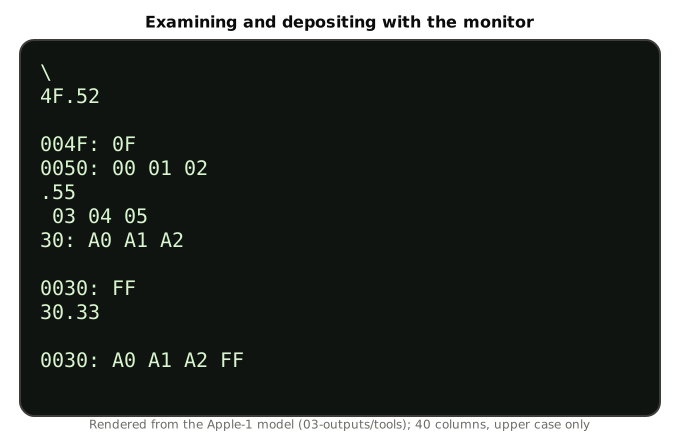
Depositing uses the colon. 30: A0 opens $0030, printing its old contents, and then stores $A0 there; further bytes on the line go to successive addresses, and a later line beginning with a colon carries on where the last deposit left off:
30: A0 A1 A2

0030: FF
30.33

0030: A0 A1 A2 FF
The manual’s rule is exact: “A colon in a command means ‘start depositing data from the most recently deposited location, or if none, then from the most recently opened one.’” Its example 15 shows the hex rule doing error correction: in 40: A1 A2 A3A4A5A6 A7, the run of digits A3A4A5A6 is one item, of which only the last two digits count, so $A6 goes into $0042 — “(data A6 will be loaded in location 42)” — and in 40506070: AA only the last four digits form the address, so $AA goes to $6070. The model agrees on both:
40: A1 A2 A3A4A5A6 A7

0040: FF
40.43

0040: A1 A2 A6 A7
Finally, R runs the program at the most recently opened location, with a JMP through the monitor’s own pointer. 10F0 R opens $10F0, prints “10F0: A9,” and jumps there; the manual notes that “The cursor is left immediately to the right of the ‘A9’; it is not returned to the next line,” so whatever the program prints begins on that same line. A program returns to the monitor by jumping to $FF1F (below), or not at all; the only other way back is the RESET button.
5.2.4 Where the manual and its listing disagree
Two details in that session differ from the manual’s printed examples, and the model follows the listing, not the prose. The monitor in the model is written from the manual’s description and from the order of operations its listing documents, and it has also been cross-checked, outside the repository, against the published listing assembled and run on the same 6502 core: every session in the self-test produces identical screens.
- Blank lines. The monitor echoes the RETURN that ends each command line, and then begins every opened location with a carriage return of its own, so a blank line separates each command from its output. The manual’s examples omit it. Photographs of real screens show it — Volume 11’s opening figure, taken on a Replica 1, has the blank line between
E000RandE000: 4C. - Continued blocks. In example 6, typing
.55after4F.52is shown printing “0053: 03 04 05.” The listing prints an address only when it opens a location or reaches a multiple of eight, so a continued block starts with the data alone: ” 03 04 05.” Example 6’s second continuation, “0056: 06 07,” is likewise ” 06 07” from the code. - Missing and extra lines. Example 3,
4F.5A, is printed without the “004F: 0F” line that examples 5 and 6 show for the same command; example 11 prints seven bytes for the six-byte block30.35; and example 14 prints “40: FF” without leading zeros.
None of this would have troubled an owner in 1976; the screen made it obvious. It does show that the manual’s examples were written out by hand, not photographed from a working machine.
5.2.5 The subroutines programs can call
Section II’s last example lists the “Useful routines in monitor which can be accessed by user programs”:
Table 1 — Section II's last example lists the "Useful routines in monitor which can be accessed by user programs"
| Address | Name | What it does (manual’s words) |
|---|---|---|
| $FF1F | GETLINE | ”monitor entry point (jumping to FF1F will enter monitor and echo carriage return.)” |
| $FFEF | ECHO | ”prints one byte (ASCII) (data from ‘A’ … contents of ‘A’ not disturbed.” |
| $FFDC | PRBYTE | ”prints one byte (HEX) (data from ‘A’, contents of ‘A’ disturbed.)” |
| $FFE5 | PRHEX | ”prints one hex digit (data from four least significant bits of ‘A’, contents of ‘A’ disturbed.)” |
With a note: “RAM locations 0024 to 002B are used as index pointers by the monitor, and are invalid for user use, when using monitor. Also, locations 0200 to 027F are used as input buffer storage.” Those four entry points are the whole operating system of the Apple-1. ECHO, in particular, is three instructions: test the display’s busy bit, loop while it is set, store the character. Volume 11 builds every program in this series on these routines.
5.2.6 The test program, and a lucky vector
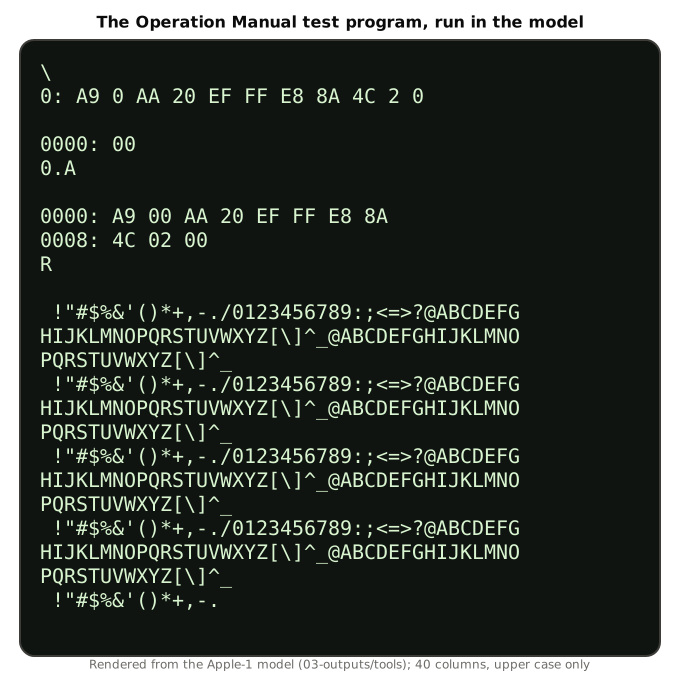
Section I of the manual ends with a “TEST PROGRAM” for a newly connected machine. The owner hits RESET, then types:
0: A9 0 AA 20 EF FF E8 8A 4C 2 0
0.A
R
and “THE PROGRAM SHOULD THEN PRINT OUT ON THE DISPLAY A CONTINUOUS STREAM OF ASCII CHARACTERS. TO STOP THE PROGRAM AND RETURN TO THE SYSTEM MONITOR, HIT THE ‘RESET’ BUTTON.” The eleven bytes are a complete program:
0000  A9 00     LDA #$00     start with character code 0
0002  AA        TAX          keep the count in X
0003  20 EF FF  JSR $FFEF    ECHO: print it
0006  E8        INX          next code
0007  8A        TXA
0008  4C 02 00  JMP $0002    and again, forever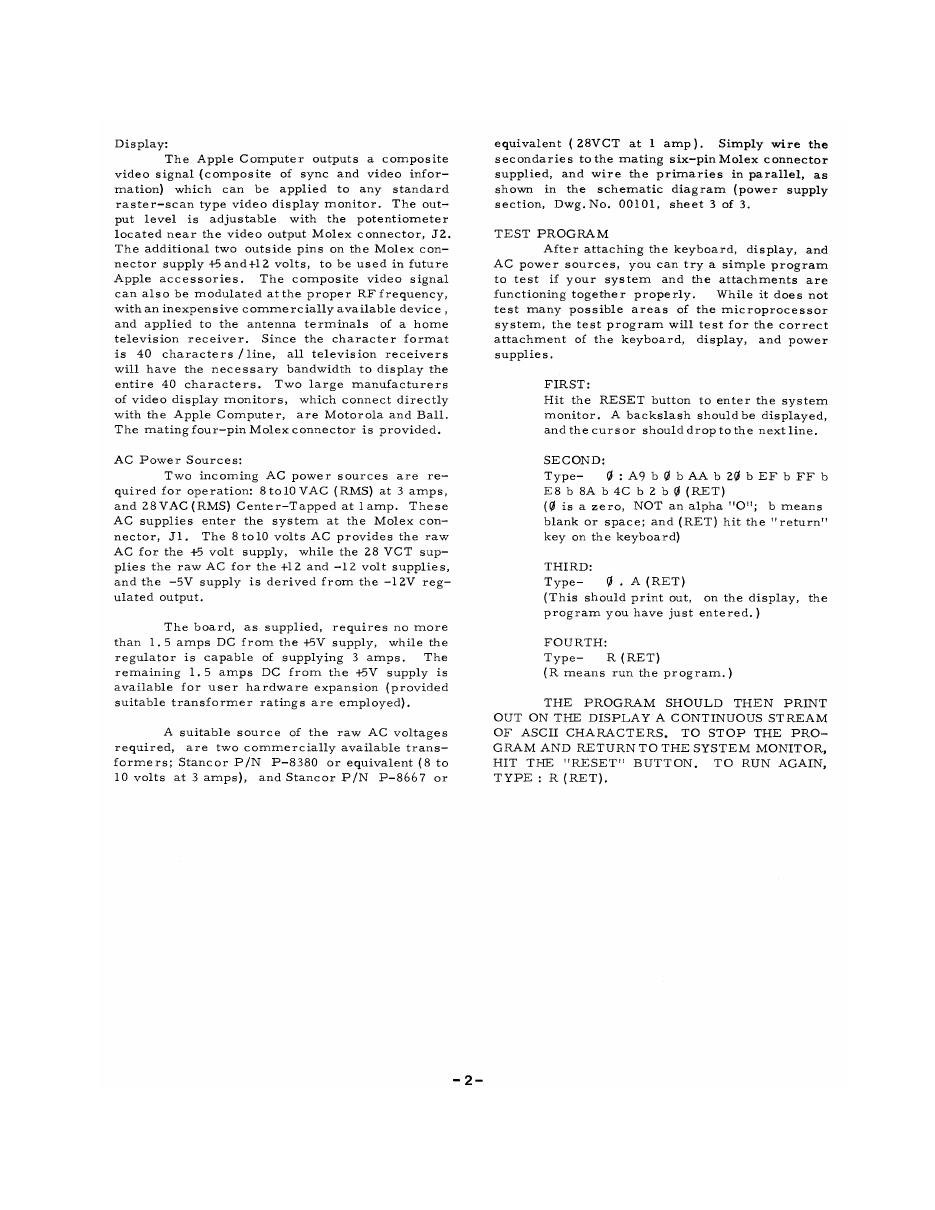
Run in the model, the screen fills with the terminal’s 64-character set, over and over. Codes $00–$1F are ignored except carriage return ($0D), which starts a new line; $20–$5F print as themselves; $60–$7F print again as upper case; and bit 7 is ignored, so the second half of each 256-code cycle repeats the first:
0000: A9 00 AA 20 EF FF E8 8A
0008: 4C 02 00
R

 !"#$%&'()*+,-./0123456789:;<=>?@ABCDEFG
HIJKLMNOPQRSTUVWXYZ[\]^_@ABCDEFGHIJKLMNO
PQRSTUVWXYZ[\]^_
 !"#$%&'()*+,-./0123456789:;<=>?@ABCDEFG
There is a subtlety in step three. 0.A prints the program — and in doing so moves the monitor’s “last opened” pointer along to $000A, the last byte printed. R then jumps to $000A, not to $0000. The byte at $000A is the $00 at the end of JMP $0002, and $00 is the 6502’s BRK instruction. BRK makes the processor jump through its interrupt vector, and the monitor PROM’s interrupt vector points to $0000 — where the program begins. The test works, every time, by way of a software interrupt. The model reproduces this exactly, because its stub supplies the documented vectors, and the self-test checks it. Whether the sequence was designed or simply worked is not recorded.
Example 14, “Enter a program into memory and run it in one line,” has the opposite fortune. Its bytes, 40: A9 0 20 EF FF 38 69 0 4C 40 0 R, load A with zero, print it, add one, and then jump back to $0040 — to the instruction that loads zero again. As printed, it sends NUL characters to the display forever, and the terminal ignores NULs; the screen shows nothing after “0040: FF.” With the jump changed to $0042, the program prints the character set as the test program does. The model confirms both.
5.3 Apple BASIC
5.3.1 What it was
Apple’s 1976 materials call it simply “APPLE BASIC”; the name Integer BASIC came with the Apple II, where it was built into ROM. Wozniak wrote it in 1976, first for the Apple-1, and his reasons are on record: “The book ‘101 BASIC Games’ made me think that the right higher level language for these low cost computers was BASIC, even though I’d never used it. I referred to an HP BASIC manual to develop my syntax diagrams. Hoping to be noted as the first with a 6502 BASIC, I left out floating point. But what I wanted was games, logic simulations, puzzle solving, etc. and integers are fine.” And: “I wrote the entire BASIC by hand with no assembler” (Wozniak, 1996). Volume 2 tells the story of its writing.
The October 1976 advertisement offered it free with the cassette card: “A tape of APPLE BASIC is included free with the Cassette Interface. Apple Basic features immediate error messages and fast execution.” By April 1977 the tape was a $5 item on the price list, alongside $5 tapes of “Mastermind,” “Lunar Lander,” “Blackjack,” “Hamurabi,” “Mini-Startrek,” a “Dis-Assembler” and an “Extended Monitor” (price list, April 1977).
5.3.2 Loading it
BASIC occupies 4K, and it loads into block E, $E000–$EFFF, so it needs the second 4K memory bank jumpered there (Volume 3). The Preliminary Apple BASIC Users Manual of October 1976 gives the procedure, which uses the cassette interface (below):
- Type C100R↵ 2. Type E000.EFFFR (don’t hit ↵ yet!) 3. Start the tape 4. Hit ↵ 5. When BASIC is loaded (about 30 seconds) the computer will print a backslash (). To enter BASIC type E000R↵. The computer will print a few characters, then, on the next line, print the prompt character >.
(Preliminary Apple BASIC Users Manual, Oct. 1976). RESET leaves BASIC; to go back without losing the program, “enter BASIC at E2B3↵, instead of E000↵. This is extremely useful when you have unintentionally hit the ‘RESET’ button while in BASIC.”
5.3.3 The language
The manual’s own description sets the limits. “Apple BASIC can represent integers in the range −32767 to +32767.” Variable names are a letter, or a letter and a digit; string variables add a dollar sign and must be dimensioned, up to 255 characters, with substrings written A$(5) or A$(2,6). The commands are AUTO, CLR, DEL, LIST, RUN, SCR, HIMEM= and LOMEM=; the statements LET, INPUT, PRINT, TAB, FOR/NEXT/STEP, IF…THEN, GOTO, GOSUB/RETURN, DIM, REM, END, POKE and CALL; the functions ABS, SGN, PEEK, RND and LEN. “Not equal” is written #, and there is a MOD operator. By default the user’s program lives between LOMEM = 2048 and HIMEM = 4096, that is $0800–$0FFF, inside the first 4K. Program execution “may be interrupted by pressing any key,” with the message “STOPPED AT” and the line number.
Its error messages are terse: *** SYNTAX, *** >32767 ERR, *** BAD BRANCH ERR, *** >8 GOSUBS ERR, *** MEM FULL ERR, *** STR OVFL ERR and a dozen more. POKE and CALL connect it to the hardware and to machine code; the manual’s example is “POKE −2048,55 stores 55 in location −2048 (−2048 = D000 (HEX)),” which shows how addresses above 32767 are written as negative numbers.
The 1976 manual contains no complete example programs, only fragments. Three of them, quoted exactly:
10 FOR I=1 TO 10 STEP 2: NEXT I
100 PRINT "THIS IS A STRING LITERAL"
200 INPUT "X=", X
These listings are from Apple’s manual and have not been run in this series’ simulator, which cannot run BASIC without Apple’s BASIC image. Volume 11 has further BASIC listings, with the same caveat. (One open-source interpreter, Stefan Lenz’s BSD-licensed “Stefan’s BASIC,” states that it implements “the specification of Apple Integer BASIC” from the documentation (github.com/slviajero/tinybasic); it was not used here, because a re-creation is not the original and its fidelity could not be checked.)
5.4 The Apple Cassette Interface
5.4.1 The card
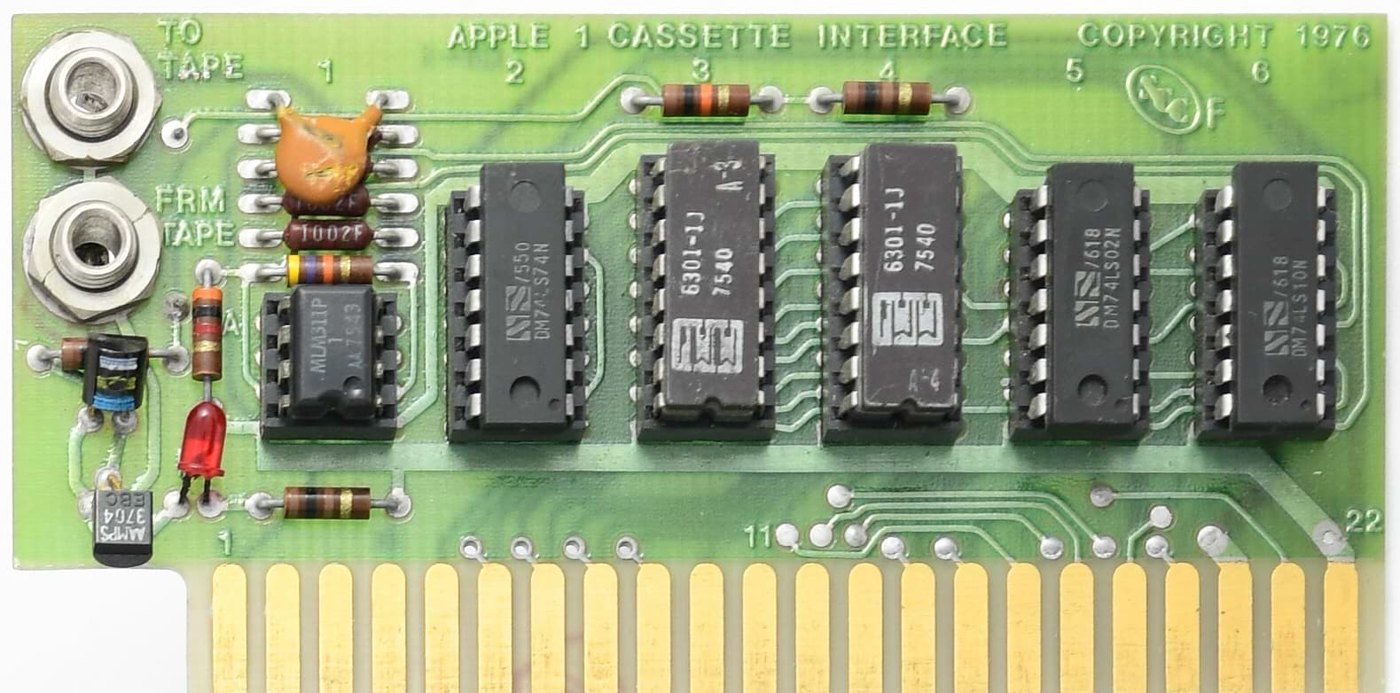
The ACI was the only peripheral card Apple made for the Apple-1, and it sold for $75 (price list, April 1977). It plugs into the upright connector at the right-hand end of the main board and, as the advertisement put it, “stands only 2” tall.” It needs one jumper on the main board, from R to C, which places it in block C of memory (Volume 3).
The advertisement made two claims for it: “Unlike many other cassette boards on the marketplace, ours works every time,” and “since it is very fast (1500 bits per second), you can read or write 4K bytes in about 20 seconds. All timing is done in software, which results in crystal-controlled accuracy and uniformity from unit to unit. Unlike some other cassette interfaces which require an expensive tape recorder, the Apple Cassette Interface works reliably with almost any audio-grade cassette recorder.”
The card is as spare as the monitor. A faithful modern reproduction by Mike Willegal lists its parts: an LM311 voltage comparator to square up the signal from the tape, a 74LS74 flip-flop to drive the signal to the tape, two more TTL chips for address decoding, two 256 × 4 PROMs holding the cassette program, an LED to set the recording level, and two jacks (Willegal, Apple Cassette Interface). Everything else — the timing of every bit — is done by the 6502 counting its own instructions.
5.4.2 How it records
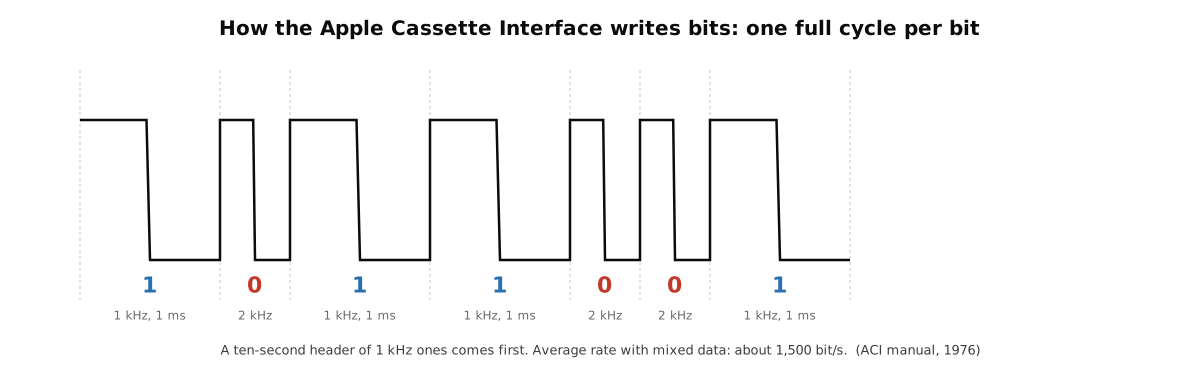
The original ACI manual explains the format: “The ACI uses the technique of recording a whole cycle of either a 1kHz cycle (representing a ‘one’ data bit) or a 2 kHz cycle (representing a ‘zero’ data bit). Therefore, with an average data mix of one’s and zero’s, data will be recorded at 1500 baud. A ten second header of all ones will automatically be recorded on the tape prior to memory data” (Apple Cassette Interface manual, 1976, as digitised in Willegal’s ACI guide). The header is why the BASIC manual says a 4K load takes “about 30 seconds” where the advertisement said twenty: ten of them are the header. “Special leaderless tapes need not be used,” the manual adds, “as the ACI automatically transmits a ten second ‘header’ of all ones before transmitting the data, which insures that the leader will have passed.”
The ACI manual’s own figure settles the speed sometimes given elsewhere as 1,200 baud (for example in Michael Moritz’s history of Apple): the card “reads and writes data at the rate of approximately 1500 baud (depending upon the data),” because a one takes a millisecond and a zero half a millisecond, so the true rate runs between 1,000 and 2,000 bits per second with the content. The October 1976 advertisement gives the same “1500 bits per second.” Neither Apple document mentions 1,200.
This is not the Kansas City standard that Byte magazine had promoted for hobby cassettes in 1976, which used several cycles of a tone per bit at a fixed 300 bits per second. One cycle per bit is roughly five times faster, at the price of depending on the tape’s speed staying steady within each cycle; there is no checksum, so careful owners saved important programs more than once.
5.4.3 Using it
The cassette program runs at $C100, and the ACI manual explains its command format, deliberately the same as the monitor’s: “When entered, the program should echo an ’*’. The format for specifying the memory address ranges to be either stored (write) or deposited into (read) is identical to the standard monitor format: Beginning . End, suffixed with either a ‘W’ (write) or an ‘R’ (read). Execution will start following a carriage return (CR). The cassette program will return control to the system monitor upon completion of a read or write.” Several ranges can go on one line — “100.200W 300.500W will write a header, 100 to 200, a second header, and 300 to 500” — but “YOU MUST USE THE SAME ADDRESS INCREMENTS AS WERE USED IN WRITING THE TAPE” when reading it back. The recording level is set by ear and eye: “The Cassette recorder output level should be set to where the LED on the ACI is just fully lit.”
Saving a BASIC program used the same commands. The BASIC manual’s recipe leaves BASIC with RESET, enters the cassette program with C100R, and writes two ranges, BASIC’s pointers in zero page and the program itself: 4A.00FFW 800.FFFW. The program is read back by the same line with R in place of W, and BASIC re-entered at $E2B3 so that it is not cleared.
5.4.4 How well it worked
Not, by later standards, very well. Willegal, who built exact reproductions, wrote that “Reliability of the ACI card, in it’s stock form, is not very good by 21st century standards,” and traced much of the trouble to a 0.01 µF input coupling capacitor; with 0.1 µF, the value the Apple II later used, reading became much more dependable, and the Registry reports the same change as making the card “considerably more reliable.” For its owners in 1976–77, though, the ACI was the difference between retyping a program in hex every time the power went off and loading BASIC in half a minute. It also fixed the shape of the Apple II’s cassette interface, which used the same one-cycle-per-bit method.
5.5 A Day’s Work on an Apple-1
Put together, the software defined a routine. Switch on the transformers; press CLEAR SCREEN and RESET; get the backslash. To use BASIC: C100R, then E000.EFFFR, start the tape, RETURN, wait half a minute for the backslash, E000R, and the > prompt. Write and run a program; save it with RESET, C100R and the two-range write; re-enter BASIC at E2B3R. To write machine code: plan it on paper, assemble it by hand into hex — the Apple-1 had no assembler in ROM, and Wozniak himself “could never afford an assembler for the 6502” — type it into the monitor eight bytes to a line, list it back with a period command to check every byte, and run it with R. Volume 11 does exactly that, with every program run in the model.
Next — Volume 6: Owners and Survivors — The Registry, the Two Hundred Boards and Where They Are. Who bought Apple-1s in 1976 and 1977, what became of them, and how the Apple-1 Registry has counted the survivors.
Comments (0)