KENBAK-1 · Volume 9
KENBAK-1 — Volume 9 — Building the Kit
The µKENBAK-1 kit from Adwater & Stir, the KENBAK-1 replica actually on sale in October 2026: what is in the box, how it is soldered and assembled step by step, the known snags and their fixes, how to test it, and what its firmware does that the original did not
9.1 About This Volume
This volume builds the µKENBAK-1 (“micro-KENBAK-1”), a kit sold by Chris Davis’s Adwater & Stir of the United States. On 27 October 2026 its product page listed the kit as in stock at $124.95 (reduced from $134.95), version 2.5 (Adwater & Stir, “µKenbak-1 Kit”). It is the only KENBAK-1 kit found on open sale at the time of writing: the same maker’s pocket-sized nanoKENBAK-1 was listed as out of stock ($25), its full-size assembled replica is sold out, and Artem Kalinchuk’s chip-for-chip TTL kit ($650) was out of stock, although its bare printed circuit board ($65) and front panel ($45) could be bought on their own (Volume 8). This volume therefore builds the µKENBAK-1 v2.5.
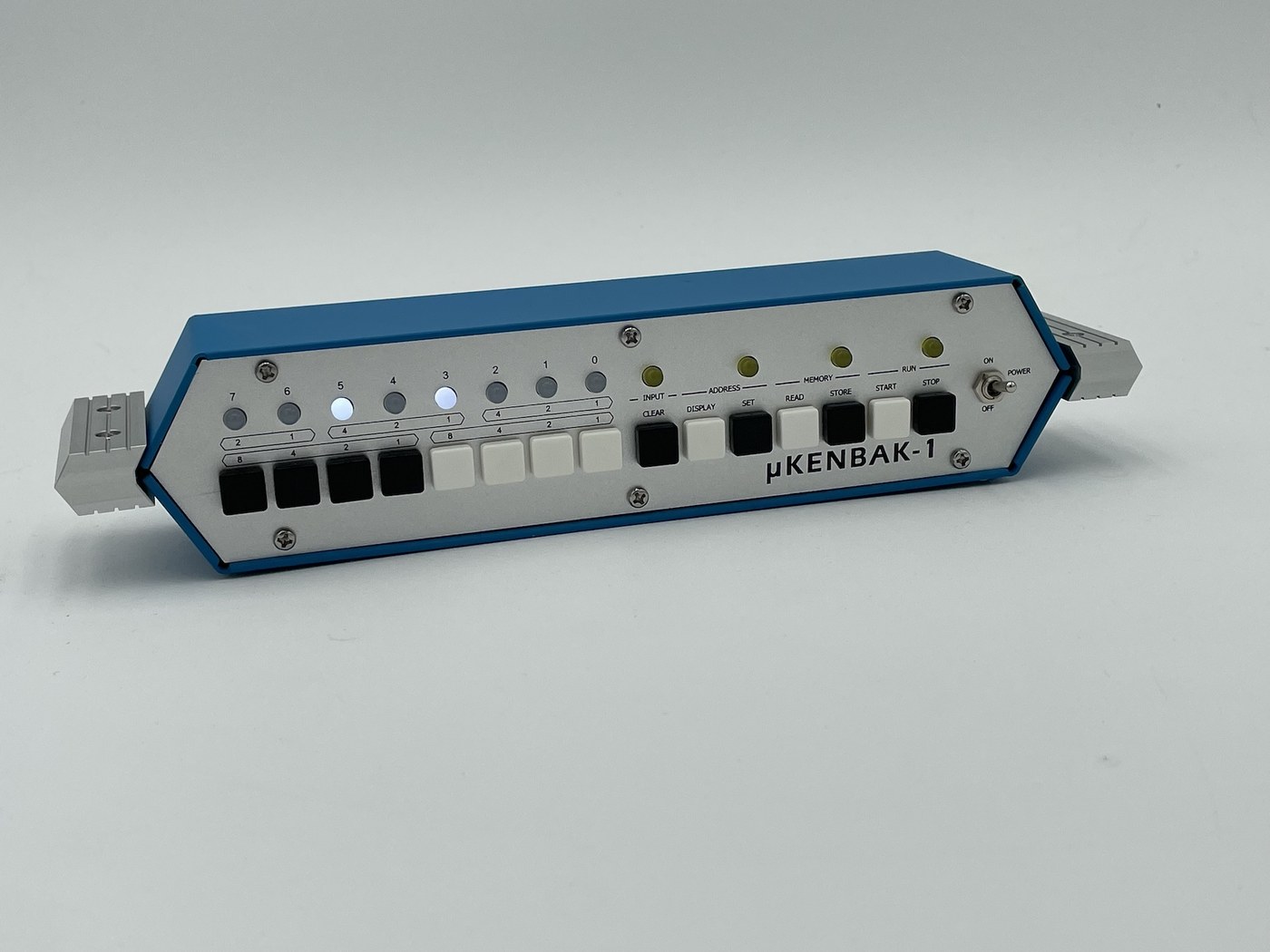
The µKENBAK-1 is not a reproduction of the original circuit. Where the KENBAK-1 has about 130 TTL chips and two shift registers (Volume 3), the µKENBAK-1 has one microcontroller, an ATmega328P, running Mark Wilson’s open-source emulation of the KENBAK-1, plus three shift-register chips to read the keys and drive the lamps. What it reproduces is the machine as a programmer meets it: the same 256 bytes, the same instruction set, the same front-panel procedure, in a case modelled on the original’s at half scale. Volume 8 compares it with the other replicas; this volume assumes the choice is made and gets on with the build.
The procedure follows the maker’s µKENBAK-1 Assembly & Operations booklet, revision 2.5 dated May 2026 (PDF), and the build-instructions page with its addendum (Adwater & Stir, “Build Instructions”), both read on 27 October 2026. The maker’s advice is to read the addendum before starting, and this volume puts its points in the steps where they apply. None of this has been built for the series yet; it is written as a procedure, and the places for the account of the actual build are marked.
9.2 What Is in the Box
The maker’s page describes the kit as “a professionally-made printed circuit board, all components” and “a steel case with CNC milled aluminum ends”, with “printed instructions”, and says the case was “based on decades-old engineering drawings from Bud Industries”. Version 2.5 changed three things from 2.0: the front panel is “screen-printed brushed aluminum” instead of coloured acrylic, the steel case has “a fingerprint-resistant matte finish”, and its blue is lighter, “closer to the original Kenbak-1”.
The booklet’s parts list, which the maker “would strongly suggest comparing … with the parts you received”:
Table 1 — The booklet's parts list, which the maker "would strongly suggest comparing … with the parts you received"
| Bag | Contents |
|---|---|
| 1 | 8 × 5 mm white LED; 4 × 5 mm yellow LED |
| 2 | 15 × tactile push button |
| 3 | 1 × 470 Ω resistor array (10-pin); 2 × 2.2 kΩ resistor arrays (10-pin); 3 × 10 kΩ resistor arrays (6-pin); 1 × 16 MHz crystal; 1 × MTS-102 toggle switch |
| 4 | 6 × 40 mm female-female hex standoffs; 6 × 12 mm pan-head screws; 6 × 8 mm pan-head screws; 4 × 14 mm flat-head screws; 4 × M3 knurled nuts; 1 × 5-pin male header; 1 × 4-pin male header (19 mm); 6 × 4 mm nylon spacers |
| 5 | 8 × black key caps; 7 × white key caps |
| Loose | 3 × 16-pin DIP socket; 1 × 28-pin DIP socket; 1 × ATmega328P; 2 × 74HC165 shift register; 1 × 74HC595 shift register; 1 × PC board; 1 × USB extension; 1 × USB-to-UART TTL module; 1 × DS3231 module; 1 × aluminium front panel; 1 × project case; 2 × aluminium ends; 4 × rubber feet |
Parts list from the µKENBAK-1 Assembly & Operations booklet, rev. 2.5 (May 2026).
The black and white key caps reproduce the original’s colour pattern: the KENBAK-1’s data keys run black, black, black, black, white, white, white, white, and its control keys alternate.
9.2.1 What the parts do
The electronics are simple enough to describe in a paragraph, and knowing them makes the build easier to check. The ATmega328P — the processor of the Arduino Uno — holds the whole KENBAK-1 in software, its 256 bytes of “memory” in the chip’s own RAM, clocked by the 16 MHz crystal. The fifteen keys are read through two 74HC165 parallel-in, serial-out shift registers, which load all sixteen inputs at once and pass them to the processor as one serial stream; the 10 kΩ arrays hold the key inputs low until a key is pressed. The eight data lamps are driven by a 74HC595 serial-in, parallel-out shift register; the four control lamps are driven directly by processor pins, the Run lamp on a pin that can dim it. The DS3231 module is a battery-backed real-time clock used by the firmware’s clock programs, and the USB-to-UART module both powers the kit and gives it a serial port. Mark Wilson’s original Kenbak-uino schematic of 2011 uses exactly this arrangement (PINS.h, Kenbakuino on GitHub); the µKENBAK-1’s printed board may differ in detail.
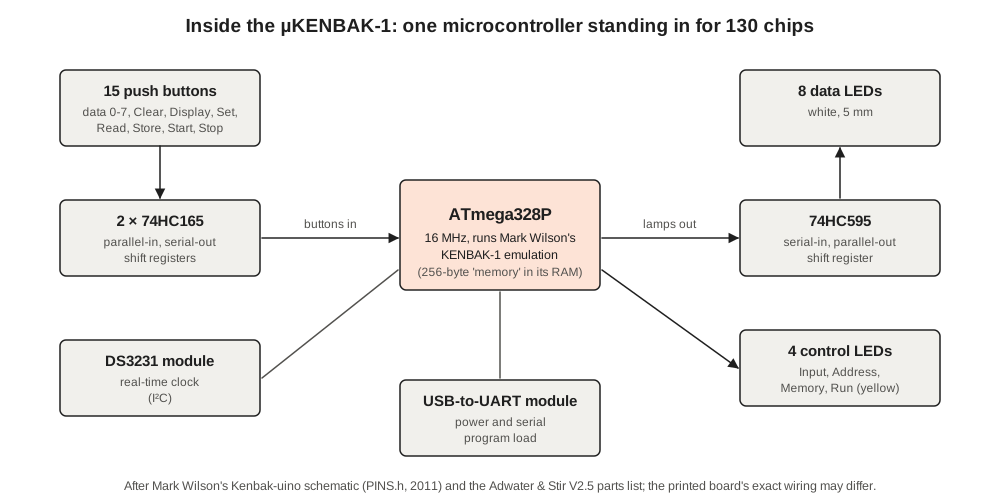
There is an amusing symmetry here. The original KENBAK-1 kept its memory in shift registers and its logic in TTL; the replica keeps its logic and memory in one chip and uses shift registers only to talk to the panel.
9.3 Tools and Preparation
The maker rates the build as “an easy build, perfect for beginners with all through-hole components”, recommends “Through-hole soldering and basic electronics familiarity”, and estimates “1–2 hours, depending on experience”. The tools listed are a soldering iron “with a nice fine tip”, solder, a desoldering iron (optional), a Phillips screwdriver, needle-nose pliers and side cutters (Adwater & Stir, “KENBAK-1”).
The booklet is emphatic about solder: “Most problems I’ve seen people have with this kit are caused by cold joints or insufficient wetting.” Its recommendations are an iron with adjustable temperature, set to about 400 °C with a fine point, and “quality 60/40 rosin core .032″ diameter solder”. A cold joint on a key or a lamp shows up later as a key that works only sometimes, which on a machine programmed entirely through its keys is maddening.
Before starting, check the parts against the list, and identify the two kinds of 10-pin resistor array, which look alike: the 2.2 kΩ arrays are marked 10X-2-222LF and the 470 Ω array 10X-2-471LF.
9.4 Step 1 — Lamps and Keys, Aligned by the Front Panel
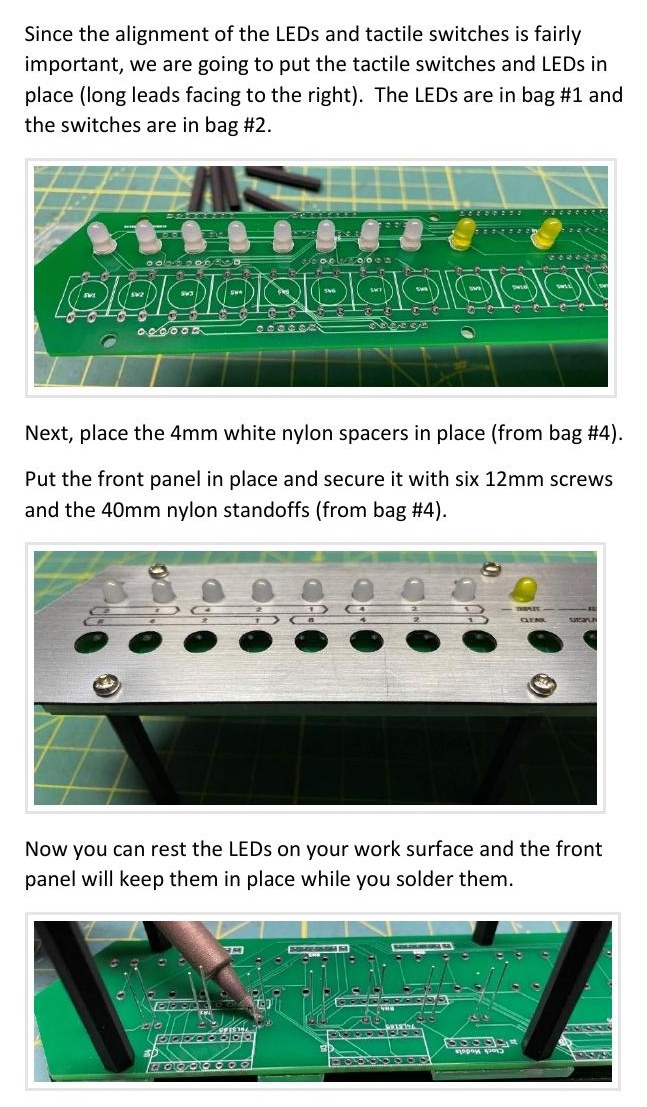
The first parts in are the ones that must line up with holes in the metal panel, and the booklet’s method uses the panel itself as the jig: “Since the alignment of the LEDs and tactile switches is fairly important, we are going to put the tactile switches and LEDs in place (long leads facing to the right).”
- Fit the twelve LEDs into the front of the board — white in the eight data positions, yellow in the four control positions — with the long lead to the right. The long lead is the anode; getting one backwards gives a lamp that never lights.
- Place the six 4 mm white nylon spacers (bag 4).
- Fit the front panel and secure it with the six 12 mm screws into the 40 mm nylon standoffs.
- Turn the assembly over so that it rests on the standoffs; the panel holds the LEDs at the right height while they are soldered. Solder the LEDs.
- Remove the panel, fit the fifteen tactile switches, and put the panel back. The booklet’s warning: “This is important: put the front panel back in place and secure it again with the screws and nylon standoffs. MAKE SURE the tactile switches are exactly centered before soldering. This is critical to make sure the button caps do not bind when pressed.”
- Solder the switches, then remove the standoffs, screws and panel and set them aside.
9.5 Step 2 — Resistor Arrays and Crystal
These parts go on the back of the board, “the side with the ‘Open Source Hardware’ logo”.
- The three 6-pin black 10 kΩ arrays go in RN2, RN3 and RN6, and their orientation matters: they are bussed arrays with a common pin. “The end with the white dot should be installed in the square pad on the left side.”
- The two 2.2 kΩ arrays (10X-2-222LF) go in RN1 and RN4. “The orientation is not important (they are isolated resistors, not bussed resistor arrays)”, but the booklet suggests putting the dot to the left for consistency.
- The 470 Ω array (10X-2-471LF) goes in RN5; again orientation does not matter.
- The 16 MHz crystal goes in Y1, either way round.
9.6 Step 3 — Sockets, Headers and Chips
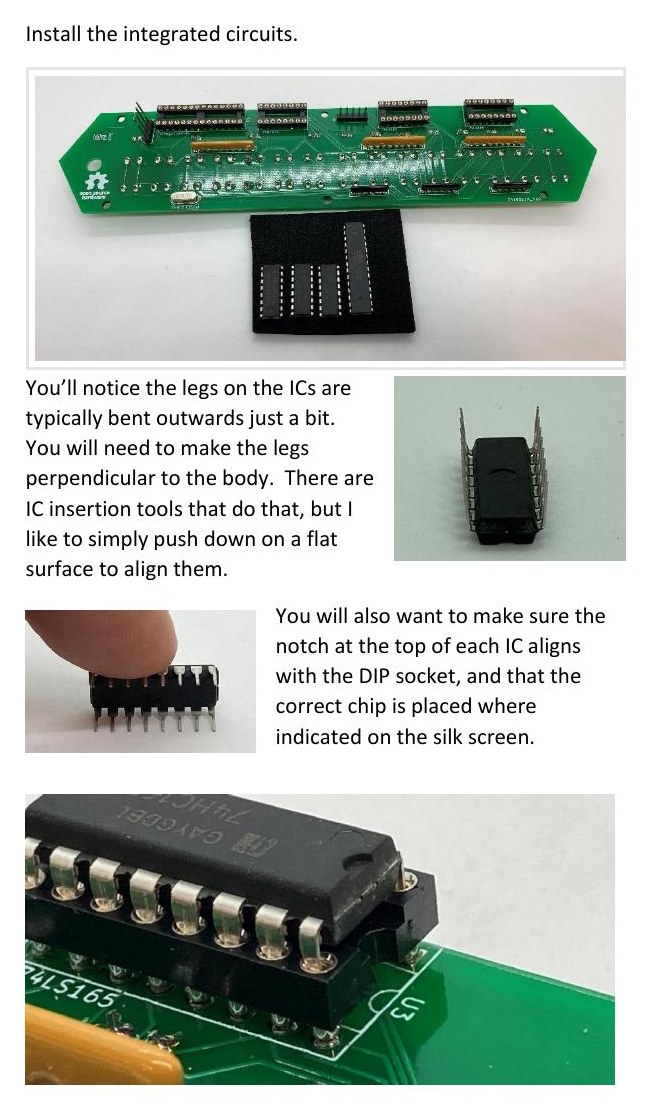
- Solder the three 16-pin sockets and the 28-pin socket on the back of the board, “with the notch facing right as indicated by the screen printing”. Sockets mean that no chip is ever soldered, and the processor can be taken out later for reprogramming.
- Solder the two male headers on the back: the standard 5-pin header at J1 and the longer 4-pin header at J2.
- Prepare the chips. “You’ll notice the legs on the ICs are typically bent outwards just a bit. You will need to make the legs perpendicular to the body.” The booklet’s method is to press each row of legs against a flat surface.
- Insert the chips with each notch matching its socket’s notch, and each type in its labelled socket: two ‘165s and one ‘595, as marked on the board, and the ATmega328P in the 28-pin socket. (The parts list calls them 74HC165 and 74HC595; the step text calls them 74LS165 and 74LS595. Go by the markings on the board and on the chips.)
9.7 Step 4 — Clock Module, USB Module and Power Switch
- The DS3231 real-time-clock module “simply mounts on the five-pin male header in the center”. Leave clearance above the ATmega328P for it.
- The USB-to-UART module is soldered to the four-pin header, matching its pins 5V, GND, RX and TX to the board.
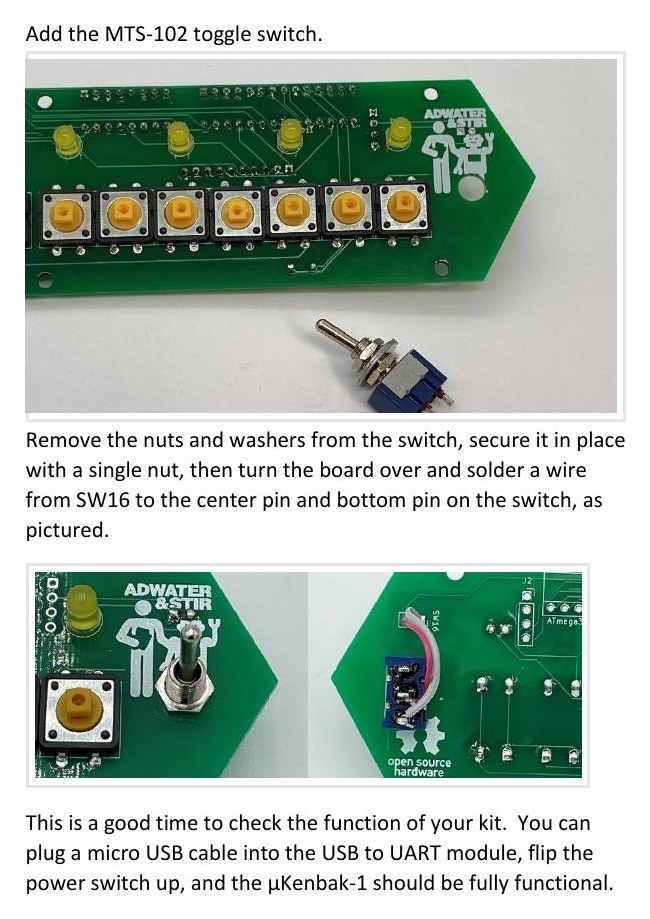
- The MTS-102 toggle switch is the power switch. “Remove the nuts and washers from the switch, secure it in place with a single nut, then turn the board over and solder a wire from SW16 to the center pin and bottom pin on the switch, as pictured.”
9.8 Step 5 — First Power-Up, Before the Case
The booklet stops here for a reason: “This is a good time to check the function of your kit. You can plug a micro USB cable into the USB to UART module, flip the power switch up, and the µKenbak-1 should be fully functional.” It is much easier to find a bad joint now, with the back of the board exposed, than after the case is closed.
A useful first check uses the original machine’s own lamp test (Volume 6): each data key should light the lamp above it, Clear should light Input, Display should light Address, Read should light Memory and Start should light Run. Then key in a program. The KENBAK-1 Programming Reference Manual’s example (Volume 6) is the obvious one; the booklet prints Mark Wilson’s variant, which adds a delay so that the count can be seen:
Loc  Contents  Symbolic
003  004       P: start at 004
004  103       ADD B C=001
005  001
006  134       STORE B OUTPUT
007  200
010  003       ADD A C=001      delay: count A round to zero
011  001
012  043       JPD A!=0 010
013  010
014  344       JPD UNC 004
015  004
The keying sequence, from the booklet: Clear, key 003, Set; then for each byte from 004 onward, Clear, key it, Store; finally Start. In the series’ simulator the lamps count ○○ ○○○ ○○●, ○○ ○○○ ○●○, ○○ ○○○ ○●● and on, one count per 256 passes of the delay loop.
9.9 Step 6 — Into the Case
- Put the front panel back on the board with the 12 mm pan-head screws and the 40 mm standoffs, as in step 1.
- Fit the USB extension to the case, “with the supplied M3 bolts”, and plug its inner end into the USB-to-UART module.
- Secure the board and panel to the case with the six 8 mm screws.
- Fit the two aluminium ends with the 14 mm flat-head bolts and the brass knurled nuts. “If your side pieces seem loose, you can add a piece or two of masking tape under them to make them fit better.”
- Push on the key caps: black and white in the original’s pattern. “The button caps will fit in any orientation, but I have found that it’s best to have the buttons mounted as pictured. It makes it easier to pry the buttons off (from the top and bottom) if necessary.”
- Stick on the four rubber feet.
9.10 Known Snags and Their Fixes
The maker’s addendum lists three problems, one of which — the first — anyone may meet.
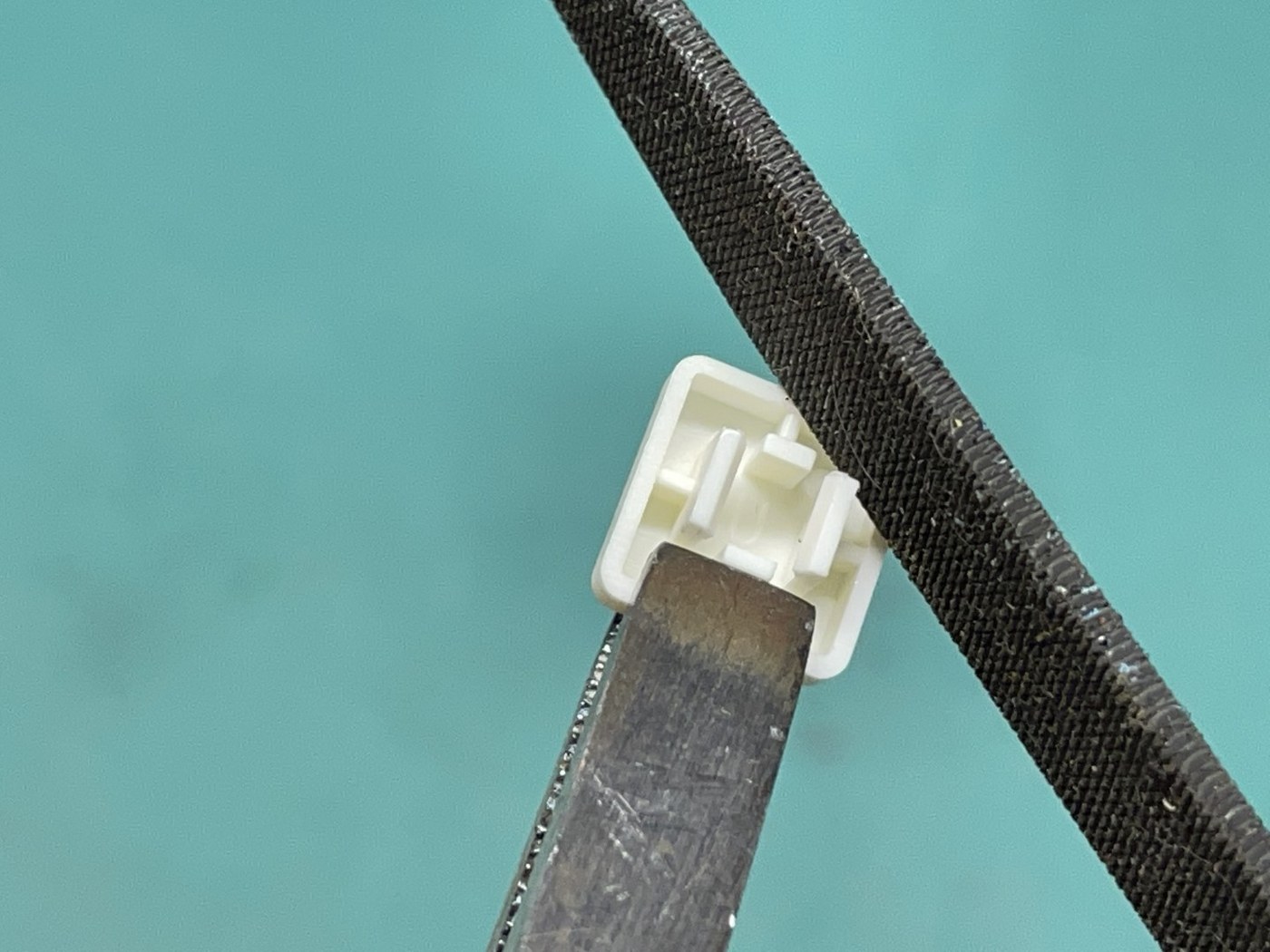
Keys that bind. “If a tactile button binds against the front panel and doesn’t click easily”, the fix is on the key cap, not the board: “use a file to file back the edges of the ‘ears’ that grip the tactile button”, or, without a file, “use clippers to snip a small piece from the edge of the ears.”
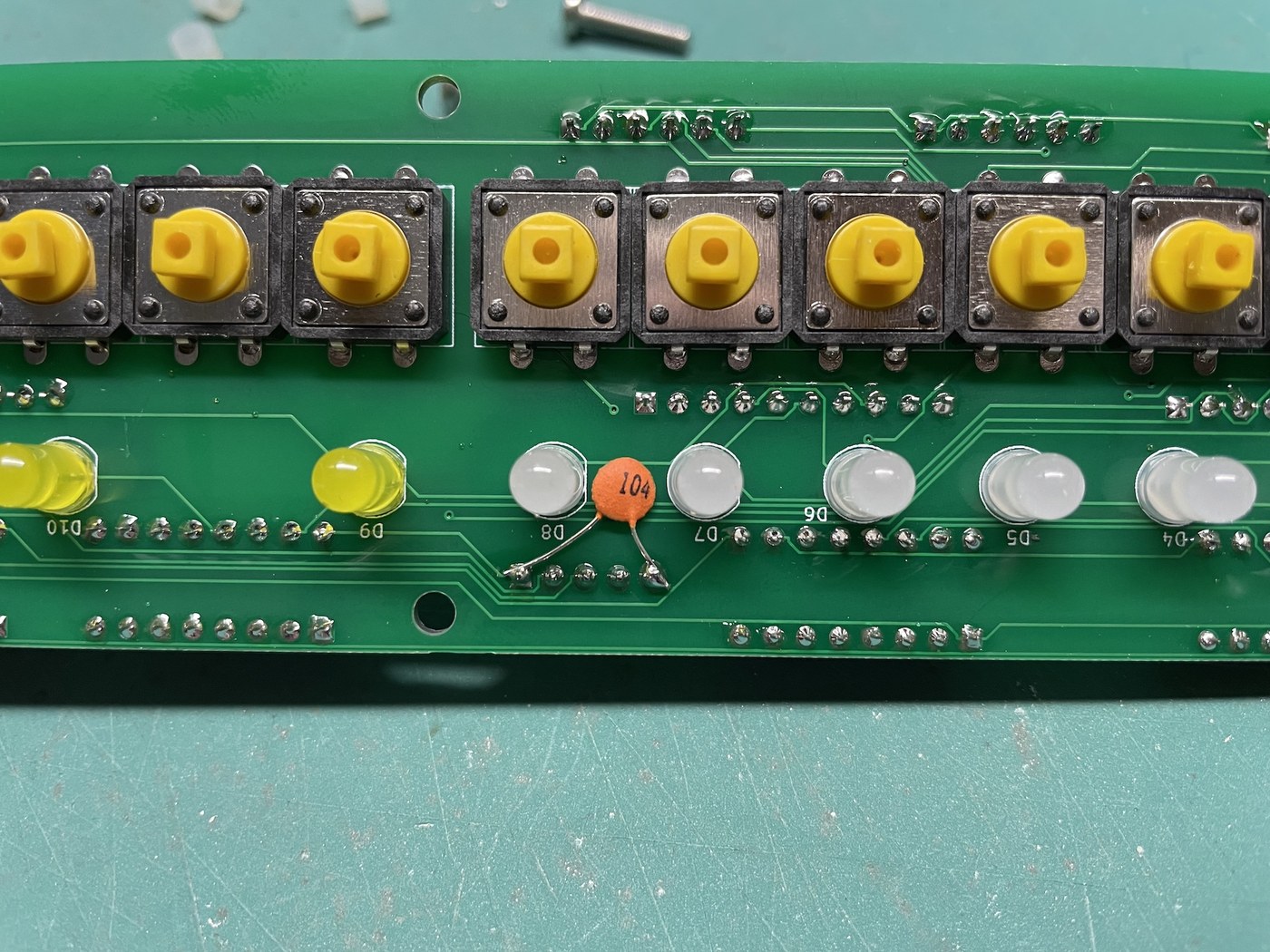
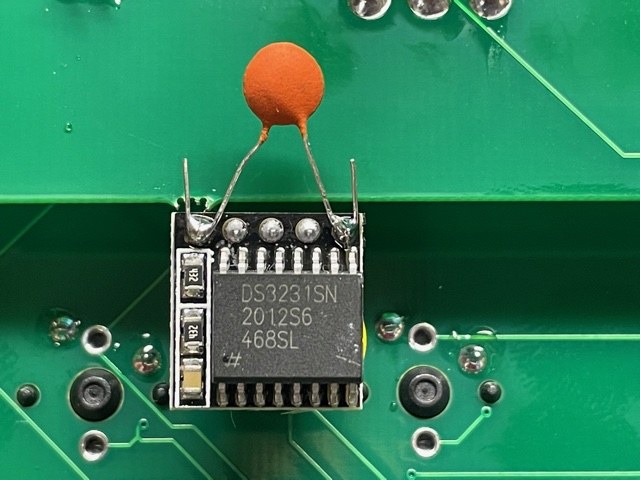
The clock forgets the time. “If the time resets to 12:00 after the power switch is turned off and on”, the addendum reports that a capacitor across the RTC module’s supply cures it: “Add a .01uF (104) capacitor between power and ground on the RTC module”, on top of the module or on the LED side of the board — “not necessary unless you are seeing this behavior”. Note that the marking 104 denotes 0.1 µF (100 nF), not 0.01 µF; the two values in the addendum disagree, and either is a normal supply-decoupling value.
A random memory lock (kits sold before 24 August 2021). On early kits the firmware read a memory-lock switch that the µKENBAK-1 does not have, so the lamp above Stop might not blink when Store was pressed. Kits ordered after 23 August 2021 have corrected firmware; older ones can be re-flashed, or fitted with a 10 kΩ resistor from pin 13 of the ATmega328P to ground.
9.11 Firmware, Extensions and Fidelity
The ATmega328P “arrives pre-programmed with Mark Wilson’s open-source Kenbak-1 emulation” (Adwater & Stir, “KENBAK-1”), the Kenbak-uino sketch he wrote in 2011 for the KENBAK-1’s fortieth anniversary. To change it, the booklet’s advice is that “there is no Arduino inside this project … the easiest way is to simply remove the ATMega328 chip from the µKENBAK-1 and replace the ATMega328 chip in an Arduino Uno, then upload like usual”, then move the chip back. The source is on GitHub.
9.11.1 Things the original could not do
The firmware adds features that the KENBAK-1 never had, all reached by holding one key and pressing another (booklet, “Extensions”):
- Speed. Holding data key N and pressing Stop sets a delay of 2ᴺ milliseconds after each instruction; the delay is 1 ms at power-on. This matters for programs written for the original: their delay loops were tuned to a machine running a few hundred instructions a second (Volume 3).
- A library of programs. Stop plus a data key loads one of eight built-in programs: a counter, a moving pattern, three clocks (counting, BCD, binary), “Das Blinken Lights”, a Sieve of Eratosthenes and a clock-setting program.
- Saving programs. Data key N plus Store saves memory to a page of the processor’s EEPROM; key N plus Read loads it back. A saved or built-in program can be set to load at power-on.
- Serial loading. Data key N plus Display sends memory to the USB serial port as 16 lines of 16 octal numbers; key N plus Set reads it back, so programs can be typed on a computer and sent to the machine instead of keyed byte by byte.
- System calls. The one-byte NOOP code 360 is used as a “SysInfo” call that reads the clock, a random number generator, user settings and the serial port. Programs that use it (the booklet’s own “Das Blinken Lights” listing does) will not run on an original KENBAK-1 or on a faithful emulator.
- Convenience keys. Clear plus Store erases memory to zero except P, which it sets to 004, and sets the address to 004, ready for a new program. Stop plus Clear blanks the lamps.
9.11.2 Checking the instruction set
Two corrections in the firmware’s history affect how faithfully old programs run. According to the Kenbak-uino change log (README), versions before May 2021 filled right shifts with zeros, where the original copies the sign bit, and versions before September 2022 advanced the program counter at the wrong moment, which changes the result of instructions that read or write P. A kit bought in 2026 should have both fixes, but a re-flashed or second-hand one may not. This short program, written for the series and run in its simulator, checks both:
Loc  Contents  Label  Symbolic
003  004              P: start at 004
004  023              LOAD A C=377
005  377
006  011              SFTR A 1         the original keeps the sign: still 377
007  003              ADD A C=001      377 + 1 = 000, with a carry
010  001
011  043              JPD A!=0 FAIL
012  023
013  312              SKP1 1 201       carry for A must be set
014  201
015  344              JPD UNC FAIL
016  023
017  023              LOAD A C=026     STORE into P continues at 026 + 2
020  026
021  034              STORE A P
022  003
023  023       FAIL   LOAD A C=017     failure: the four right-hand lamps
024  017
025  034              STORE A OUTPUT
026  200
027  000              HALT
030  023       OK     LOAD A C=252     success: alternate lamps
031  252
032  034              STORE A OUTPUT
033  200
034  000              HALT
On a correct machine it halts with alternate lamps lit, ●○ ●○● ○●○ (252), after ten instructions, as it does in the simulator. A zero-filling shift sends it to FAIL (○○ ○○● ●●●, 017); a program counter that is not advanced after the STORE lands it at 026, where it runs into a NOOP and a HALT without lighting anything.
9.12 What the Kit Is, and Is Not
Built, the µKENBAK-1 is a faithful programmer’s replica: anything in Volumes 6, 7 and 10 keys in and runs exactly as described, apart from speed, and the procedure for loading, examining and single-stepping is the original’s. It is not a faithful electrical replica. There are no TTL chips, no shift-register memory and no 29-state controller — all of that is a few hundred lines of C++ — and the memory survives in EEPROM only if the owner saves it. Its LEDs are brighter and crisper than the original’s incandescent lamps, and its keys are tactile switches under caps rather than the original’s keyswitches. For a builder who wants the machine of Volume 3, the route is one of the TTL reproductions in Volume 8, with 131 chips to solder and a pair of Intel 1404As to find. For a builder who wants to program a KENBAK-1, this kit is an evening’s work.
Next — Volume 10: Programs to Run — Games, Patterns and Puzzles. A light that bounces from end to end, Kill the Bit with an exclusive-OR built from AND, OR and LNEG, the Fibonacci numbers until they overflow, every prime below 256, and a guessing game in which the lamps say “higher” and “lower” — each in octal as keyed, and each run in the simulator.
Comments (0)