KENBAK-1 · Volume 6
KENBAK-1 — Volume 6 — The Instruction Set — Registers, Addressing and the Front Panel
Everything a KENBAK-1 programmer works with: 256 bytes and nine special addresses, three registers and a program counter that are only memory, numbers in two's complement, an instruction set read as three octal digits, five addressing modes, and a console of fifteen buttons and twelve lamps
6.1 About This Volume
This volume is the reference card for the rest of the series. It sets out the KENBAK-1 as a programmer sees it: the memory and its special locations, the way numbers are represented, the format of an instruction, the five addressing modes, every instruction in the set, a handful of tricks that come free from the design, and the operation of the front panel. Volume 7 then uses all of this to write programs, and Volume 10 offers programs to run.
The primary source is Kenbak Corporation’s Programming Reference Manual, 24 pages dated 4/1/71, priced at $2.00, which describes itself as “a summary of the KENBAK-1 computer programming characteristics” for a reader “assumed to be acquainted with the general theory of digital computers” (scan at Adwater & Stir, originally from kenbakkit.com). Page references below (PR-n) are to that manual. The beginners’ route through the same material is the Laboratory Exercises workbook, cited as EX.
Every worked example in this volume was run in the series’ simulator, 03-outputs/tools/kenbak_sim.py, whose self-test checks it against the examples printed in those two manuals (all 33 checks pass); the examples themselves are reproduced by vol6_examples.py in the same folder.
6.2 The Programmer’s Model
6.2.1 Memory and octal
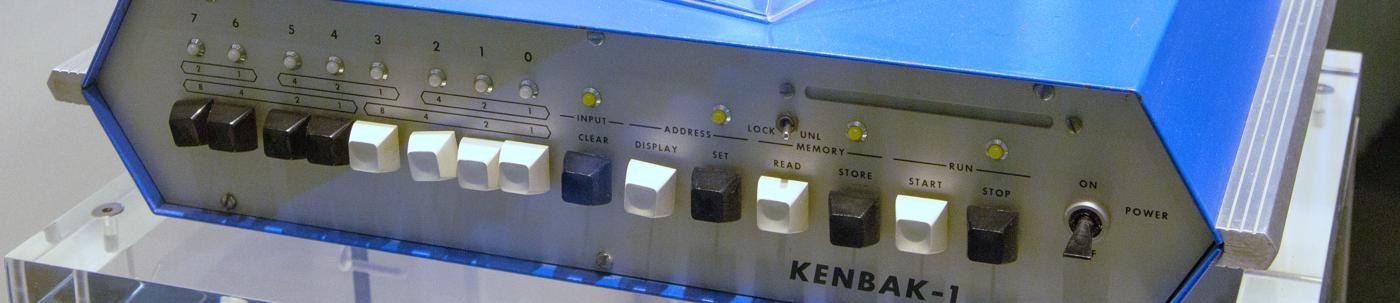
The KENBAK-1 is “a serial stored program general purpose digital computer with a memory of 256 eight bit bytes. Internally the machine is binary two’s complement” (PR-1). Every byte is addressable, and since 2⁸ = 256 one byte holds a complete address. Addresses and data are written in octal, base eight, three binary digits to an octal digit. Eight bits split as 2 + 3 + 3, so a byte runs from 000 to 377 octal, and the first octal digit “never assumes a value larger than 3”. The front panel is grouped the same way: two buttons, then three, then three, with the octal weights printed above them. Octal is not a convenience laid over the machine; the instruction set is designed in it, as the next sections show.
6.2.2 Nine special locations
Nine addresses have assigned jobs (PR-1). They are ordinary memory and can be read or written by any instruction, “though the programmer must be aware that he may be interfering with the assigned special function.”
Table 1 — Nine special locations
| Octal | Name | Purpose |
|---|---|---|
| 000 | A | Primary accumulator: load, store, add, subtract, AND, OR, load complement, shift, rotate |
| 001 | B | Secondary accumulator: load, store, add, subtract, shift, rotate |
| 002 | X | Index register; also usable for arithmetic |
| 003 | P | Program counter: the address of the next instruction |
| 200 | OUTPUT | Shown in the eight data lamps while the machine runs |
| 201 | — | Overflow (b0) and carry (b1) for A |
| 202 | — | Overflow (b0) and carry (b1) for B |
| 203 | — | Overflow (b0) and carry (b1) for X |
| 377 | INPUT | Set by the eight data buttons, in run or halt |
Volume 3 explains why these particular addresses: the registers are not hardware at all, but bytes in the circulating memory, and 201–203 are the slots that pass the heads one byte time after A, B and X. For the programmer the consequence is that A, B, X and P can be used as operands like any other byte, which produces the register-to-register operations described below.
6.2.3 Numbers
One byte can be read three ways (PR-3): as a positive integer from 0 to 255 (octal 000 to 377); as a signed integer from −128 to +127 in two’s complement (octal 200 to 177, with 377 meaning −1); or as a signed fraction from −1 to +127/128. “Since the binary arithmetic is identical in all of these representations”, the programmer simply chooses. The jump conditions “negative”, “positive” and “positive non-zero” assume a signed reading; “zero” and “non-zero” apply to all.
Every ADD or SUB to a register updates that register’s overflow and carry byte (201, 202 or 203), clearing its other six bits. Carry (b1) is the carry out of b7, or for a subtraction the borrow: the Laboratory Exercises note that “If we were nit-pickers, we would note that the carry bit should be called a borrow bit for subtractions” (EX 27-1). For unsigned numbers the carry is the overflow. Overflow (b0) is set when the true signed result is outside −128…+127. No other instruction changes these bytes. Run in the simulator:
Table 2 — Every ADD or SUB to a register updates that register's overflow and carry byte (201, 202 or 203), clearing its other six bits. Carry (b1) is the carry out of b7, or for a subtraction the borrow: the Laboratory Exercises note that "If we were nit-pickers, we would note that the carry bit should be called a borrow bit for subtractions" (EX 27-1). For unsigned numbers the carry is the overflow. Overflow (b0) is set when the true signed result is outside −128…+127. No other instruction changes these bytes. Run in the simulator
| Instruction pair | Result in A | 201 | Meaning |
|---|---|---|---|
| A = 120, ADD A C=050 | 170 | 000 | 80 + 40 = 120, no carry, no overflow |
| A = 100, ADD A C=100 | 200 | 001 | 64 + 64 = 128: overflow (it reads as −128) |
| A = 377, ADD A C=001 | 000 | 002 | −1 + 1 = 0 signed; 255 + 1 carries out |
| A = 005, SUB A C=007 | 376 | 002 | 5 − 7 = −2; the borrow sets carry |
| A = 200, SUB A C=001 | 177 | 001 | −128 − 1 = +127: overflow |
6.3 Reading an Instruction
Instructions are one or two bytes. HALT, NOOP and the shifts and rotates take one byte; everything else takes two, and a two-byte instruction “may start on either an odd or even address” (PR-1). The first byte is read as three octal digits, and each digit is a field.
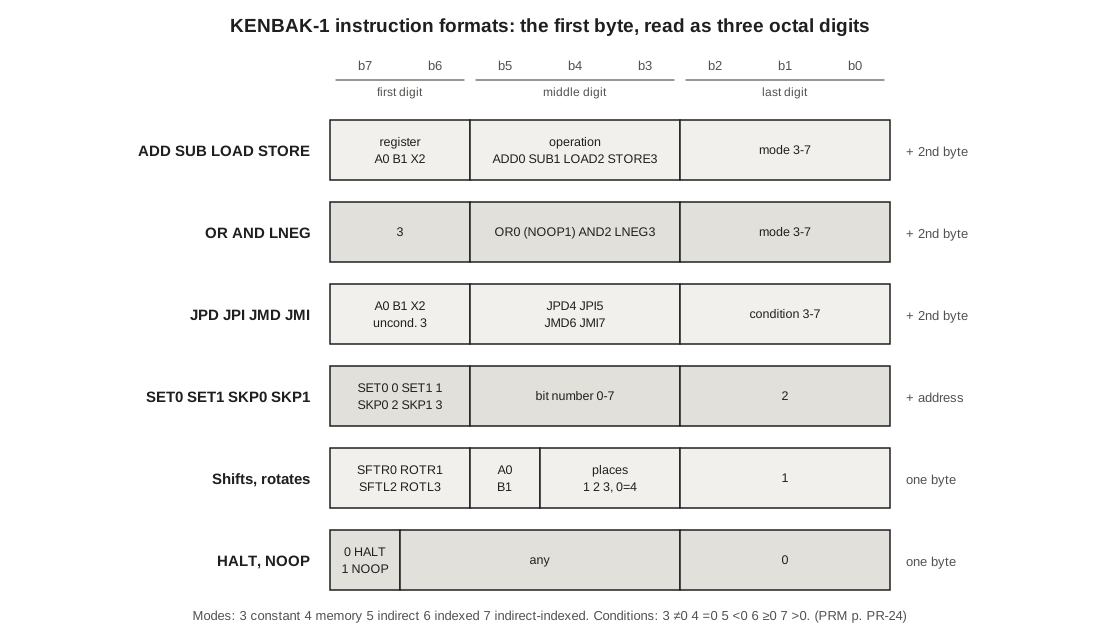
For the arithmetic instructions the pattern is exact: the first digit is the register (A 0, B 1, X 2), the middle digit the operation (ADD 0, SUB 1, LOAD 2, STORE 3) and the last digit the addressing mode (3 to 7). So 103 is “ADD to B, constant”, 034 is “STORE A, memory” and 226 is “LOAD X, indexed”. A programmer who has read the table once can assemble most instructions in their head, which was the point: the machine was sold to teach programming, and there was no assembler to hand.
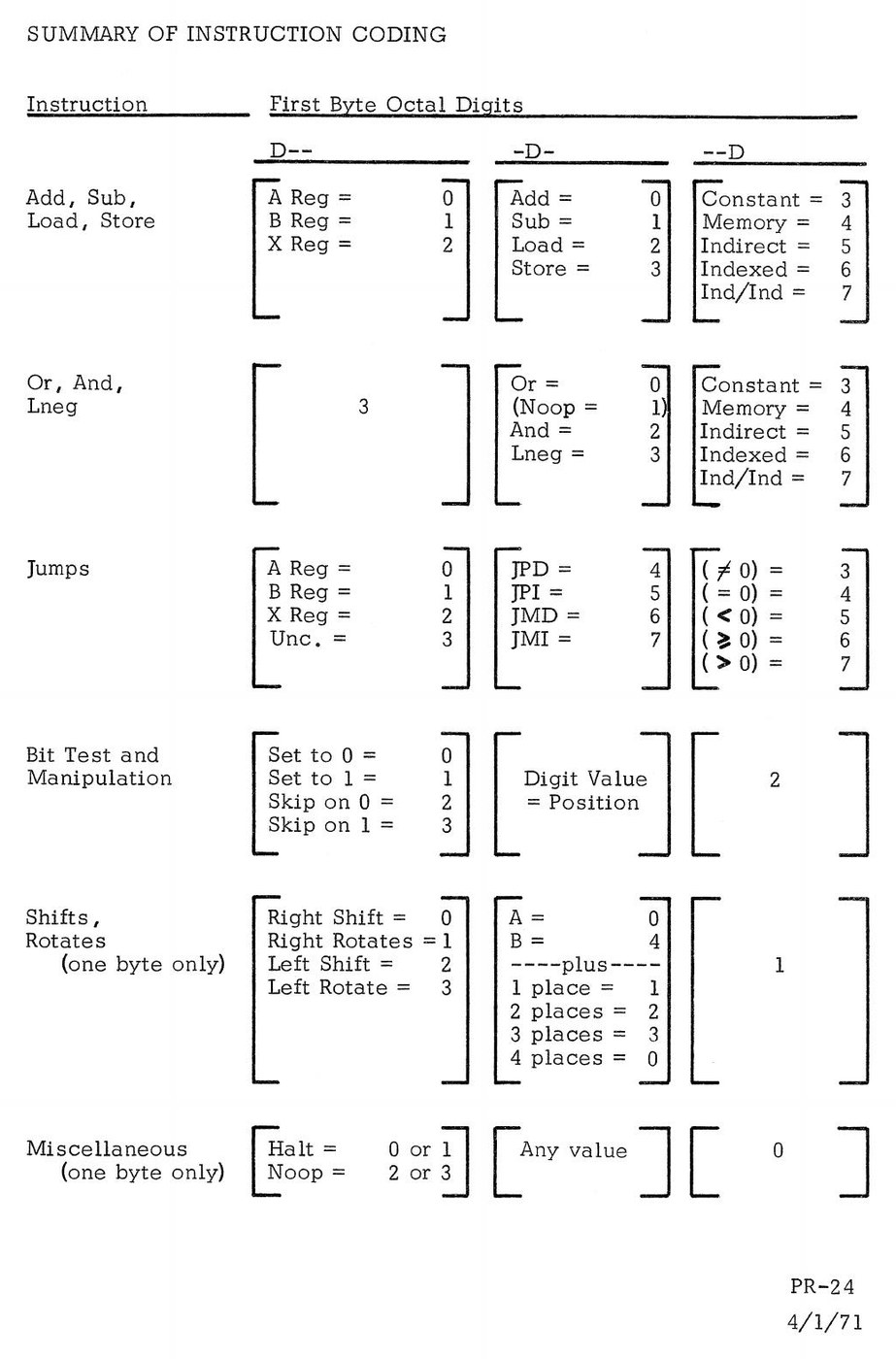
The last digit separates the groups. If it is 0 the byte is HALT or NOOP; if 1, a shift or rotate; if 2, a bit operation; if 3 to 7 it is an addressing mode (for the arithmetic and logic instructions) or a jump condition (for the jumps). The Programming Reference Manual ends with a one-page summary in exactly this form, and the company printed a coding sheet with the same table down its margin (Volume 7).
6.4 Five Addressing Modes
The arithmetic and logic instructions — ADD, SUB, LOAD, STORE, AND, OR and LNEG — have five addressing modes, which say how the second byte n is turned into an operand (PR-4):
- 3, constant (immediate), written
C=n: the operand is n itself. - 4, memory, written
n: the operand is the byte at address n. - 5, indirect, written
(n): n is “the address of the address of the operand”. - 6, indexed, written
n,X: the operand is at n + X. - 7, indirect indexed, written
(n),X: the byte at n is fetched, X is added to it, and the operand is at that address.
The notation is the manual’s own (PR-14). Run in the simulator with X = 003 and four bytes set (040 = 100, 043 = 011, 100 = 007, 103 = 052), the five versions of “LOAD A” with second byte 040 give five different answers:
Table 3 — The notation is the manual's own (PR-14). Run in the simulator with X = 003 and four bytes set (040 = 100, 043 = 011, 100 = 007, 103 = 052), the five versions of "LOAD A" with second byte 040 give five different answers
| Bytes | Symbolic | A becomes | Because |
|---|---|---|---|
| 023 040 | LOAD A C=040 | 040 | the constant itself |
| 024 040 | LOAD A 040 | 100 | the byte at 040 |
| 025 040 | LOAD A (040) | 007 | 040 holds 100; the byte at 100 |
| 026 040 | LOAD A 040,X | 011 | the byte at 040 + 3 = 043 |
| 027 040 | LOAD A (040),X | 052 | 040 holds 100; 100 + 3 = 103 |
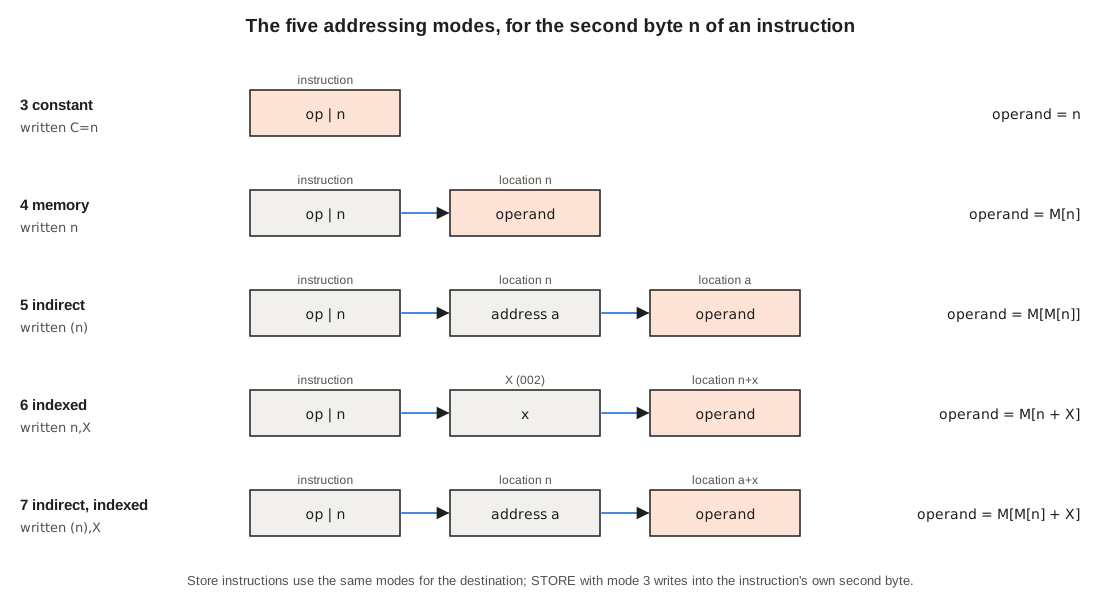
For STORE the same modes name the destination. “STORE A C=n” is not meaningless: “In Store Immediate instructions the data is stored in the second half of the instruction” (PR-4). With A = 321, the simulator shows “STORE A C=000” at 004 leaving 321 in byte 005 — the instruction overwrites its own operand, a legitimate way to plant a value in a later instruction. The bit instructions use only memory addressing, and the jumps use memory (called direct) or indirect.
6.5 The Instructions
6.5.1 ADD, SUB, LOAD, STORE
These work on A, B or X with any of the five modes (PR-5, PR-6). ADD and SUB put the result in the register and update its overflow and carry byte; LOAD and STORE copy without touching the flags. The P register advances by 2.
6.5.2 AND, OR, LNEG
These three work only on A (PR-7, PR-8). AND and OR combine the operand with A bit by bit; the Laboratory Exercises example is 063 AND 125 = 021 and 063 OR 125 = 167 (EX 22-2), both confirmed in the simulator. LNEG, “load complement”, loads A with the arithmetic negative of the operand, “the value obtained by subtracting from zero”: LNEG A C=005 gives 373. LNEG of −128 (200) gives −128 again; this overflow “is not detected nor is the A Register Overflow bit in location 201 altered”. There is no exclusive-OR and no bitwise NOT; the workbook shows how to make NOT from LNEG followed by ADD A C=377 (EX 22-3), and Volume 10 builds an exclusive-OR from AND, OR and LNEG.
The codes 31m (that is, 313 to 317) fall in this group but do nothing: they are a two-byte NOOP (PR-24 lists “Noop = 1” in the middle column). (The µKENBAK-1 replica’s firmware takes a different spare code, the one-byte NOOP 360, as the hook for its extensions; Volume 9.)
6.5.3 Jumps
There are four jumps (PR-9): JPD, jump direct; JPI, jump indirect; JMD, jump and mark direct; and JMI, jump and mark indirect. The first digit names the register to test, or 3 for unconditional; the middle digit is 4, 5, 6 or 7 for JPD, JPI, JMD, JMI; and the last digit is the condition:
Table 4 — There are four jumps (PR-9): JPD, jump direct; JPI, jump indirect; JMD, jump and mark direct; and JMI, jump and mark indirect. The first digit names the register to test, or 3 for unconditional; the middle digit is 4, 5, 6 or 7 for JPD, JPI, JMD, JMI; and the last digit is the condition
| Last digit | Condition | Symbol used in this series |
|---|---|---|
| 3 | non-zero | A!=0 |
| 4 | zero | A=0 |
| 5 | negative (b7 = 1) | A<0 |
| 6 | positive, including zero (b7 = 0) | A>=0 |
| 7 | positive non-zero | A>0 |
So 344 is “jump unconditionally, direct” — the commonest code in KENBAK-1 programs — and 044 is “jump if A is zero”. The manual adds a warning that the last digit must still be 3 to 7 even for an unconditional jump, or the byte is not a jump at all.
Jump and Mark is the KENBAK-1’s subroutine call. If the jump is taken, “the value p + 2 is stored in the target address prior to executing the instruction in the location following the target address” (PR-10). A subroutine therefore begins with a spare byte; the call writes the return address there and continues one byte further on; and the subroutine returns with an indirect jump through that byte, JPI UNC start. There is no stack, so a subroutine cannot call itself, and Volume 7 shows the mechanism at work.
6.5.4 Skips and bit setting
The SKP0 and SKP1 instructions test one bit of one byte in memory and skip the next two bytes if it is 0 (or 1) (PR-10). “Either a two byte instruction or two one byte instructions may be skipped.” SET0 and SET1 force one bit of a byte to 0 or 1 (PR-11). In both, the first digit gives the instruction (SET0 0, SET1 1, SKP0 2, SKP1 3), the middle digit gives the bit number, the last digit is 2, and the second byte is the address. So 372 377 is “skip if bit 7 of the input is a 1”, the usual way to wait for a button, and “SET1 0 200 / SET1 7 200” lights the two outer lamps (output 201), as the simulator shows. These two instructions are the only ones that work on a memory byte directly without passing it through a register.
6.5.5 Shifts and rotates
Shifts and rotates are one-byte instructions on A or B, by 1, 2, 3 or 4 places (PR-12). The first digit picks the kind (right shift 0, right rotate 1, left shift 2, left rotate 3); in the middle digit, 4 selects B, and the remaining value is the number of places, with 0 meaning 4; the last digit is 1. SFTL moves bits left and brings in zeros; SFTR moves them right but copies the sign bit, so that it divides a signed number by two (the manual’s table: c7 c6 … c1 becomes c7 c7 c6 … c1). ROTL and ROTR carry the bit that falls off one end round to the other. On A = 227 (10 010 111), the simulator gives:
Table 5 — Shifts and rotates are one-byte instructions on A or B, by 1, 2, 3 or 4 places (PR-12). The first digit picks the kind (right shift 0, right rotate 1, left shift 2, left rotate 3); in the middle digit, 4 selects B, and the remaining value is the number of places, with 0 meaning 4; the last digit is 1. SFTL moves bits left and brings in zeros; SFTR moves them right but copies the sign bit, so that it divides a signed number by two (the manual's table: c7 c6 … c1 becomes c7 c7 c6 … c1). ROTL and ROTR carry the bit that falls off one end round to the other. On A = 227 (10 010 111), the simulator gives
| Instruction | Result | |
|---|---|---|
| SFTL A 1 | 056 | 00 101 110: a zero enters at b0 |
| SFTR A 1 | 313 | 11 001 011: b7 is copied |
| SFTR A 4 | 371 | 11 111 001: the sign spreads |
| ROTL A 4 | 171 | 01 111 001: the two halves exchanged |
Shifts do not set the overflow and carry bytes. The workbook points out that “ADD A A” doubles A and records overflow and carry, which SFTL A 1 does not (EX 24-2; PR-15).
The sign-copying right shift matters for anyone running old programs on a replica: Mark Wilson’s Kenbak-uino firmware, which the µKENBAK-1 kit runs, filled right shifts with zeros until a correction in May 2021, and only then matched the original (Kenbakuino README, GitHub).
6.5.6 NOOP and HALT
A byte whose last digit is 0 is HALT if its top bit is 0 and NOOP if it is 1 (PR-13); the other bits are ignored, so 000 is HALT and 200 is NOOP. HALT stops the machine “at the end of this instruction”, with P already advanced to the next byte, so pressing Start carries on from where the program stopped. Many programs in Volumes 7 and 10 use HALT to show a result and wait.
6.6 Tricks That Come Free
Because A, B, X and P have addresses, the memory-addressed instructions double as register operations. The Programming Reference Manual lists them (PR-15, PR-16):
- Clear:
SUB A A,SUB B B,SUB X X. - Transfer:
LOAD B AorSTORE A Bcopies A into B, and so on for every pair. - Register arithmetic:
ADD A Bis A + B into A;SUB X Ais X − A into X. - Double with flags:
ADD A A, which sets carry from the old b7 and overflow if the original number “was larger than 63 or smaller than −64”. The simulator confirms both edges: 077 doubles cleanly, 100 overflows. - Computed jump:
STORE A P. “Storing a number n in the P Register under program control causes an unconditional branch or jump to location n + 2” — the + 2 because P is advanced after the instruction that wrote it. - Table look-up:
LOAD A (A)replaces A with the byte at the address A held. - Relative addressing:
(003),X— indirect indexed through P — addresses a byte X bytes beyond the current instruction.
6.7 Input and Output
Input and output are memory too (PR-17). The eight data buttons set bits in 377 whether the machine is running or halted; they only set bits, and the Clear button zeroes the byte. A program reads 377 like any other byte, or tests single bits of it with the skip instructions. Because the byte changes while the operator is still pressing buttons, the manual advises that “one of the bits should be used as an interlock signal”: the programs in Volumes 7 and 10 wait for bit 7 before they read the other seven. Output is 200: “A transfer of data to 200 is equivalent to the output of that data to the Console Data Lamps.”
6.8 The Front Panel
6.8.1 Lamps
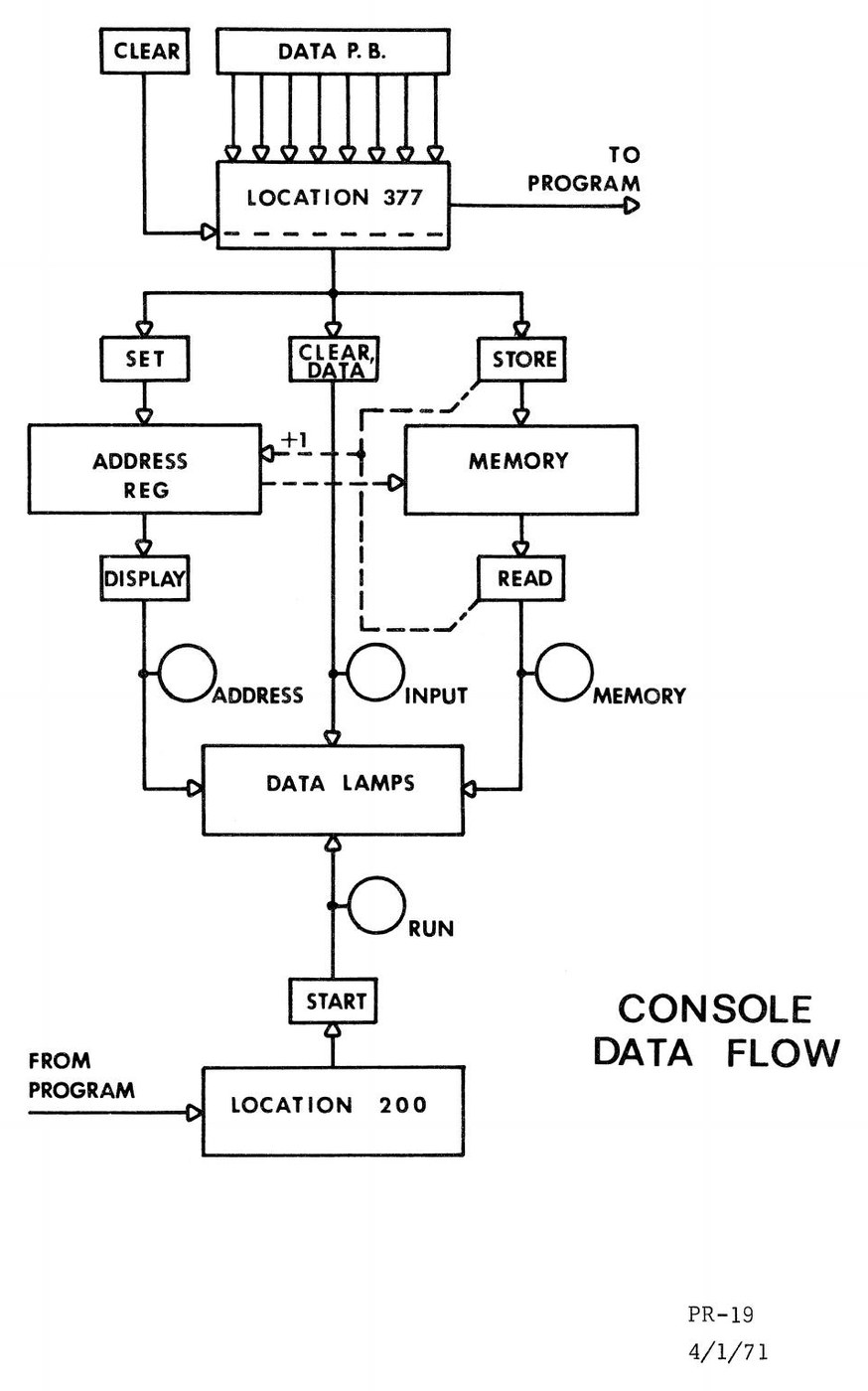
The eight data lamps show one of four things, and the four control lamps say which (PR-18 to PR-20). With Input lit they show 377, the byte being keyed in; with Address lit, the address register; with Memory lit, a byte just read; with Run lit, or none, the output byte 200. While data buttons are pressed during a run, the lamps “will predominantly display the contents of location 377”, with 200 showing “as a fainter light” behind.
6.8.2 Buttons
There are fifteen buttons, in five labelled groups across the panel:
- Data 7–0 set the bits of 377; Clear (Input) zeroes it.
- Display (Address) shows the address register; Set (Address) loads it from 377.
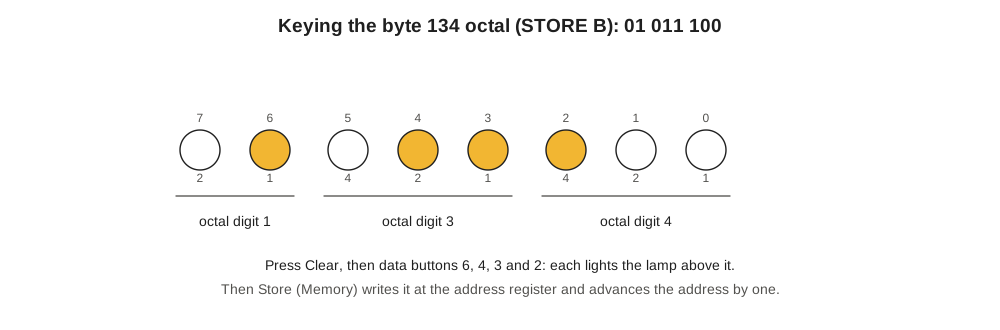
- Read (Memory) shows the byte at the address register and advances the address by one; Store (Memory) writes 377 into that byte and advances the address.
- Start and Stop (Run). Holding Stop while pressing and releasing Start executes “one and only one instruction” — the single step.
A toggle between the Address and Memory groups locks the memory against entry from the panel (LOCK) or unlocks it (UNL) (EX 1-3). Every lamp can be tested by holding a button: each data button lights its own lamp, Clear lights Input, Display lights Address, Read lights Memory and Start lights Run (PR-22). When power is first applied the memory holds random data and the control may be in an undefined state; the manual’s instruction is to press Start, and then Stop if the machine stays running (PR-18).
6.8.3 Loading and running a program
The manual’s own example (PR-23) loads a three-instruction counting program and lists every button press, 39 of them. Condensed:
Table 6 — The manual's own example (PR-23) loads a three-instruction counting program and lists every button press, 39 of them. Condensed
| Address | Contents | Symbolic |
|---|---|---|
| 003 | 004 | initial value of P |
| 004 | 103 | LOOP: ADD B C=1 |
| 005 | 001 | |
| 006 | 134 | STORE B OUTPUT |
| 007 | 200 | |
| 010 | 344 | JPD UNC LOOP |
| 011 | 004 |
The procedure is: power on; Start, Stop; Clear, key 003, Set (Address); then for each of the seven bytes Clear, key the byte, Store (Memory). At that point Display (Address) should show 012, the next address. To check the entry, Clear, key 003, Set, and press Read seven times, comparing each byte. Then Start. “This program adds 1 to the B Register, puts the value of B out to location 200, and hence the Data Lamps, and recycles or loops.” In the simulator, which presses the same 39 buttons in the same order, step 28 shows 012, steps 32–38 read back 004 103 001 134 200 344 004, and the lamps then count 001, 002, 003 and onward — at, by the timing model of Volume 3, about 160 counts a second.
Note that P must be loaded too. Location 003 is where the machine looks for the address of the next instruction, so loading a program always begins by storing its start address there.
6.9 The Whole Set on One Page
Table 7 — The Whole Set on One Page
| First byte | Instruction | Second byte |
|---|---|---|
| r o m (r = 0–2, o = 0–3, m = 3–7) | ADD, SUB, LOAD, STORE to A/B/X | operand by mode |
| 3 0 m / 3 2 m / 3 3 m | OR, AND, LNEG (A only) | operand by mode |
| 3 1 m | two-byte NOOP | ignored |
| r j c (j = 4–7, c = 3–7) | JPD, JPI, JMD, JMI on A/B/X; r = 3 unconditional | target |
| k b 2 (k = 0–3) | SET0, SET1, SKP0, SKP1 bit b | address |
| k n 1 | SFTR, ROTR, SFTL, ROTL; n = places (0 = 4), +4 for B | — |
| 0 x 0 / 1 x 0 (top bit 0 / 1) | HALT / NOOP | — |
Every one of the 256 possible first bytes is a valid instruction; the simulator’s self-test confirms that each disassembles to an instruction which assembles back to the same byte, apart from the don’t-care bits of HALT, NOOP and the unconditional jumps.
Next — Volume 7: Programming the KENBAK-1 — From Counting Lights to Subroutines. The workbook’s way in: a counter you can watch, a program that waits for a button, fifty numbers added by a program that rewrites its own instructions and then by one that uses the index register, and a multiply subroutine called with Jump and Mark — every listing in octal as keyed, and every result run in the simulator.
Comments (0)