KENBAK-1 · Volume 10
KENBAK-1 — Volume 10 — Programs to Run — Games, Patterns and Puzzles
Five programs to key into a KENBAK-1 or a replica — a bouncing light, Kill the Bit, the Fibonacci numbers, every prime below 256, and a game of Hi-Lo — each in octal as keyed, each explained line by line, and each run in the series' simulator with the lamps it lights
10.1 About This Volume
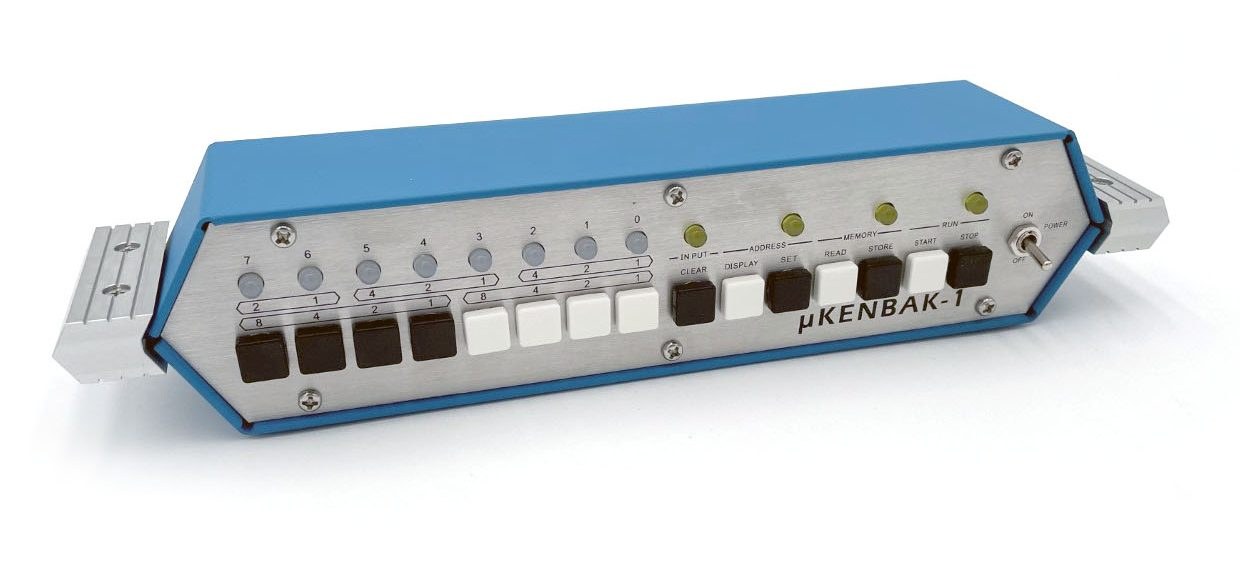
A KENBAK-1 has eight lamps for output and eight buttons for input. Everything a program shows must be shown in those lamps, and everything it is told must come through those buttons. This volume is a small collection of programs that make the most of that: two that make patterns, one that is a game of reflexes, two that compute something worth seeing, and one guessing game in which the lamps answer back.
Each program is given in octal as keyed: the address, the byte to store there, and the symbolic form in the notation of Volume 6. Every listing was produced by the series’ assembler and every program was run in the series’ simulator, 03-outputs/tools/kenbak_sim.py; the programs and the scripted runs are in kenbak_programs.py, and its output file programs_output.txt holds everything quoted here. Where a program waits for the player, the simulator presses the buttons on a script, and the script is described with the run. Times “on the original” come from the simulator’s timing model of Volume 3 and are estimates.
10.1.1 How to key a program
Every program starts at address 004, and its start address must also be stored in P, at 003. The procedure is the original’s (Volume 6): power on; Start, then Stop; Clear, key 003, Set (Address); Clear, key 004, Store (Memory); then for each byte of the listing in order, Clear, key the byte, Store. Read it all back from 003 before pressing Start. On a µKENBAK-1 (Volume 9), Clear plus Store first erases memory and sets P to 004 and the address to 004, which saves a step, and a finished program can be saved to the replica’s EEPROM with a data key plus Store.
10.1.2 A note on speed
Two of these programs contain delay loops whose length is set by a single byte called SPEED. On an original machine, by the timing model, the values given make the patterns move at a few steps a second. A replica may run at a different rate — the µKENBAK-1’s firmware adds an adjustable delay to every instruction (Volume 9) — so SPEED is the byte to change: a larger value is slower.
10.2 A Light That Bounces
The simplest pleasing program for a row of lamps is a single light that runs from one end to the other and back. This one rotates A left until the lit bit reaches lamp 7, then right until it reaches lamp 0, and calls a delay subroutine between steps.
Loc  Contents  Label   Symbolic
003  004               P: start at 004
004  023       START   LOAD A C=001
005  001
006  034       LEFT    STORE A OUTPUT
007  200
010  364               JMD UNC DELAY
011  030
012  311               ROTL A 1
013  047               JPD A>0 LEFT     until the bit reaches lamp 7
014  006
015  034       RIGHT   STORE A OUTPUT
016  200
017  364               JMD UNC DELAY
020  030
021  111               ROTR A 1
022  302               SKP1 0 A         back at lamp 0?
023  000
024  344               JPD UNC RIGHT
025  015
026  344               JPD UNC LEFT
027  006
030  000       DELAY   (mark)
031  224               LOAD X SPEED
032  041
033  213       DLOOP   SUB X C=001
034  001
035  243               JPD X!=0 DLOOP
036  033
037  354               JPI UNC DELAY
040  030
041  040       SPEED   040
How it works. The leftward run uses a jump condition: after ROTL, A is positive and non-zero until the bit arrives in b7, when A becomes 200 — negative — and “JPD A>0 LEFT” falls through. The rightward run cannot use the same trick, because nothing about A’s sign changes when the bit reaches b0, so it tests the bit directly: “SKP1 0 A” (302 000) skips the next jump when bit 0 of A — address 000 — is a 1, landing on “JPD UNC LEFT”. The DELAY subroutine counts X down from SPEED; it uses only X, so A is preserved across the call. It is entered with Jump and Mark and left through its mark with JPI, exactly as in Volume 7.
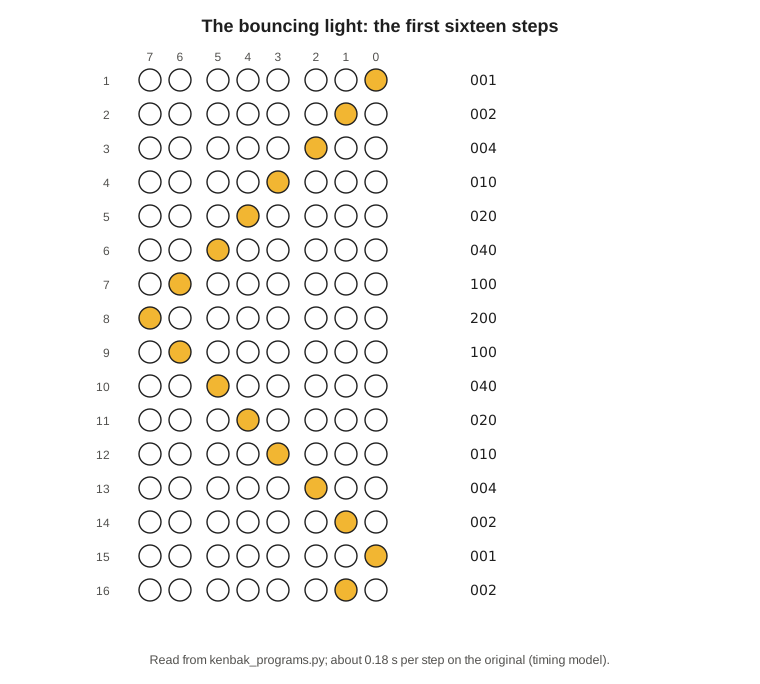
The run. In the simulator the lamps step 001, 002, 004, 010, 020, 040, 100, 200, 100, 040, 020, 010, 004, 002, 001, 002 and on, without repeating the end lamps. With SPEED at 040 (32), the timing model gives about 0.18 seconds per step on an original, or a complete sweep there and back in under three seconds.
Variations. Change the starting value at 005 to 003 or 007 and a bar of two or three lamps bounces instead. Change ROTL and ROTR (311 and 111) to the B register (351 and 151) and use B throughout, and A is free for something else.
10.3 Kill the Bit
Kill the Bit is the most famous front-panel game in computing. Dean McDaniel wrote it for the MITS Altair 8800 in May 1975, in a couple of dozen bytes of 8080 code: a lit bit runs across the panel’s lamps, and the player tries to switch it off by flipping the switch beneath it at the moment it is lit; a switch flipped at the wrong moment adds a bit instead (altairclone.com, “Kill the Bit” listing). The KENBAK-1 predates the Altair by four years and the game by nearly as much, but its panel suits the game well, with one difference: its data buttons do not stay down. A press sets a bit in the input byte, 377, which stays set until the program clears it — so the program reads 377 once per step and then wipes it.
The game’s arithmetic is an exclusive-OR: each button pressed flips the matching bit of the pattern. The KENBAK-1 has no exclusive-OR instruction, so the program builds one from what it has. For pattern p and input i, p XOR i = (p OR i) AND NOT (p AND i), and NOT x is −x − 1, which is LNEG followed by subtracting one.
Loc  Contents  Label   Symbolic
003  004               P: start at 004
004  023       START   LOAD A C=001     one bit to begin
005  001
006  034               STORE A PAT
007  074
010  023               LOAD A C=000
011  000
012  034               STORE A INPUT
013  377
014  024       LOOP    LOAD A PAT
015  074
016  034               STORE A OUTPUT   show the pattern
017  200
020  364               JMD UNC DELAY    the player's chance
021  062
022  024               LOAD A PAT       PAT xor INPUT:
023  074
024  324               AND A INPUT        PAT and IN
025  377
026  334               LNEG A A           -(PAT and IN)
027  000
030  013               SUB A C=001        -x - 1 = not x
031  001
032  034               STORE A T
033  075
034  024               LOAD A PAT
035  074
036  304               OR A INPUT         PAT or IN
037  377
040  324               AND A T            ... and not (PAT and IN)
041  075
042  311               ROTL A 1         move the pattern one lamp left
043  034               STORE A PAT
044  074
045  123               LOAD B C=000
046  000
047  134               STORE B INPUT    forget the buttons
050  377
051  043               JPD A!=0 LOOP
052  014
053  023       WIN     LOAD A C=377     every bit killed
054  377
055  034               STORE A OUTPUT
056  200
057  000               HALT
060  344               JPD UNC START    Start plays again
061  004
062  000       DELAY   (mark)
063  224               LOAD X SPEED
064  073
065  213       DLOOP   SUB X C=001
066  001
067  243               JPD X!=0 DLOOP
070  065
071  354               JPI UNC DELAY
072  062
073  100       SPEED   100
074  000       PAT
075  000       T
Two instructions show off the KENBAK-1’s registers-in-memory design. “LNEG A A” (334 000) loads A with the negative of the byte at address 000 — that is, of A itself. “LOAD B C=000 / STORE B INPUT” clears the input byte from the program, so that the player never needs the Clear button.
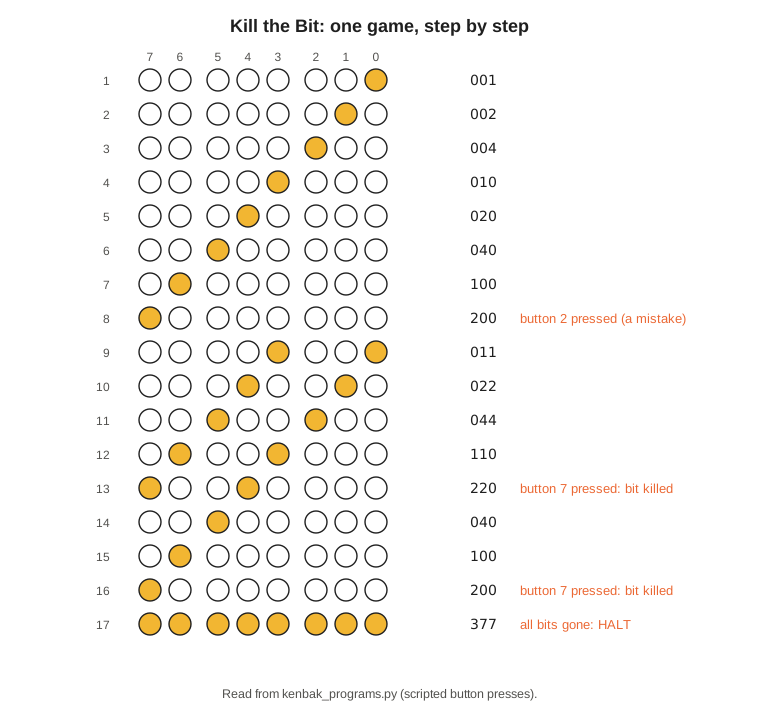
The run. The simulator plays one game on a script. It lets the bit travel once from lamp 0 to lamp 7; presses button 2 by mistake while lamp 7 is lit, which adds a second bit; and then presses button 7 each time a bit reaches lamp 7. Pattern by pattern:
 1  ○○ ○○○ ○○●   001
 2  ○○ ○○○ ○●○   002
 3  ○○ ○○○ ●○○   004
 4  ○○ ○○● ○○○   010
 5  ○○ ○●○ ○○○   020
 6  ○○ ●○○ ○○○   040
 7  ○● ○○○ ○○○   100
 8  ●○ ○○○ ○○○   200   button 2 pressed (a mistake)
 9  ○○ ○○● ○○●   011
10  ○○ ○●○ ○●○   022
11  ○○ ●○○ ●○○   044
12  ○● ○○● ○○○   110
13  ●○ ○●○ ○○○   220   button 7 pressed: bit killed
14  ○○ ●○○ ○○○   040
15  ○● ○○○ ○○○   100
16  ●○ ○○○ ○○○   200   button 7 pressed: bit killed
17  ●● ●●● ●●●   377   all bits gone: HALT
Step 9 shows the rules at work: the pattern 200 with button 2 pressed became 204, and the left rotation carried the top bit round to lamp 0, giving 011. With SPEED at 100 (64), the timing model gives about a third of a second per step on an original — a fair game. Lower SPEED to make it harder.
10.4 Fibonacci Until the Byte Overflows
The Fibonacci numbers — 1, 1, 2, 3, 5, 8, each the sum of the two before — grow fast enough to run out of a byte in a dozen steps, which makes them a good way to watch the KENBAK-1’s carry at work. The program shows one number per press of Start, and when the next sum no longer fits in eight bits it lights every lamp and stops.
Loc  Contents  Label   Symbolic
003  004               P: start at 004
004  123       START   LOAD B C=000     B = the last number
005  000
006  023               LOAD A C=001     A = this number
007  001
010  034       LOOP    STORE A OUTPUT
011  200
012  000               HALT             press Start for the next one
013  034               STORE A T
014  034
015  004               ADD A B          next = this + last
016  001
017  124               LOAD B T         last = this
020  034
021  312               SKP1 1 201       carry out of A?
022  201
023  344               JPD UNC LOOP
024  010
025  023               LOAD A C=377     overflow: all lamps
026  377
027  034               STORE A OUTPUT
030  200
031  000               HALT
032  344               JPD UNC START
033  004
034  000       T
How it works. “ADD A B” (004 001) adds register B to register A by B’s address, and updates the overflow-and-carry byte for A at 201. LOAD does not touch 201, so after “LOAD B T” the carry from the addition is still there to be tested: “SKP1 1 201” (312 201) skips the jump back when bit 1 — the carry — is set. The numbers are treated as unsigned, which is why the program tests carry rather than overflow; overflow (bit 0) would trip a step earlier, at 89 + 55 = 144, the first sum above 127.
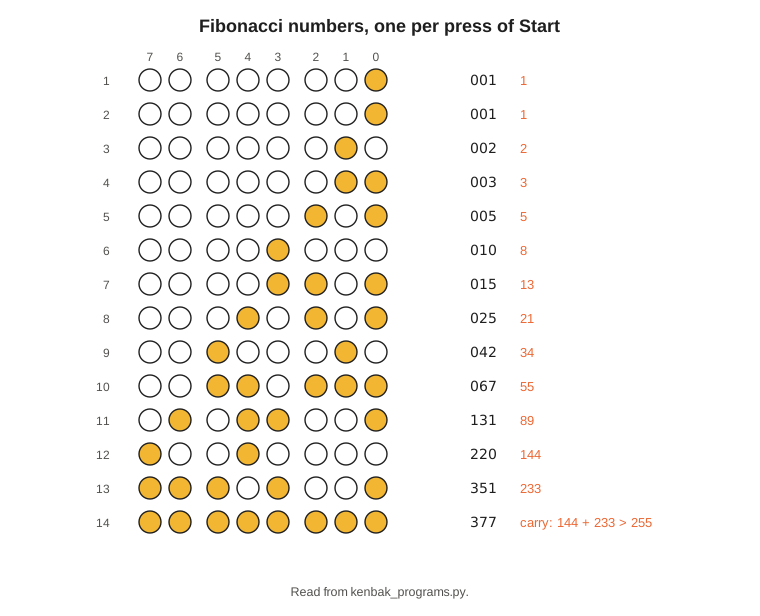
The run. Successive presses of Start show:
001 (1)   001 (1)   002 (2)   003 (3)   005 (5)   010 (8)   015 (13)
025 (21)  042 (34)  067 (55)  131 (89)  220 (144) 351 (233) 377 (overflow)
The fourteenth press lights all eight lamps: 144 + 233 = 377 decimal does not fit in a byte.
10.5 Every Prime Below 256
This is the longest-running program in the volume, and the most satisfying to leave on a desk: it finds every prime number that fits in a byte, halting to show each one, and continues when Start is pressed. It uses trial division: for each number N from 2 upward, try the divisors D = 2, 3, 4 … while D × D is no larger than N. If none divides N, N is prime.
The KENBAK-1 has neither multiply nor divide, so both are done the long way. D × D is kept in a byte SQ and updated by adding, since (D + 1)² = D² + 2D + 1. “Does D divide N?” is answered by subtracting D from N repeatedly: if the remainder reaches exactly zero, D divides N; if it goes below zero first, it does not. “Below zero” here means a borrow, read from the carry bit at 201, because N and SQ are unsigned numbers up to 255.
Loc  Contents  Label   Symbolic
003  004               P: start at 004
004  023       START   LOAD A C=002
005  002
006  034               STORE A N
007  114
010  023       NEWN    LOAD A C=002     D = 2
011  002
012  034               STORE A D
013  115
014  023               LOAD A C=004     SQ = D x D = 4
015  004
016  034               STORE A SQ
017  116
020  024       TRY     LOAD A N
021  114
022  014               SUB A SQ
023  116
024  212               SKP0 1 201       borrow means N < D x D ...
025  201
026  344               JPD UNC PRIME    ... so N is prime
027  074
030  024               LOAD A N         A = N, less D until it goes below zero
031  114
032  014       MOD     SUB A D
033  115
034  312               SKP1 1 201
035  201
036  344               JPD UNC MODC
037  042
040  344               JPD UNC NEXTD    went below zero: D does not divide N
041  046
042  043       MODC    JPD A!=0 MOD
043  032
044  344               JPD UNC COMP     exactly zero: D divides N
045  101
046  024       NEXTD   LOAD A SQ        (D+1)^2 = D^2 + 2D + 1
047  116
050  004               ADD A D
051  115
052  004               ADD A D
053  115
054  003               ADD A C=001
055  001
056  034               STORE A SQ
057  116
060  024               LOAD A D
061  115
062  003               ADD A C=001
063  001
064  034               STORE A D
065  115
066  013               SUB A C=020      D reached 16: no divisor found
067  020
070  044               JPD A=0 PRIME
071  074
072  344               JPD UNC TRY
073  020
074  024       PRIME   LOAD A N
075  114
076  034               STORE A OUTPUT
077  200
100  000               HALT             show the prime; Start continues
101  024       COMP    LOAD A N
102  114
103  003               ADD A C=001
104  001
105  034               STORE A N
106  114
107  043               JPD A!=0 NEWN    until N wraps from 377 to 000
110  010
111  034               STORE A OUTPUT
112  200
113  000               HALT
114  000       N
115  000       D
116  000       SQ
One guard is needed. For the largest primes, D reaches 16, and 16 × 16 = 256 does not fit in a byte: SQ would wrap to 0 and the test would go wrong. Since a composite number below 256 always has a divisor smaller than 16, the program stops trying at D = 16 (020 octal) and declares N prime. Every prime 227 and above passes this way.
The run. The simulator presses Start after each halt and collects all 54 primes below 256, 2, 3, 5, 7, 11 … 241, 251, matching the list computed independently in Python. The last three, 239, 241 and 251, light ●● ●○● ●●● (357), ●● ●●○ ○○● (361) and ●● ●●● ○●● (373). After 251 the program carries on to 255, finds no more primes, lets N wrap to zero, darkens the lamps and halts. The whole run takes 145,994 instructions, which by the timing model is about three and a half minutes of computing on an original KENBAK-1, not counting the time spent reading each prime and pressing Start. Most of it is spent in the subtraction loop, dividing the larger numbers by 2 and 3 one subtraction at a time.
10.6 Hi-Lo: A Guessing Game
The last program plays a game. The KENBAK-1 thinks of a number from 0 to 127; the player guesses; the lamps say whether the guess was too high, too low or right. The player keys a guess on buttons 0–6 and presses button 7 to enter it, using the interlock of Volume 7.
A computer with no clock and no random-number generator still has one source of unpredictability: the player. While the player keys the first guess, the program spins the X register round as fast as it can; when button 7 is pressed, the low seven bits of X become the secret. On an original machine, by the timing model, X goes round about once every 1.3 seconds, while the first guess takes several seconds to key; the exact moment of the press decides the secret, and no player can time that to a fraction of a second.
Loc  Contents  Label   Symbolic
003  004               P: start at 004
004  223       START   LOAD X C=000
005  000
006  023               LOAD A C=000
007  000
010  034               STORE A INPUT
011  377
012  034               STORE A COUNT
013  116
014  034               STORE A OUTPUT
015  200
016  203       SPIN    ADD X C=001      the secret spins while the first guess is keyed
017  001
020  372               SKP1 7 INPUT
021  377
022  344               JPD UNC SPIN
023  016
024  234               STORE X SECRET
025  117
026  024               LOAD A SECRET
027  117
030  323               AND A C=177      0 to 127
031  177
032  034               STORE A SECRET
033  117
034  344               JPD UNC CHECK
035  042
036  372       GUESS   SKP1 7 INPUT     wait for button 7
037  377
040  344               JPD UNC GUESS
041  036
042  024       CHECK   LOAD A COUNT
043  116
044  003               ADD A C=001      count the guesses
045  001
046  034               STORE A COUNT
047  116
050  024               LOAD A INPUT
051  377
052  323               AND A C=177      drop the interlock bit
053  177
054  123               LOAD B C=000
055  000
056  134               STORE B INPUT    clear for the next guess
057  377
060  014               SUB A SECRET     guess - secret
061  117
062  044               JPD A=0 RIGHT
063  102
064  045               JPD A<0 LOW
065  074
066  023               LOAD A C=017     too high: the right-hand lamps
067  017
070  034               STORE A OUTPUT
071  200
072  344               JPD UNC GUESS
073  036
074  023       LOW     LOAD A C=360     too low: the left-hand lamps
075  360
076  034               STORE A OUTPUT
077  200
100  344               JPD UNC GUESS
101  036
102  023       RIGHT   LOAD A C=377
103  377
104  034               STORE A OUTPUT
105  200
106  000               HALT
107  024               LOAD A COUNT     Start shows the number of guesses
110  116
111  034               STORE A OUTPUT
112  200
113  000               HALT
114  344               JPD UNC START
115  004
116  000       COUNT
117  000       SECRET
How it works. The comparison is a subtraction followed by two jumps on A: zero means right, negative means the guess was low. Because both numbers are between 0 and 127, their difference always lies between −127 and +127 and its sign is reliable; that is why the secret and the guesses are kept to seven bits. The lamp signals point the way to go: the four left-hand lamps (360) mean “aim higher”, the four right-hand lamps (017) mean “aim lower”.
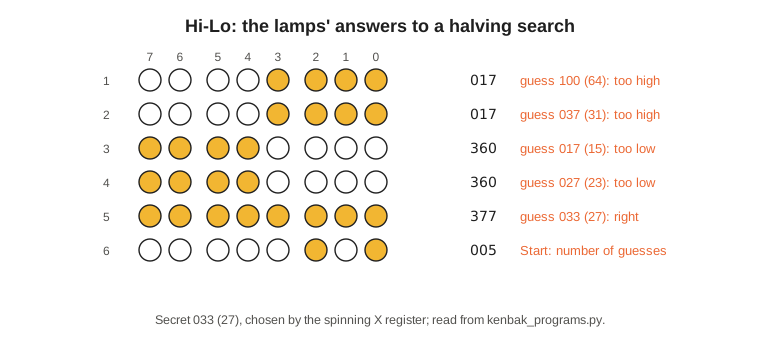
The run. In the simulator the program runs for 1,234 instructions while the “player” keys the first guess, which fixes the secret at 033 (27). The scripted player then halves the range each time, as a sensible human would:
guess 100 (64)   ○○ ○○● ●●●   too high
guess 037 (31)   ○○ ○○● ●●●   too high
guess 017 (15)   ●● ●●○ ○○○   too low
guess 027 (23)   ●● ●●○ ○○○   too low
guess 033 (27)   ●● ●●● ●●●   right
Start            ○○ ○○○ ●○●   005: five guesses
Halving always finds a number from 0 to 127 in seven guesses or fewer, so a score of seven is par.
10.7 Writing More
These five programs take between 25 and 76 bytes each — a tenth to a third of the KENBAK-1’s memory — and there is room for much more: a binary clock, built with a delay loop calibrated against a watch; a reaction timer that counts while waiting for a button; a sorting program, which the Laboratory Exercises set as Exercise 28; or a two-player game in which the buttons are split four and four. The method is the one Kenbak Corporation taught in 1971 and Volume 7 follows: write it symbolically, assign locations from 004 with constants well away from the code, assemble it from the coding table, key it, read it back, and single-step it when it misbehaves. The simulator and its assembler in 03-outputs/tools/ accept programs in the notation used throughout this series, and will print the octal to key.
Back to the start — Volume 1: KENBAK-1 — The First Personal Computer. The series began with a blue box of lights and switches, a 1971 advertisement and a 1986 museum contest; with the hardware, the instruction set and a working replica now in hand, Volume 1’s account of what the KENBAK-1 was, and why it is called the first personal computer, reads differently.
Comments (0)