KENBAK-1 · Volume 7
KENBAK-1 — Volume 7 — Programming the KENBAK-1 — From Counting Lights to Subroutines
How Kenbak Corporation's workbook taught programming to people who had never seen a computer, and the same road walked again: counting in the lamps, writing a program on a coding sheet, slowing a loop down, waiting for a button, adding fifty numbers two ways, and calling a subroutine with Jump and Mark — every listing in octal as keyed, every result run in the simulator
7.1 About This Volume
The KENBAK-1 was sold to schools and individuals as a way to learn programming, and it came with the means to do it: the Programming Reference Manual summarised in Volume 6 and, for beginners, a workbook of Laboratory Exercises that starts from “Every computer has a memory in which numbers are stored” and ends, thirty exercises later, with sorting, subroutines and a date-entry program. This volume follows the same road. It begins with the workbook’s first programs, shows how a KENBAK-1 program was written on paper and then keyed in, and builds up through delays, input, loops over data, decisions and subroutines.
Every program here is given in octal as keyed — address, contents, then the symbolic form — and every one was assembled and run in the series’ simulator, 03-outputs/tools/kenbak_sim.py. The programs that are new to this volume are in kenbak_programs.py beside it, whose output file programs_output.txt holds the listings and runs quoted below. The workbook’s own programs were checked in the simulator’s self-test against the answers the workbook gives. Instruction names and notation follow Volume 6; lamps are drawn as ● (lit) and ○ (dark), grouped 2–3–3 as on the panel.
7.2 The Workbook
The Laboratory Exercises (Kenbak Corporation, 1971; scan at Adwater & Stir) is a workbook of about 150 pages, “intended for independent work”. Its preface states the method: “Ideas and concepts are introduced in small increments and are interspersed with actual experience on the computer. Emphasis is placed on the principles of self-discovery, immediate feedback, and rewards.” It asks questions and leaves blanks for the answers; it gives the reader a program to load before it explains what any of the numbers mean; and it holds back features until the reader has felt the need for them. Immediate (constant) addressing does not appear until Exercise 19, after the reader has written many programs that keep their constants in separate bytes; indexed addressing waits for Exercise 21, and subroutines for Exercise 25. Each new feature arrives with the reminder that it “did not allow us to do anything that we couldn’t do before, but [it] made it easier”.
The first exercise is about nothing but memory: storing a byte, reading it back, and noticing that reading does not destroy it. One experiment asks the reader to store numbers, switch the power off and on, and read them again, and asks “Has the data changed? Do you know why?” — the shift-register memory of Volume 3 forgets everything without power. Another asks the reader to store 000 at location 377 and read it back, and explains only that “This is a special location and we will learn more about it later.”
7.3 A First Program: Counting in the Lamps
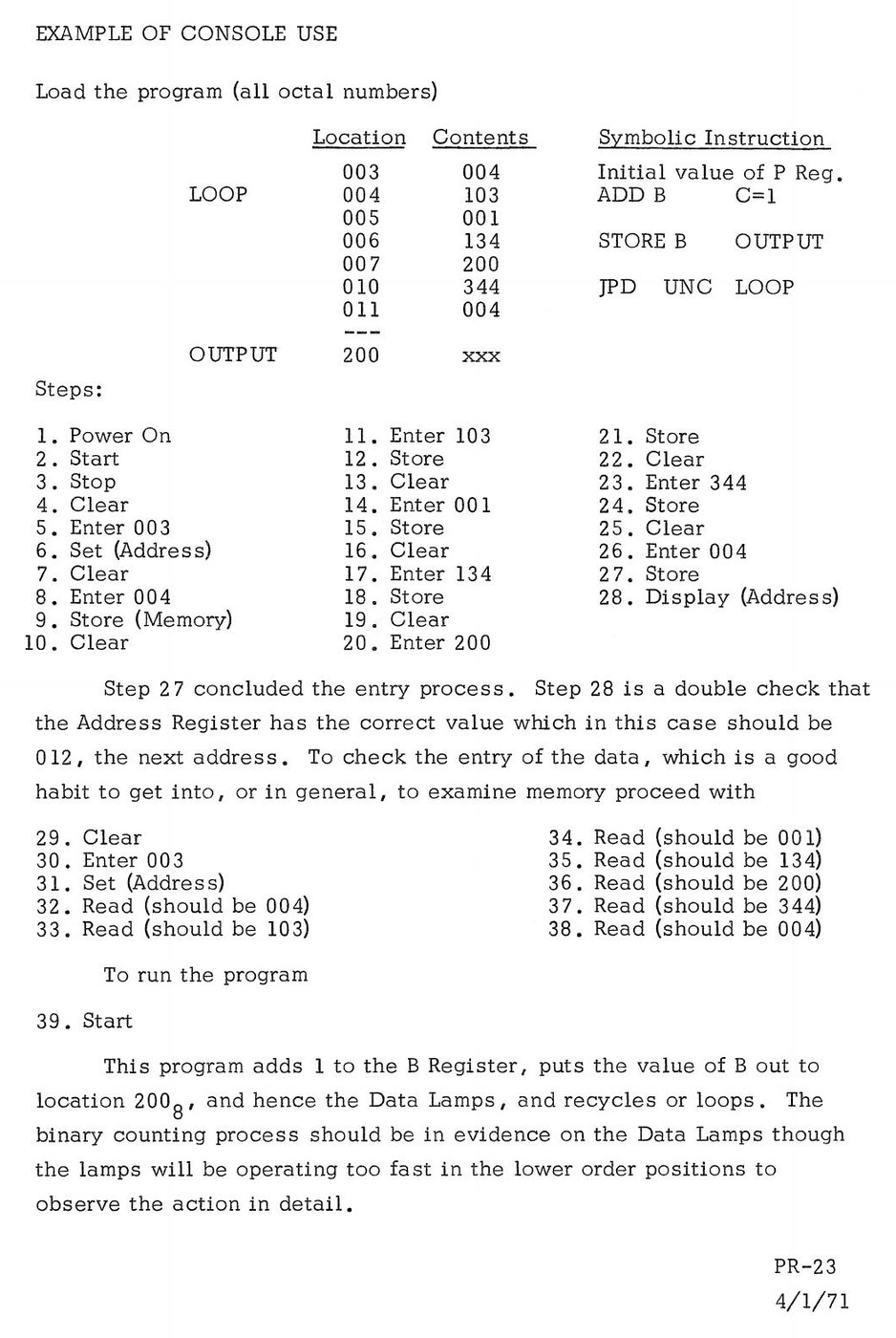
In Exercise 2 the reader stores seven bytes, starting at address 003, and is told to press Start. “The output lights should have started blinking.” Only in Exercise 3 does the workbook reveal that “The numbers you stored in the memory were instructions or commands to the computer”, and it gives a variant that halts after each pass, so that the reader can watch it count:
Loc  Contents  Symbolic
003  004       P: start at 004
004  023       LOAD A C=000      A = 0
005  000
006  034       STORE A OUTPUT    show A in the lamps
007  200
010  000       HALT              wait for Start
011  003       ADD A C=001       A = A + 1
012  001
013  344       JPD UNC 006       back to the STORE
014  006
The workbook lists these as binary, since it has not yet introduced octal: the first byte is “00 000 100”. The reader presses Start repeatedly: “The output lights should all be out”, then “00 000 00●”, then “00 000 0●0”. In the simulator, four presses of Start show:
Start 1   ○○ ○○○ ○○○   000
Start 2   ○○ ○○○ ○○●   001
Start 3   ○○ ○○○ ○●○   002
Start 4   ○○ ○○○ ○●●   003
The exercise’s real lesson is binary counting, which the reader is asked to discover as a rule about the lamps: “Find the first light at or from the right hand end that is Off. This light will change to On. All of the lights from the right hand end up to this light but not including this light will change to Off.”
The continuous version — Exercise 2’s program, and the one the Programming Reference Manual uses as its example of console use (Volume 6) — runs too fast to follow: in the timing model of Volume 3, the lowest lamp changes about 160 times a second.
7.4 Writing a Program on Paper
By Exercise 12 the workbook has the reader writing programs, and it teaches a method that would be recognised by any assembly-language programmer of the period. A program is first written symbolically, with names for locations, on a coding sheet whose columns are Loc, Data, Symbolic Address, Contents and Comments. Kenbak printed pads of these sheets, with the whole instruction code table down the left margin.
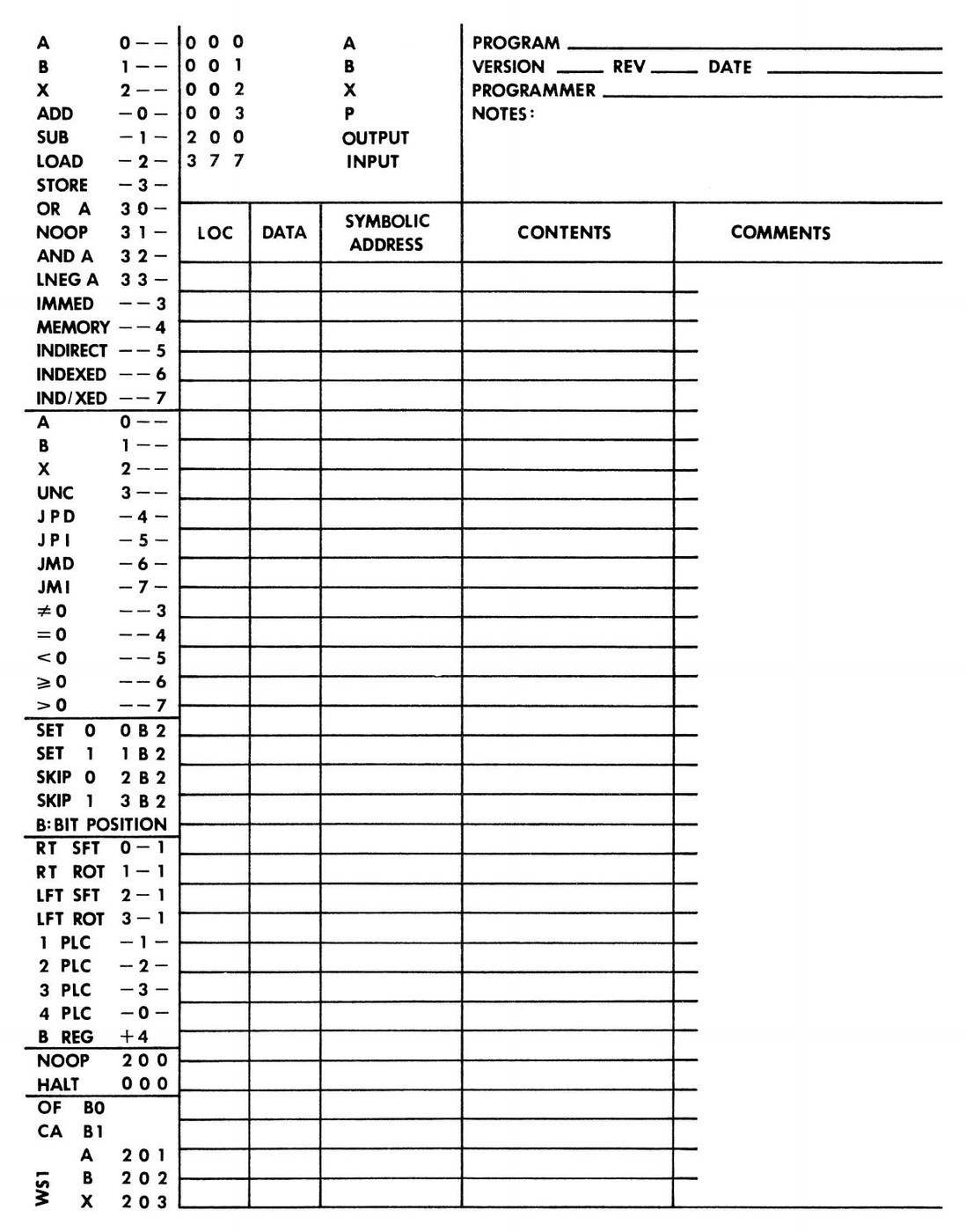
Then locations are assigned. The workbook’s advice is concrete: “Except for the reserved locations 000, 001, 002, 003 and 200, 201, 202, 203 and 377, we can make most any choice for the first instruction. Location 004 is a very good choice.” It suggests putting constants well away from the code (“We’ll assign ONE beginning at 204. Then if we add more instructions to the program, we won’t have to move ONE”). Finally the octal codes are filled in from the table, the addresses from the assignments, and the program is keyed in with Clear, the data buttons and Store, one byte at a time. The series’ simulator includes a small assembler that does exactly this bookkeeping, using the manual’s notation; every listing below is its output.
7.5 Slowing Down: A Delay Loop
A program that shows something in the lamps must usually waste time on purpose. The simplest way is a loop that counts a register round from 0 back to 0:
Loc  Contents  Label   Symbolic
004  103       LOOP    ADD B C=001      count in B
005  001
006  134               STORE B OUTPUT   show it
007  200
010  223               LOAD X C=000     then waste time:
011  000
012  203       WAIT    ADD X C=001      X runs 1, 2 ... 377, 0
013  001
014  243               JPD X!=0 WAIT    256 passes
015  012
016  344               JPD UNC LOOP
017  004
003  004               (P: start at 004)
The inner loop is two instructions, run 256 times. The simulator shows the lamps stepping through 001, 002, 003, 004 … with 430 instructions per count; the timing model of Volume 3 puts that at about 1.3 seconds per count on an original machine. On a replica the figure depends on its firmware’s speed setting (Volume 9), and the length of a delay loop is the one thing that will usually need adjusting when a program moves from one KENBAK to another.
7.6 Listening to the Buttons
The data buttons write into location 377 even while a program runs, so a program can read them at any time. The difficulty is knowing when the operator has finished keying a number. The Programming Reference Manual gives the answer: “If the input data is not to be used until the formation or entry is completed, one of the bits should be used as an interlock signal.” The program below keeps a running total. The operator keys a number from 0 to 127 on buttons 0–6, and then presses button 7 to say “enter”:
Loc  Contents  Label   Symbolic
004  123       START   LOAD B C=000     running total
005  000
006  134               STORE B OUTPUT
007  200
010  134               STORE B INPUT    clear the input register
011  377
012  372       WAIT    SKP1 7 INPUT     button 7 pressed? then skip the jump
013  377
014  344               JPD UNC WAIT
015  012
016  024               LOAD A INPUT
017  377
020  323               AND A C=177      drop the interlock bit
021  177
022  104               ADD B A          total = total + entry
023  000
024  134               STORE B OUTPUT
025  200
026  023               LOAD A C=000
027  000
030  034               STORE A INPUT    clear for the next entry
031  377
032  344               JPD UNC WAIT
033  012
Four things in it recur in every interactive KENBAK-1 program. The wait is a skip on a bit (372 377) followed by a jump back (344 012): two instructions that loop until bit 7 of the input is a 1. The interlock bit is removed with AND A C=177. “ADD B A” is a register-to-register addition: memory addressing with address 000, which is A. And the program clears 377 itself by storing zero there, so the operator does not have to press Clear.
In the simulator, entering 005, then 014, then 144 (5, 12 and 100 decimal), each followed by button 7, gives totals:
after 005 + 7    ○○ ○○○ ●○●   005   (5)
after 014 + 7    ○○ ○●○ ○○●   021   (17)
after 144 + 7    ○● ●●○ ●○●   165   (117)
and between the number keys and button 7 the lamps do not change — the program is still waiting.
7.7 Loops Over Data: Fifty Numbers, Two Ways
7.7.1 The workbook’s way: a program that rewrites itself
Exercise 14 sets a problem: fifty small numbers — “the number of runs that a baseball team scored in 50 games” — are stored at locations 204 to 265 octal. Add them up. Before it has introduced indirect or indexed addressing, the workbook solves it with self-modifying code: an ADD instruction whose address byte the program increments on each pass. “After the computer has done the second instruction above, do you think it could add 1 to the address in this instruction?” Assembled from the workbook’s symbolic listing (EX 14-6), with the codes of EX 14-2:
Loc  Contents  Label   Symbolic
004  024       BEGIN   LOAD A K204
005  043
006  034               STORE A ADDR     reset the address in the ADD
007  013
010  024               LOAD A ZERO
011  044
012  004       LOOP    ADD A 204        ADDR is the byte at 013
013  204
014  034               STORE A SAVESUM
015  045
016  024               LOAD A ADDR      form next address
017  013
020  004               ADD A ONE
021  046
022  034               STORE A ADDR
023  013
024  014               SUB A K266       last address?
025  047
026  044               JPD A=0 END
027  034
030  024               LOAD A SAVESUM   restore A
031  045
032  344               JPD UNC LOOP
033  012
034  024       END     LOAD A SAVESUM
035  045
036  034               STORE A OUTPUT
037  200
040  000               HALT
041  344               JPD UNC BEGIN
042  004
043  204       K204
044  000       ZERO
045  000       SAVESUM
046  001       ONE
047  266       K266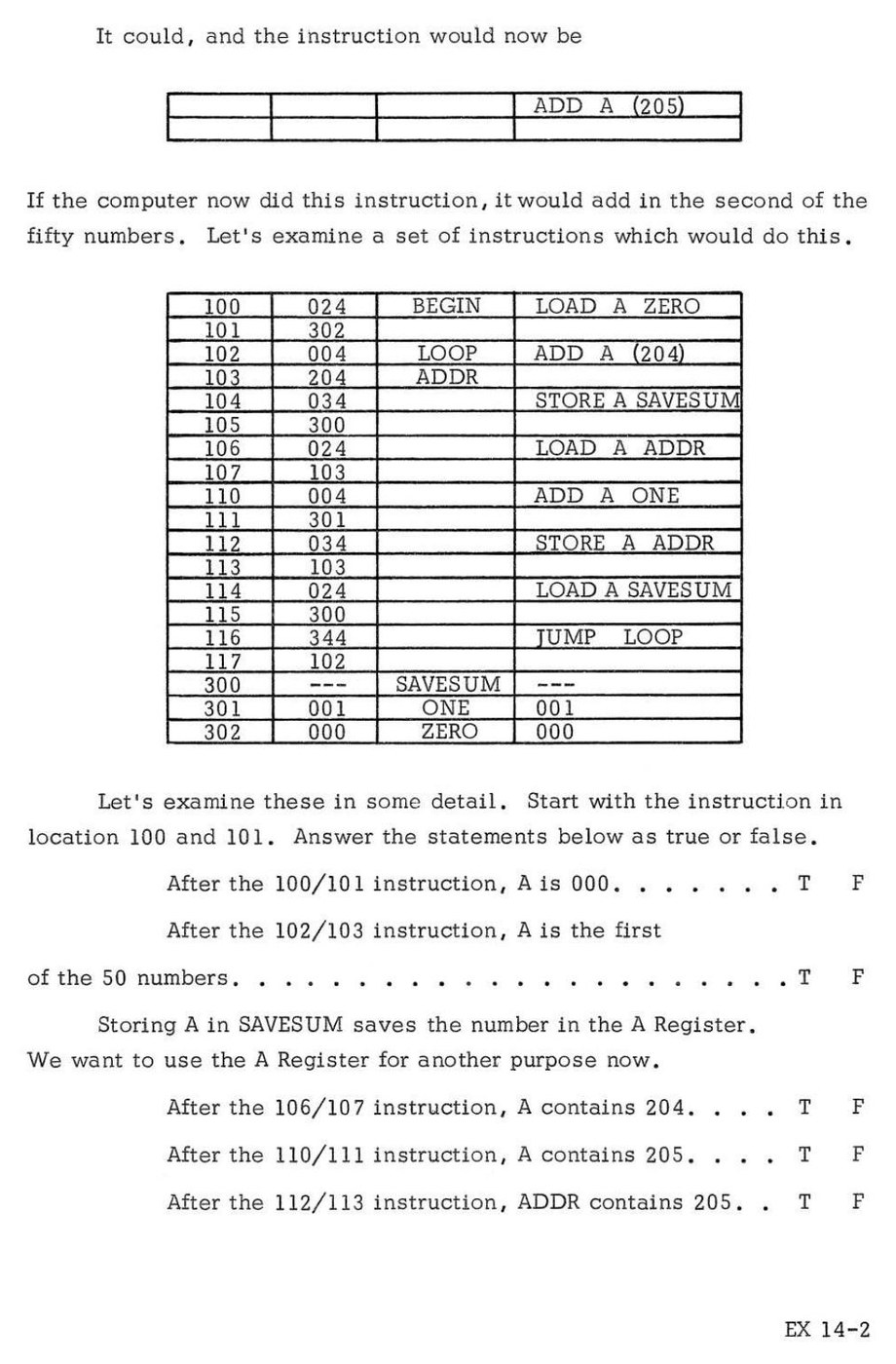
The workbook supplies test data — “00000 11111 22222 33333 44444 55555 66666 77777 88888 99999” — and the answer: “The correct answer is 225 (= 341 octal).” In the simulator the program halts with the lamps showing ●● ●○○ ○○●, 341. The workbook then asks the reader to change the five 0s to 9s: “The correct answer is now 270 which is equal to octal 416. What answer does the computer give you? Can you show the octal number 416 at one time in the lights?” The simulator shows ○○ ○○● ●●○, 016 — 270 less 256, the carry lost — which is the point of the question.
7.7.2 With the index register
Exercise 21 introduces indexed addressing, and the same job becomes a loop that does not touch its own instructions. X counts from 0 to 50 decimal (062 octal); ADD A TABLE,X adds the byte at 204 + X:
Loc  Contents  Label   Symbolic
004  023       BEGIN   LOAD A C=000
005  000
006  223               LOAD X C=000
007  000
010  006       LOOP    ADD A TABLE,X    indexed: address = 204 + X
011  204
012  203               ADD X C=001
013  001
014  124               LOAD B X         B = X
015  002
016  113               SUB B C=062      062 octal = 50
017  062
020  143               JPD B!=0 LOOP
021  010
022  034               STORE A OUTPUT
023  200
024  000               HALT
025  344               JPD UNC BEGIN
026  004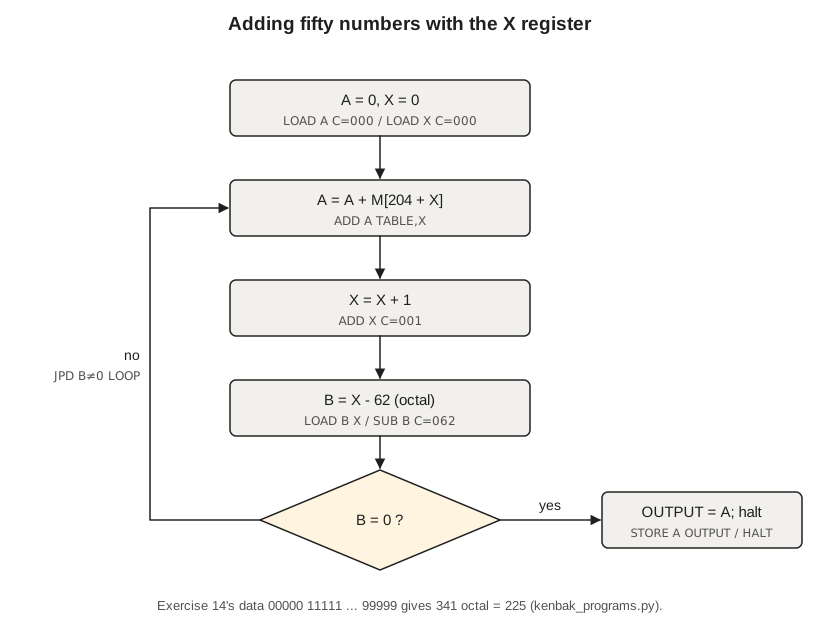
On the same data it halts showing 341. The comparison, from the simulator, is a fair summary of what the addressing modes are for:
Table 1 — On the same data it halts showing 341. The comparison, from the simulator, is a fair summary of what the addressing modes are for
| Version | Bytes | Instructions executed | Model time on an original |
|---|---|---|---|
| Self-modifying (EX 14-6) | 36 | 454 | about 0.7 s |
| Indexed | 19 | 254 | about 0.5 s |
Self-modifying code was not a trick on the KENBAK-1 but a normal technique, and the workbook teaches it deliberately: a program that writes its own address bytes is the plainest possible demonstration that instructions are numbers in memory.
7.8 Decisions: Jumps, Skips and the Flags
A KENBAK-1 program decides by testing a register (the conditional jumps), a single bit (the skips) or the result of arithmetic (the overflow and carry bytes at 201–203). The last is the one that needs care, because the jump conditions read a register as signed. To ask whether one unsigned number is smaller than another — whether an address has passed 377, for instance — subtract and look at the carry, which on the KENBAK-1 is the borrow: “SKP0 1 201” skips if there was no borrow. Volume 10’s prime-number program uses exactly this to compare a number with the square of a trial divisor.
The workbook’s Exercise 27 makes the point with a puzzle. It asks for a subroutine that adds a 16-bit number in memory (pointed to by X) to a 16-bit number held in B and A, and prints “one person’s solution which has an error in it”:
ADD DP   (mark)
         ADD A (X)
         ADD X C=1
         ADD B (X)
         SKIP 0 b1 (201)
         SUB B C=1
         JPI UNC ADD DP
The error is the fifth line. If the low halves produced a carry, the carry must be added to the high half, so “SUB B C=1” should be “ADD B C=1”. With that correction, the simulator adds the workbook’s own example operands, 10 011 101 11 110 100 and 01 000 100 01 101 001, to get 342 135 octal in B and A, which is their 16-bit sum.
7.9 Subroutines with Jump and Mark
A subroutine on the KENBAK-1 begins with one spare byte. The call, JMD UNC name, writes the caller’s return address (the address just after the call) into that byte and continues at the byte after it; the subroutine ends with JPI UNC name, an indirect jump through the stored address (Volume 6). The program below multiplies by the shift-and-add method — the KENBAK-1 has no multiply instruction — and calls the subroutine twice, halting to show each product:
Loc  Contents  Label   Symbolic
004  023       MAIN    LOAD A C=006
005  006
006  123               LOAD B C=007
007  007
010  364               JMD UNC MPY      A = 6 x 7
011  030
012  034               STORE A OUTPUT
013  200
014  000               HALT
015  023               LOAD A C=015
016  015
017  123               LOAD B C=013
020  013
021  364               JMD UNC MPY      A = 13 x 11
022  030
023  034               STORE A OUTPUT
024  200
025  000               HALT
026  344               JPD UNC MAIN
027  004
030  000       MPY     (mark)           return address is written here
031  034               STORE A MCAND
032  073
033  023               LOAD A C=000
034  000
035  034               STORE A PROD
036  074
037  144       MLOOP   JPD B=0 MDONE    no multiplier bits left
040  067
041  202               SKP0 0 B         low bit of B a zero? skip the add
042  001
043  344               JPD UNC MADD
044  057
045  024       MSHIFT  LOAD A MCAND     multiplicand x 2
046  073
047  211               SFTL A 1
050  034               STORE A MCAND
051  073
052  051               SFTR B 1         multiplier / 2 ...
053  072               SET0 7 B         ... and clear the copied sign bit
054  001
055  344               JPD UNC MLOOP
056  037
057  024       MADD    LOAD A PROD
060  074
061  004               ADD A MCAND
062  073
063  034               STORE A PROD
064  074
065  344               JPD UNC MSHIFT
066  045
067  024       MDONE   LOAD A PROD
070  074
071  354               JPI UNC MPY      return through the mark
072  030
073  000       MCAND
074  000       PROD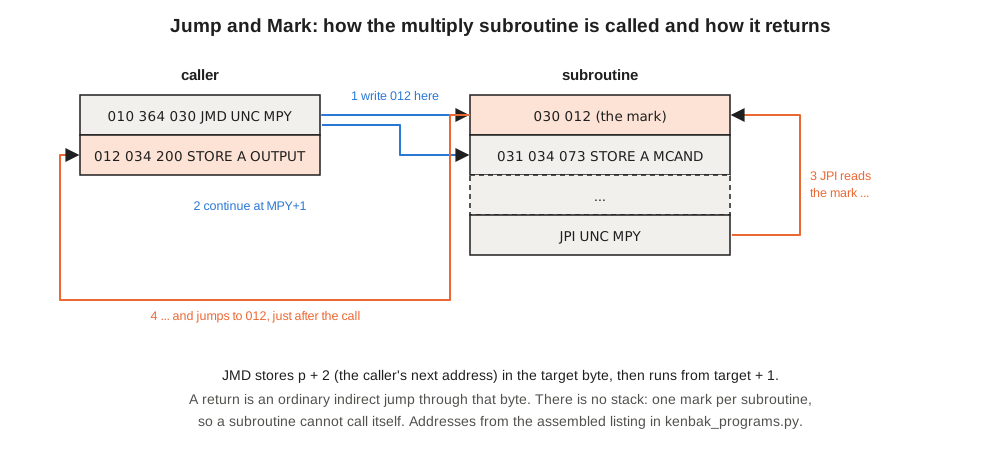
The first Start shows ○○ ●○● ○●○, 052 — 42, which is 6 × 7. The second shows ●○ ○○● ●●●, 217 — 143, which is 13 × 11, correct as an unsigned number although the jump conditions would read that byte as negative. After the second call, location 030 holds 023, the address after the second JMD: the mark is simply overwritten by each call.
Three details of the listing are worth noticing. “SKP0 0 B” (202 001) tests bit 0 of register B by its address, 001 — the bit instructions work on registers because registers are memory. “SFTR B 1” (051) is the sign-preserving shift of Volume 6, so it copies bit 7; for a multiplier above 127 that would leave a 1 at the top for ever and the loop would never end, so “SET0 7 B” (072 001) clears it. And because there is only one mark byte per subroutine, MPY cannot call itself, and a subroutine that calls another must not be called by it.
7.10 Debugging With Twelve Lamps
The KENBAK-1 has no screen and no printer, and the tools for finding a mistake are the ones on the panel. The manual’s first advice is to read back what was keyed — “To check the entry of the data, which is a good habit to get into…” — by setting the address and pressing Read once per byte. The second is the single step: hold Stop, press and release Start, and exactly one instruction runs. The P register (location 003) then shows “the address of the next instruction to be executed”, and A, B and X can be read at 000–002. The workbook’s Exercise 9 has the reader single-step a program and record P after each instruction, predicting the values first.
The third tool is HALT. A program under test can be peppered with HALT instructions that stop it with an intermediate result in the lamps; since HALT leaves P pointing at the next instruction, Start carries on from where it stopped. Many of the programs in this volume and in Volume 10 use HALT the same way in normal operation, to show one result at a time.
What none of these tools can do is show the program and its data at once. The KENBAK-1 programmer works with a coding sheet on the desk and the machine beside it, keeping the two in step by hand. That is slow, and it is also exactly the discipline the workbook set out to teach: to know, before pressing Start, what every byte should be.
Next — Volume 8: The Replica Kits — Re-creating KENBAK-1 Fifty Years On. From Grant Stockly’s TTL “Series 2” of 2011 and Mark Wilson’s Arduino-based Kenbak-uino to the µKENBAK-1 and nanoKENBAK-1 on sale today and the new chip-for-chip reproductions — what each one is, what is inside it, and how faithfully it behaves.
Comments (0)