Digi-Comp · Volume 9
Digi-Comp — Volume 9 — Building a Digi-Comp I
From the Minds-On Toys v2.0 kit — or a set of 3D-printed parts — to a working three-bit computer: the order of assembly the 1963 machine was designed around, the parts that decide whether it works, commissioning by the original check-out procedure, and the first programs stepped state by state against the simulator
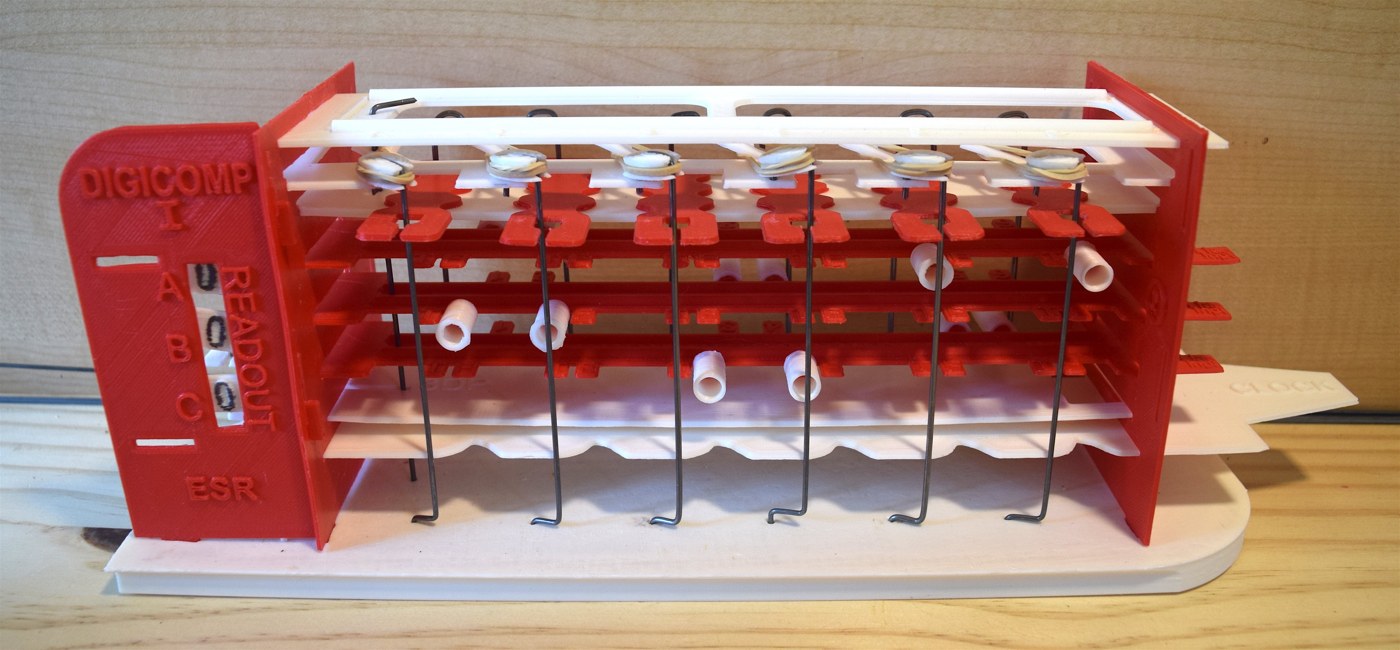
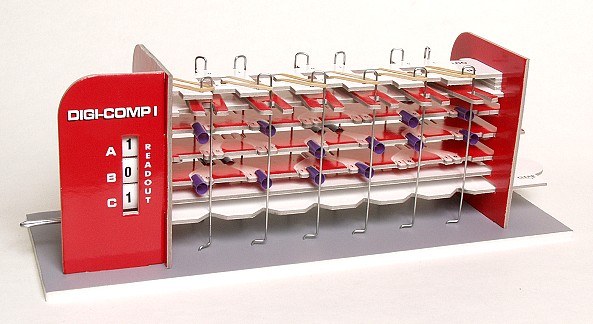
9.1 About This Volume
This volume builds a working Digi-Comp I. The route is the Minds-On Toys Digi-Comp I v2.0 kit, which is the only Digi-Comp I that can be bought new: on 20 October 2026 its maker’s page announced a “20th production run, 53 in stock” (mindsontoys.com, read 27 October 2026). A second route, printing Mark Ziemer’s free 3D-printable replica of the 1963 parts, is described alongside, because it is a good way to make spare parts and because some builders will prefer plastic to card. Volume 8 compares all the reproductions; this volume is about putting one together and making it compute.
The kit comes with its own 48-page User Guide, with a “fully illustrated, step-by-step assembly sequence”, and that guide is the authority for the kit’s own parts and order. This volume does not replace it. What it adds is the reasoning behind the order, taken from E.S.R.’s 1963 parts list and assembly sheets and from the patent; the handful of adjustments that decide whether a Digi-Comp works; a commissioning procedure built from the original manual’s check-out; and a set of test programs whose every expected state was computed by the series’ simulator, digicomp_sim.py. Volume 3 explains what every part does, and Volume 4 the programs.
None of this has been built yet for this series. The procedures are written as procedures, and the places where the account of the actual build belongs are marked.
9.2 Choosing a Route
Table 1 — Choosing a Route
| Route | What it is | Cost and status, October 2026 | Notes |
|---|---|---|---|
| Minds-On Toys Digi-Comp I v2.0 (the route of this volume) | Die-cut kit of laminated binder’s board, piano-wire rods, rubber bands and plastic tubes, with a 48-page User Guide | $55 plus about $15 US shipping on the product page; the order page gives $67 per kit with Priority shipping included ($70 for ZIP codes over 80000; New Jersey sales tax $4.50). Checks or PayPal; worldwide orders accepted. In stock, 20th production run | Assembly “a couple of hours”; needs white glue and a ruler. First run of 100 kits in November 2005; “over 1,900 more” since |
| Mark Ziemer’s printable Digi-Comp I | 3D-printable copies of the 1963 styrene parts, plus a printable template for bending the wire rods | Free files, Thingiverse thing 1477209, published 9 April 2016, licence CC BY-NC 4.0; cost is filament, music wire and rubber bands | Ziemer reported in May 2016 that it “passes the check out problem from the original manual after a little tweaking”. His documentation site, someoldguycoding.com, has since lapsed |
| An original E.S.R. machine | Styrene parts, 1963 onwards | Only second-hand | Not a build; Volume 8 discusses originals |
Sources: mindsontoys.com product page and order page; Thingiverse thing 1477209. All read 27 October 2026.
The kit is chosen for three reasons. It is the only route in which every part is known to fit every other, since the maker has run it through twenty production runs. It costs about the same as a spool of filament and the wire. And its manual uses the original programming model, renamed — “‘input’ and ‘output’ versus ‘logic’ and ‘clock’” in the maker’s words — so every coding sheet in Volume 4 loads onto it once the names are translated. Printing is the better route for a builder who wants the look and feel of 1963 plastic, or who needs to replace a part of an original.
9.3 What the 1963 Machine Was Made Of
Every reproduction copies the same twenty-one kinds of part. E.S.R.’s parts list is the clearest description of them, and it is the list a printed build works from:
Table 2 — Every reproduction copies the same twenty-one kinds of part. E.S.R.'s parts list is the clearest description of them, and it is the list a printed build works from
| No. | Part | Qty | Job |
|---|---|---|---|
| 1 | Base plate | 1 | carries everything; its front edge marks the front of the computer |
| 2 | End plate | 2 | the slotted uprights that fix the height of every plate |
| 3 | Gusset | 1 | braces the right-hand end plate |
| 4 | Rod bearing plate | 1 | holds the tops of the twelve rods; anchors the rubber bands |
| 5 | Slider plane | 1 | the plate the sliders ride on |
| 6 | Clear & set clock | 1 | the clock lever and the SET plane; its front edge holds the logic rods clear |
| 7 | Reset clock | 1 | the RESET plane, driven opposite to 6 |
| 8 | Single slider | 6 | link logic rod n to clock rod n |
| 9 | Flip-flop | 3 | the three bits, with T/F pegs at the front and pegs 1-6 at the back |
| 10 | Top plate | 1 | printed RESET 1, SET 2 … SET 6 |
| 11 | Front panel | 1 | the read-out window and the slots for the panel cards |
| 12 | Double slider | 2 | the OR of two logic rods (Volume 3) |
| 13, 14 | Read-out plug and sticker | 3 + 4 | the “0 1” digits |
| 15 | Logic tube | 22 | short tubes: the program’s conditions |
| 16 | Clock tube | 8 | long tubes: the program’s actions |
| 17 | Rubber band | 8 | pull the logic rods toward the flip-flops |
| 18 | Logic & clock rod | 12 | bent wire, six at the front and six at the back |
| 19 | Stop pin | 1 | a long pin through every plane into the base, locking the stack |
| 20 | Spring clip | 6 | pushed into slots under the base (assembly step 8) |
| 21 | Wire crank | 1 | links planes 6 and 7 so that they move in opposite directions |
Source: E.S.R., Inc., “Digi-Comp 1 Parts List” (Montclair, N.J., 1963), Friends of DigiComp archive, archive.org/details/digicomp_i.
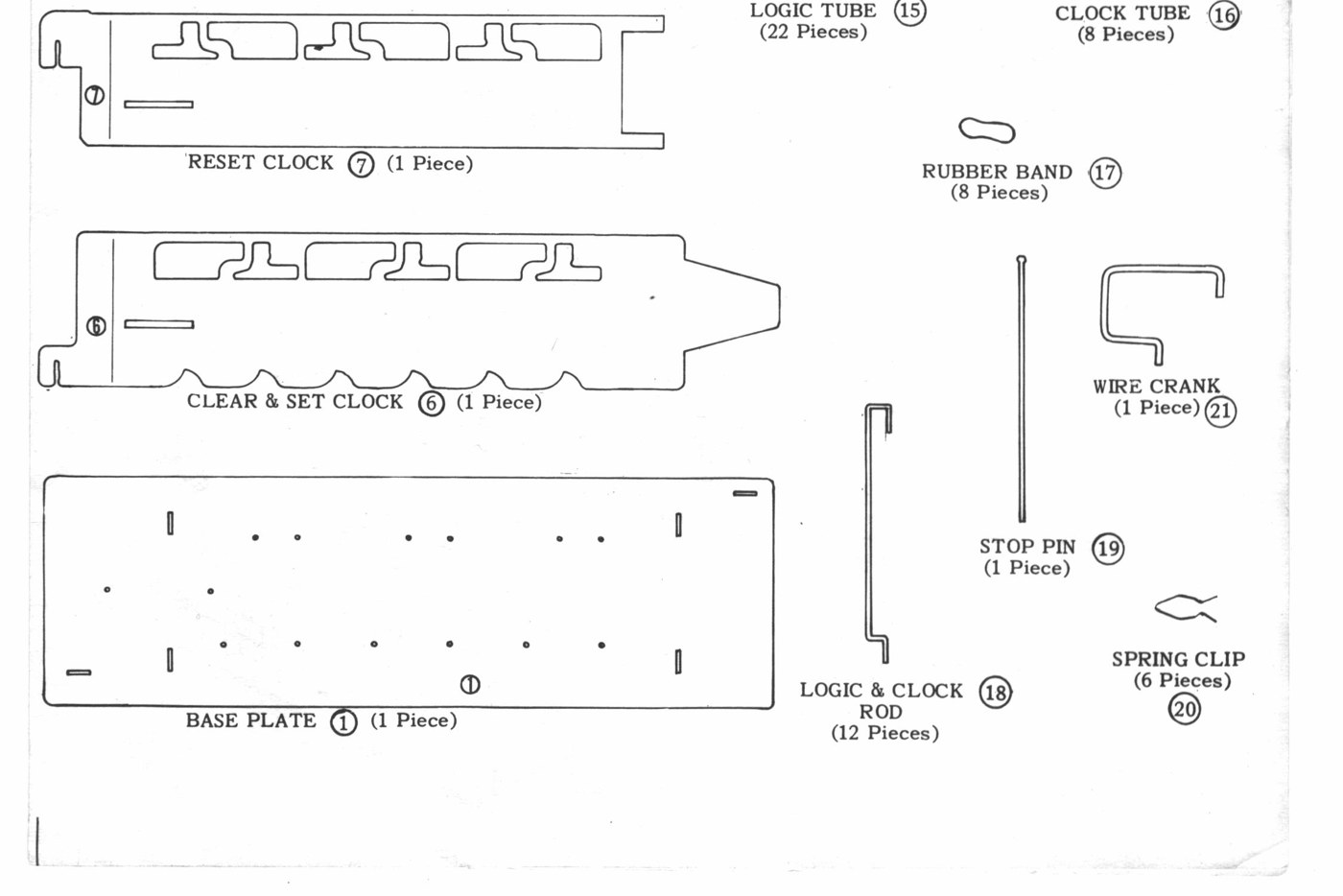
The Minds-On Toys kit makes the plates from “sturdy 80 point binders board, laminated with laser-printed high-gloss Kromekote”, “precision die-cut into punch-out sheets”, with “custom-formed piano-wire rods”, rubber bands and plastic tubes (mindsontoys.com). The maker’s notes record two consumables worth knowing about before starting. The rubber bands are “Size 10s”, which “are uncommon”; the suggested replacement is a longer band of the same 1/8-inch width, knotted and trimmed to a loop. And the tubes were for years Solo “Neon” drinking straws, which “disappeared from the market” in early 2008, after which the kit’s tubes changed (news page). A few spare bands and a length of drinking straw of the same diameter are worth keeping with the machine.
9.4 The Order of Assembly, and Why
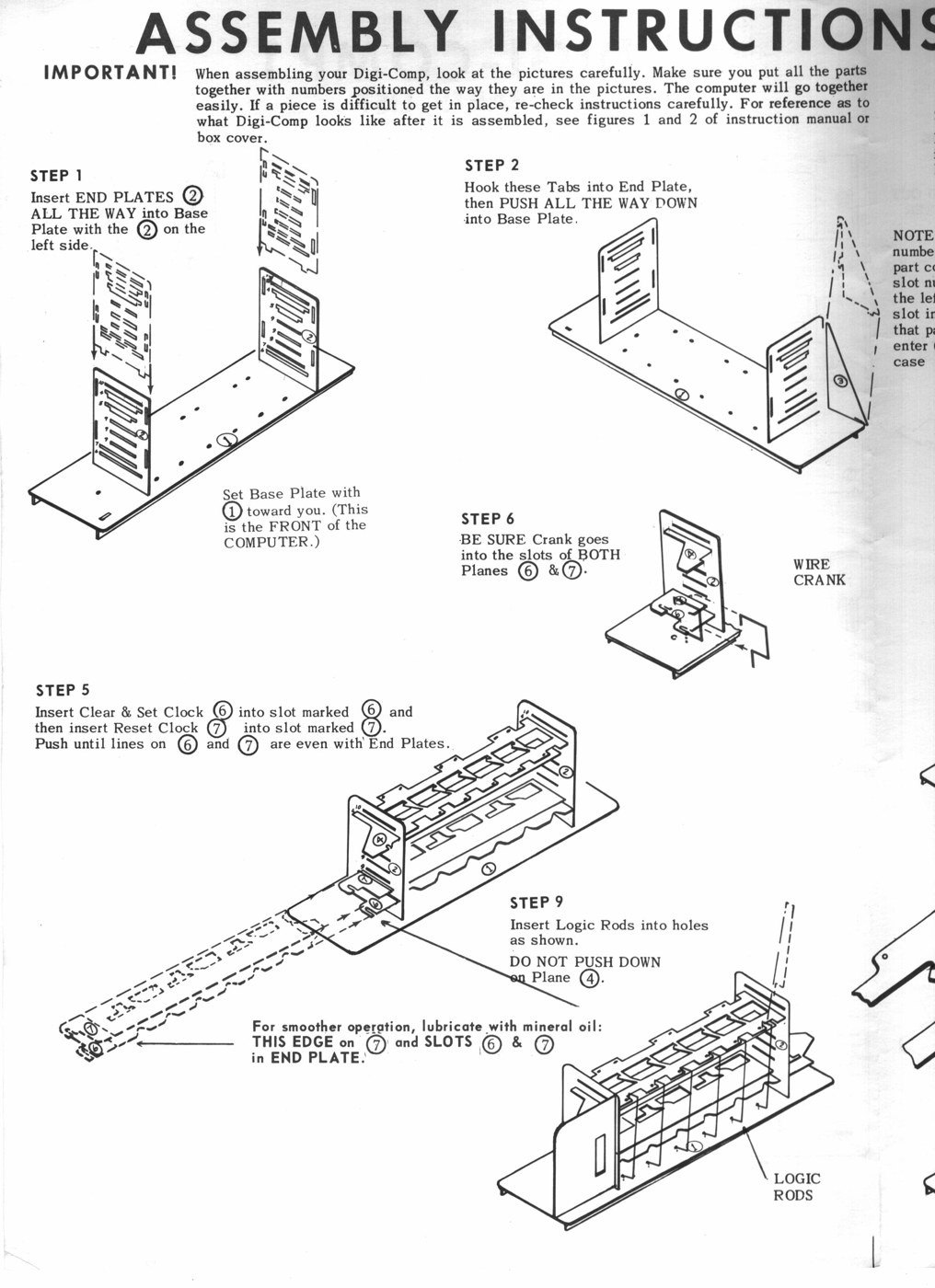
E.S.R.’s four assembly sheets give sixteen steps. Card or plastic, any Digi-Comp I goes together in essentially this order, because each stage traps the parts of the one before:
- The frame. End plates into the base, numbered side to the left, with the base’s marked edge toward the builder: “This is the FRONT of the COMPUTER” (steps 1-2). The gusset hooks onto the right-hand end plate.
- The fixed planes. Plane 5 (the slider plane) and plane 4 (the rod bearing plate) snap into their numbered slots in the end plates (steps 3-4). The sheets’ rule for every plate: “the encircled numbers shown on each part correspond to the slot numbers shown on the left end of each End Plate into which that part must enter.”
- The clock. Plate 6 into slot 6, then plate 7 into slot 7, pushed in “until lines on 6 and 7 are even with End Plates” (step 5); then the wire crank, which must go “into the slots of BOTH Planes 6 & 7” (step 6). E.S.R. advised: “For smoother operation, lubricate with mineral oil: THIS EDGE on 7 and SLOTS 6 & 7 in END PLATE.”
- The front panel hooks on and pushes down into the base (step 7).
- Underneath. With the machine upside down, held by the gusset and front panel “so that they don’t fall out”, the six spring clips are pushed “ALL THE WAY INTO SLOTS” (step 8).
- The logic rods and their rubber bands. The six front rods go into their holes (step 9: “DO NOT PUSH DOWN on Plane 4”), and each gets a rubber band “by first looping under tab of Plane 4 then stretching around the top of Logic Rod” (step 10).
- The sliders, inserted from the rear between planes 4 and 5 (step 11): “BE SURE LOGIC RODS ARE IN SLOTS.”
- The clock rods, from the back, “FIRST THROUGH SLOTS IN SLIDERS then through the openings in Planes 6 & 7”, checking that they are “PAIRED-UP” (step 12).
- The flip-flops and read-outs. A short tube on the left-hand tab of each flip-flop, the read-out plug pressed onto it with “‘0’ on the LEFT & ‘1’ on the RIGHT” (steps 13-14); then the three flip-flops slid in from the front “until the lines on 9 are lined up with the End Plates” (step 15).
- The top plate, and finally the stop pin “through each Plane and into the Base Plate” (step 16).
Quotations from E.S.R., Inc., Digi-Comp I Assembly Instructions, sheets 1-3 (1963).
The order makes sense once the mechanism is known (Volume 3). The clock planes go in before the rods because the rods pass through them. The logic rods go in before the sliders because each slider’s slot has to engage its rod. The clock rods go in last of the wire parts because they thread through the sliders and the clock planes, and the sliders have to be there first. The flip-flops go in near the end because they slide freely and would otherwise fall out while the machine is turned over. The stop pin locks the whole stack, and comes out again whenever a double slider is fitted (Volume 4).
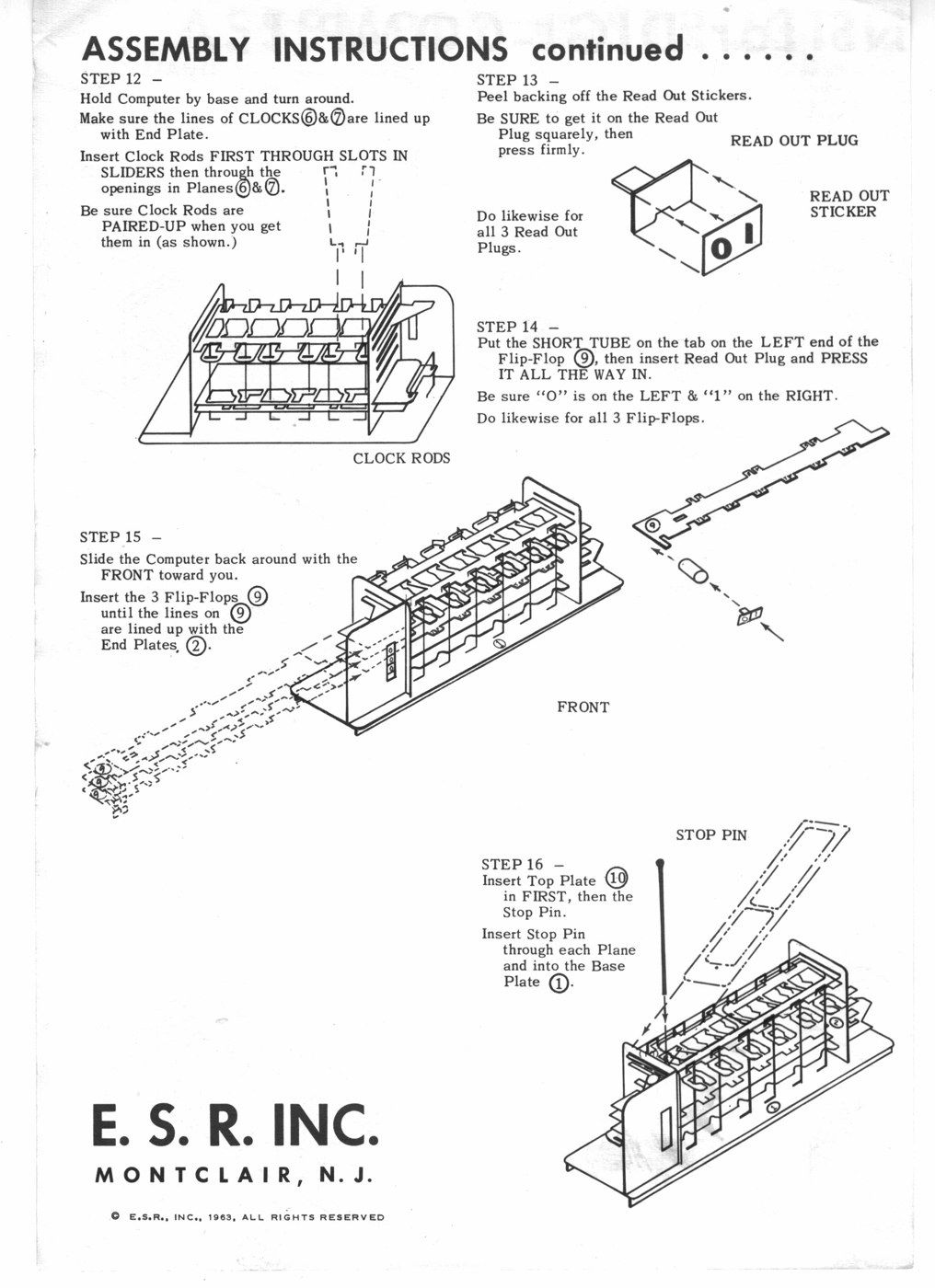
The Minds-On Toys User Guide has its own sequence for the card parts, which should be followed where it differs. Two practical points carry over from the original sheets to any build: glue nothing that moves, and check that each moving plate slides its full travel before the next part traps it.
9.5 The Adjustments That Decide Whether It Works
A Digi-Comp I has no tolerance stack to speak of, but it has four places where a small fault stops it computing. The original manual’s check-out procedure, Ziemer’s build notes for the printed version and the Minds-On Toys maker’s notes all point at the same four.
The logic rods must swing freely and all the way. Each rod has to follow the clock plane’s edge into its recess when nothing blocks it. The 1963 check-out’s step 5 is to move the clock part-way in and “look down at the logic rods to see if they are ALL touching the groove of the CLOCK PLANE”; if one is not, check that it is in its top and bottom holes, that it “moves EASILY”, and then its spring. On the printed version, Ziemer warns that “the slot in the front of the sliders must allow a rod to move smoothly into and out of the slot. If the rods catch in the slot the device will not function”, and that “the rod shape has little tolerance. If the horizontal sections of a rod are too long (even slightly), the rod may not move into the correct place, especially with the clock rods” (Thingiverse 1477209).
The rubber bands must pull. They are the only thing that drives a logic rod in. A tired band leaves its rod hanging back, so the rod never drops even when no tube blocks it, and the program silently loses a term. The Minds-On Toys notes say bands “will relax over time if you leave ‘em stretched out”, and recommend unhooking them if the machine is going to sit unused; the maker also publishes a construction tip for boosting the tension of “tired (or slightly oversized) rubber bands” (news page). Ziemer printed small pulleys for the tops of his rods after his bands kept “popping off”.
The two clock planes must travel their full stroke, in opposite directions. That depends on the wire crank being in both slots. The manual’s figure 2 calls this out, and Ziemer adds for the printed base that “the crank hole in the base is intentionally tight … It’s critical that the crank does not wobble”, and should be reamed “just until the crank fits”.
No tube may rub a rod. A logic tube that is not fully home can catch a rod as its flip-flop slides past. The manual’s operating step 1 is to move each flip-flop in and out by hand, slowly, “to see if any of the logic tubes are hitting the logic rods. If a logic tube hits a logic rod, push it on firmly. If it still hits the logic rod replace it” (p. 4).
9.6 The Printing Route in Brief
For a builder who prints instead, Ziemer’s build list is:
- in white: the base (“full base” or a “modified” base with two rounded corners for easier printing), the top plate, the slider plate, the reset clock, the set-clear clock and the rod bearing plate;
- in red: two end pieces, the gusset, the read-out, three flip-flops, three read-out tabs, three read-out connectors (“or use short sections of drinking straw”), six single sliders and one or two double sliders;
- in any colour: a wire-bending template and six base clips;
- not printed: 0.055-inch music wire for the twelve rods, 0.061-inch music wire for the crank, a pin bent from wire, and six No. 10 rubber bands.
His tips are short and worth following: clean off any “overprint or schmutz” where parts slide, especially the first-layer spread in slots; bend every rod against the template with square corners and check that it lies flat; trim the top end of a rod that catches on a slider; and wear safety glasses, because “music wire can split into sharp shards”. Bending twelve rods is, in his words, “tough work, but after making 12 of them, you’ll have it mastered.” Michael Gardi, who built one, later printed a wire-bending jig for the job; his notes are in Volume 10.
Tubes for a printed machine can be cut from drinking straws, as on the kit. The 1963 kit had 22 short logic tubes and 8 long clock tubes, and every program in the manual fits within those numbers (Volume 4); cutting at least that many of each, plus spares, is enough for the whole manual.
9.7 Commissioning
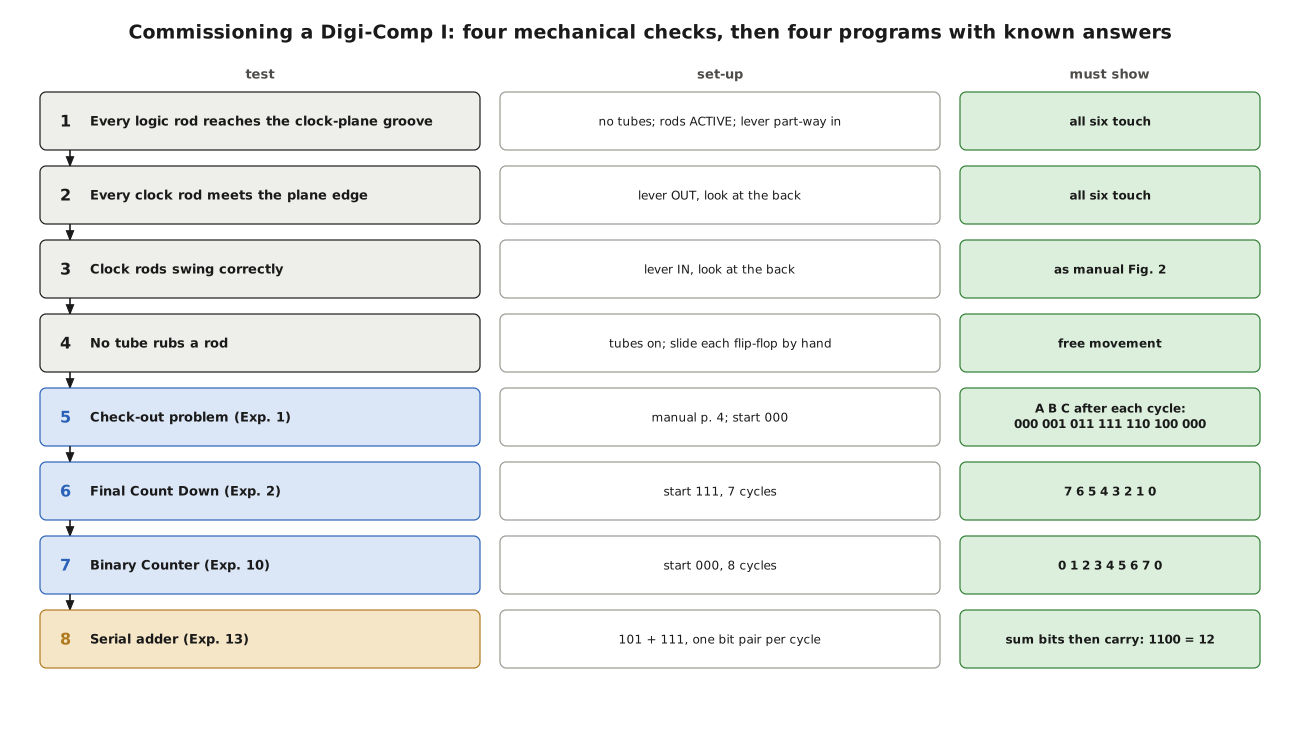
A newly built machine should be proved in stages, mechanical first, then logical, so that each test can fail for only one reason.
9.7.1 Mechanical checks
These are the 1963 manual’s own, in its own order (pp. 2-4):
- With no tubes on and every logic rod turned to ACTIVE, cycle the clock about five times, then bring it part-way in. Every logic rod must touch the groove of the clock plane.
- With the clock out, turn the machine round. Every clock rod must touch the inner edge of its clock plane.
- With the clock pushed in, the clock rods must stand as the manual’s figure 2 shows. If one does not, check that its logic rod is in its slider’s slot, that the clock rod is in its slider’s slot, and that both planes 6 and 7 move all the way.
- Put the tubes of a program on and slide each flip-flop slowly by hand. No tube may touch a rod.
9.7.2 Logical checks
Each test below is a program from Volume 4 with a known answer. Every expected read-out was produced by the simulator (python3 digicomp_sim.py --dc1 checkout, and so on). States are written A B C, top to bottom of the read-out. On the Minds-On Toys kit the clock is called the output side and the logic rods the input side; the coding sheets load the same way.
Test 1: the check-out problem (manual p. 4). Tubes as in Volume 3: logic tubes on B-F at 1, B-T at 2, C-F at 3, C-T at 4, A-T at 5, A-F at 6; clock tubes on A at 1 and 2, B at 3 and 4, C at 5 and 6. Start at 000 and cycle six times. The read-out must show:
Table 3 — Test 1: the check-out problem (manual p. 4). Tubes as in Volume 3: logic tubes on B-F at 1, B-T at 2, C-F at 3, C-T at 4, A-T at 5, A-F at 6; clock tubes on A at 1 and 2, B at 3 and 4, C at 5 and 6. Start at 000 and cycle six times. The read-out must show
| Cycle | 0 | 1 | 2 | 3 | 4 | 5 | 6 |
|---|---|---|---|---|---|---|---|
| A B C | 000 | 001 | 011 | 111 | 110 | 100 | 000 |
This is the best first test because it uses every rod, and each rod acts in at least one cycle. A sequence that goes wrong at a particular cycle points at a particular rod: if the first cycle fails to set C, rod 6 is at fault; if the third fails to set A, rod 2; and so on.
Test 2: the Final Count Down (p. 8). Start at 111; seven cycles must give 7, 6, 5, 4, 3, 2, 1, 0 (A = ones bit), and the eighth wraps to 7. This exercises rods with two and three tubes, which the check-out does not.
Test 3: the Binary Counter (p. 21). Start at 000; eight cycles must give 0, 1, 2, 3, 4, 5, 6, 7 and back to 0. The table in A B C order, for checking against the read-out cycle by cycle:
Table 4 — Test 3: the Binary Counter (p. 21). Start at 000; eight cycles must give 0, 1, 2, 3, 4, 5, 6, 7 and back to 0. The table in A B C order, for checking against the read-out cycle by cycle
| Cycle | 0 | 1 | 2 | 3 | 4 | 5 | 6 | 7 | 8 |
|---|---|---|---|---|---|---|---|---|---|
| A B C | 000 | 100 | 010 | 110 | 001 | 101 | 011 | 111 | 000 |
| Value | 0 | 1 | 2 | 3 | 4 | 5 | 6 | 7 | 0 |
The step from 7 to 0 is the hardest cycle the machine performs: rods 1, 3 and 5 all act at once and all three flip-flops are reset together.
Test 4: the serial adder (p. 25). This needs both double sliders fitted (stop pin and top plate out; manual p. 22). Add 101 to 111, one bit pair per cycle, lowest bits first, C starting at 0 and never touched by hand. After each cycle copy A, the sum bit. The simulator’s trace:
Table 5 — Test 4: the serial adder (p. 25). This needs both double sliders fitted (stop pin and top plate out; manual p. 22). Add 101 to 111, one bit pair per cycle, lowest bits first, C starting at 0 and never touched by hand. After each cycle copy A, the sum bit. The simulator's trace
| Cycle | A, B entered | C before | A after | C after |
|---|---|---|---|---|
| 1 | 1, 1 | 0 | 0 | 1 |
| 2 | 0, 1 | 1 | 0 | 1 |
| 3 | 1, 1 | 1 | 1 | 1 |
Sum bits 0, 0, 1 and the final carry 1 read 1100, twelve. A machine that passes this has working double sliders and can run every program in the manual.
9.8 When It Does Not Work
Table 6 — When It Does Not Work
| Symptom | Likely cause | Remedy |
|---|---|---|
| A flip-flop never changes in a test where it should | its logic rod is not dropping (band slack, rod out of its slot, rod bent) or its clock rod is not caught | check-out steps 1-3; replace or tighten the band; re-seat the rod in its slider |
| A flip-flop changes when it should not | a missing or misplaced logic tube; a rod not turned to INACTIVE | compare with the coding sheet one position at a time |
| The clock stiffens or jams part-way | a flip-flop commanded to set and reset at once, or a tube catching a rod | load the program into the simulator and look for a conflict; push tubes home |
| Planes do not travel fully | wire crank out of one slot, or wobbling | re-seat the crank in both slots; on a printed base, a tight crank hole |
| Rods catch on the sliders | rod tail too long, or slot edges rough | trim the rod end; clean the slot |
| Everything right but intermittent | tired rubber bands | replace with size 10 bands, or the knotted substitute |
The simulator is the quickest diagnostic tool. A program that misbehaves on the machine should first be checked by running its coding sheet through digicomp_sim.py, which will show either that the machine is wrong or that the sheet is. Volume 4 found one sheet in the manual itself, the Ho-Hum riddle, that asks a flip-flop to be set and reset in the same cycle for one input.
9.9 Living With the Machine
The Minds-On Toys maker recommends unhooking the bands if the machine will stand unused, and a dust cover — they made one from a sheet of overhead-projector film, creased to fit round the frame (news page). For more to do once the manual is exhausted, the same page points to Bill Kustes’s More Fun for Digi-Comp I (revised June 2008), “nearly 50 new activities including games, magic tricks, puzzles and the like”, written in the original nomenclature; the page noted in January 2026 that Kustes, “for many years a loyal contributor to the FriendsOfDigiComp group”, had died.
The original manual’s two unsolved problems are the natural next step: an automatic counter that “must count 4 clock cycles, then stop”, and the riddle of the three boys, Tom, Dick and Jim, and who caught the fish (p. 28). Each should be designed on paper, checked in the simulator, and only then put on the machine — which is the working method of every programmer since 1963.
Next — Volume 10: Building a Digi-Comp II. With Evil Mad Scientist’s plywood machine out of production, the rolling-ball computer is built from Michael Gardi’s free 3D-printed replica: the decks, the thirty-three springs, the start mechanism, the fine tuning that makes marbles go where they should, and the manual’s tests run against the simulator.
Comments (0)