Digi-Comp · Volume 3
Digi-Comp — Volume 3 — How Digi-Comp I Works — Three Flip-Flops, Rods and Pegs
Styrene slides that hold one bit each, wire rods that ask a question of all three, plastic tubes that write the program, and a clock lever that makes the whole thing step: the mechanism of E.S.R.'s 1963 computer, part by part, and why it is a real clocked state machine
3.1 About This Volume
Volume 1 introduced the two Digi-Comps and Volume 2 the company and the science-toy market that produced them. This volume opens the first machine and explains how it works. It goes part by part: the flip-flops that hold the state; the pegs and tubes that state the program; the logic rods, which make the decisions; the sliders and clock rods, which carry those decisions to the back; and the clock lever and its two planes, which move every flip-flop at once. It then looks at the machine as a designer of digital logic would: as a three-bit register with a programmable array of AND and OR gates in front of it. That view explains both what Digi-Comp I can do and the limits that the 1963 manual works around.
The sources are E.S.R.’s own: the 1963 instruction manual, the parts list and four assembly sheets that came in the box, and the patent that Irving J. Lieberman, William H. Duerig and Charles D. Hogan filed in October 1963 (US 3,273,794, granted 20 September 1966). Scans of all of them are kept by the Friends of DigiComp group at the Internet Archive (archive.org/details/digicomp_i). Every behaviour described here is also modelled in the series’ simulator, digicomp_sim.py, which reproduces every result printed in the manual. Volume 4 uses it to work through the manual’s programs.
3.2 The Machine on the Table
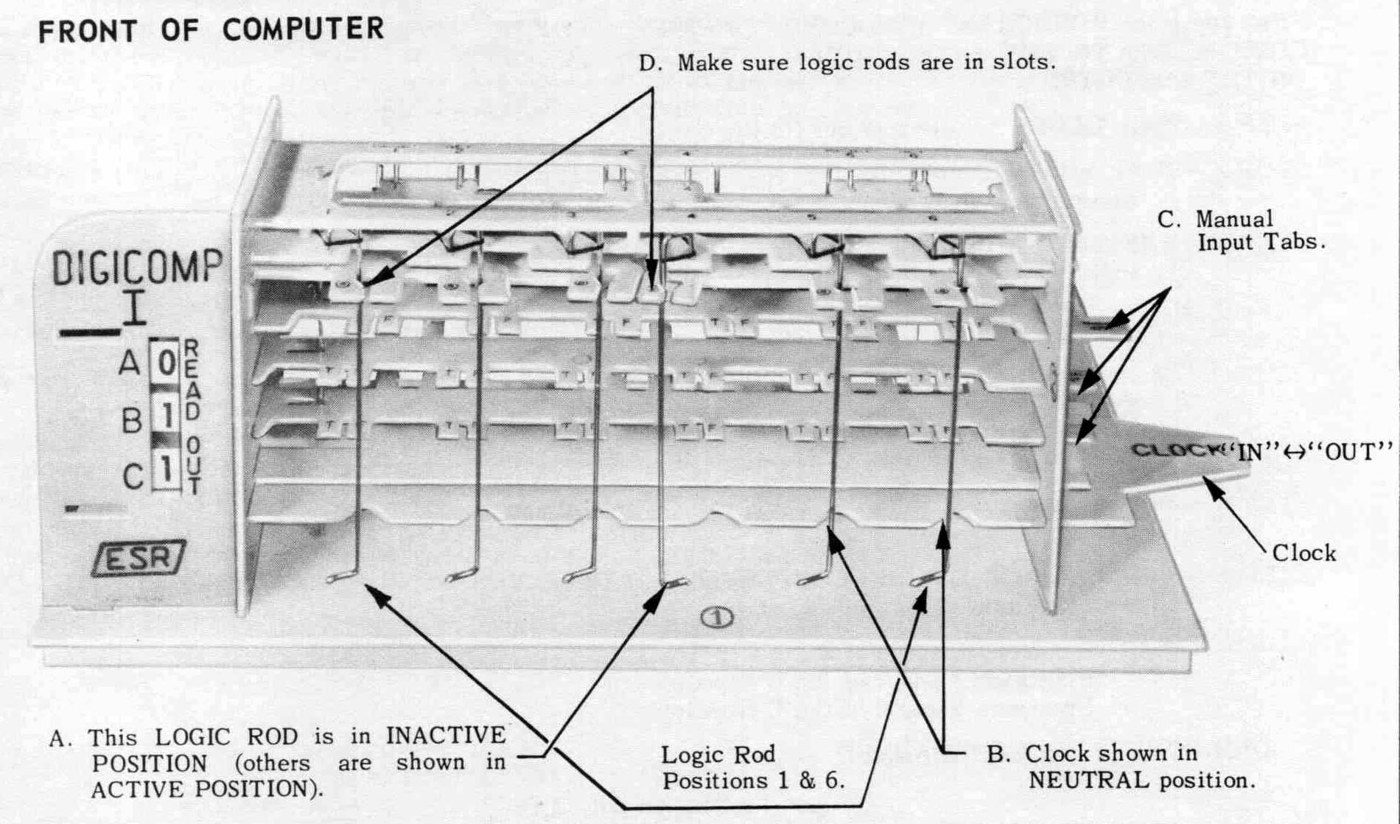
An assembled Digi-Comp I is a small rack of white and red plastic about 31 cm long, 8 cm deep and 12 cm high (retrocmp.com). A flat base plate carries two upright end plates, and between them run a stack of horizontal plates, all slotted into the end plates at fixed heights. Three long red slides, the flip-flops, pass through the end plates from front left to right. At the left end each flip-flop carries a read-out plug printed “0 1”; a window in the front panel shows one digit for each flip-flop, so the panel reads as a column of three binary digits. At the right a tab sticks out of each flip-flop so that it can be pushed by hand. These are the “manual input tabs”. A sliding lever at the right end, the clock, goes in and out.
Twelve vertical wire rods hang through the stack, six along the front and six along the back. The front six are the logic rods and the back six the clock rods. Short and long white tubes, pushed onto pegs moulded on the flip-flops, set the program.
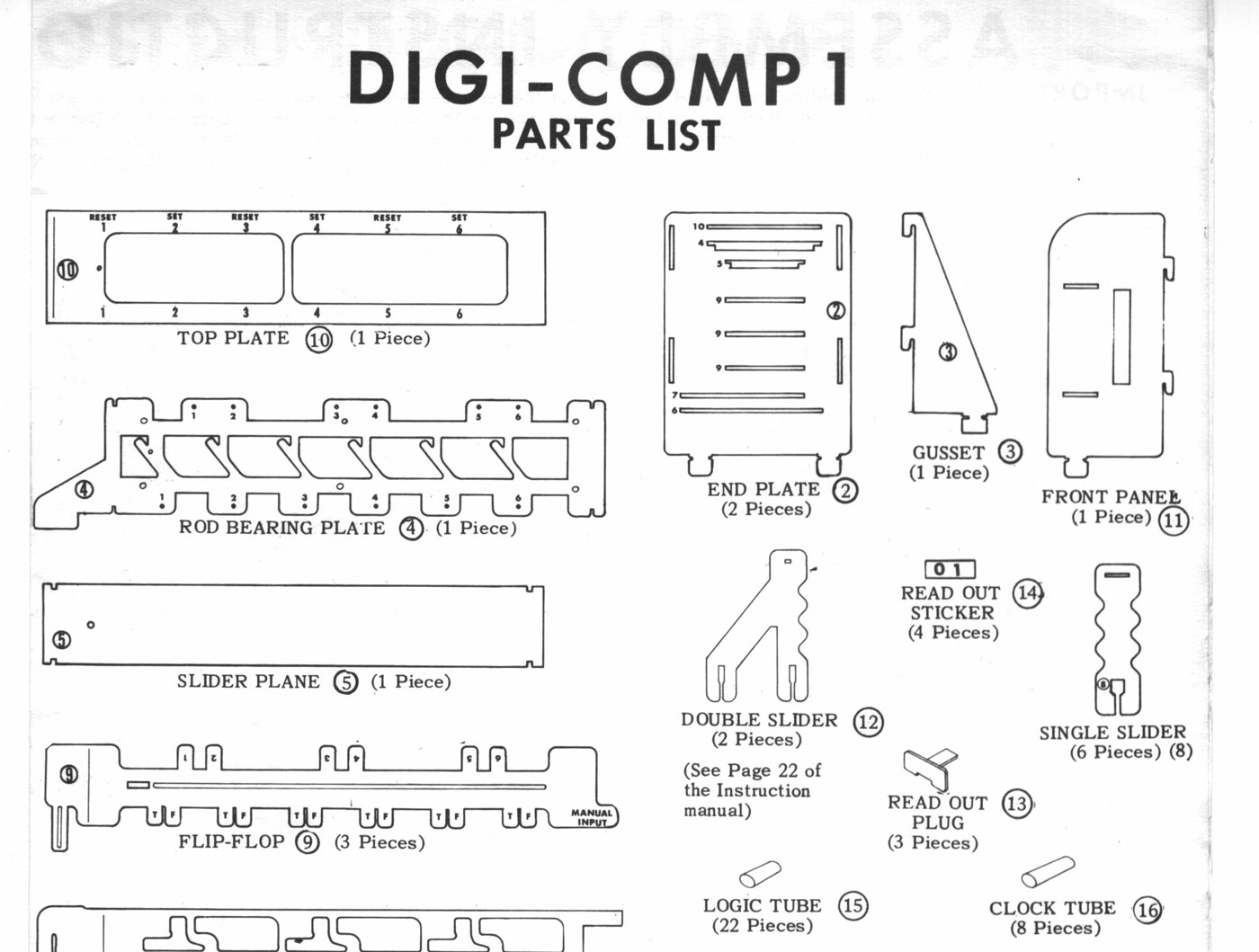
The parts list that came with the kit names twenty-one kinds of part:
Table 1 — The parts list that came with the kit names twenty-one kinds of part
| No. | Part | Qty | No. | Part | Qty |
|---|---|---|---|---|---|
| 1 | Base plate | 1 | 12 | Double slider | 2 |
| 2 | End plate | 2 | 13 | Read-out plug | 3 |
| 3 | Gusset | 1 | 14 | Read-out sticker | 4 |
| 4 | Rod bearing plate | 1 | 15 | Logic tube | 22 |
| 5 | Slider plane | 1 | 16 | Clock tube | 8 |
| 6 | Clear & set clock | 1 | 17 | Rubber band | 8 |
| 7 | Reset clock | 1 | 18 | Logic & clock rod | 12 |
| 8 | Single slider | 6 | 19 | Stop pin | 1 |
| 9 | Flip-flop | 3 | 20 | Spring clip | 6 |
| 10 | Top plate | 1 | 21 | Wire crank | 1 |
| 11 | Front panel | 1 |
Source: E.S.R., Inc., “Digi-Comp 1 Parts List” (1963).
Two numbers in that list matter later. There are 22 logic tubes and 8 clock tubes, so no program can use more. Every program in the manual fits: the hungriest, the adder and the subtractor of Volume 4, use 16 logic tubes and 4 clock tubes. There are also two double sliders, the only part that makes an OR of two rods.
3.3 The Flip-Flops: Three Bits of Memory
The patent calls the flip-flop “the basic unit of any binary digital computer … an element which has two stable positions or states”. Each of Digi-Comp I’s three is a flat styrene slide. It is stable in two positions only, left and right. The patent explains how: a boss on its underside rides in a slot in the side section of the frame, and “the stability of these two positions results from the pull of gravity upon the flip-flop 19 which will not allow boss 43 to slide through slot 20 unless an external force is applied”. A limit pin through a slot in the slide stops it moving in any other way. The two stable positions are all the machine has for memory. Nothing in it is electrical.
The manual’s convention is fixed throughout:
- SET moves a flip-flop to the left, and its read-out shows 1.
- RESET moves it to the right, and its read-out shows 0.
The flip-flops are lettered A, B and C from top to bottom, and the read-out is a column with A at the top. When the manual uses the machine as a counter, A is the ones bit, B the twos and C the fours, so the column 1-0-0 (A over B over C) means one. That is the opposite of the usual written order, and it trips up every new owner. In this series a state is always written A B C, so 100 means A = 1, B = 0, C = 0.
Each flip-flop carries two sets of pegs. Along its front edge are six pairs, one pair under each of the six logic-rod positions, labelled T and F. Along its back edge are six single pegs, numbered 1 to 6, under the six clock-rod positions. The front pegs are how the flip-flops are read; the back pegs are how they are moved.
3.4 Pegs and Logic Tubes: Writing the Question
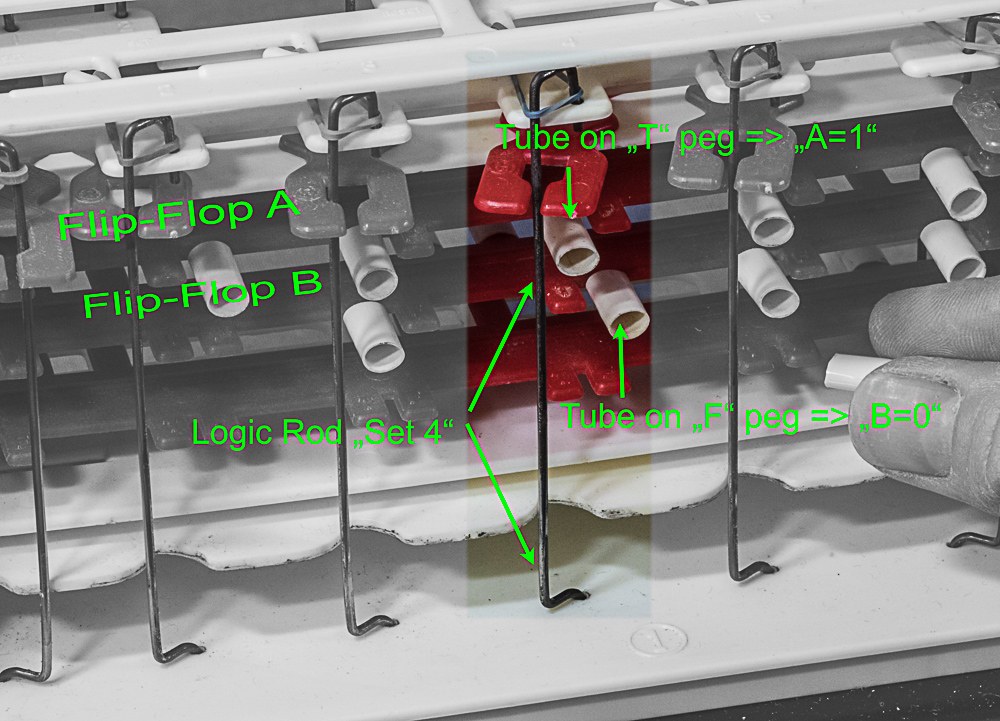
A logic rod hangs vertically past all three flip-flops. A rubber band at its top pulls it toward the flip-flops. As the clock lever goes in, each rod is free to swing in, unless something is in its way. What can be in its way is a short plastic tube, a logic tube, pushed onto a peg of one of the flip-flops directly below the rod.
Because the flip-flop slides, the tube on its peg moves with it. In one position of the flip-flop the tube sits under the rod and blocks it; in the other it has moved aside and the rod passes. The pegs are placed so that:
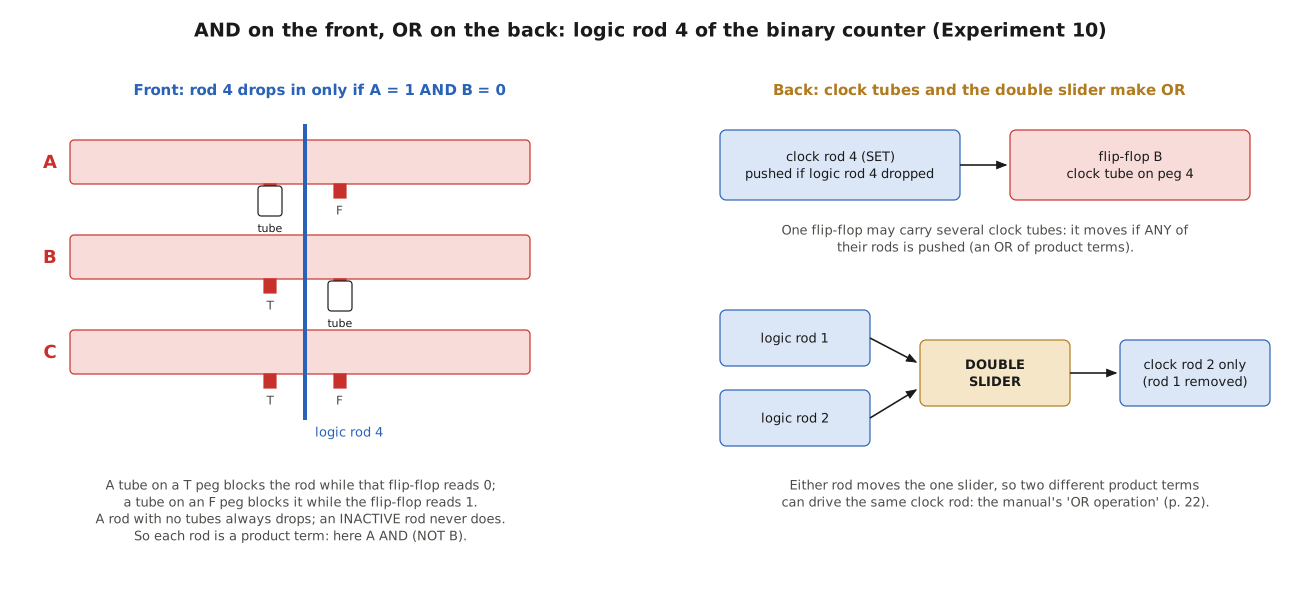
- a tube on the T peg blocks the rod while that flip-flop reads 0, so the rod can move only when the flip-flop is true (1);
- a tube on the F peg blocks the rod while the flip-flop reads 1, so the rod can move only when it is false (0).
The manual puts it plainly for the first program it explains: “Logic rod 2 will go ‘in’ only when flip-flops A AND B are both ‘1’. If either one of them is ‘0’, logic rod 2 will be blocked from moving ‘in’ by the logic tubes” (p. 14). A rod with tubes on several flip-flops moves only if none of them blocks it. That is a logical AND of every condition its tubes state. A rod with no tubes always moves in. A rod can also be switched out entirely: each logic rod can be turned to the left, its “inactive” position, where it never acts, or to the right, “active”. The coding sheets mark an inactive rod “OUT”.
Six rods, then, ask six questions of the present state, each of the form “is A = 1 and B = 0?”, with up to three conditions each. These questions are the program’s product terms.
3.5 Sliders and Clock Rods: Carrying the Answer to the Back
A logic rod that moves in does not touch the flip-flops. Above the stack, under the top plate, it pushes a small part called a slider. Each of the six positions has a single slider, which connects logic rod n at the front to clock rod n directly behind it. The manual describes it from the back: “Notice when a logic rod moves in it pushes the SLIDER. When the slider moves it pushes the clock rod out so that the clock rod is caught by the clock plane” (p. 7).
The six clock rods hang down the back past the numbered pegs. Their function is printed on the top plate: positions 1, 3 and 5 are RESET, and 2, 4 and 6 are SET. The manual’s rule is “If a flip-flop has a CLOCK TUBE on the PEG in CLOCK ROD POSITIONS 1, 3 or 5 it will RESET when the clock is cycled. If a Flip-Flop has a CLOCK TUBE on the PEG in CLOCK ROD POSITIONS 2, 4 or 6 it will SET when the clock is cycled” (p. 7). The rule means “if the clock rod at that position has been pushed out”, since a clock rod is only caught and moved when its logic rod went in.
A clock tube is longer than a logic tube. Pushed onto the back peg of a flip-flop at position n, it puts that flip-flop in the path of clock rod n. When the clock rod is swung, it hits the tube and drags the flip-flop with it, left for SET, right for RESET. A clock rod that has not been caught stays still, and a tube beside it stays where it is.
Two consequences follow. First, a single logic rod can act on more than one flip-flop at once: put clock tubes on peg n of two flip-flops and both move when rod n goes in, in the same direction. Second, one flip-flop can respond to more than one rod: give it clock tubes at positions 2 and 4 and it is set if either rod 2 or rod 4 went in. That is the machine’s OR. A third sort of OR is the double slider, a forked part that replaces the single sliders of two neighbouring positions. Either of its two logic rods pushes it, and it drives the one clock rod left in place; the other clock rod is taken out. The coding sheets draw it as a bar over two positions with a circle on the clock rod it drives. Fitting one means taking off the top plate and the stop pin and re-threading the clock rods (manual p. 22), so it is a semi-permanent part of a program rather than a quick change.
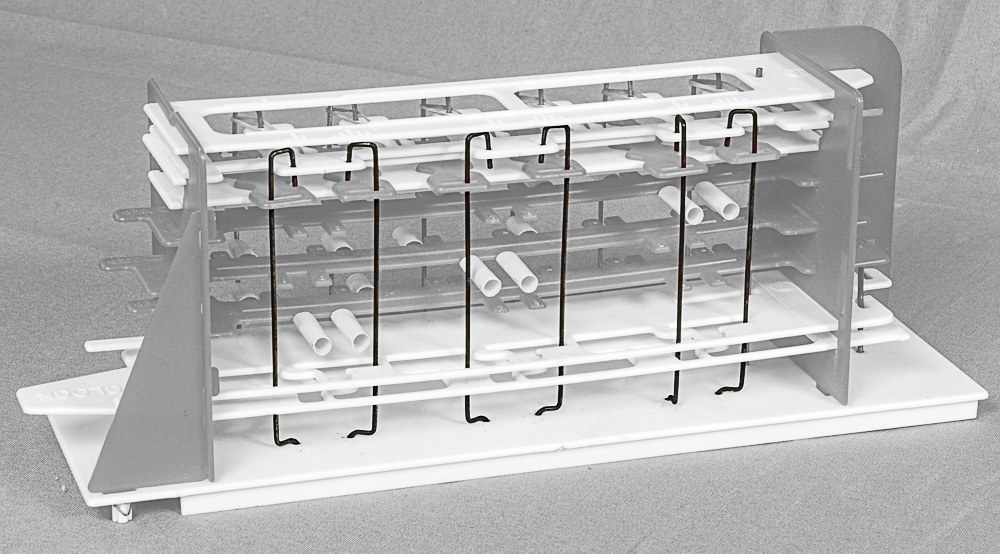
3.6 The Clock: Two Planes and a Crank
All of this happens because of one horizontal movement. The clock lever is the end of plate 6, the “clear and set clock”. Plate 7, the “reset clock”, lies just above it. A bent wire crank links the two through slots in each, so that when plate 6 moves left, plate 7 moves right. The manual’s check-out procedure insists that the crank sits in both slots: “If both Planes 6 and 7 are not moving all the way, make sure wire crank is in BOTH slots” (Figure 2).
Each plane has a row of cut-outs, one under each clock rod. In the parts list they are visibly different. The set plane has a T-shaped cut-out that catches a SET rod and a large one that lets a RESET rod pass; the reset plane is the reverse. When a slider pushes a clock rod out, the rod drops into the narrow part of its plane’s cut-out; when the planes move, the caught rod moves with them, the SET rods to the left and the RESET rods to the right. A rod that was not pushed out sits in the wide part of the cut-out and is left behind.
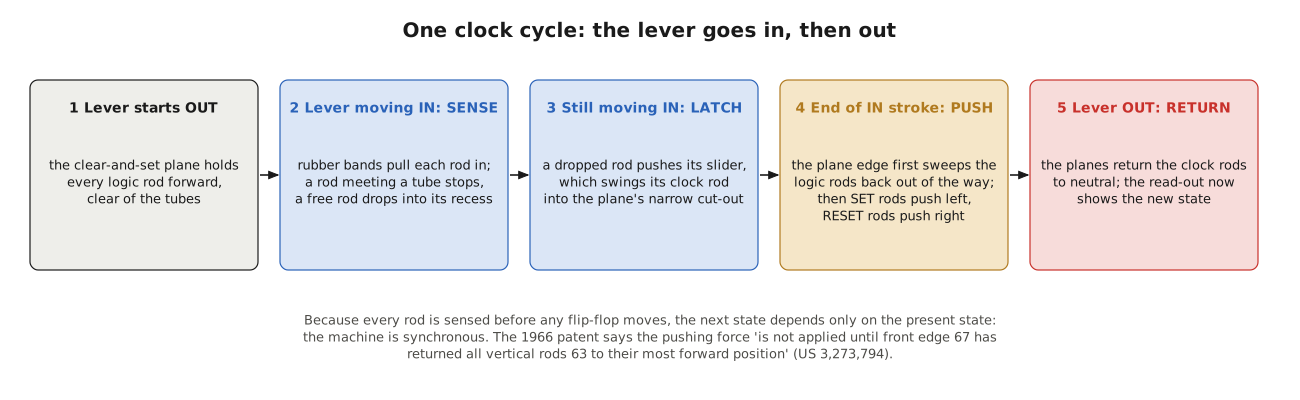
The patent spells out the order of events in a single stroke of the lever, and the order is what makes the machine work:
- With the lever out, the front edge of plate 6 holds every logic rod forward, clear of all the tubes.
- As the lever goes in, the edge moves back and the rubber bands pull each rod after it. A rod with a tube in its way stops against the tube; a free rod “continues in contact with front edge 67 into its respective recess 69”, which is to say it drops in.
- A rod that dropped in pushes its slider, and the slider moves its clock rod into the catching part of the plane’s cut-out.
- Only then do the planes reach the clock rods. The patent says: “The clocking mechanism is designed so that the pushing force is not applied until front edge 67 has returned all vertical rods 63 to their most forward position beyond the forward end of plugs 68, thereby allowing the flip-flops to be moved even though a plug 68 will thereby be moved passed a vertical rod 63.”
- As the lever comes out again, the cut-outs push the clock rods back to their starting positions.
Step 4 is the important one. Before any flip-flop moves, every logic rod has been pulled back out of the tubes’ way. If the rods were still in, a moving flip-flop would drag its tubes into them and jam. More importantly for the logic, the decision of each rod has already been made and stored in the position of its clock rod. The flip-flops then all move together, each according to a decision taken from the state before any of them moved. In electronic terms, the logic is sampled and then the register is clocked: Digi-Comp I is a synchronous machine.
3.7 A Clock Cycle Followed Through
The manual’s first experiment, the “check-out problem”, is the best one to follow through by hand, because it uses every rod and every flip-flop. Its program is, in words (manual p. 4):
Table 2 — The manual's first experiment, the "check-out problem", is the best one to follow through by hand, because it uses every rod and every flip-flop. Its program is, in words (manual p. 4)
| Rod | Logic tube on | Moves in when | Clock tube on | Effect |
|---|---|---|---|---|
| 1 | B, F peg | B = 0 | A, peg 1 | RESET A |
| 2 | B, T peg | B = 1 | A, peg 2 | SET A |
| 3 | C, F peg | C = 0 | B, peg 3 | RESET B |
| 4 | C, T peg | C = 1 | B, peg 4 | SET B |
| 5 | A, T peg | A = 1 | C, peg 5 | RESET C |
| 6 | A, F peg | A = 0 | C, peg 6 | SET C |
Start with all three flip-flops at 0. As the lever goes in, rods 1, 3 and 6 find no tube in the way (B, C and A are all 0, which is what their F tubes ask for), and rods 2, 4 and 5 are blocked by their T tubes. Rods 1 and 3 catch RESET clock rods behind A and B, which are already reset, so nothing changes there. Rod 6 catches the SET clock rod behind C, so C moves left. After one cycle the read-out shows A = 0, B = 0, C = 1.
In the next cycle the same reasoning, applied to the new state, sets B; then A; then resets C, then B, then A. The simulator gives the whole run, which is exactly the sequence the manual tells the owner to expect:
Table 3 — In the next cycle the same reasoning, applied to the new state, sets B; then A; then resets C, then B, then A. The simulator gives the whole run, which is exactly the sequence the manual tells the owner to expect
| After cycle | 0 | 1 | 2 | 3 | 4 | 5 | 6 |
|---|---|---|---|---|---|---|---|
| A B C | 000 | 001 | 011 | 111 | 110 | 100 | 000 |
The manual calls this “COUNTING BY SHIFTING”: “whatever is in the Read Out of a flip-flop is transferred (shifted) to the flip-flop above AND the opposite of what is in the Read Out of the top flip-flop is transferred (shifted) into the bottom flip-flop” (p. 5). Each flip-flop takes the old value of the one below it, and C takes the complement of the old A. A circuit designer would recognise it as a three-stage twisted-ring or Johnson counter, which runs through six states and returns. The two states it never visits, 010 and 101, form a second little cycle of their own (010 goes to 101 and back), which is why the manual tells the owner to start from 000.
The example shows why the synchronous clock matters. In cycle 3, A is set because B was 1, and in the same cycle C is reset because A was 0 — the old A, before A moved. If the flip-flops moved one at a time, the answer would depend on which went first. Because every rod is sensed before anything moves, it does not.
3.8 The Machine as a Logic Designer Sees It
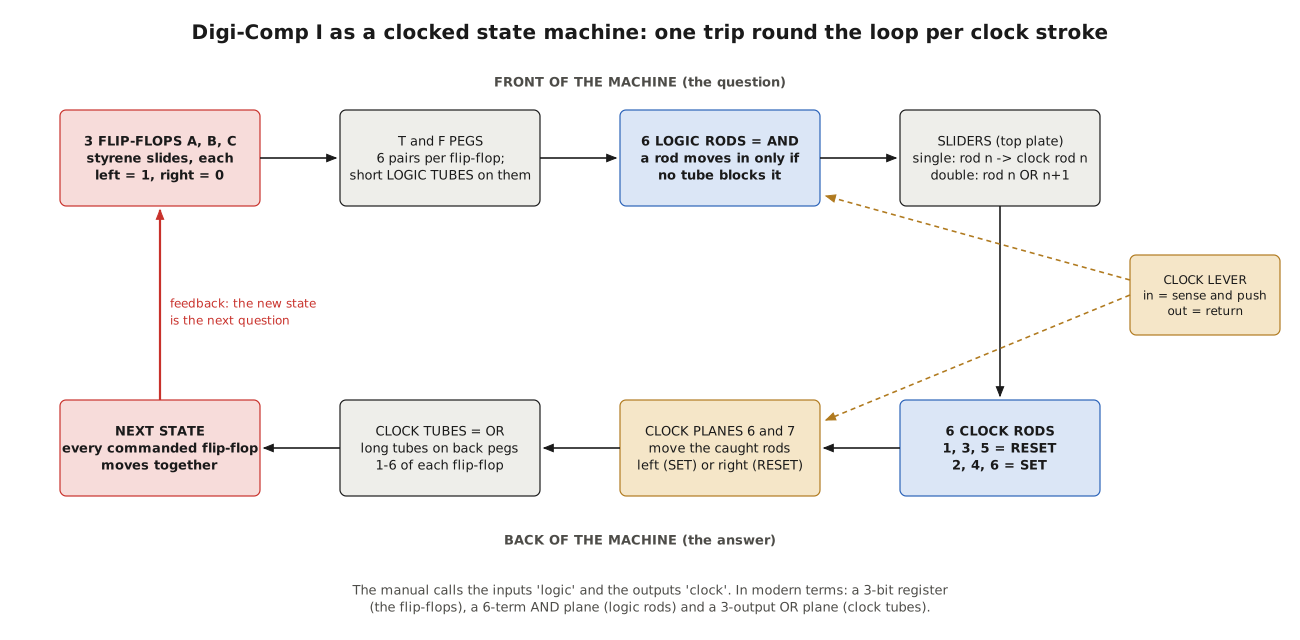
Put together, Digi-Comp I is a finite-state machine with three bits of state and no other input than the hand on the manual tabs. Its parts map neatly onto the vocabulary of later digital design:
Table 4 — Put together, Digi-Comp I is a finite-state machine with three bits of state and no other input than the hand on the manual tabs. Its parts map neatly onto the vocabulary of later digital design
| Digi-Comp I part | Logic function | Modern equivalent |
|---|---|---|
| 3 flip-flops | state register | three set-reset flip-flops with a common clock |
| T and F pegs | true and complement outputs of each flip-flop | Q and Q-bar |
| logic tubes + 6 logic rods | six AND gates, up to three inputs each | the AND plane of a programmable logic array |
| inactive rod (OUT) | a disabled product term | a blown fuse |
| single slider | a product term routed to one clock rod | fixed wiring |
| double slider | OR of two product terms | an OR gate |
| clock tubes | which flip-flops each term sets or resets | the OR plane |
| clock lever | one clock pulse | the clock |
The comparison with a programmable logic array is not fanciful. Bob Shepard drew the whole machine as a registered PLA for the Friends of DigiComp group in 2003, with each logic rod a “six input AND gate” whose inputs “default to ‘1’ if not connected”, and each flip-flop’s set and reset inputs a “three input OR gate” (DC1-PLA.pdf). The retrocomputing writer at retrocmp.com describes the same thing as a Medvedev machine — a state machine whose output is simply its state — with the tubes as the “visible LUT content” of a three-bit macrocell (retrocmp.com, “A State Machine”).
3.8.1 What the six rods cannot do
The PLA view also shows the machine’s limits plainly.
Six product terms. There are only six logic rods, and each is hard-wired to one clock rod, three of them SET and three RESET. With the single sliders fitted, each rod can set or reset whatever flip-flops carry its clock tubes, but rods 1, 3 and 5 can only ever reset and 2, 4 and 6 only ever set. A general three-bit next-state function needs, in the worst case, more terms than that. The binary counter is near the limit: it uses all six rods, two for each flip-flop, and its terms for C need all three flip-flops as inputs. The double slider is the manual’s way of stretching the budget, by letting two terms share a clock rod. With two double sliders in place, positions 1 to 4 become two OR-terms, one SET and one RESET, which is how the serial adder of Volume 4 fits its four sum terms and two carry terms into six rods.
SET and RESET together. Nothing in the machine prevents a program from asking a flip-flop to be set and reset in the same cycle. Mechanically that means two clock rods pulling one slide in opposite directions, and the retrocmp analysis calls the result a “mechanical jam”. The manual’s programs are written to avoid it — with one exception that Volume 4 finds with the simulator. The simulator reports such a cycle as a conflict instead of guessing which way the slide would go.
Three bits. With three flip-flops there are only eight states, and the machine has no input except the operator’s hands. Every program is therefore either a sequence that runs round some of the eight states by itself (the counters), or a function evaluated in one cycle on bits that the operator has set by hand (the logic riddles and the bank lock), or a serial operation in which the operator feeds in a new pair of bits each cycle while one flip-flop carries something forward (the comparator, adder and subtractor). Volume 4 works through all three kinds.
3.9 How the Program Is Written Down: the Coding Sheet
The manual introduces a coding sheet to save describing each tube in words: “A coding sheet is used for all electronic digital computers to make it easier for the man to prepare problems for the computer” (p. 5). It is drawn to look like the machine seen from the front. Across the top are the six positions. Under each position are three columns, T, F and the position number. The rows are the three flip-flops. An L in a T or F column means a logic tube on that peg; a C in the numbered column means a clock tube on that back peg. A rod marked (OUT) is turned inactive, and a bar with a circle over two positions is a double slider.
Table 5 — How the Program Is Written Down: the Coding Sheet
| T | F | 1 | T | F | 2 | T | F | 3 | T | F | 4 | T | F | 5 | T | F | 6 | |
|---|---|---|---|---|---|---|---|---|---|---|---|---|---|---|---|---|---|---|
| A | C | C | L | L | ||||||||||||||
| B | L | L | C | C | ||||||||||||||
| C | L | L | C | C |
The check-out program of the previous section as a coding sheet (manual p. 28, answer to the exercise on p. 7).
Reading a sheet down a position gives the rod’s condition (the L’s) and its effect (the C’s). Reading along a flip-flop’s row gives everything that can set or reset it. It is a compact and complete notation, and it is all that Volume 4 needs to describe a program.
3.10 The Second Edition of the Mechanism
Two later machines show which parts of the 1963 design matter and which were simply cheap. The Minds-On Toys reproduction of 2005 (Volumes 8 and 9) rebuilds the same mechanism from laminated binder’s board, piano-wire rods, rubber bands and drinking-straw tubes, and renames the logic and clock rods “input” and “output” (mindsontoys.com); the logic is unchanged. Michael Gardi’s Digi-Comp I Redux of 2019 replaces the rods with strings of normally closed magnetic reed switches, the tubes with magnetic pegs and the clock rods with solenoids, and adds a fourth flip-flop and two more terms; to make the sensing and the pushing happen in the right order it needs an Arduino, which Gardi calls the machine’s “microcode”: “The Arduino simply moves the system from one state to the next in a controlled way” (Instructables, 2019). That is exactly the job the shape of plate 6 does in the original: sense everything, then move everything.
3.11 What the Mechanism Teaches
E.S.R.’s patent opens with the claim that “no mechanical binary digital computer has been devised”, and that a computer “reduced to its bare essential parts” would let “even the layman … follow its operation”. Digi-Comp I does deliver that. Everything a synchronous digital system needs is present and visible: stored state; a combinational function of that state, stated as a sum of products; and a clock that separates deciding from acting. The programmer writes the function directly in tubes. The machine’s weakness is as instructive as its strength: with six product terms and no inputs it can only run very small programs, and a careless program can tie its own flip-flops in a knot. Both of those are true of every clocked logic circuit ever built; they are simply easier to see in white styrene.
Next — Volume 4: Programming Digi-Comp I — The Manual’s Problems Worked. Every coding sheet in the 1963 manual, transcribed and run on the simulator: the counters, the elevator, the bank locks, the logical riddles, the space-ship check-out, Nim, and the serial comparator, adder, subtractor and multiplier — with the state table each program produces, and one coding sheet that does not do what it says.
Comments (0)