Digi-Comp · Volume 5
Digi-Comp — Volume 5 — Digi-Comp II — Marbles, Toggles and the Story of the Rolling-Ball Computer
A General Electric engineer's gravity-powered binary computer: the 1965 patent, the tilted Masonite board and its registers, the toggle that a marble reads and flips in one passage, the self-starting cascade, a manual that ran from counting to FORTRAN, a commercial disappointment — and a second career, half a century later, in computational-complexity theory
5.1 About This Volume
Digi-Comp II is the second and stranger of E.S.R.’s two computers. Where Digi-Comp I (Volumes 3 and 4) is a clocked machine of sliding plates and wire rods, Digi-Comp II is a sloping board down which marbles roll, one after another, through a maze of plastic toggles. Each toggle is one bit of memory; each marble is a pulse; gravity is the power supply. With nothing but those, the machine counts, adds, subtracts, multiplies and divides binary numbers, takes complements, detects overflow and stops itself when it has finished.
This volume tells the machine’s story: its inventor, John Thomas “Jack” Godfrey of General Electric; his 1965 patent; the board, its registers and its switches; the single mechanical idea — a toggle that a marble reads and flips in one passage — on which everything rests; the instruction manual, which began with counting and ended with FORTRAN; the machine’s fortunes in the shops and in schools; and its unexpected afterlife as an object of study in theoretical computer science. The arithmetic itself, worked step by step on this series’ simulator, is the subject of Volume 6.
5.2 The Inventor
John Thomas Godfrey (1924–2009) was an engineer at General Electric in Schenectady, New York; his patent gives his address as Scotia, a village across the Mohawk River from the GE works. Very little else about his career before E.S.R. is on record in published sources; an obituary in the Lansing State Journal of 13 October 2009 is the principal biographical source cited for his dates (Wikipedia, “Digi-Comp II”).
His connection with E.S.R. began as a customer. Bill Duerig, one of E.S.R.’s three founders, told the story in a letter of March 2000:
A short time after Digicomp was on the market, my wife and I were interrupted at our meal at a restaurant (we had left our number with the baby sitter) by the waiter saying there was a call for me. It was John Godfrey, an engineer with GE in Schenectady. John said he was so excited after getting Digicomp to find some people who might understand his inventions. Dr. Nim and, later called, Digicomp II. Of course we invited him down to our plant in Jersey and immediately saw the possibilities. (Duerig, letter of March 2000)
Both inventions used marbles rolling through gates — the very principle that E.S.R.’s co-founder Irving Lieberman had proposed for the first Digi-Comp and that Duerig and Dave Hogan had rejected as impractical (Volume 2). Godfrey had made it practical. The Amazing Dr. Nim, the simpler of the two, went into production first, after Hogan redesigned it for plastic moulding; Volume 7 tells its story. Digi-Comp II took longer.
Duerig’s letter adds that Godfrey’s contacts through E.S.R. led him into a quite different business: an on-line system for calculating the mix of additives a blast furnace needed to produce a desired steel, run by a company he founded in Pittsburgh under the name On-Line Systems, which Duerig says was successful and was eventually sold, leaving Godfrey “rather wealthy”. That account has not been confirmed from other sources. In 2000 Godfrey was living in Punta Gorda, Florida, near Duerig, and still had working models of Digi-Comp II and copies of its manual.
5.3 The Patent
Godfrey filed his application for a “Binary Digital Computer” on 30 April 1965, and it was granted as US 3,390,471 on 2 July 1968, assigned to E.S.R., Inc. of Montclair (US 3,390,471). Its abstract describes the machine in one sentence: flip-flops mounted on inclined tables are triggered by balls rolling down under gravity; the flip-flops direct the balls’ paths and the balls move the flip-flops, so that arithmetic can be performed on binary numbers set into them.
The first claim is more specific, and reads like a description of the board as sold. It claims impulsing means — the balls — and table surfaces; a distributor made of pivoted flip-flops arranged in tiers, which sends balls along cyclic paths; an accumulator register of flip-flops; and an addend register of switches set by hand. Dependent claims add the manually operated lever switches of the addend register and the guide switches that control how balls pass between accumulator flip-flops.
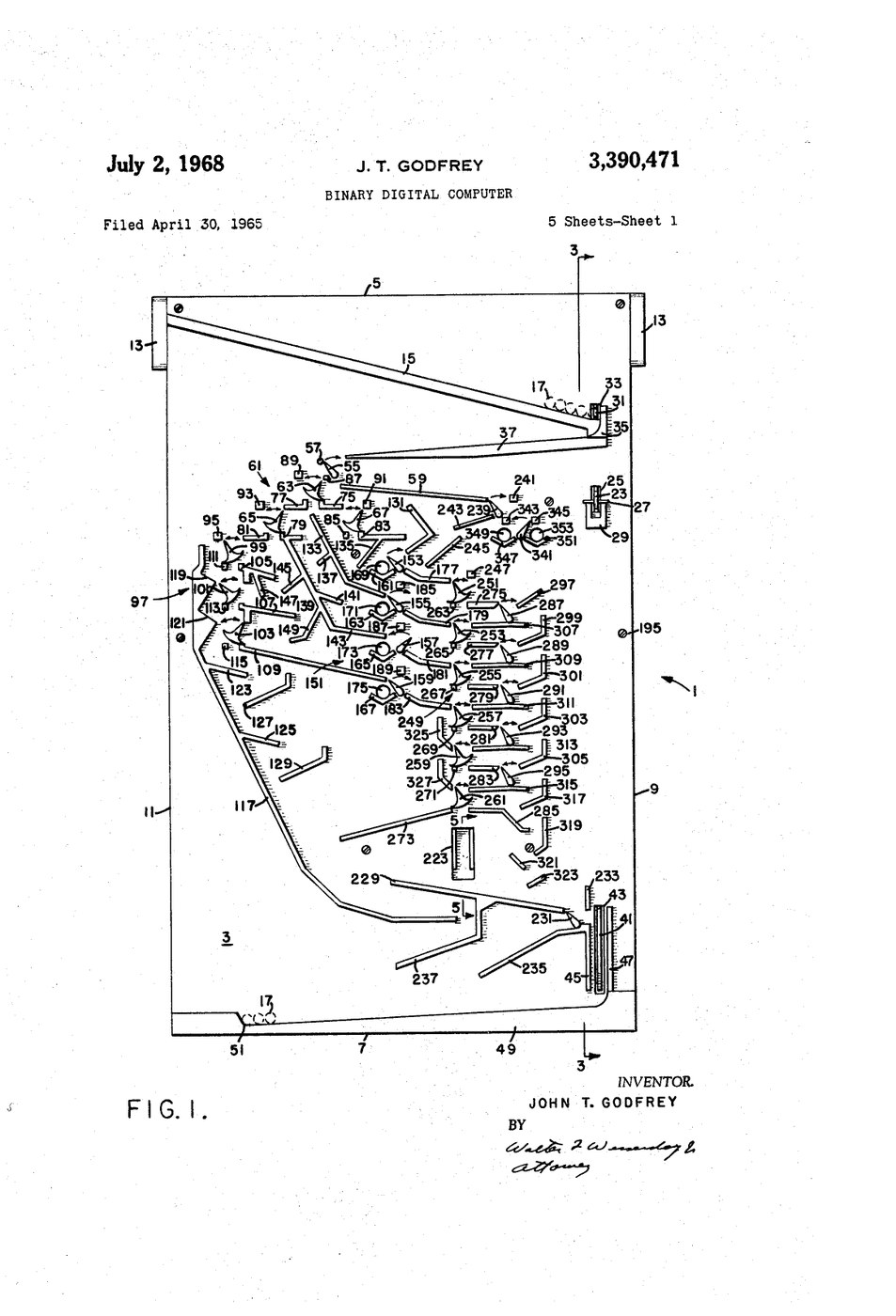
The patent also describes two games built on the same principle — boards on which a player and the machine take turns gating balls, one, two or three at a time, from a rack of fifteen, and “the player left with one ball to gate loses the game”. That is the game of Nim in its “misère” form, and exactly the game that The Amazing Dr. Nim plays. The two products, in other words, share one patent and one idea. The patent’s later history shows the fate of E.S.R. itself: the US assignment record lists the rights passing in 1984 from KPB Industries to Binney & Smith, the Crayola company that had bought E.S.R. and never put its computers back on sale.
5.4 The Board
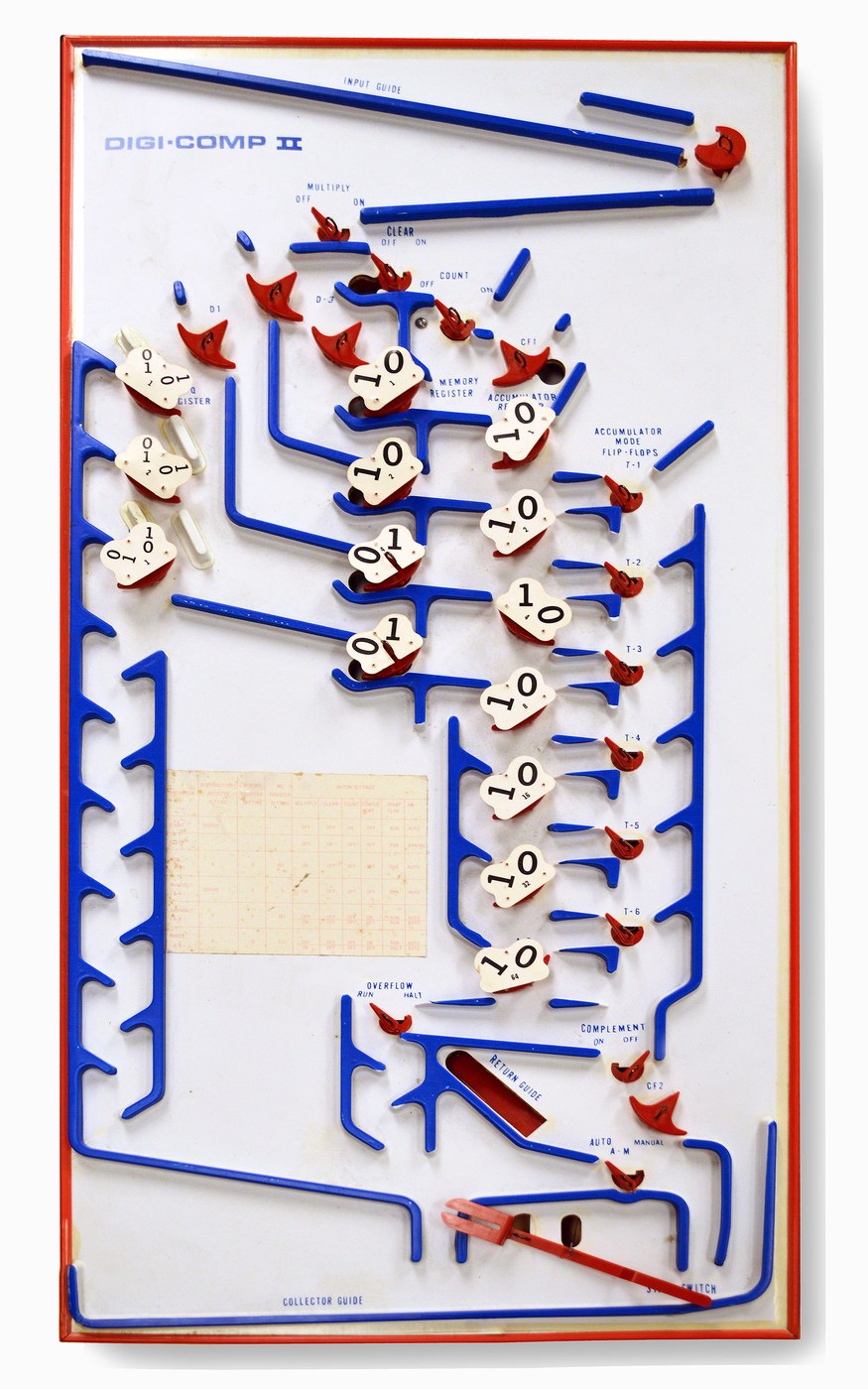
As sold, Digi-Comp II was a flat board about 14 by 28½ inches (36 × 72 cm), made of two levels of Masonite hardboard, propped up at an angle on a stand. Blue plastic guides on the upper surface form the channels the marbles follow; the levers that do the computing are pivoted on the same surface, each with its two positions printed on the board beneath it. Some channels pass through holes to the lower level, where hidden runs take a marble from one part of the board to another. The marbles themselves are half-inch (12.5 mm) marbles, loaded into an input guide across the top. At the bottom, a collector guide catches them, and a start lever near the bottom releases the first one. Because nothing on the board is removable except the marbles, it stands up well to being handled — one reason museums and schools have found it easier to display than Digi-Comp I with its loose pegs (Wikipedia, “Digi-Comp II”).
The instruction manual names every part, and the names are those of a real computer of the 1960s (E.S.R., Digi-Comp II Instruction Manual):
Table 1 — The instruction manual names every part, and the names are those of a real computer of the 1960s ([E.S.R., Digi-Comp II Instruction Manual](https://archive.org/details/digi-comp-ii))
| Part | Manual name | What it holds or does |
|---|---|---|
| Seven flip-flops in a column, A1 to A7 | ACCUMULATOR register | Any seven-bit number; all arithmetic results build up here |
| Three flip-flops | M-Q (multiplier-quotient) register | A three-bit number: the multiplier, or the quotient as a division proceeds |
| Four switches, M1 to M4 | MEMORY register | A four-bit number to be added or multiplied; “remembers” it, unchanged by the calculation |
| Three flip-flops, D1 to D3 | DISTRIBUTOR | Routes successive balls in a cycle during multiplication |
| Hand-set switches | MULTIPLY, CLEAR, COUNT | Choose the operation |
| Switch, with two flip-flops CF1 and CF2 | COMPLEMENT | Takes the ones’ or twos’ complement of the accumulator |
| Flip-flop | OVERFLOW | Records a carry out of the top of the accumulator |
| Switch | A-M (automatic / manual) | Whether a finished ball releases the next one |
| Six switches, T1 to T6 | — | Set at the start of each operation, as the manual’s check list instructs |
The registers are read in an unexpected direction. A note on the manual’s diagram warns that they “are read from bottom to top to correspond to reading the binary number from left to right” — the least significant bit is at the top of the column.
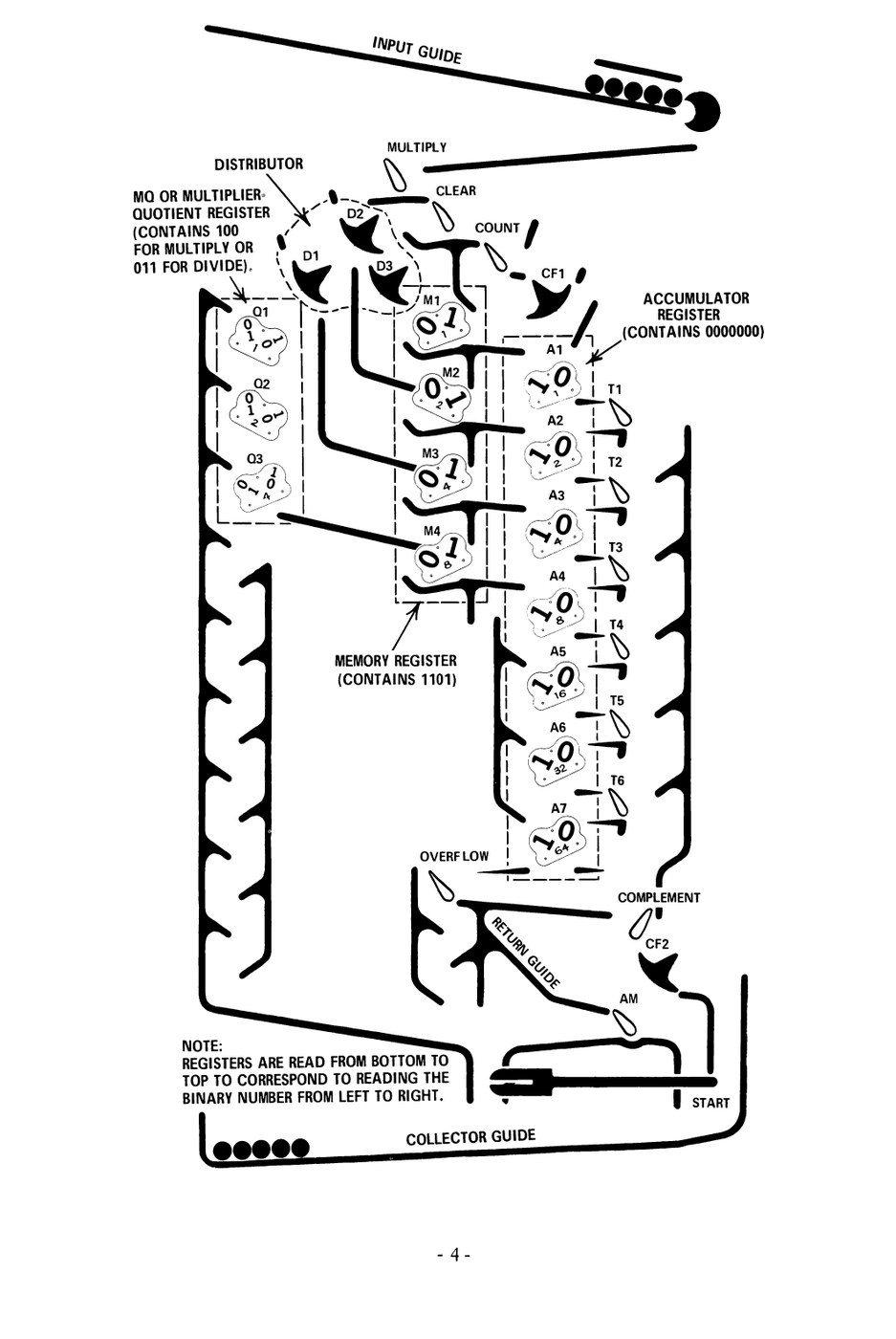
To begin any operation the operator initializes the machine — the manual’s word — by working through a “New Operations Check List”: T1 to T6 to the left; CF1 to the left and CF2 to the right; the distributor flip-flops to the right; and so on, with the correct starting position of every switch printed on the face of the board as a reminder. The numbers to be worked on are set by hand into the memory, M-Q and accumulator registers. Then the start lever is pulled.
5.5 How a Marble Computes
5.5.1 The toggle
Everything Digi-Comp II does rests on one mechanical idea. The manual explains it with care:
The logic elements in DIGI-COMP II simulate “FLIP-FLOP” circuits in an electronic computer. These elements are simply pivoted levers which have two possible positions. In entering the element from the top the ball is directed to exit along one of two possible paths according to the present setting of the element. The path of the ball out of the element is determined by the setting of the element and reveals the setting of the element. This is the sense in which the ball “interrogates” or questions the element as to its prior state.
And in passing through, the ball pushes the lever over to its other position. A single passage therefore does two things at once: it reads the bit (by the path the ball takes) and inverts it (by moving the lever). Not every lever on the board does this. The hand-set switches — MULTIPLY, CLEAR, COUNT and the rest — route every ball the same way and are never moved by it; they are the machine’s control settings. The flip-flops are its memory.
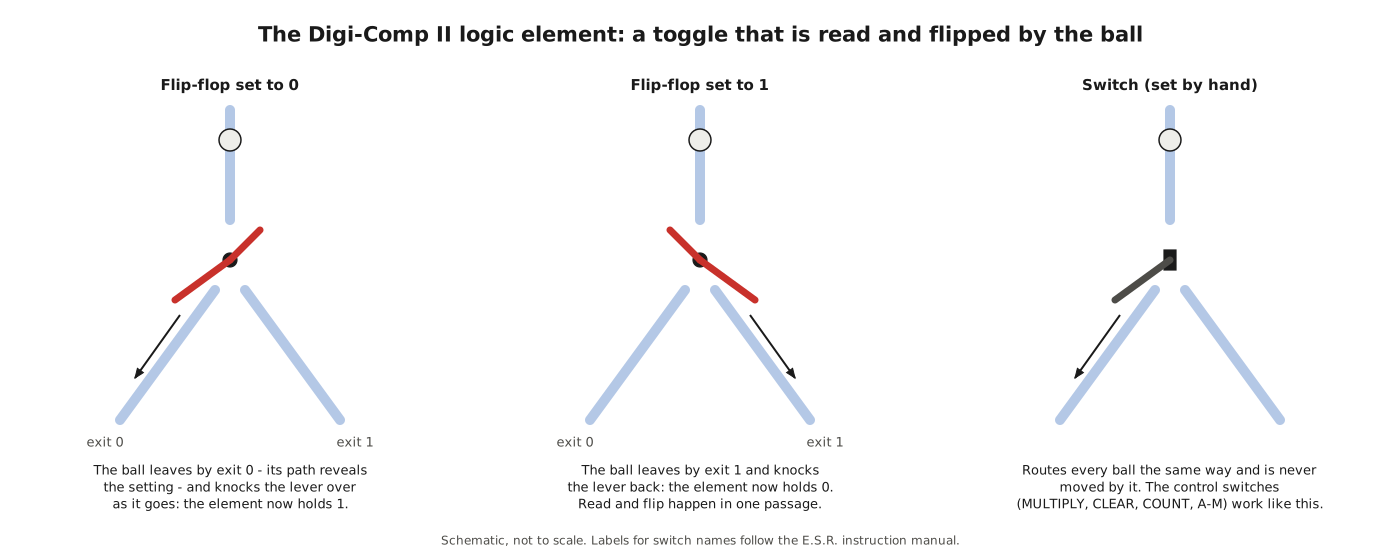
A read-and-invert element is exactly what a binary counter needs. To add one to a binary number, the lowest bit is inverted; if it was 1 (and so is now 0), a carry passes to the next bit, which is inverted in turn; and so on until a bit that was 0 becomes 1 and the carry stops. On Digi-Comp II a ball entering the accumulator at its least significant bit does this literally: at each flip-flop it either finds a 0, flips it to 1 and leaves the register, or finds a 1, flips it to 0 and rolls on to the next flip-flop. The carry is the ball. Addition, multiplication, complement and division are all built from controlled sequences of such counting passages, as Volume 6 shows step by step.
5.5.2 The cascade
A single ball can carry a single count. Most operations need many balls, and the second part of Godfrey’s idea is that the machine releases them itself. The manual again:
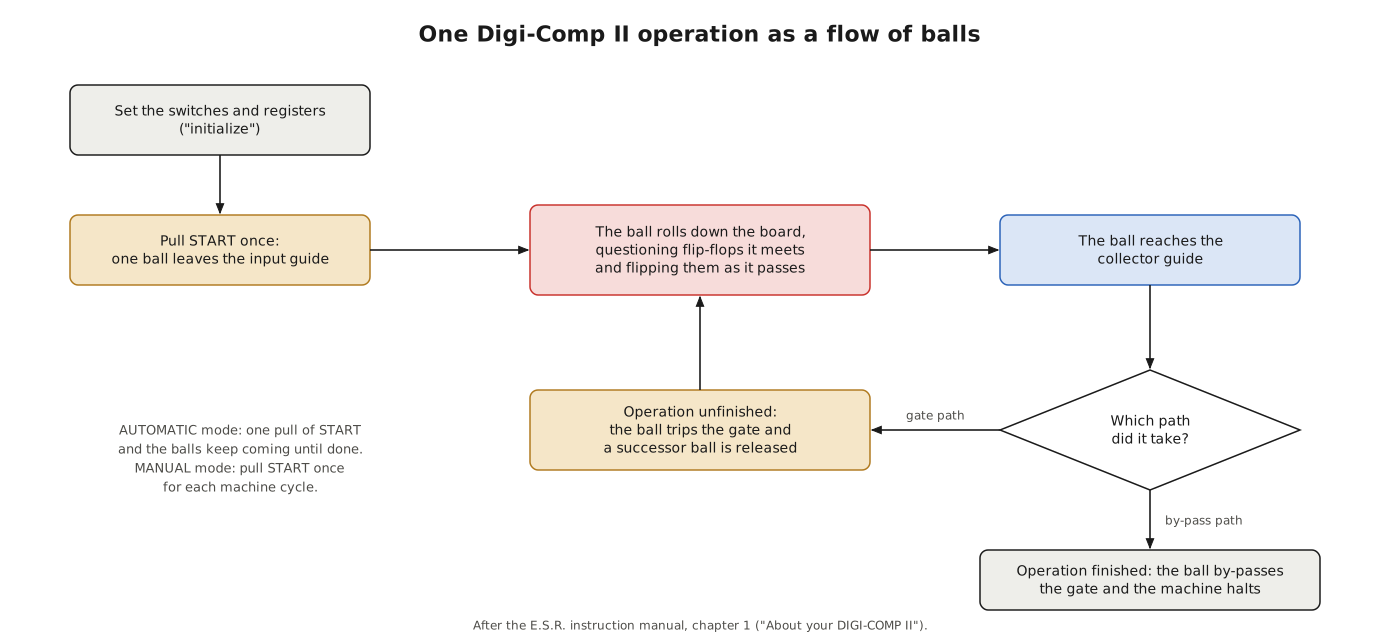
If the desired operation is only partially completed by the ball when it reaches the bottom it will be automatically directed to “gate” or trigger a successor ball from the top. This successor will in turn travel down the surface by a different path and gate still another successor ball if required, which will behave in like manner, etc., until the entire operation is complete. The machine will then shut itself off by directing the last ball to by-pass the gating mechanism.
The path a ball takes to the bottom therefore decides whether the machine goes on. In AUTOMATIC mode, one pull of the start lever sets off the whole cascade; in MANUAL mode the operator pulls the lever once for each machine cycle, slowing the machine still further for demonstration. The ball’s journey is, in modern terms, an instruction cycle: fetch (release a ball), execute (roll through the logic, changing state), and decide (gate the next cycle or halt).
5.5.3 What it can do
The manual lists eleven things that “with appropriate settings” the machine can be made to do:
- count out a specified number of balls;
- count in binary arithmetic;
- add;
- multiply;
- multiply and add;
- obtain either the “1’s” or “2’s” complement;
- subtract;
- divide;
- zero or clear;
- overflow;
- halt.
All of them are performed with numbers of at most seven bits in the accumulator and four in the memory register. It is a fixed-function machine — the board’s course cannot be rearranged — but within that course the switches select among several different “programs”, and the operator’s sequence of operations makes up a larger program, written in the manual’s own language.
5.5.4 Slow motion
The manual makes a virtue of the speed. “Where the electronic computer requires only a few millionths of a second to complete an operation, DIGI-COMP II requires a few seconds to complete the same task. Thus, the speed of the electronic computer has been reduced by a factor of a million to one. This enables the person operating DIGI-COMP II to comprehend what is happening as it occurs.” A chapter on “Speeding up DIGI-COMP II Operation” concedes that patience has limits.
5.6 The Manual
The instruction manual is a booklet of more than sixty pages in fourteen chapters, with a programmer’s card that carried a binary-to-decimal table and a summary of the machine’s commands (E.S.R., Digi-Comp II Instruction Manual). It offers three routes through itself — for beginners, intermediate users and advanced users — and each route ends with the advice to try Digi-Comp I and its advanced manual as well, to “learn more about computer machine organization, and logic”.
The early chapters check the machine out with five tests, teach binary counting and conversion between binary and decimal, and work through count-and-clear, addition, multiplication, subtraction and division. Middle chapters introduce the octal system as a shorthand for binary, and explain the multiplier-quotient register, the distributor, the memory register, the rules of binary addition, shifting, complement arithmetic and negative numbers, division with remainders, and binary fractions.
5.6.1 DIGI-TRAN
Chapter 4 does something no toy manual had done before: it introduces a compiler language. The manual first explains that the step-by-step instructions used so far are “machine language”, which the computer understands directly, and that real computers are programmed in languages that combine many machine steps into one command:
These compiler languages have been largely responsible for the fantastic growth rate of the computer industry. They have made it possible for a great number of people to write relatively difficult programs with very little professional training. We can develop a “compiler language” called DIGI-TRAN which basically combines several commands in one.
A DIGI-TRAN program sets registers to values and names an operation — the manual’s example sets the accumulator and memory and then gives the single command DIVIDE in place of seven machine-language steps. On a real computer, it adds, the numbers could be written in decimal because “electronic computers are equipped with automatic binary decimal converters”; “DIGI-COMP II has no automatic converter, so we will stick with the binary numbers.”
5.6.2 From marbles to FORTRAN
The manual’s last chapters are its most ambitious. Chapter 13, “Special Problems and Applications”, sets problems from science and life: calculating areas, the weight of air, the principle of Archimedes, summing infinite series, “The Population Explosion”, the area of a circle, random-number generation, simulation, an accounting problem and “Ballistic Missile Calculations” — each to be programmed in DIGI-TRAN and run in marbles. Chapter 14 then takes the reader to a real machine. Because FORTRAN “has been for years one of the more popular computer languages”, the manual shows how DIGI-TRAN programs translate into FORTRAN for “numerous existing commercial digital computers such as the IBM 1620, IBM 1401, IBM 1410, IBM 7070, IBM 7074, IBM 704, IBM 709, IBM 7090, CDC 1604, Honeywell 800”. Its introduction promises that “if you should have available an IBM computer of the models stated, you will actually be able to insert simple problems into it with no further help required!!!”
The manual is careful about the differences. “FIRST, and most important, is that in the use of DIGI-COMP II, most commands actually refer to things you must do, while in a large electronic computer, the commands specifically tell the machine what to do.” It is an honest summary of what a mechanical teaching computer could and could not be.
5.7 In the Shops and in the Schools
E.S.R.’s flyer of the later 1960s introduced “the recently introduced DIGI-COMP II” as a machine that “provides a larger computational capacity than its predecessor DIGI-COMP I. It has a readout capable of handling large numbers, yet is exceptionally simple to program.” The selling copy was enthusiastic — “This is the first mechanical computer with automatic switch action … you can literally PROCESS DATA!” — and the price was $16.00, more than two and a half times that of Digi-Comp I (E.S.R., “A Word About E.S.R. Inc.”). The exact year it first went on sale is not recorded in any source found for this series; the patent was filed in 1965, the Newark Sunday News was writing about E.S.R.’s “educated marbles” in November 1966, and secondary sources say only that it was made “in the late 1960s”.
It did not sell as Digi-Comp I had. Duerig’s account is brief and candid: Godfrey and Hogan “built enough models and developed a manual which was tried out in the local school system, but getting the teachers to be able to understand it sufficiently was the problem. So Digi II languished.” A machine sold as “a perfect introduction to computers for children” turned out, in the classroom, to need a teacher who understood binary arithmetic, complements and registers — a great deal to ask in the 1960s. The board was also larger, more expensive and more fragile than its predecessor, and it could not be reprogrammed into games and riddles the way Digi-Comp I could.
The consequence is that original Digi-Comp IIs are rare. Masonite warps and swells; the small plastic levers break or go missing; the marbles are lost. Surviving examples are held by computer museums such as the System Source Computer Museum in Maryland, whose machine is shown at the head of this volume, and change hands among collectors. Most people who have operated a Digi-Comp II since the 1970s have done so on a reproduction (Volume 8).
5.8 A Second Career
The machine’s reputation recovered in the twenty-first century, first among makers and then, unexpectedly, among theoretical computer scientists. In 2011 Evil Mad Scientist Laboratories built a giant Digi-Comp II running on billiard balls, and in 2012 began selling a tabletop wooden version (Volumes 7 and 8). A giant built by the same company was installed in the Stata Center at the Massachusetts Institute of Technology in honour of the computer scientist Charles Leiserson’s sixtieth birthday (MIT CSAIL, “DigiComp II”).
Leiserson demonstrated it to his colleague Scott Aaronson, who on 4 July 2014 posted a short paper, “The Power of the Digi-Comp II”, asking exactly what such a machine can compute (Aaronson, Shtetl-Optimized, 4 July 2014). Abstracting the board as a network of toggles through which a stream of balls is passed, he showed that the problem of predicting where the balls end up is complete for the class CC — the problems that reduce, with very little computation, to evaluating “comparator circuits”, a class that includes the stable-marriage problem and lies between the classes NL and P. In plain terms: an idealised Digi-Comp II, given a polynomial number of balls, can solve exactly the CC problems, which makes it surprisingly powerful for a toy, but it cannot simulate an arbitrary logic circuit unless CC turns out to equal P, which complexity theorists generally doubt. The reason, Aaronson noted, is that toggle networks are “1-Lipschitz”: changing one input can change at most one output, and general circuits need more freedom than that. A board allowed an exponential number of balls can still be simulated in polynomial time, but exactly how hard that problem is he left open.
It is a fitting coda. A toy whose manual spent seventy pages persuading children that it was “a real binary digital computer” turned out, fifty years later, to define a natural complexity class of its own.
5.9 Digi-Comp I and Digi-Comp II Compared
Table 2 — Digi-Comp I and Digi-Comp II Compared
| Digi-Comp I (1963) | Digi-Comp II (1965 patent) | |
|---|---|---|
| Inventors | Irving J. Lieberman, William H. Duerig, C. David Hogan | John T. Godfrey |
| Power | the operator’s hand on the clock lever | gravity; the operator pulls the start lever |
| Memory | 3 flip-flops (sliding plates) | 7-bit accumulator, 3-bit M-Q register, 4-bit memory register, distributor, complement and overflow flip-flops |
| Logic | wire rods blocked or freed by pegs | the paths of the balls through toggles and switches |
| Programmable? | yes, by moving pegs: any next-state function of three bits that the rods can express | no; switches select among built-in operations |
| Size | about 12 × 4½ in | about 14 × 28½ in |
| Price | $4.99 at launch | $16.00 |
| Sales | more than 100,000 by later accounts | far fewer; it “languished” (Duerig) |
Next — Volume 6: Digi-Comp II’s Arithmetic — Counting, Adding and Multiplying. The board in operation, marble by marble: initialising the machine, counting a given number of balls, clearing the accumulator, adding the memory register into it, multiplying by repeated addition under the control of the distributor and the M-Q register, taking ones’ and twos’ complements, subtracting and dividing — each worked on the series’ simulator and checked against the answers in E.S.R.’s manual.
Comments (0)