Digi-Comp · Volume 6
Digi-Comp — Volume 6 — Digi-Comp II's Arithmetic — Counting, Adding and Multiplying
Marble by marble through E.S.R.'s rolling-ball computer: initialising the board, counting and clearing, the carry that runs down the accumulator, adding the memory register, multiplying with the distributor and the MQ, two's complements, subtraction, division and the remainder trick — each worked on the series' simulator against the answers in the 1965 manual
6.1 About This Volume
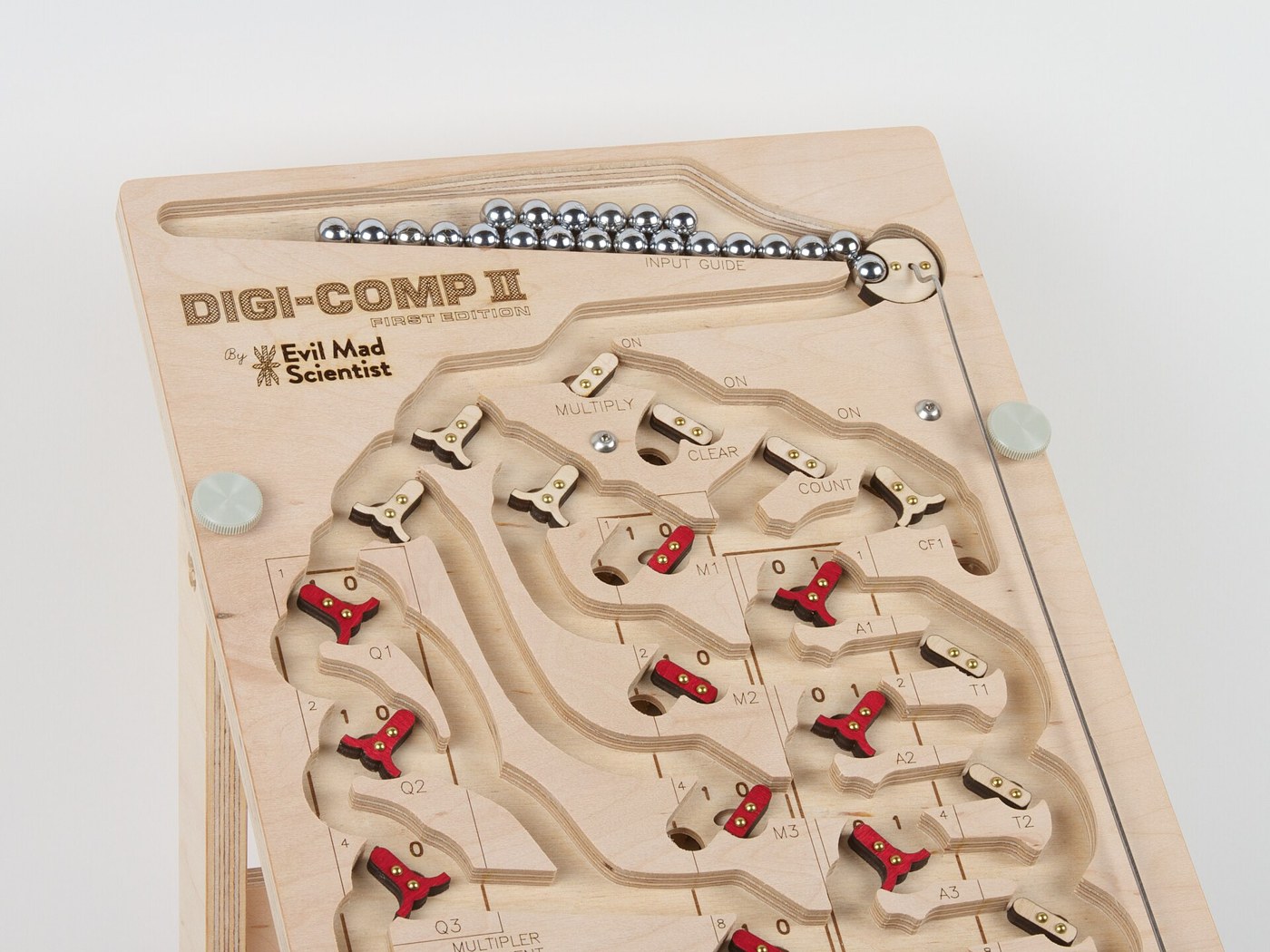
Volume 5 told the story of Digi-Comp II and described its board: a tilted surface down which marbles roll, past toggles that each hold one bit and send a marble left or right according to their setting, flipping as it passes. This volume runs the machine. It follows the order of E.S.R.’s instruction manual — initialising, counting, clearing, adding, multiplying, complementing, subtracting and dividing — and follows individual marbles through each operation.
The answers all come from the series’ simulator, digicomp_sim.py, whose Digi-Comp II half models every element the manual describes. Run as python3 digicomp_sim.py --dc2 multiply 4 13 it prints a table with one line per marble: where the marble went, and the state of every register after it had passed. Its self-test runs 38 checks taken from the manual’s own examples, tests and answers, and all pass. Two of the manual’s printed answers turn out to be wrong, and they are noted where they occur. One part of the model is an inference rather than a reading of the manual, and it is flagged too.
The manual is quoted from the scan that Evil Mad Scientist Laboratories made of an original copy (DCII-manual.pdf); page numbers are the manual’s own.
6.2 The Board as a Computer
Digi-Comp II has three registers, each a column of flip-flops with a printed read-out of 0 and 1:
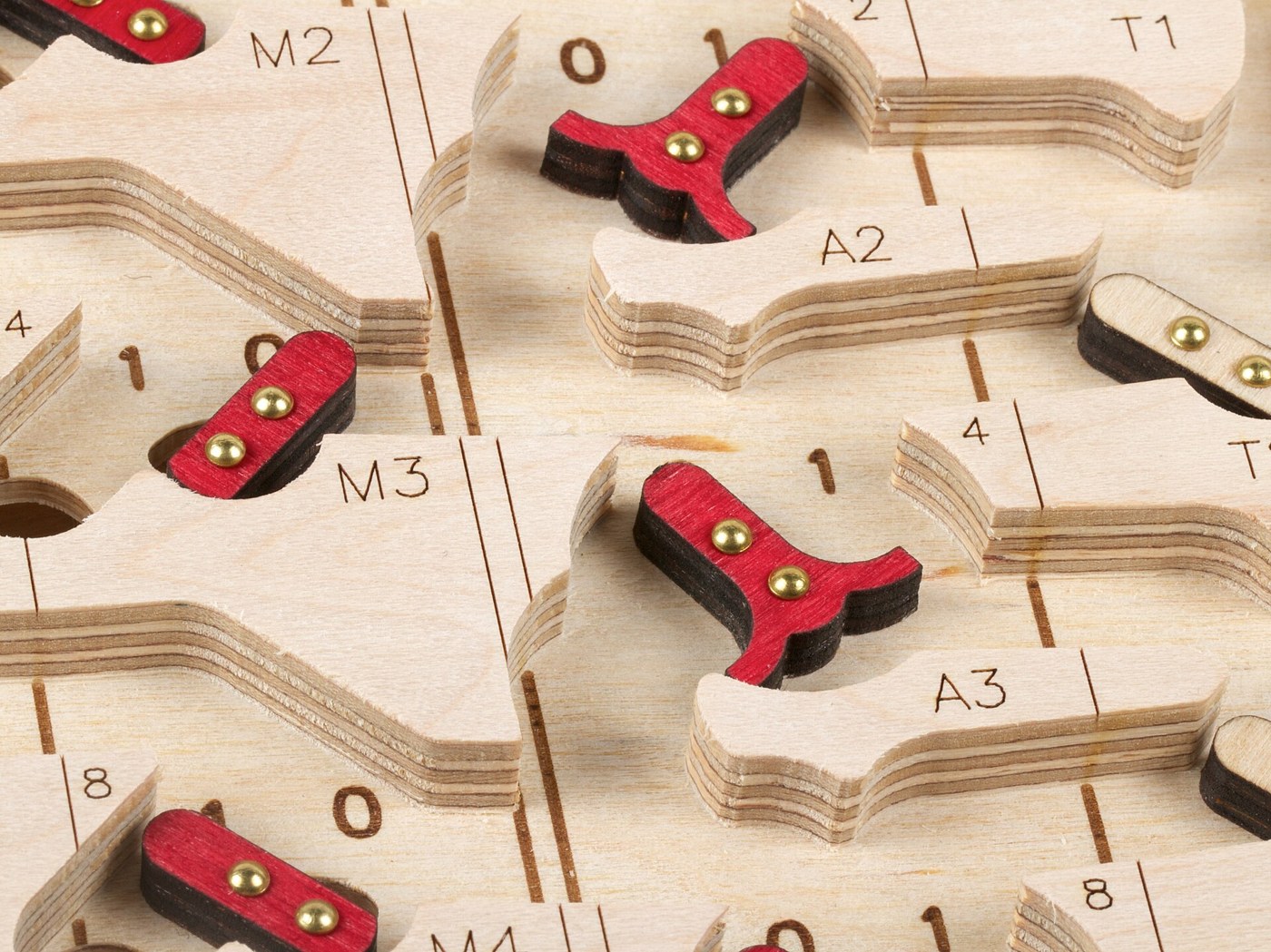
- the accumulator, seven bits, A1 to A7, down the right-hand side, where “all of the arithmetic performed by the computer occurs” (p. 5);
- the memory register, four bits, M1 to M4, in the middle, which “‘remembers’ a number but this number is not changed during the course of calculation”;
- the MQ (multiplier-quotient) register, three bits, Q1 to Q3, on the left, which counts how many times an operation has been done.
Registers are read from bottom to top, so the bottom bit, A7, is the 64s bit and A1 at the top the ones. The manual adds that “if you stand on the right side, which is the side the START SWITCH is on, you can see that you will read the ACCUMULATOR as an ordinary binary number” (p. 11).
There are also control flip-flops that the operator does not normally set: the distributor D1 to D3, the six accumulator mode flip-flops T1 to T6, and two complement flip-flops, CF1 and CF2. And there are six switches that the operator sets and the marbles only read: MULTIPLY, CLEAR, COUNT, COMPLEMENT, OVERFLOW (RUN or HALT) and A-M (AUTO or MANUAL). The difference between a switch and a flip-flop is the whole difference between program and data: “switches such as the COMPLEMENT SWITCH and AM are only changed by the operator but FLIP-FLOPS like CF2 are changed by the machine process” (p. 9).
A marble is released from the input guide by pulling the START lever. In AUTO, every marble that reaches the bottom by the normal route rolls under the START lever on its way to the collector and releases the next one; in MANUAL it simply stops. The machine therefore runs until a marble takes a route that by-passes the start lever. That is how it halts.
6.2.1 Initialising
Before any operation the manual asks for the board to be initialised from a “New Operations Check List” (p. 5): T1 to T6 to the left; CF1 to the left and CF2 to the right; D1, D2 and D3 to the right; every switch to its “normal” position, which is OFF, RUN and AUTO — all to the left, except the COMPLEMENT switch, whose OFF position is to the right. The simulator’s initialize() does exactly this and leaves the three registers alone, since their contents are the data.
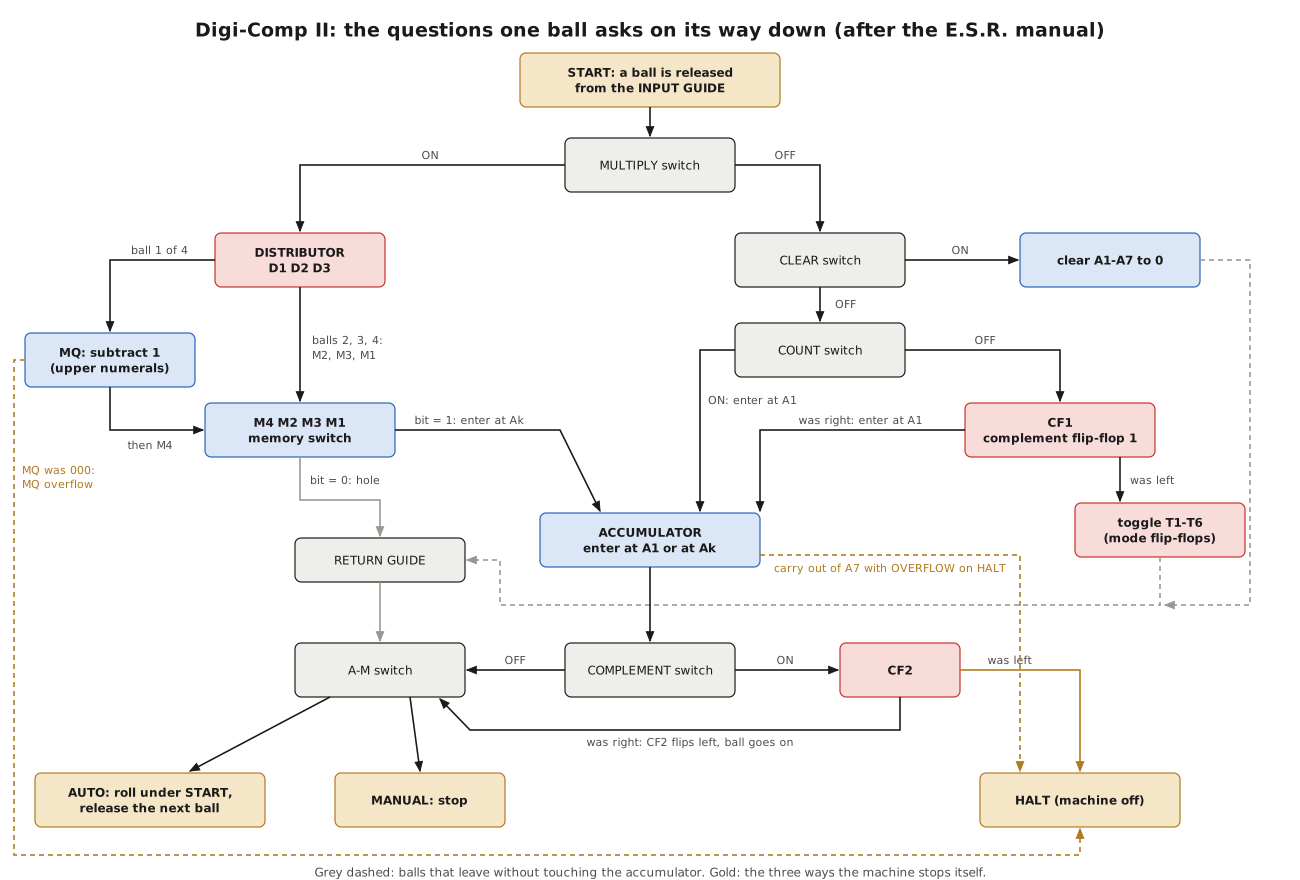
6.3 Counting: the Carry Made Visible
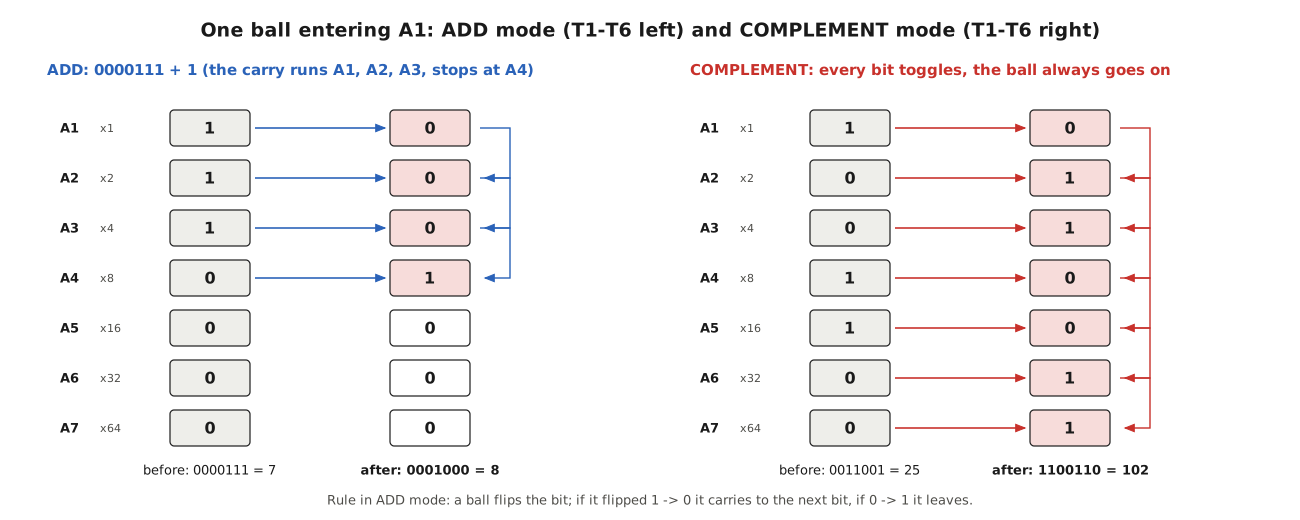
The simplest operation is COUNT. With the COUNT switch on, and MULTIPLY and CLEAR off, each marble enters the accumulator at A1 and adds one. The rule for an accumulator flip-flop is the whole of binary addition: “If one of these elements is in the ‘zero’ state an impulse flips it to the ‘one’ state, but the impulse does not ‘carry’ to the next FLIP-FLOP” (p. 20). If it is in the one state, the marble flips it to zero and rolls on to the next flip-flop down, which is the carry.
The manual’s first experiment counts from zero, one marble at a time in MANUAL, and asks the owner to watch the eighth marble, which adds one to seven:
“Notice that A1 flips to ‘0’ and the ball is carried to the entry of A2. Then A2 flips to ‘0’ and the ball goes to A3. Then A3 flips to ‘0’ and the ball goes to A4. Next, however, A4 is a ‘0’ rather than a ‘1’ and so no carry to A5 takes place.” (p. 11)
The simulator follows the same marble through the same flip-flops. A carry on Digi-Comp II is a single marble rolling further down the column; it takes longer the further it has to go, and it can be watched.
In AUTO the machine counts by itself, a marble every few seconds. The manual points out that more than one marble can be on the board at once: an owner who pulls START again when the first marble is a third of the way down, and again at two-thirds, keeps three marbles running, and “the machine will count correctly, even with multiple balls going down the surface at the same time and the counting operation is thus speeded up by a factor of three to one” (p. 20). It is a pipeline, explained to schoolchildren in 1965.
6.3.1 Overflow
The accumulator holds seven bits, so 1111111 + 1 has nowhere to put its carry. The manual’s demonstration (p. 19) starts at 1111100 and counts six marbles; the simulator gives the same read-outs:
Table 1 — The accumulator holds seven bits, so 1111111 + 1 has nowhere to put its carry. The manual's demonstration (p. 19) starts at 1111100 and counts six marbles; the simulator gives the same read-outs
| Marbles | 0 | 1 | 2 | 3 | 4 | 5 | 6 |
|---|---|---|---|---|---|---|---|
| Accumulator | 1111100 | 1111101 | 1111110 | 1111111 | 0000000 | 0000001 | 0000010 |
On the fourth marble, the carry leaves A7 “on the left path and enters the OVERFLOW SWITCH”. With the switch on RUN the marble rejoins the normal route and the machine carries on. On HALT it is sent past the start lever, and the machine stops with 0000000 showing. The OVERFLOW switch is the machine’s only conditional instruction.
6.3.2 Clearing
With the CLEAR switch on, a marble goes “to the left of the ‘CLEAR’ switch, drop[s] to the lower level and change[s] all the ACCUMULATOR flip-flops to ‘zero’” (p. 7). One marble clears the register. In AUTO a CLEAR would release marble after marble, all doing the same thing, so the manual’s CLEAR program always sets A-M to MANUAL.
6.4 Adding the Memory Register
Counting adds one. Adding a number from the memory register uses the multiplication machinery, with the MQ set to one. The manual’s first addition is 13 + 71 (p. 16): 71 = 1000111 in the accumulator, 13 = 1101 in the memory, MQ = 001, MULTIPLY on. The simulator’s trace:
Table 2 — Counting adds one. Adding a number from the memory register uses the multiplication machinery, with the MQ set to one. The manual's first addition is 13 + 71 (p. 16): 71 = 1000111 in the accumulator, 13 = 1101 in the memory, MQ = 001, MULTIPLY on. The simulator's trace
| Marble | Route | Accumulator | Value |
|---|---|---|---|
| 1 | distributor → MQ (subtract 1, now 000) → M4 = 1 → enters A4 | 1001111 | 79 |
| 2 | distributor → M2 = 0 → through the hole | 1001111 | 79 |
| 3 | distributor → M3 = 1 → enters A3 | 1010011 | 83 |
| 4 | distributor → M1 = 1 → enters A1 | 1010100 | 84 |
| 5 | distributor → MQ was 000: overflow, machine stops | 1010100 | 84 |
The answer, 1010100 = 84, is the manual’s. Five marbles did the work, and they show how the machine is organised.
The distributor is a ring of three flip-flops that sends four successive marbles four different ways: the first to the MQ and then to M4, the second to M2, the third to M3 and the fourth to M1. After every fourth marble D1, D2 and D3 are all back to the right. “In other terminology the three DISTRIBUTOR FLIP-FLOPS D1, D2 and D3 are connected as a ‘Ring Counter’ that counts to four” (p. 24). The manual gives the order of the four outputs but not how the three flip-flops are linked inside. The simulator models them as a two-level tree — D1 alternates between D2 and D3, and each of those between two outputs — which gives the published order and the return to “all right” after four marbles. That wiring is an inference, not something the manual states.
The memory register is read without being changed. A marble arriving at a memory switch Mk set to 1 is passed into the accumulator at Ak, where it adds 2 to the power k−1 with all the carrying that implies; at a switch set to 0 it drops through a hole and returns to the start lever by the return guide. The manual calls this “Non-Destructive” read-out, “to distinguish it from ‘Destructive’ readout which changes or destroys the information during the process” (p. 27). The order — 8, then 2, then 4, then 1 — does not matter, because addition does not care.
The MQ counts the additions. Its read-outs carry two sets of numerals, an upper set for multiplication and a lower set for division, and each is the one’s complement of the other. A marble arriving at the MQ adds one in the lower numerals, which is subtracting one in the upper. If the upper numerals already read 000 the subtraction overflows: “an MQ REGISTER OVERFLOW will direct the ball out of the left side of the lowest bit of the MQ REGISTER and it will bypass M4 and the TRIGGERING MECHANISM” (p. 24). The fifth marble above found 000 and stopped the machine. As it went, it turned the MQ back to 111, so the board is not left ready for the next operation; the INITIALIZE step and a fresh MQ setting take care of that.
The manual’s next example, 15 + 112, gives 1111111 on the simulator, as the manual says. Adding is limited by the registers: the number in memory must be 15 or less, and the sum 127 or less unless the overflow is acceptable. The manual’s problem 4, 9 + 125, deliberately overflows: the simulator shows 0000110, with the eighth bit lost, which is the answer the manual expects the owner to find.
6.4.1 Adding a list of numbers
A charming experiment (p. 27) adds 12 + 13 + 14 + 15 by setting the MQ to 4 and the memory to 15, and then changing one memory switch at a time while the machine runs: to 14 “when the fifth ball is first triggered”, to 12 at the ninth and to 13 at the thirteenth. The simulator, changing the switches at the same moments, ends with 54 in the accumulator, and the machine turns itself off on the seventeenth marble, as the manual says. The operator is acting as the program’s memory, feeding a new operand at the start of each cycle of four.
6.5 Multiplying
“Multiplication is accomplished in DIGI-COMP II by adding the number in the MEMORY REGISTER to the ACCUMULATOR REGISTER as many times as the value of the number placed in the MQ REGISTER. This is simply repeated Addition” (p. 29). The program is the same as for adding, with the multiplier in the MQ instead of 001 and the accumulator cleared first.
The manual’s first multiplication is 4 × 13 (p. 16): MQ = 100, M = 1101, A = 0000000. The simulator runs it in seventeen marbles, four cycles of four and a last marble to discover that the MQ is empty, and ends with 0110100, which is 52, the manual’s answer.
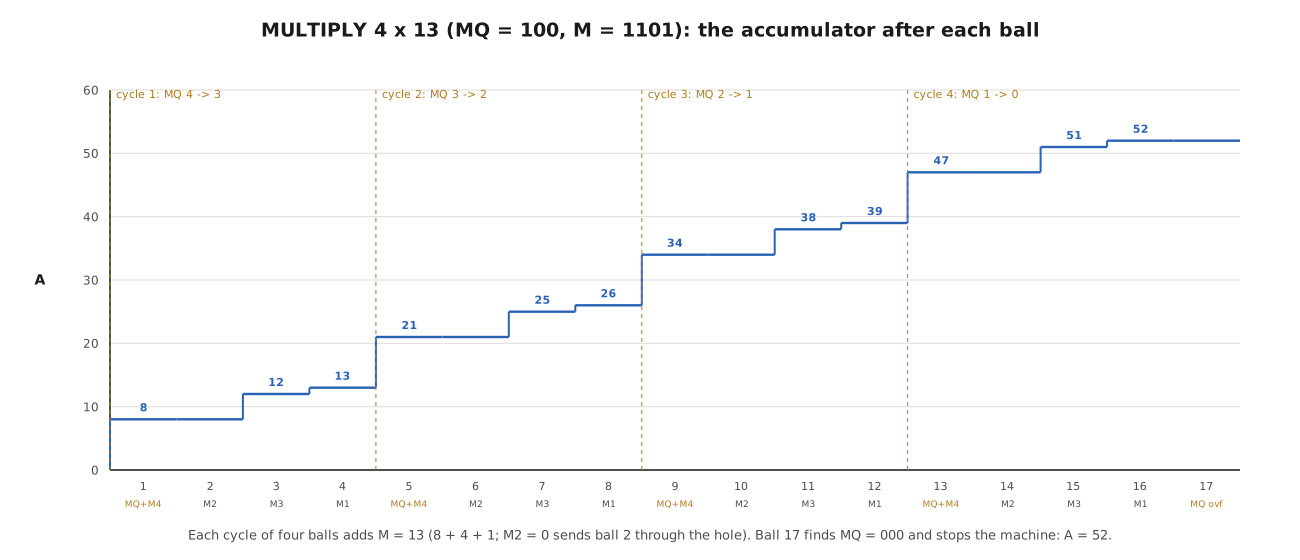
The other results in the manual’s multiplication chapter all come out the same on the simulator: 3 × 15 = 0101101 (45); 2 × 9 = 0010010 (18), in nine marbles; 4 × 9 = 0100100, which is 9 shifted left two places, as the manual remarks; and 7 × 15 = 1101001 (105) with no overflow. The last answers the question of why the accumulator has seven bits: “its size must be equal to the size of the MQ, 3-bits, plus the size of the MEMORY REGISTER, 4-bits. As a result of the choice of this size, no ACCUMULATOR OVERFLOW can occur during multiplication if the ACCUMULATOR is initially set to zero” (p. 31).
6.5.1 Which number goes where
Repeated addition makes the time depend on the multiplier. The manual has the owner multiply 5 × 7 both ways and count the marbles (p. 30). The simulator agrees with its arithmetic: with 5 in the MQ and 7 in memory, five cycles of four plus one, 21 marbles; with 7 in the MQ and 5 in memory, 29. “For speed of multiplication, then, the smaller number should be placed in the MQ.” Every computer architect since has made the same observation about multipliers, usually with more expensive hardware at stake.
6.5.2 Multiply and add
Because multiplication only adds to whatever is in the accumulator, a non-zero start gives A × B + C for free. The manual uses this to turn the machine into a decimal-to-binary converter: 49 is 4 × 10 + 9, so MQ = 100, M = 1010 (ten) and A = 0001001 (nine) gives 0110001, and 57 = 5 × 10 + 7 gives 0111001 (pp. 31-32). Two multiplications in a row, without clearing between them, give (5 × 13) + (4 × 14) = 1111001, 121. The simulator reproduces all three.
6.6 Complements and Subtraction
6.6.1 The two’s complement in four marbles
Digi-Comp II cannot subtract directly. It subtracts the way most computers do, by adding a complement. The one’s complement of a number in the accumulator is every bit inverted; the two’s complement, which the manual calls simply the complement, is the one’s complement plus one, and behaves in every way like a negative number: 25 plus the complement of 25 gives zero with an overflow.
The machine takes a complement in four marbles, using the mode flip-flops and CF1. With MULTIPLY, CLEAR and COUNT all off, a marble goes to CF1, and CF1 alternates. The simulator’s trace for 25 (0011001), which is the manual’s own example (pp. 33-34):
Table 3 — The machine takes a complement in four marbles, using the mode flip-flops and CF1. With MULTIPLY, CLEAR and COUNT all off, a marble goes to CF1, and CF1 alternates. The simulator's trace for 25 (0011001), which is the manual's own example (pp. 33-34)
| Marble | What it does | Accumulator | Mode T1-T6 | CF2 |
|---|---|---|---|---|
| 1 | CF1 left→right; marble flips T1-T6 to the right (COMPLEMENT mode) | 0011001 | right | right |
| 2 | CF1 right→left; enters A1, flips every bit, never carries; then flips CF2 | 1100110 | right | left |
| 3 | CF1 left→right; flips T1-T6 back to the left (ADD mode) | 1100110 | left | left |
| 4 | CF1 right→left; enters A1 and adds one; then flips CF2 back and halts | 1100111 | left | right |
In COMPLEMENT mode, “the corresponding MODE FLIP-FLOP directs any ball exiting to the right, back to the next lower FLIP-FLOP” (p. 34): the marble toggles every bit and always carries on. The result, 1100111, is 103, which is 128 − 25. The marble that stops the machine is the one that flips CF2 from left to right. With the COMPLEMENT switch on, CF2 alternates on every marble that leaves the accumulator, and on alternate passes it sends the marble past the start lever. “In performing the COMPLEMENT operation DIGI-COMP II will take four marbles and shut off” (p. 17).
The manual tests the result by counting (p. 34): leave 1100111 in the accumulator, turn the OVERFLOW switch to HALT and count in AUTO. The machine stops on an overflow with exactly 25 marbles in the collector — the simulator agrees — because 25 plus the complement of 25 is zero. Turned round, the trick counts out any number of marbles: complement the number, then count until overflow (p. 34). For 9, the machine releases exactly nine.
6.6.2 The manual’s table of complements, and a misprint
The manual’s sixth complement experiment (p. 36) gives the complements of 0, 1, 2 and 3 as 0000000, 1111111, 1111110 and 1111101, and of 23 as 1101001. The simulator agrees with all five. It then gives the complement of 47 as 1010000 and of 52 as 1001011. The simulator gives 1010001 and 1001100. The printed values are the one’s complements — each is one less than the two’s complement — and they fail the manual’s own tests on the same page: 47 + 1010000 is 1111111, not zero. The scan was checked: the printed digits are as quoted. It is a misprint, not a scanning error, and the simulator’s values are correct.
6.6.3 Subtraction
To compute B − C, the manual puts the smaller number C in the accumulator, complements it, and then adds B from the memory register with MQ = 001 (p. 17). For 12 − 4 the simulator’s trace is the four complement marbles (0000100 becomes 1111100, which is 124) followed by an ADD with M = 1100:
Table 4 — To compute B − C, the manual puts the smaller number C in the accumulator, complements it, and then adds B from the memory register with MQ = 001 (p. 17). For 12 − 4 the simulator's trace is the four complement marbles (0000100 becomes 1111100, which is 124) followed by an ADD with M = 1100
| Marble | Route | Accumulator |
|---|---|---|
| 5 | MQ (1 → 0), M4 = 1, enters A4: 124 + 8 overflows | 0000100 |
| 6 | M2 = 0, through the hole | 0000100 |
| 7 | M3 = 1, enters A3 | 0001000 |
| 8 | M1 = 0, through the hole | 0001000 |
| 9 | MQ was 000: overflow, stop | 0001000 |
The answer is 0001000, eight. The accumulator overflow on marble 5 is not an error; it is how complement arithmetic works, and with OVERFLOW on RUN the machine ignores it. The same program gives 15 − 14 = 0000001 and 15 − 9 = 0000110, as the manual says. (In the 15 − 9 example the manual writes “MQ = 1111”, which must mean M = 1111, since the MQ has only three bits.)
6.7 Division
Division is repeated subtraction, done as repeated addition to a negative number. The dividend goes in the accumulator and is complemented; the divisor goes in the memory; the MQ is set to 000 in the lower numerals; the OVERFLOW switch is set to HALT; and the machine adds the divisor over and over, counting the additions in the MQ, until the accumulator overflows by passing zero (p. 40). Because a marble arriving at the MQ adds one in the lower numerals, the same mechanism that counts the multiplier down counts the quotient up.
The manual’s example is 25 ÷ 5. The simulator complements 25 to 1100111 (103) in four marbles, then runs cycles that each add 5 (the M3 marble adds 4, the M1 marble adds 1): 108, 113, 118, 123, and in the fifth cycle 127 and then, on the M1 marble, 128 — an overflow, which on HALT stops the machine. The MQ’s lower numerals read 101, five, the manual’s answer. The same program gives 45 ÷ 9 = 5, 52 ÷ 13 = 4 and 78 ÷ 13 = 6, all as printed (pp. 40-41). The last is interesting: 78 is more than 63, so its complement cannot be read as a valid negative seven-bit number, but “the division does come out correct following the same procedure, however, even for dividends greater than +63” — because all that matters is when the accumulator passes 128.
6.7.1 Remainders
If the divisor does not go exactly, the overflow comes part-way through a cycle, and the answer needs repairing. The manual’s procedure for 50 ÷ 11 (pp. 41-42) is the most elaborate piece of operating in the book: run the division; when it halts, finish the cycle of four by hand until D1, D2 and D3 are all to the right again; complement the accumulator; flip every MQ flip-flop to its opposite (so that the count appears in the upper numerals); and pull START four more times with MULTIPLY on, which adds the divisor back once and takes one off the count.
The simulator follows every step. The division overflows on the first marble of the fifth cycle, which is the M4 marble (128 is passed when 8 is added); three more marbles by hand finish the cycle and leave 0000101, which is 55 − 50 = 5. Complementing gives 1111011, and adding 11 back gives 0000110. The MQ’s upper numerals read 100. The quotient is 4 and the remainder 6: 50 = 4 × 11 + 6.
6.8 What the Arithmetic Teaches
Digi-Comp II has no instruction memory, no program counter and no arithmetic unit in the modern sense. Its “program” is six switch settings. Yet with three registers, a four-way distributor and a pair of complement flip-flops it does everything the arithmetic unit of an early computer did:
- counting with ripple carry, where the carry is a marble rolling further;
- non-destructive reading of a memory register and destructive counting in another;
- multiplication as repeated addition under the control of a down-counter, with the familiar lesson that the order of the operands affects the time;
- two’s-complement arithmetic, with overflow detected and either ignored or used to stop;
- division by repeated subtraction, with a remainder correction that is a hand-operated version of the “restoring” division used in real machines.
The manual draws the same moral: “an electronic computer follows a similar but even more complicated sequence procedure to perform division” (p. 42). What the marbles add is that every step can be seen, and that the machine is honest about cost. A multiplication takes four marbles per unit of the multiplier; a carry takes longer the further it travels; a complement takes four marbles every time. The simulator’s traces are, in effect, the timing diagrams of a gravity-powered computer.
Next — Volume 7: After E.S.R. — Dr. Nim, Think-a-Dot, Turing Tumble and the Giant Digi-Comp. What became of the rolling-ball idea: John Godfrey’s marble Nim player, Joseph Weisbecker’s Think-a-Dot, Evil Mad Scientist’s giant Digi-Comp II with billiard balls, and Turing Tumble, the reprogrammable marble computer of 2017.
Comments (0)