Digi-Comp · Volume 10
Digi-Comp — Volume 10 — Building a Digi-Comp II
With the plywood kit out of production, the rolling-ball computer built from Michael Gardi's free 3D-printed replica: the parts and the wood, a base box cut to the original size, thirty-three hand-bent springs, the start-and-release mechanism, the fine tuning that makes every ball go where it should, how many balls each operation needs, and commissioning by the 1965 manual's own tests
10.1 About This Volume
This volume builds a working Digi-Comp II. The route is Michael Gardi’s 3D-printed replica, published free on Instructables in February 2019 and on Thingiverse (thing 3418066), with plywood for the base and steel balls for the marbles. It is chosen because no Digi-Comp II can now be bought new. Evil Mad Scientist Laboratories’ plywood Digi-Comp II: First Edition, the only commercial reproduction, is marked “No longer in production” on the company’s shop page, its B-grade version likewise, and its refurbished units “None available at this time” (shop page, refurbished; both read 27 October 2026). Volume 8 tells the story of that machine and the other reproductions.
Gardi’s replica is not a kit. It is a set of STL files, two PDFs — a scan of the original E.S.R. manual and the original “Parts and Assembly” instructions — and ten steps of notes on where his build departs from E.S.R.’s (Instructables). This volume works through it in the order a builder needs it: materials, printing, the base box, the springs, assembly, tuning, and then commissioning, using the tests in E.S.R.’s manual and the arithmetic of Volume 6, every expected result computed by the series’ simulator.
None of this has been built yet for this series. The text is a design and a procedure, and the places where the account of the actual build will go are marked.
10.2 Choosing a Route
Table 1 — Choosing a Route
| Route | What it is | Status, October 2026 | Notes |
|---|---|---|---|
| Gardi’s 3D-printed replica (this volume) | STL files for every deck, flip-flop and switch; build on a plywood box | Free; Instructables “Digi-Comp II Replica” (9 February 2019) and Thingiverse 3418066; licence CC BY-NC-SA | Full size, about 14 × 28 in; optimised for ½-inch steel balls |
| Gardi’s replica with cut wooden parts | as above, with the base top, frame and supports cut from plywood | DXF files contributed by Mark Ziemer, April 2019, attached to the same Instructable | Needs a laser cutter or CNC router |
| Evil Mad Scientist Digi-Comp II: First Edition | Assembled CNC-routed hardwood plywood machine, 10 × 24 in, 11 mm pachinko balls | No longer in production; no refurbished units available | Sold assembled rather than as a kit (Volume 8) |
| An original E.S.R. Digi-Comp II | Vacuum-formed plastic decks on Masonite, injection-moulded flip-flops, 14 × 28½ in | Second-hand only, rarely seen | Gardi: “when they do appear they sell for many hundreds of dollars” |
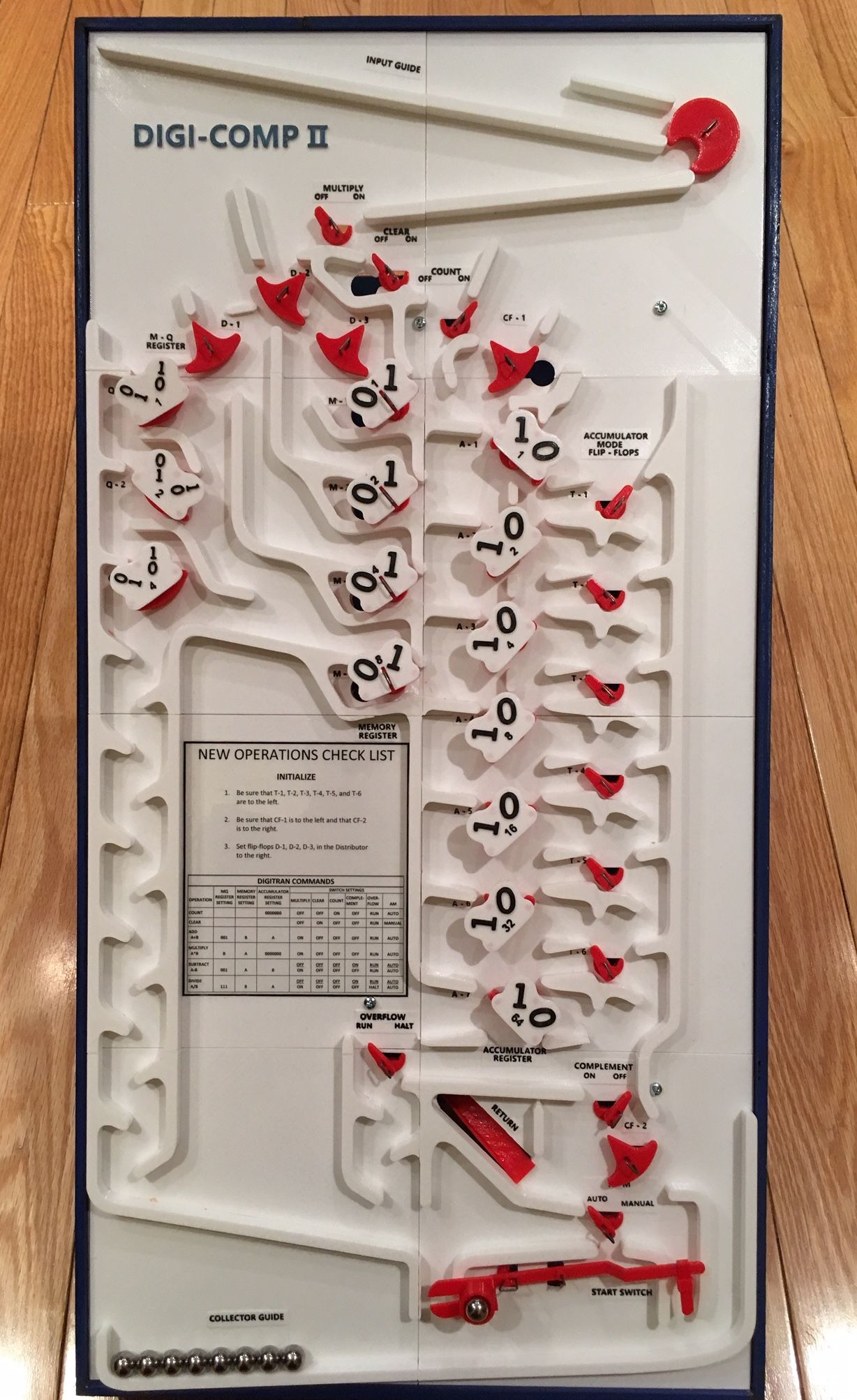
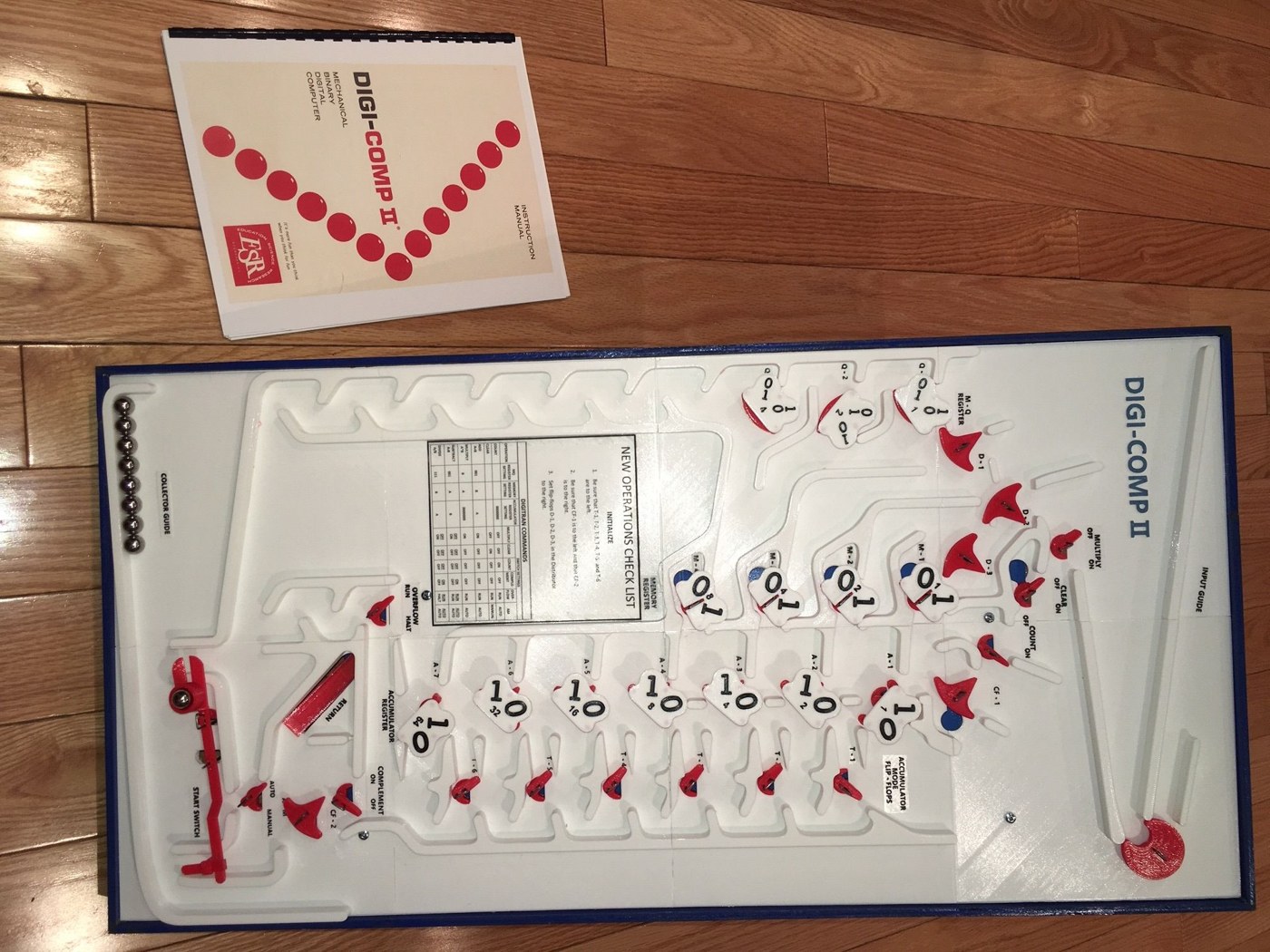
The replica is faithful in a way the plywood reproduction is not. Gardi set out to make “a full size working replica of that Digi-Comp II from 5 decades ago … as authentic as possible based on the images and technologies that I have available to me. The original top and inside decks for instance were vacuformed plastic attached to pieces of masonite board, and the flip-flops and switches were injection molded. In my replica the decks and pieces are all 3D printed.” He worked without an original to hand, from photographs supplied by Jaap Scherphuis, and he changed “the design of some of the flip-flops (that are not visible when operating the device) to improve their reliability”. His own summary is modest: “I did not design the Digi-Comp II, I just did the modelling. The real design work happened back in the 60’s.”
10.3 Bill of Materials
10.3.1 Printed parts
Gardi printed everything in PLA “at .2 mm with no supports unless specified”, with 20 % infill for the two large decks and “100% for pretty much everything else”, in red, white and black. The full list from his notes:
Table 2 — Gardi printed everything in PLA "at .2 mm with no supports unless specified", with 20 % infill for the two large decks and "100% for pretty much everything else", in red, white and black. The full list from his notes
| Qty | Part | Used for |
|---|---|---|
| 1 | Top deck (one piece, or eight pieces for smaller beds) | the visible playfield |
| 1 | Bottom deck (one piece, or two pieces plus a bottom-deck support) | the lower level that clears and complements run on |
| 33 | Bearing | pivots for every flip-flop and switch |
| 7 | Flip-flop with display, accumulator register (or the later “no ball” version) | A1-A7 |
| 7 | Half flip-flop | fitted under A1-A7 |
| 3 | Flip-flop with display, MQ register | Q1-Q3 |
| 5 | Flip-flop, no display, top | D1, D2, D3, CF1, CF2 |
| 6 | Flip-flop, no display, bottom | under the mode switches T1-T6 |
| 4 | Switch with display | memory M1-M4 |
| 12 | Switch | MULTIPLY, CLEAR, COUNT, OVERFLOW, A-M, COMPLEMENT, T1-T6 |
| 14 | Display panel | the 0/1 read-out numerals of every register |
| 1 each | Start switch (needs supports), start-switch pieces, release wheel, release wheel lever, release balance (needs supports), release balance holder, release lever joiner | the start-and-release mechanism |
| 1 | Return guide, with holder and tab | carries balls back up to the first surface |
| 1 | Marble cup; 2 foot balls and 2 foot sockets; 1 leg holder pair; 4 spacers | fittings |
| 1 | Spring template; labels sheet (optional) | tooling and decoration |
Source: M. Gardi, “Digi-Comp II Replica”, step 1 (Instructables, 2019).
Two of the STL files were replaced after users reported slicing problems (“Repaired” versions of the bottom-deck support and the no-display bottom flip-flop), and in March 2019 Gardi added an accumulator flip-flop that “does not require a steel ball”, which he found “a little bit more reliable”. The current files should be downloaded together from the Instructable, which carries all of them.
10.3.2 Other materials
From Gardi’s step 2:
- one 2 × 4 ft sheet of ¼-inch plywood;
- one 8 ft length of 1 × 2 in lumber (¾ × 1½ in actual);
- a 3 ft length of ⅜-inch dowel, for the legs;
- about 12 ft of 1.2 mm (3/64 in) piano wire, for the springs and the actuator wire;
- four ⅛ × 1¼ in bolts with eight nuts; four No. 6 × ¾ in wood screws; some 1 in finishing nails or brads;
- thirteen 7.25 mm steel balls (7 mm or 9/32 in will do) — “not required but I have found that when used they improve the reliability of the machine” — pressed into the accumulator flip-flops and the bottom no-display flip-flops;
- ½-inch steel balls to compute with: “This version of Digi-Comp II has been optimized to work with 1/2 inch steel balls.” Gardi lists “a dozen or so”; the section on ball counts below explains why about thirty are better.
10.4 Printing
The two decks are the long prints and the ones that matter most. A bed large enough for the whole top deck is rare (“if it is boy am I jealous”), so the top deck is supplied in eight equal pieces as well, and the bottom deck in two. Gardi notes that splitting the top deck into equal eighths “was not optimal” in places and that builders may split it differently. The pieces are taped together and to the base before gluing, so their joins must be flush where a ball rolls across them: a step of a fraction of a millimetre in a channel floor is enough to stop or divert a ball. A light pass with a file or fine abrasive across every seam in a channel is worth doing before the deck is glued down.
Small parts are best printed with clean first layers. A flip-flop that rubs on its bearing or on the deck will stick in one position, and a stuck flip-flop is the commonest fault in any Digi-Comp II.
The display panels and labels use a mid-print colour change: Gardi “paused the print at the 2.2 mm mark to switch colors from white to black to highlight the numbers”, and printed the labels sheet at 0.05 mm with a change at 0.25 mm.
10.5 The Base Box
The original machine is “constructed on and in a wooden box or base approximately 14 by 28 inches”. Gardi’s base:
- Cut two 2 × 48 in strips from the long side of the ¼-inch plywood, for the edging, and one 13.85 × 28 in panel from the rest.
- Make a 13.85 × 28 in frame, 1½ in tall, from the 1 × 2, and fix the panel to it.
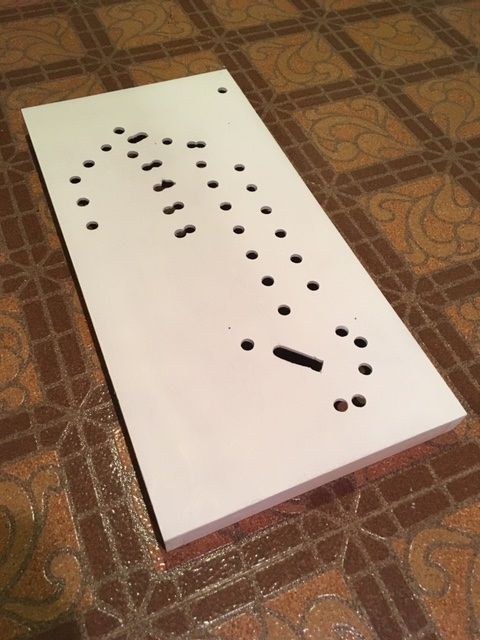
- Lay the top-deck pieces on the panel, taped in place, and pencil round every opening, including the four small holes that hold the lower deck.
- Drill out the round and half-round openings and the ends of the ball-return slot with a ⅝-inch bit, the four small holes at ⅛ in, and clear the rest of the return slot with a jigsaw. “It’s OK if the holes are a little bigger than the marked areas.”
- Check that the deck openings line up with the holes; file away any wood that sticks into an opening. Gardi painted the panel white, because “the wood grain showed through the Top Deck pieces a bit since the bottom layer is so thin”.
- Paint the edging strips and fix them round the box so that they stand about ¼ in above the top, forming a lip.
- Glue the top deck down, checking again that every hole aligns.
With a laser cutter or CNC router the panel, frame and supports can be cut instead from Mark Ziemer’s three DXF files (“DCII Top Panel Cut From .25 Inch Plywood”, “DCII 2 Inch Frame Pieces Cut From .25 Inch Plywood” and “DCII 1.5 Inch Support Pieces Cut From .75 Inch Plywood”), which save the marking and drilling.
10.6 Thirty-Three Springs
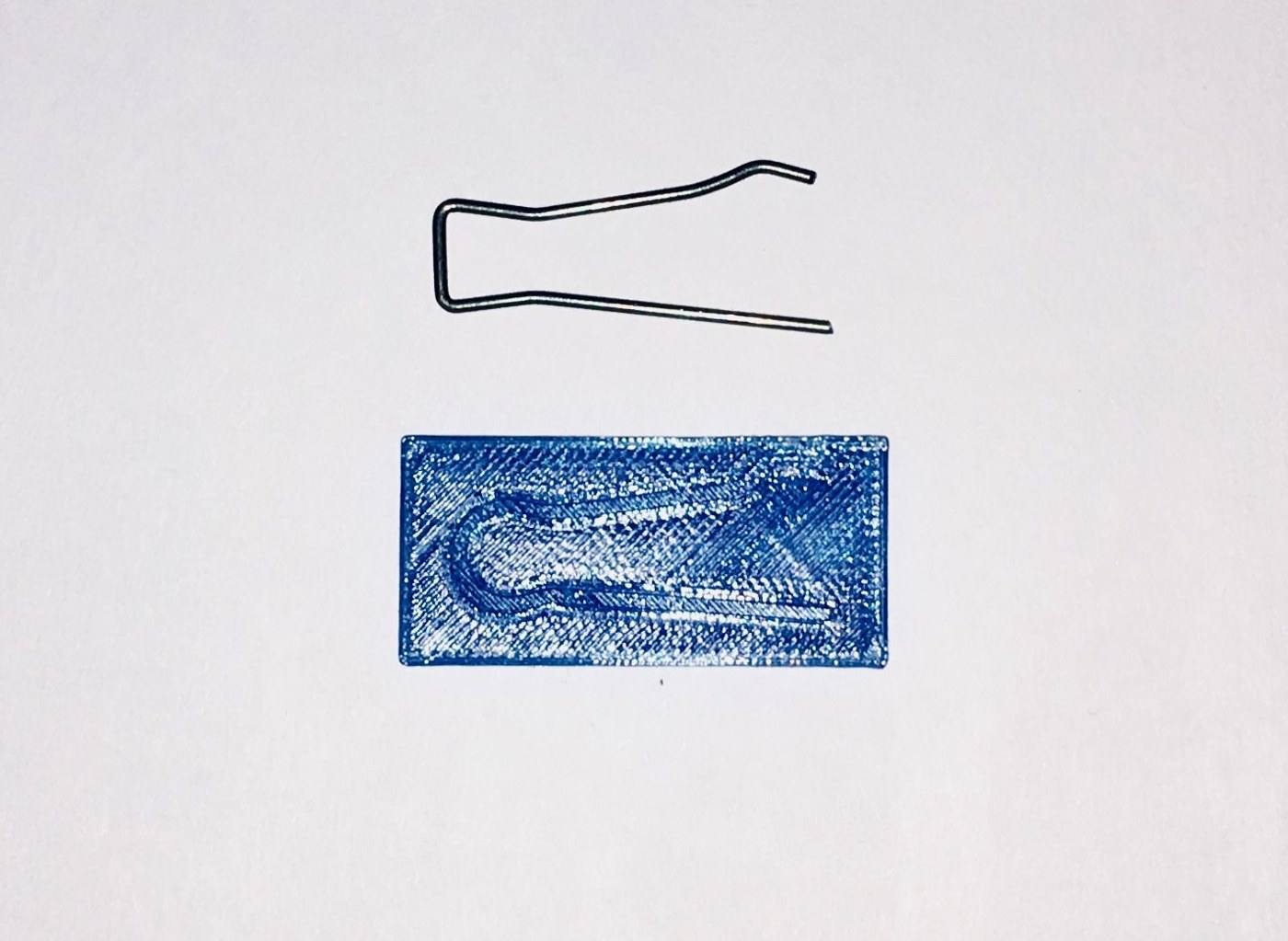
“This might be the hardest part of the build.” Every pivoting part of a Digi-Comp II — flip-flop or switch — is held to the top deck by a small spring of piano wire, and the machine needs 33 of them. The printed spring template is “based on the original Digi-Comp II spring”; Gardi made his with a square top instead of a rounded one, “which was much easier to do and does not make any difference in the operation of the device”. He used a printed wire-bending jig, made originally for building Mark Ziemer’s Digi-Comp I (Volume 9), and included its STL files with the Instructable.
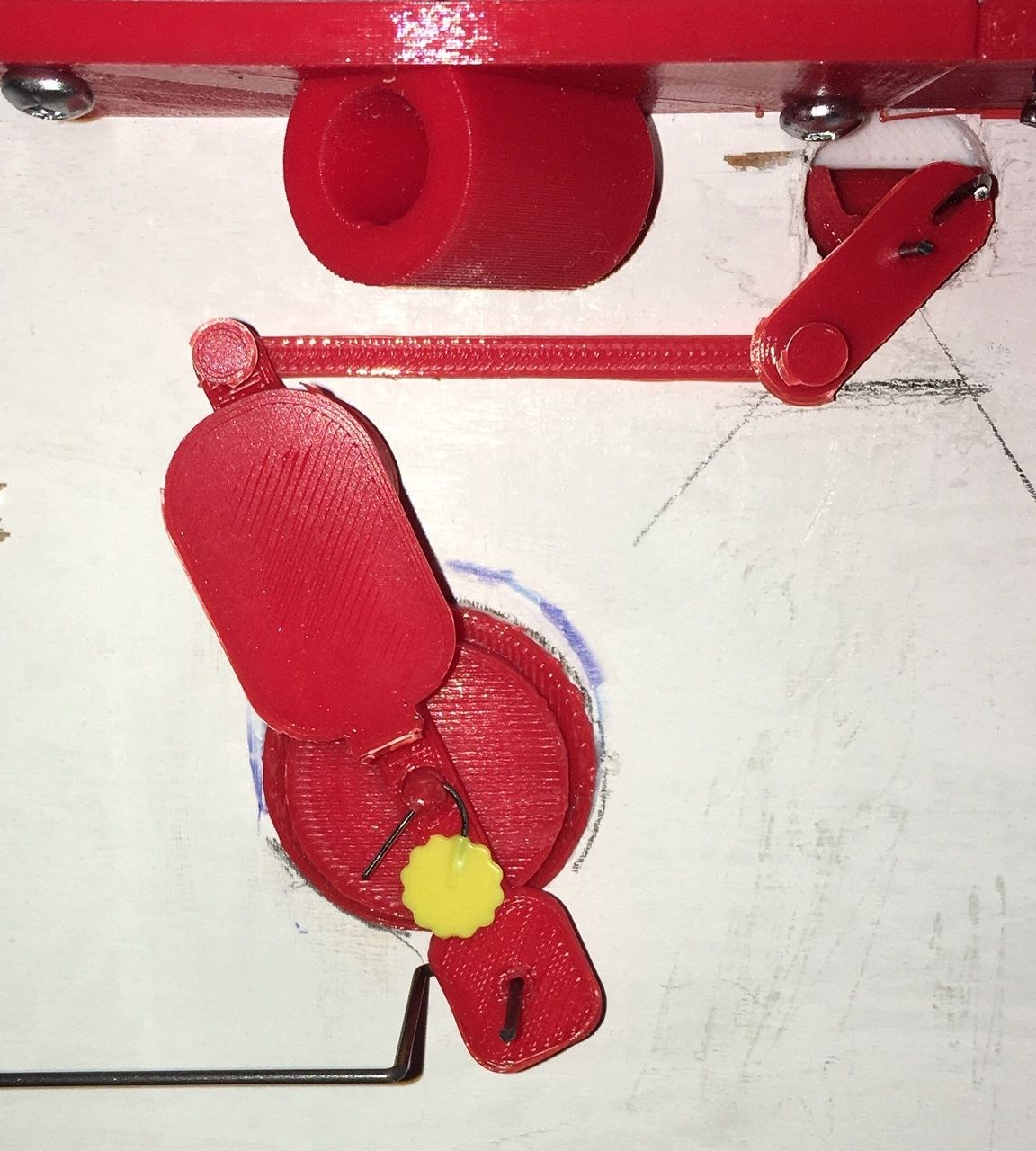
One more piece of wire is needed: the actuator wire that links the start switch to the release balance. Gardi’s advice is to make every bend except the last 50 mm one, leave extra wire, attach it to the release balance, and only then measure the exact distance to the start switch and make the final bend.
Each spring has two working ends, which Gardi calls the pivot (the side that passes through the hole in the part and holds it) and the stopper (the other side). Their spacing decides whether the part works. “If the stopper is too close to the pivot, the piece will not be able to twist to the left or right as far as it needs … if they are too far apart the stopper will rub against the front flat part of the bearing hole preventing free and easy movement of the part.” A little rubbing is wanted on the switches, which should stay where the operator puts them, but not on the mode flip-flops T1-T6, which balls must turn. Getting each spring into the “Goldilocks Zone” is most of the tuning of the machine.
10.7 Assembly
The replica is assembled by following E.S.R.’s original Parts List and Assembly Instructions, supplied as a PDF with the files, with Gardi’s changes to particular steps:
- Step 4 (the release mechanism). The printed frame does not allow the release balance to sit directly on the release wheel’s shaft as the original did. Instead a release wheel lever is fitted to the wheel’s shaft; a redesigned release balance sits in a release balance holder glued to the underside of the top deck “with center about 59 mm from the inside right edge of the frame and 74 mm from the inside top edge of the frame”, held by a pin through the holder’s shaft; and a release lever joiner links the two. The actuator wire attaches to the release balance as in the original.
- Steps 5 and 6. Skipped: the return guide goes in after the bottom deck, and step 6 describes an older version of the machine.
- Step 7 (the bottom deck). Gardi put an extra nut, not tight, on each spacer to hold it to the top deck, which makes the bottom deck easier to slip on: “Spacer, nut, Lower Deck and then another nut.”
- Step 8. The actuator wire is pushed straight up through the small hole in the start switch and given a small bend to stay in place, instead of a hook.
- Steps 9 and 10 (legs). The two leg holders are screwed inside the frame, their top edges about 40 mm below the inside top edge, with the holes sloping down toward the bottom of the base. The legs are two 330 mm lengths of the ⅜-inch dowel, with the printed foot balls and sockets.
- Step 11 (return guide). The return guide slides down through the return slot in the top deck and under the flap of the holder on the bottom deck; its front edge rests on the bottom edge of the slot, and can be held with a little two-sided tape.
Before the decks go together, a 7.25 mm steel ball is pressed into each accumulator flip-flop and each no-display bottom flip-flop (unless the later “no ball” accumulator flip-flops are used).
10.8 Tuning
Two things decide whether a finished Digi-Comp II computes: the springs, described above, and the slope.
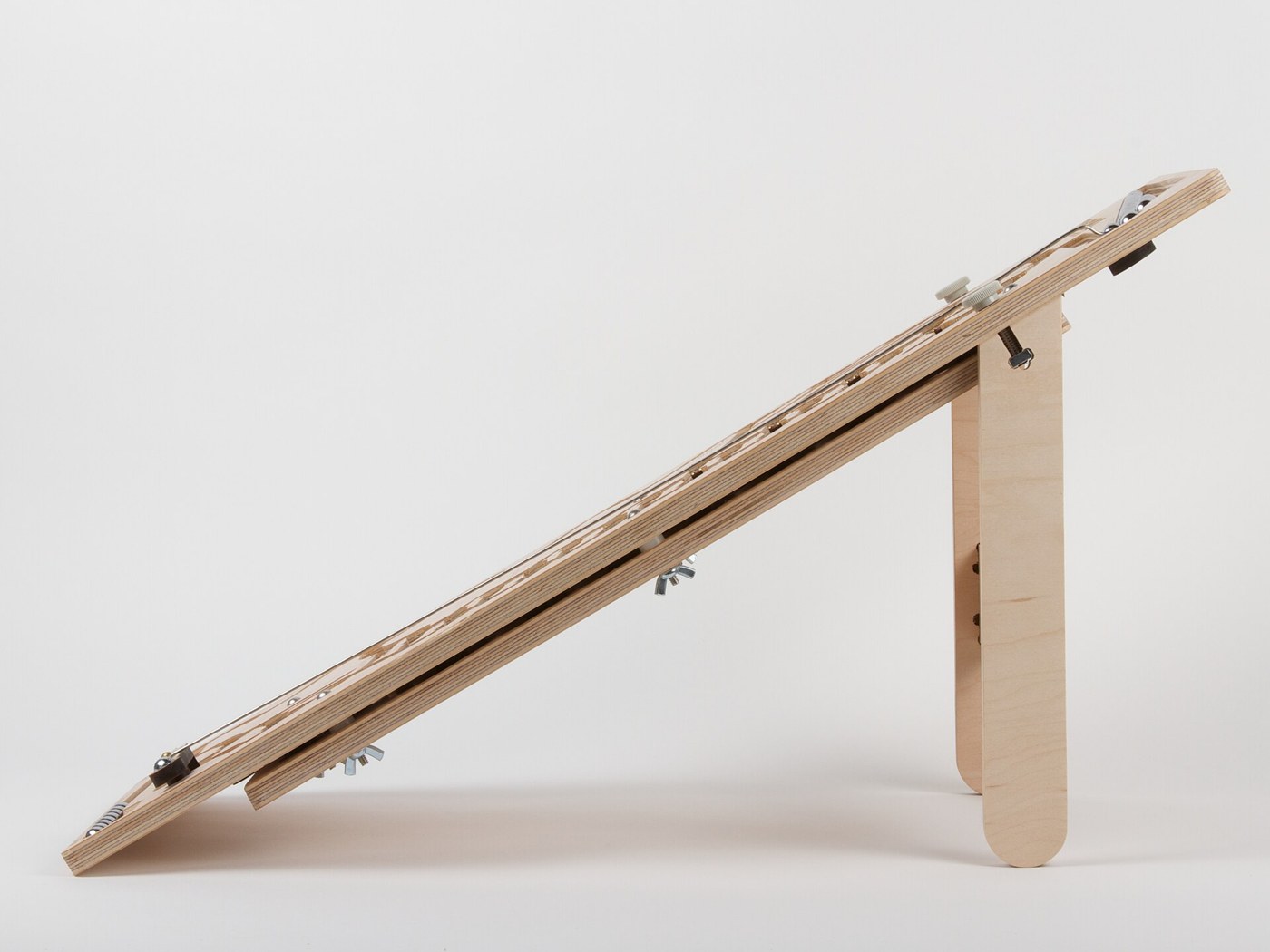
Level and angle. A rolling-ball computer depends on gravity acting straight down its channels. Gardi: “you should also make sure that Digi-Comp II is placed on a level surface. It’s quite susceptible to uneven surfaces.” The board must be level from side to side, so that balls do not favour one wall of a channel, and tilted at its designed angle from top to bottom. Gardi’s dowel legs fix his replica’s angle. Evil Mad Scientist’s stand, for comparison, set their smaller board at 30°, with a second setting of about 20° when the stand was reversed (Evil Mad Scientist, 2012).
Balls. The replica is designed for ½-inch steel balls, which is the size of the original’s marbles. Balls must be clean and round. A ball that is undersize can pass a flip-flop without turning it; one that is oversize can wedge.
10.9 How Many Balls
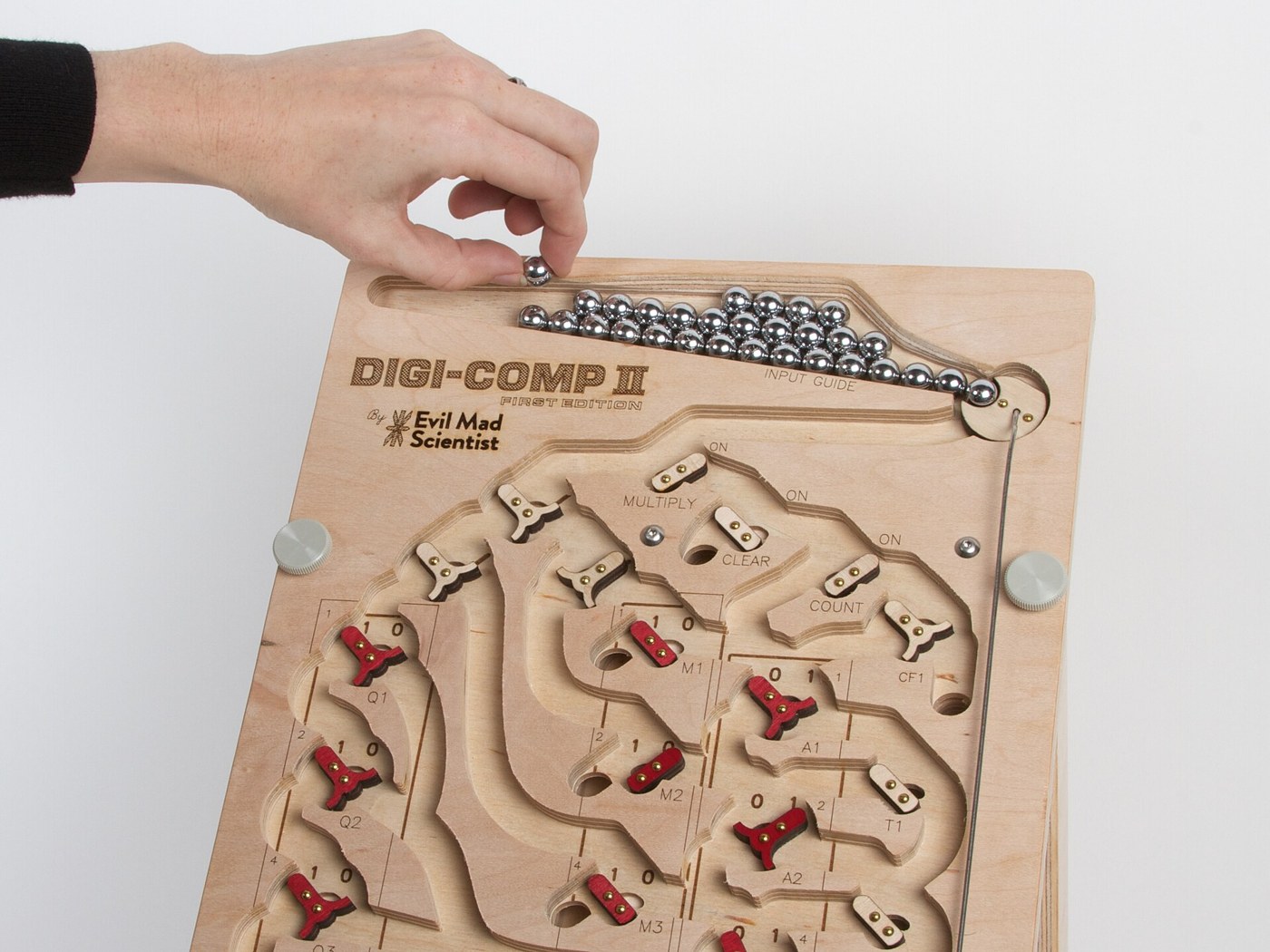
The manual says only to “place all of the balls (or a sufficient number) in the INPUT GUIDE”. How many is sufficient follows from Volume 6. Every ball used in an operation ends in the collector, and an automatic run cannot continue once the input guide is empty. The simulator counts the balls each of the manual’s operations needs:
Table 3 — The manual says only to "place all of the balls (or a sufficient number) in the INPUT GUIDE". How many is sufficient follows from Volume 6. Every ball used in an operation ends in the collector, and an automatic run cannot continue once the input guide is empty. The simulator counts the balls each of the manual's operations needs
| Operation | Balls released | Notes |
|---|---|---|
| Count to 15 | 15 | one ball per unit |
| ADD 13 to 71 | 5 | one cycle of four, plus the ball that finds MQ = 000 |
| MULTIPLY 4 × 13 | 17 | four cycles plus one |
| MULTIPLY 7 × 15 | 29 | the largest possible multiplication: seven cycles plus one |
| COMPLEMENT | 4 | always four |
| SUBTRACT 12 − 4 | 4 + 5 | complement, then add |
| DIVIDE 78 ÷ 13 | 4 + 24 | complement, then six cycles |
| DIVIDE 50 ÷ 11 with remainder | 32 in all | including the hand-finished cycle and the correction |
| Count out 9 balls | 4 + 9 | complement 9, then count to overflow |
The longest single automatic run is the 29 balls of 7 × 15. The longest exact division, a quotient of 7, needs 28 after its complement. A machine with thirty balls in its input guide can therefore run any operation in the manual without stopping to refill; one with “a dozen or so” can run additions and complements but not most multiplications. The manual itself has the operator recycle balls between the steps of a combined operation — “Place the four balls in the COLLECTOR GUIDE back up in the INPUT GUIDE” (p. 35) — and the same can be done between the two halves of a subtraction or division. Whether the replica’s input guide holds thirty ½-inch balls should be checked on the finished machine; the plywood First Edition’s feeder held 30.
10.10 Commissioning
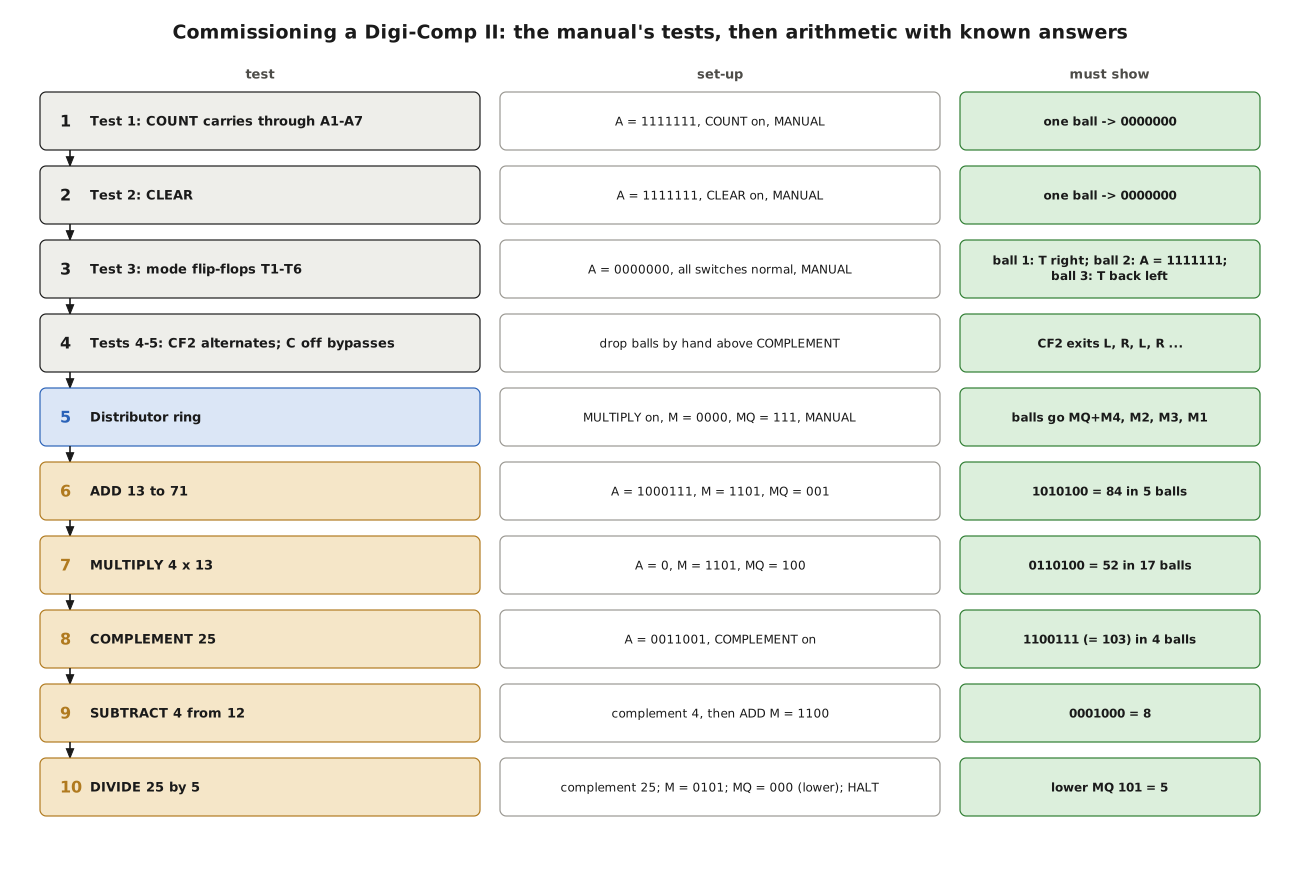
The 1965 manual begins with five tests, designed to prove each part of the board before it is used (pp. 6-8). They make a natural commissioning sequence, followed by operations whose answers are known. Every expected result below was produced by digicomp_sim.py. “Initialise” means the manual’s New Operations Check List: T1-T6 left, CF1 left, CF2 right, D1-D3 right, every switch in its normal position (all left except COMPLEMENT, whose OFF is right).
10.10.1 The manual’s five tests
- Test 1 — the carry. A = 1111111, COUNT on, A-M on MANUAL, pull START once. The ball must run down the whole accumulator and leave 0000000. Any flip-flop it fails to turn is stiff: “Wiggle that flip-flop back and forth until it is nice and free.”
- Test 2 — CLEAR. A = 1111111, CLEAR on, MANUAL. One ball must leave 0000000 and come out by the return guide.
- Test 3 — the mode flip-flops. A = 0000000, every switch normal, MANUAL. The first ball turns T1-T6 to the right; the second turns the accumulator to 1111111; the third turns T1-T6 back to the left. This is the complement machinery working, and it is the most demanding test of the T springs.
- Tests 4 and 5 — CF2. With COMPLEMENT on, balls placed by hand above the COMPLEMENT switch must leave CF2 alternately left and right. With COMPLEMENT off they must by-pass CF2.
10.10.2 The distributor
MULTIPLY on, M = 0000, MQ = 111, MANUAL: four balls in turn must go to the MQ (which drops to 110 in the upper numerals) and M4, then M2, then M3, then M1, leaving D1-D3 all to the right (manual p. 23).
10.10.3 Arithmetic
Each of these should be run in AUTO, with enough balls loaded:
Table 4 — Each of these should be run in AUTO, with enough balls loaded
| Test | Set-up | Must show |
|---|---|---|
| ADD 13 to 71 | A = 1000111, M = 1101, MQ = 001, MULTIPLY on | 1010100 (84), 5 balls |
| MULTIPLY 4 × 13 | A = 0000000, M = 1101, MQ = 100, MULTIPLY on | 0110100 (52), 17 balls |
| COMPLEMENT 25 | A = 0011001, COMPLEMENT on | 1100111 (103), 4 balls |
| SUBTRACT 4 from 12 | complement A = 0000100, then M = 1100, MQ = 001, MULTIPLY on | 0001000 (8) |
| DIVIDE 25 by 5 | A = 0011001, M = 0101, MQ = 000 (lower); complement; then OVERFLOW on HALT, MULTIPLY on | MQ lower numerals 101 (5) |
When a test fails, the simulator’s ball-by-ball trace (python3 digicomp_sim.py --dc2 multiply 4 13, for instance) shows what every ball should have done and the state after it, so the first ball that goes astray can be found by running the machine in MANUAL and comparing after each pull of START.
10.11 When It Does Not Work
Table 5 — When It Does Not Work
| Symptom | Likely cause | Remedy |
|---|---|---|
| A ball passes a flip-flop without turning it | spring too tight (stopper rubbing), or the part rubbing on the deck | reset the spring spacing; clean the bearing |
| A flip-flop turns but the ball goes the wrong way | the part does not reach its full throw | open the spring (stopper too close to the pivot) |
| A ball stops in a channel | a step at a deck seam; the board not level | file the seam; level the board |
| Automatic operation stops early | a ball by-passed the START lever, or the release did not trigger | check the actuator wire length and the release balance; the manual: “If the ball should ever happen to pass under the START SWITCH without triggering another one, just pull it manually” |
| Right answer in MANUAL, wrong in AUTO | balls released too close together, or the input guide ran out | load more balls; check the release wheel releases exactly one |
| Complement never halts | CF2 not initialised to the right, or COMPLEMENT not on | initialise; check CF2 alternates (Tests 4-5) |
10.12 What the Build Teaches
A Digi-Comp I has to be clocked by hand, but once it is built its logic is either right or wrong. A Digi-Comp II computes by itself, and that is exactly why it is harder to build. Every flip-flop must turn every time a ball passes, the slope and level must be right, the springs must be neither too tight nor too loose, and the release must give one ball, no more and no less. The 1965 manual’s tests are a good engineer’s acceptance procedure: each proves one subsystem — the carry, the clear, the mode flip-flops, the complement flip-flop — before any is trusted with arithmetic. Running them against a simulator that knows where every ball should go turns commissioning from guesswork into comparison. And when the machine at last multiplies thirteen by four in seventeen balls, the answer arrives the way it did in 1965: one marble at a time, with the carries rolling down the board where anyone can see them.
Back to the start — Volume 1: Digi-Comp — Computers Made of Plastic. The two machines, the company that made them and the story of how a three-bit plastic computer and a board of marbles taught a generation what a computer does.
Comments (0)