Number Sieves · Volume 13
Number Sieves — Volume 13 — Building the Tiny Sieve (ATtiny412 + RP2040)
Thirty eight-pin microcontrollers, one shared wire and a Raspberry Pi Pico: kbsriram's open electronic sieve, card by card
13.1 About This Volume
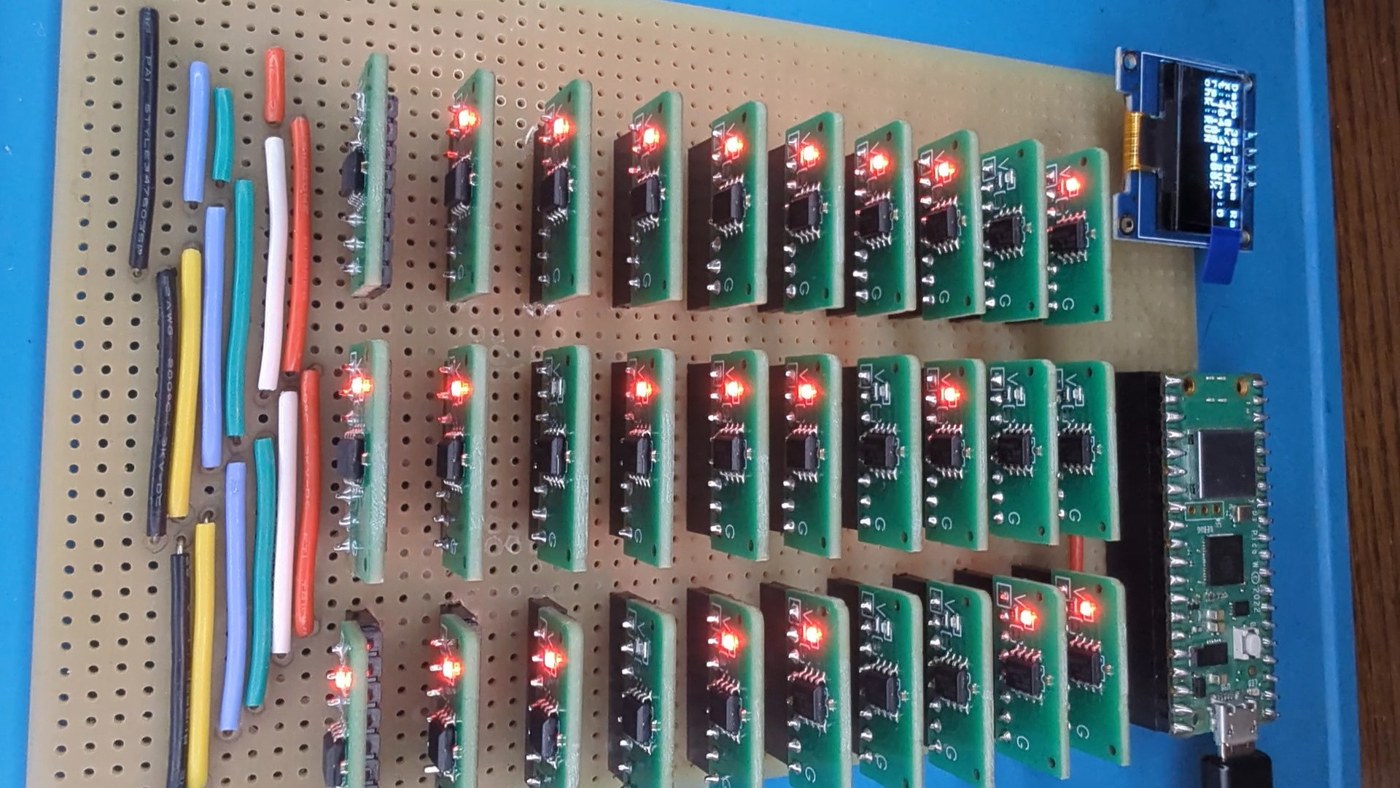
The two mechanical builds in Volumes 11 and 12 reproduce what Lehmer built in 1927 and 1932. This volume builds what he described in 1982 — and someone else built in 2026. kbsriram’s A Tiny Sieve: Lehmer’s math machine in ATtinys (Hackaday.io project 206556) is an electronic number sieve made of thirty ATtiny412 microcontrollers, one per modulus, and a Raspberry Pi Pico that clocks them and checks what they let through. It is the project that started this series. It steps 500,000 candidates a second, reruns Lehmer’s published problems at the speed of each of his machines, and is documented in six build logs and an open repository: github.com/kbsriram/a-tiny-sieve.
Everything in this volume is kbsriram’s design. The volume walks through it in the order a builder meets it — architecture, the modulus card, the backplane, the parts, ordering the boards, programming thirty chips, the test jig, the Pico firmware, loading a problem, the self-tests and the checkpoint-and-rollback that make a long run trustworthy — and links to the source files rather than reproducing them. Where the text says how something works, the authority is his code and his logs; where it suggests something he did not do, it says so.
Licence. The repository’s LICENSE.txt is the MIT License, “Copyright (c) 2026 KB Sriram”, and GitHub reports the repository’s licence as MIT. The MIT licence permits use, copying, modification and distribution of the software, provided the copyright notice and permission notice are included in copies or substantial portions; it comes without warranty. The repository’s README states that it holds “Software and hardware” for the project — firmware, Pico code, the card’s gerbers, Altium source, and JLCPCB BOM and pick-and-place files. The photographs in this volume are from kbsriram’s Hackaday.io pages, where no separate licence is stated; each is credited to him and linked.
13.2 Architecture
13.2.1 Lehmer’s 1982 design
In a 1982 lecture D. H. Lehmer described how a sieve would be built with the electronics of the day: a bank of read-only memories, one per modulus, each with a counter stepping through its addresses, all clocked together, their outputs combined, and a general-purpose computer to load the patterns, drive the clock and check survivors. kbsriram’s build is that design with one substitution: “thirty ATtiny412s in place of his ROM and counter pairs, an RP2040 in place of the controlling computer” (project page). He is explicit that it is “my implementation based on that design, and not a replica.”
Each ATtiny412 holds one modulus m and a ring: m bits, one per residue, bit r set if residue r is acceptable. On each clock edge the chip reads the bit at its current phase, votes on it, and advances its phase by one, wrapping at m. The candidate number itself never reaches the chips — exactly as no chain in Lehmer’s 1927 machine knew what number it was on. The ring lives in RAM and is loaded over I²C at the start of a run, so any card can hold any modulus up to 128; this is the “adjustable sieve” Lehmer wanted and could not build in steel. kbsriram quotes him from the 1982 lecture: “…we don’t have to commit ourselves hardware wise to the set of modulus that we use…“.
13.2.2 Three shared wires and a bus
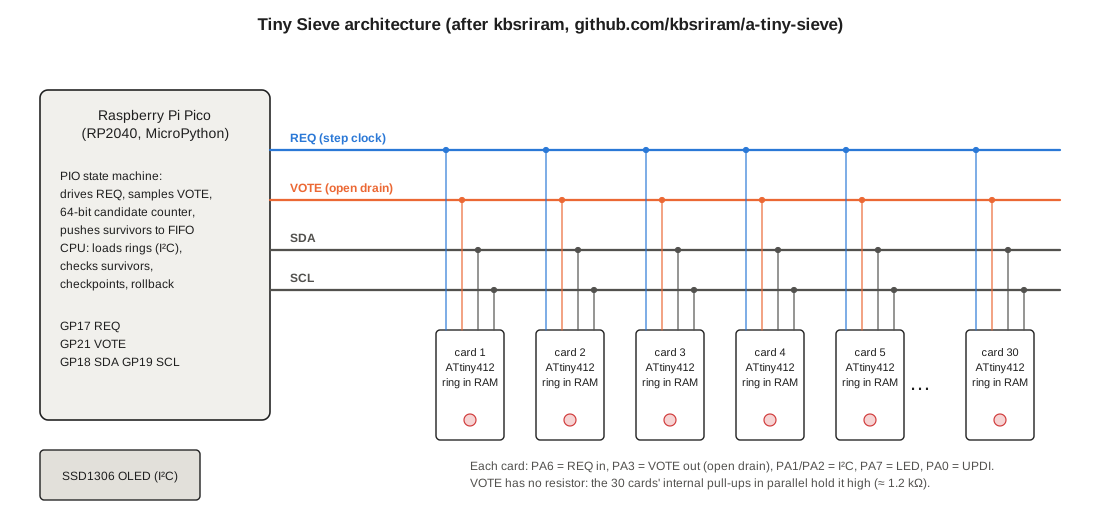
Four signals run to every card (build code/05 and code/06):
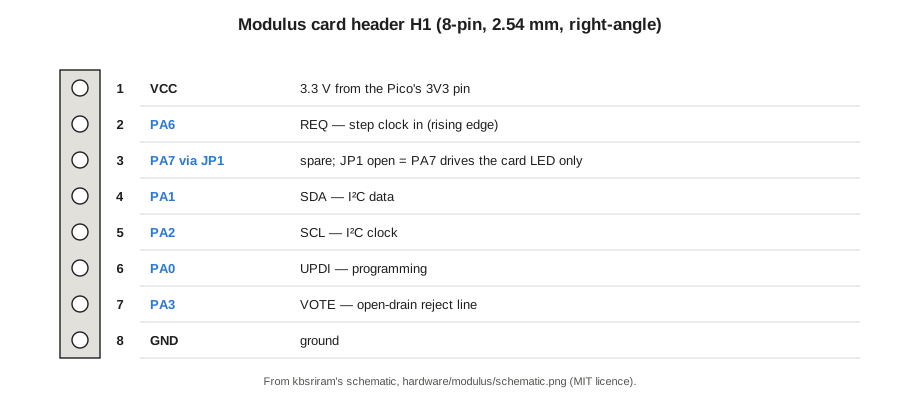
- REQ — the step clock, from the Pico (GP17) to every card’s PA6. On each rising edge every armed card drives VOTE from its ring and advances its phase.
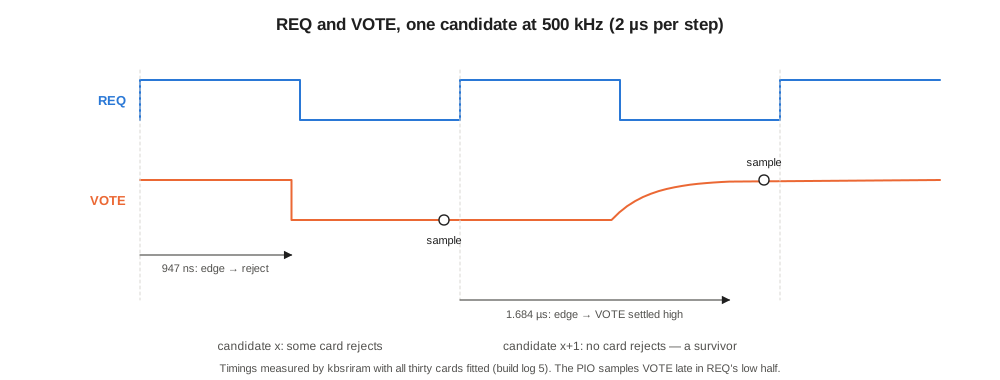
- VOTE — one wire shared by all thirty cards (PA3), read by the Pico (GP21). It is open-drain: a card that rejects pulls it low; a card that accepts lets go. So VOTE is high only if no card rejected — the electrical equivalent of Lehmer’s contacts all agreeing, and the same logic as the chain sieve’s series string. There is no pull-up resistor: the cards’ internal pull-ups in parallel hold the line high, about 1.2 kΩ for thirty.
- SDA, SCL — I²C at 100 kHz from the Pico (GP18, GP19) to every card (PA1, PA2) and to the OLED. Used only while REQ is held low, before and between runs.
- Each card also lights an LED on PA7 whenever it is pulling VOTE low, so the board shows which moduli are rejecting.
13.2.3 The Pico: PIO rejecter-driver, CPU checker
The Pico’s PIO state machine is the sieve’s clock and its fast half. In code/06/rpi/scanner.py each candidate takes exactly 100 PIO cycles — 50 with REQ high and 50 with REQ low — and VOTE is sampled near the end of the low half. If VOTE is high the state machine pushes the 64-bit candidate count into its FIFO; either way it decrements its counter and goes round again. The step rate is the state-machine clock divided by 100: 500 kHz for Lehmer’s 5,000 steps a second, 50 MHz for the board’s ceiling of 500,000. The CPU, running MicroPython, drains the FIFO and tests each survivor — the slow half. Every sieve since the 1960s has had this two-stage shape, a fast rejecter and a slower checker; kbsriram’s second build log is about what happens when the balance between them is wrong.
13.3 Before the Cards: Two Breadboard Builds
kbsriram reached the thirty-card board in two breadboard steps, and both are worth repeating before ordering anything.
Build 01 — the sound of sieving (code/01, build log). Three ATtiny412s with hard-coded patterns for moduli 3, 5 and 7, a push button wired to PA1 on all three to step them, and a piezo buzzer across the shared reject line (PA2 on each chip, pulled high). A chip that rejects drives the line low for about 62 ms, and the buzzer sounds. It solves y² − 2x² = 4001: the first silence the scorekeeper hears is at 17, and the first solution at 38, where 2·38² + 4001 = 6889 = 83². The Pico here runs CircuitPython and only counts presses and drives the OLED. The point of the build is to hear the sieve: each modulus added makes the buzzing denser and the silences rarer.
Build 02 — sieving versus checking (code/02, build log). Three chips, now loaded over I²C and clocked at 50 kHz by the Pico’s PIO, factor 5,283,065,753,709,209 — the number Lehmer’s gear machine factored at its first public demonstration in October 1932 — by searching a² + 7(4k)² = N for two representations. The sieve scanned 5.6 million candidates in 113 seconds and rejected 87 per cent; the Pico then spent 23 minutes testing the 740,000 survivors, about 1.85 ms each. The sieve was idle 92 per cent of the run. A sieve in that state is filter-bound, and the cure is more moduli: three moduli let one candidate in eight through, while Lehmer’s thirty let so few through that a person could check them by hand.
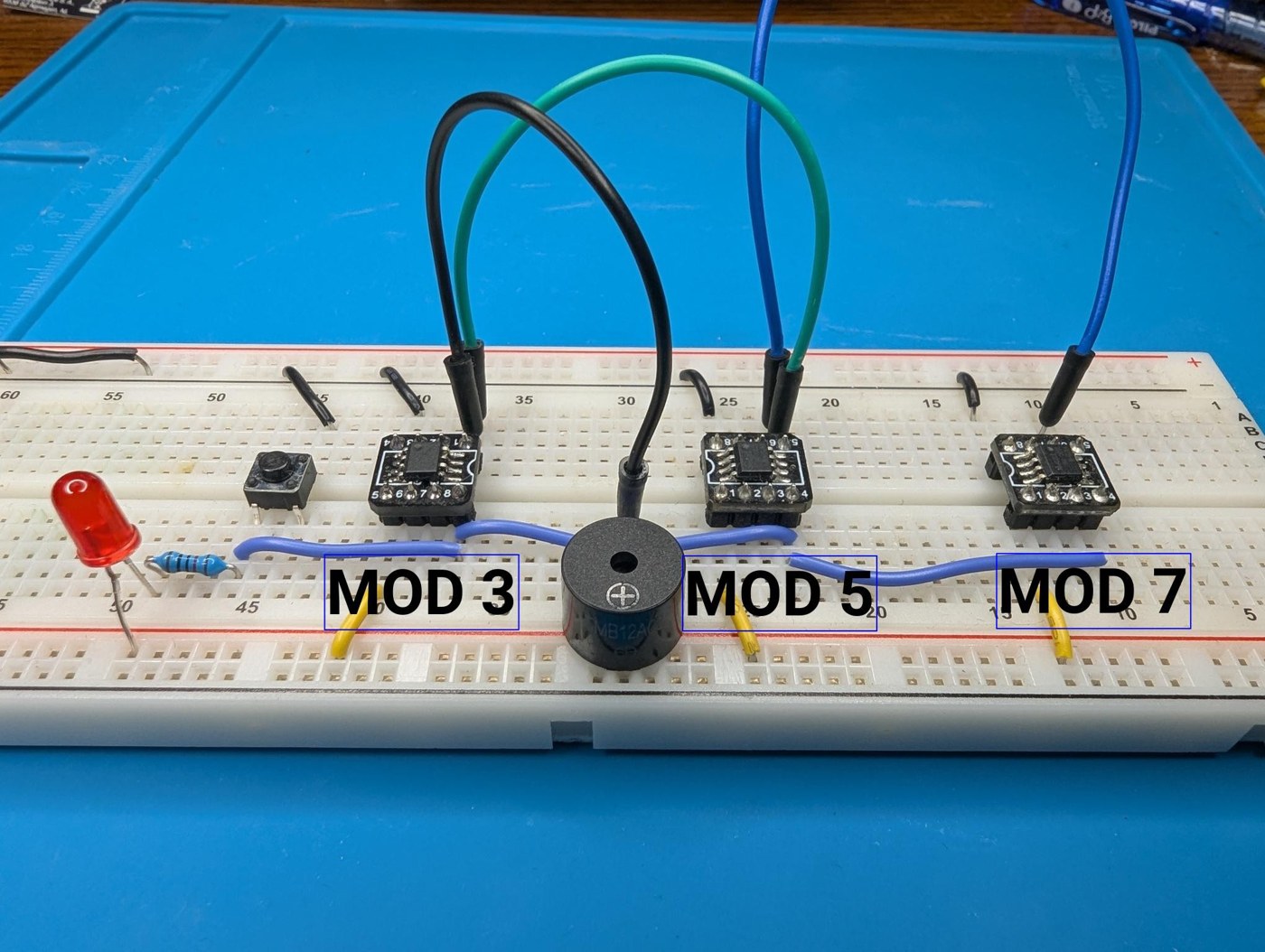
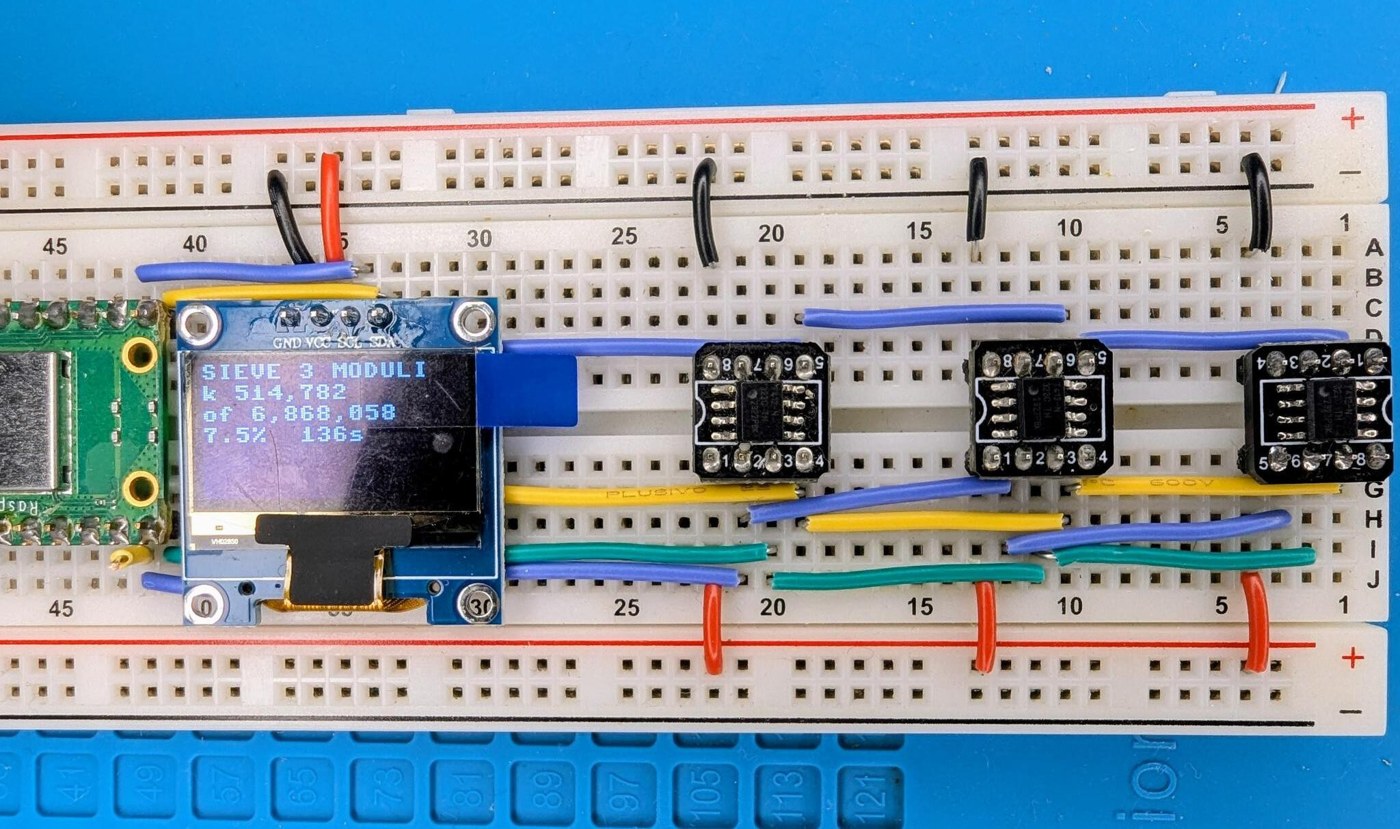
Rebuilding build 01 first costs three chips and an evening, and teaches the UPDI toolchain, the open-drain line and the vocabulary of rings and phases before thirty cards depend on them.
13.4 The Modulus Card
13.4.1 Schematic
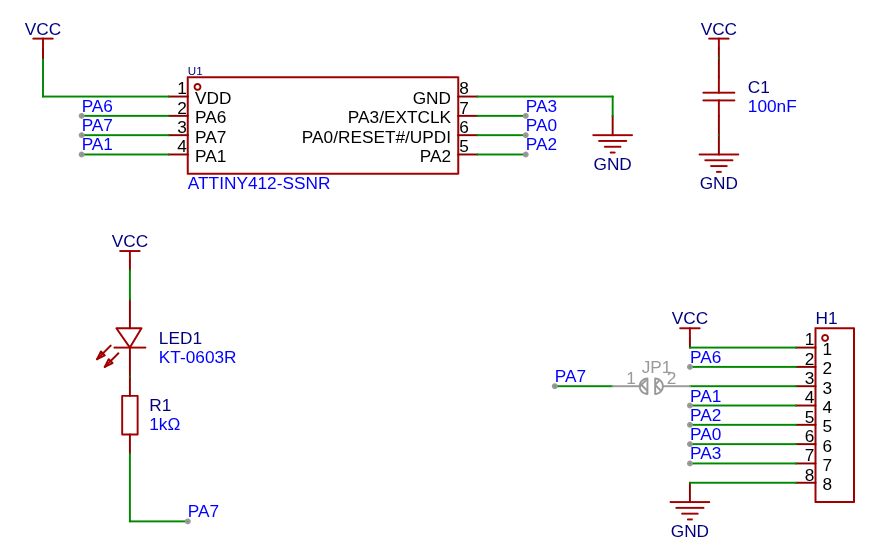
The card (hardware/modulus/schematic.png; build log 3, “A modular modulus”) is as small as a microcontroller board can be:

- U1, ATtiny412-SSNR in SOIC-8 — Microchip’s tinyAVR 1-series part with 4 KB of flash, 256 bytes of SRAM, an internal 16/20 MHz oscillator and single-wire UPDI programming (datasheet).
- C1, 100 nF decoupling, 0402, across VDD and GND.
- LED1 (KT-0603R red, 0603) and R1, 1 kΩ, from VCC to PA7: the card’s reject indicator.
- JP1, a solder jumper that can tie PA7 to header pin 3, in case the line is wanted off the card instead of driving the LED.
- H1, an 8-pin 2.54 mm header carrying every signal to one edge.
The pin assignment keeps UPDI (PA0) free for programming, puts I²C on PA1/PA2 where the chip’s TWI lives, uses PA6 for REQ and PA3 for VOTE, and gives PA7 — “the peripherals I’m least likely to need,” in kbsriram’s words — to the LED.
13.4.2 Board
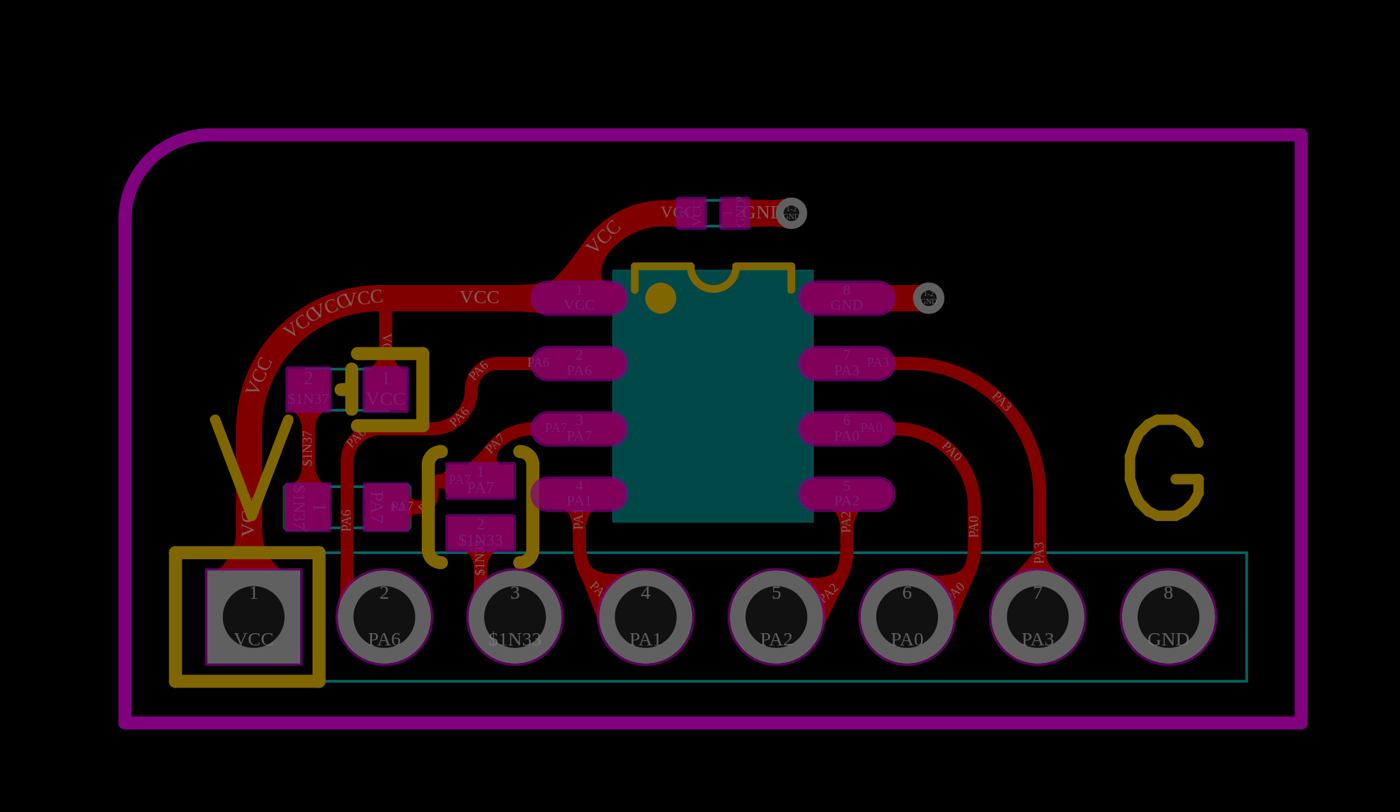
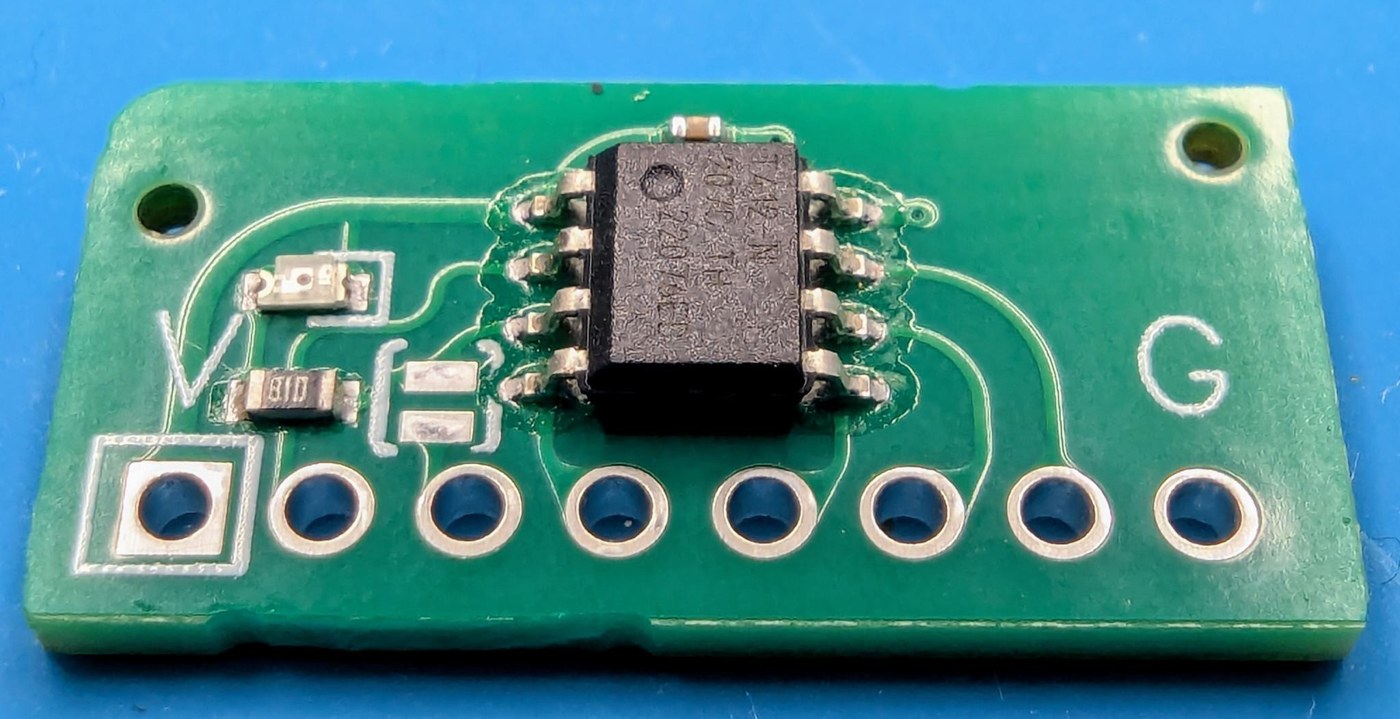
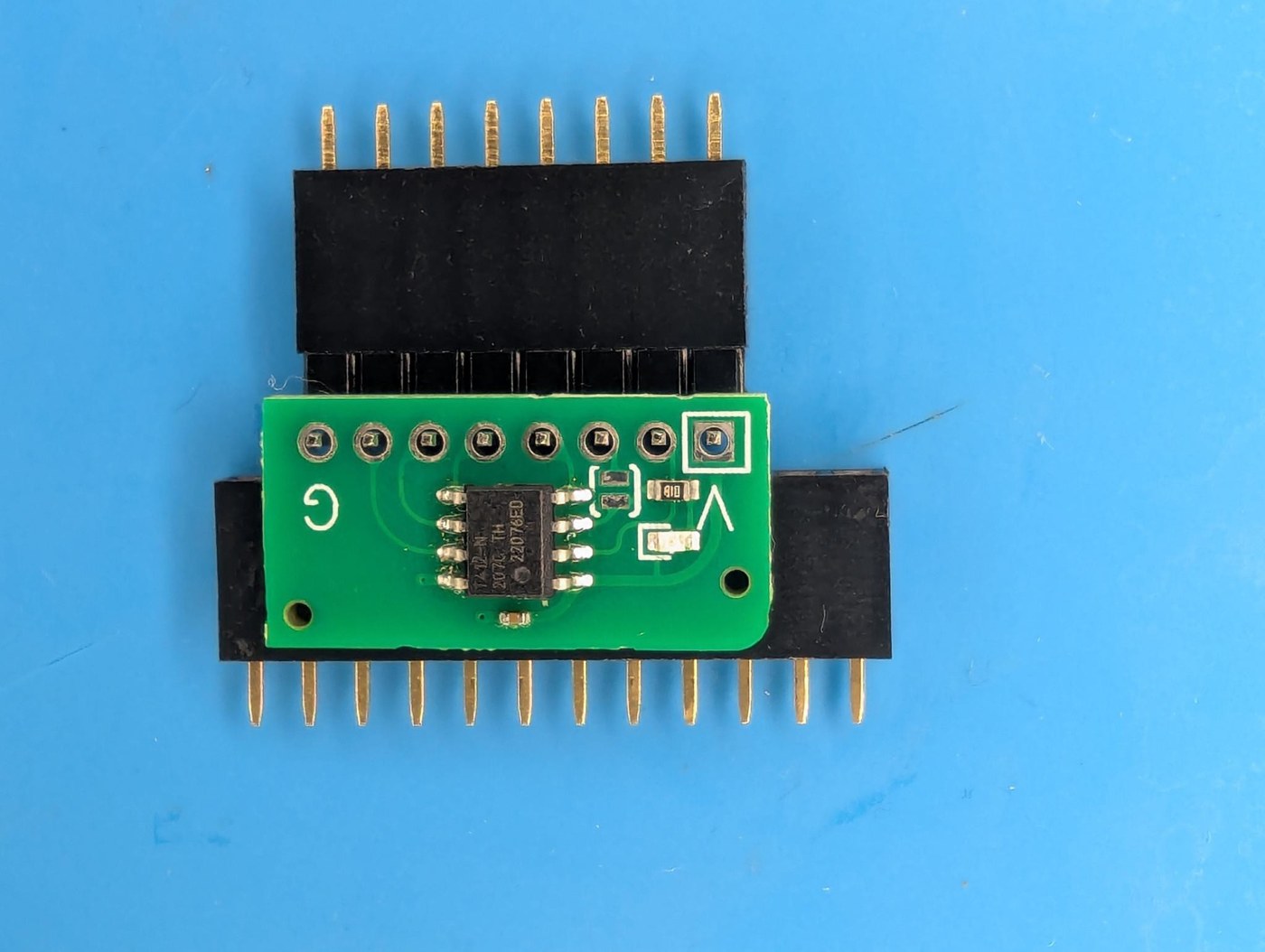
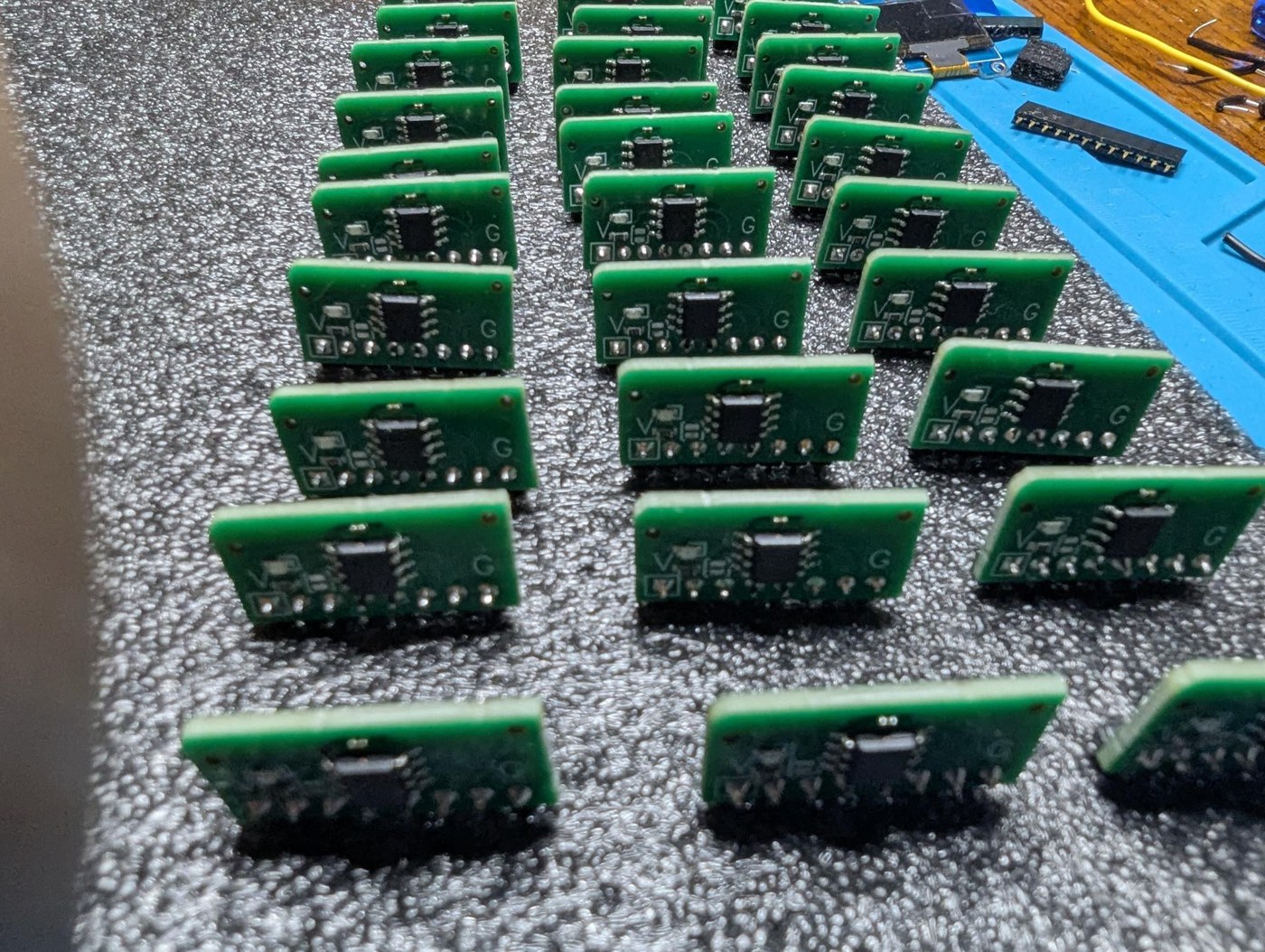
The board is about 31.5 × 19.2 mm (from the outline layer of the gerbers), two-layer, with all routing on the top layer. kbsriram rounded the traces “for the look of a hand-drawn PCB” and rounded one corner of the outline so that thirty cards can be checked at a glance for orientation. The header’s pins come out of one long edge so the card stands vertically in a female header on the backplane. Every card is identical: the modulus is loaded at run time, and only the I²C address — compiled into the firmware — distinguishes one card from another.
13.5 Bill of Materials
13.5.1 One modulus card (from hardware/modulus/bom/bom_vertical_adapter.csv)
Table 1 — One modulus card (from hardware/modulus/bom/bomverticaladapter.csv)
| Ref | Part | Package | Manufacturer part | LCSC part |
|---|---|---|---|---|
| U1 | ATtiny412 microcontroller | SOIC-8 | ATTINY412-SSNR (Microchip) | C1337190 |
| C1 | 100 nF capacitor | 0402 | CL05B104KB54PNC (Samsung) | C307331 |
| LED1 | red LED | 0603 | KT-0603R (Kento) | C2286 |
| R1 | 1 kΩ resistor | 0603 | 0603WAF1001T5E (UNI-ROYAL) | C21190 |
| H1 | 8-pin 2.54 mm header | through-hole | hand-fitted (right-angle male pins in kbsriram’s build) | — |
| JP1 | solder jumper | — | left open | — |
kbsriram’s thirty assembled boards cost $81 including shipping and tariffs, about $2.70 a modulus (build log 3, September 2026).
13.5.2 The rest of the sieve
Prices are estimates in US dollars, October 2026.
Table 2 — The rest of the sieve
| Item | Specification | Qty | Est. total |
|---|---|---|---|
| Modulus cards | assembled, from the repo’s gerbers, BOM and pick-and-place | 30 (+5 spare) | $85–100 |
| Right-angle male headers | 1 × 8, 2.54 mm | 35 | $5 |
| Female headers | 1 × 8, 2.54 mm, for the backplane slots | 30 | $10 |
| Controller | Raspberry Pi Pico (kbsriram’s photographs show a Pico W; the wireless is not used) | 1 | $5–7 |
| Display | SSD1306 128 × 64 OLED, I²C (address 0x3C) | 1 | $8 |
| Backplane | 3U Eurocard stripboard, 100 × 160 mm (62 holes × 38 strips) | 1 | $8 |
| UPDI programmer | Adafruit UPDI Friend (product 5879) or any USB-serial adapter wired for serial UPDI | 1 | $7–10 |
| Jig | small stripboard, two 8-pin male headers, one 8-pin female header | 1 | $3 |
| Breadboard, wire, USB cable | 1 lot | $15 | |
| Optional: piezo buzzer | for a slow-clock demonstration on VOTE (as in build 01) | 1 | $2 |
| Total | ≈ $150–170 |
It is by far the cheapest of the three builds, and the only one that will run all six of Lehmer’s 1928 and 1932 problems in an afternoon.
13.6 Ordering the Boards
The repository’s hardware/modulus/ holds:
gerber/— the Gerber and drill files exported from EasyEDA Pro (top and bottom copper, solder mask, silkscreen, paste, outline, plated drills, and a flying-probe test file);bom/—bom_vertical_adapter.csvandpick_and_place_vertical_adapter.csv, in JLCPCB’s assembly format;altium/— the Altium schematic and PCB source;gerber/How-to-order-PCB.txt, which points to EasyEDA’s own guide to ordering (prodocs.easyeda.com).
kbsriram drew the card in JLCPCB’s online editor and “picked parts they stock so the boards arrive assembled,” leaving only the header to hand-solder. To order the same thing: zip the gerber folder, upload it to the board house, choose a standard 1.6 mm two-layer board, select assembly on the top side, and upload the BOM and pick-and-place files so the four SMD parts are placed. Check the part matches the assembler proposes against the LCSC numbers in the table above, and check the ATtiny412’s pin-1 orientation in the placement preview. Order a few spares: the board is cheap and a card damaged later is easier to replace than to repair. Do not copy the gerbers into this project’s repository; order from kbsriram’s.
13.7 Soldering the Headers
Thirty cards with eight pins each are 240 joints, and kbsriram’s point about them is the important one: “any one could break the sieve silently.” An open joint on VOTE only costs time, but a bridge to ground on VOTE makes a card reject every candidate, and the run ends without a solution.
His fixture for keeping a right-angle header square to a small board is worth copying exactly: put a sacrificial female header under the flat, component-free ground side of the card to hold it level, insert the right-angle pins in another female header so the card stays in the plane of the pins, and solder.
13.8 Programming Thirty ATtiny412s
13.8.1 Toolchain
The card firmware is C, built with avr-gcc. The Makefile in code/05/avr/src/ expects the Microchip AVR 8-bit GNU toolchain at a path set by BASE, builds for attiny412 at F_CPU = 10000000UL, takes the card’s I²C address as ADDR (default 0x10), and flashes with avrdude’s serialupdi programmer at 115,200 baud on the port set by PORT:
cd code/05/avr/src
make clean flash ADDR=0x10
Two details in the Makefile matter. The fuses are generated from a FUSES structure in the C source and flashed with the program, so a card is completely configured by one command. And every file is compiled with -ffixed-r2 -ffixed-r4 -ffixed-r26 -ffixed-r27, because the REQ interrupt handler keeps four registers live between interrupts (below). A file compiled without those flags would corrupt the handler’s state.
The clock is 10 MHz because the cards run at 3.3 V, where the ATtiny412 is rated for 0–10 MHz (its datasheet gives 0–20 MHz only at 4.5–5.5 V). kbsriram’s build log 5 records the correction: an earlier build had run the chips at 20 MHz at 3.3 V.
13.8.2 Addresses
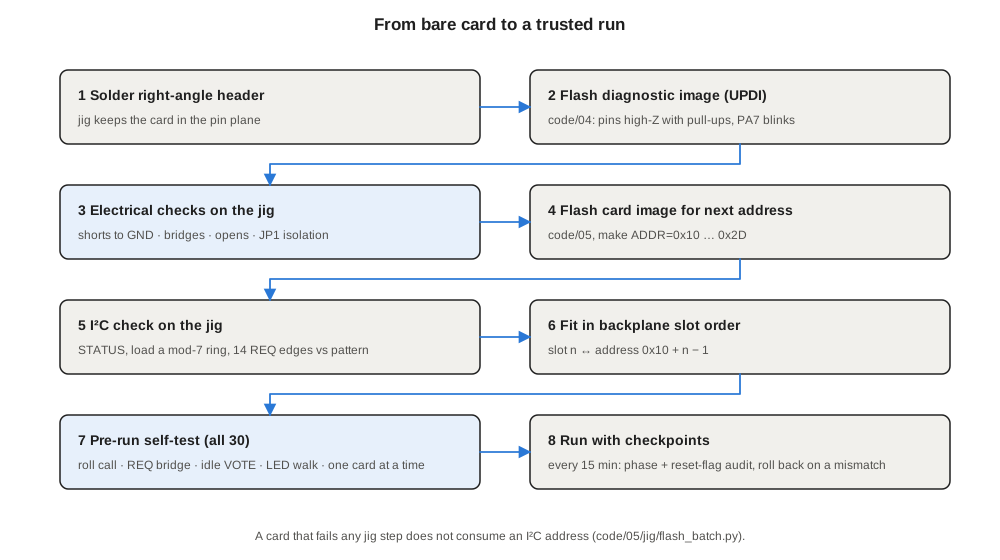
The thirty cards take I²C addresses 0x10 to 0x2D (ADDR_FIRST and ADDR_LAST in code/05/rpi/card.py). Card n goes in backplane slot n, so an address can always be tied to a physical position when something goes wrong.
13.8.3 The batch flasher
code/05/jig/flash_batch.py runs on the PC and walks a tray of cards through the jig one at a time. For each card it:
- builds both images first — the diagnostic image from
code/04and the card image fromcode/05— so a toolchain error stops the run before a card is touched; - flashes the diagnostic image over UPDI;
- runs the four electrical checks on the Pico (below);
- flashes the card image built for the next free address;
- checks over I²C that the card answers at that address, reads its STATUS, loads a modulus-7 ring, steps 14 REQ edges by hand and compares VOTE against the pattern the ring should produce.
A card that fails any step does not consume an address: reseat it, or set it aside, and the next card gets the same address. --addr 0x17 flashes one card at a fixed address, and --verify 0x17 runs only the functional check. kbsriram reports that poor seating in the jig socket was the only failure he saw while flashing all thirty.
13.9 The Test Jig
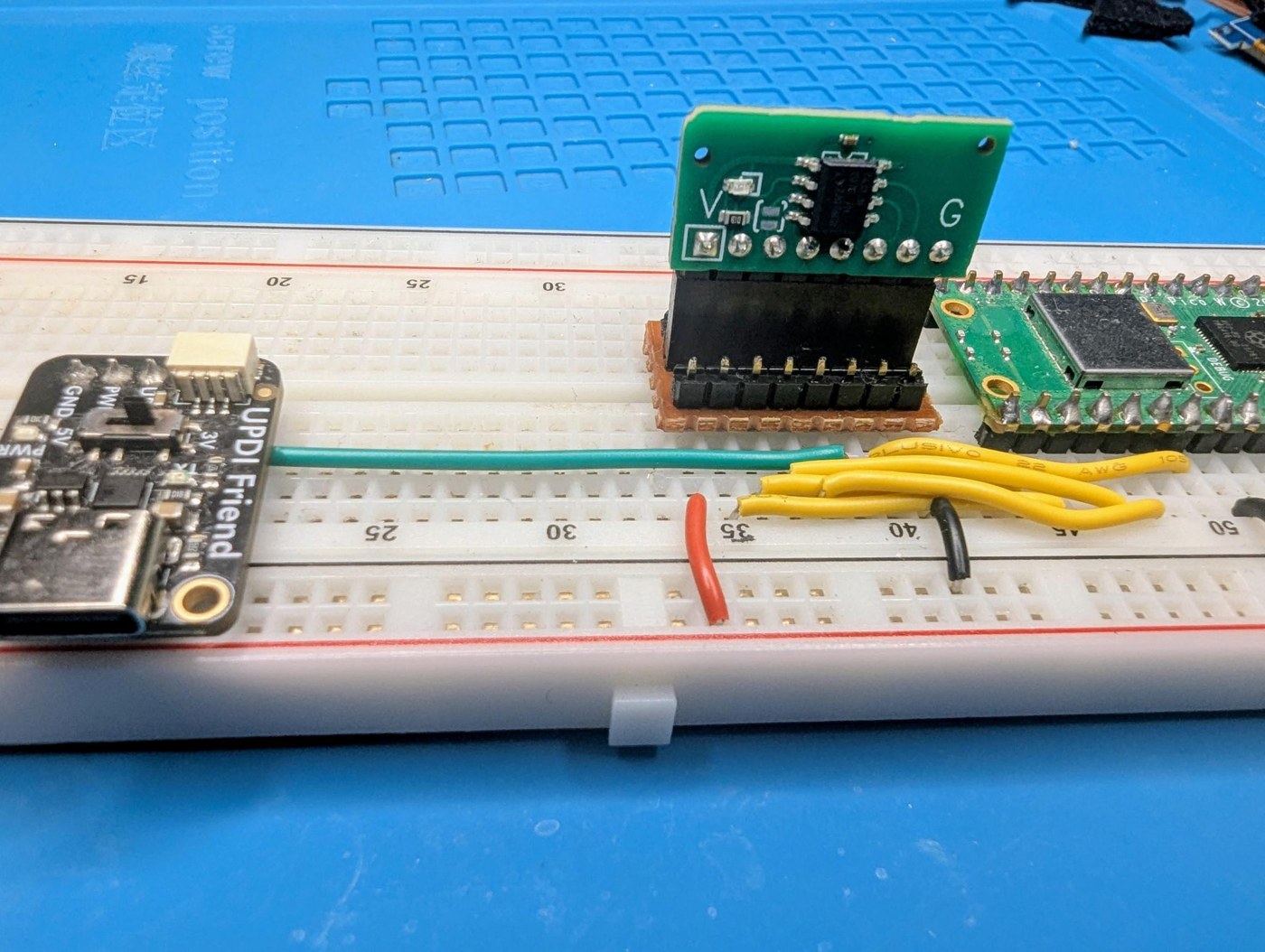
The jig (code/04, build log 4, “Qualify the moduli”) is a small piece of stripboard with two 8-pin male headers that plug into a breadboard and one female header that takes the card under test. A Pico and a UPDI programmer stay on the breadboard; the card is only ever inserted into the jig’s socket, so thirty insertions wear the jig, not the breadboard. The jig’s Pico pins are in code/05/rpi/jig_pins.py: GP17 to the card’s REQ, GP16 to H1 pin 3 (PA7 via JP1), GP18/GP19 to SDA/SCL, GP21 to VOTE. The UPDI programmer connects to H1 pin 6 (PA0).
The diagnostic image makes PA6, PA1, PA2 and PA3 inputs with pull-ups and toggles PA7 every second (the LED blinks — a visual check that the chip is alive). The Pico then runs four checks, in order:
- Shorts to ground — all lines must read high.
- Bridges and shorts to VCC — drive each of PA6, PA1, PA2 and PA3 low in turn; the others must stay high, and the driven pin must go low.
- Opens — release everything; all lines must read high again. The pull-ups are in the chip, so a line with an open joint stays low.
- JP1 isolation — hold pin 3 low for three seconds; no pin may follow PA7’s toggling. This finds a closed JP1 and any bridge to PA7.
A failing card reports the exact fault — for example, “Bridge detected: driving PA6 (H1-2) pulled down PA7 (H1-3)” — and the shipping image is not flashed.
13.10 The Backplane
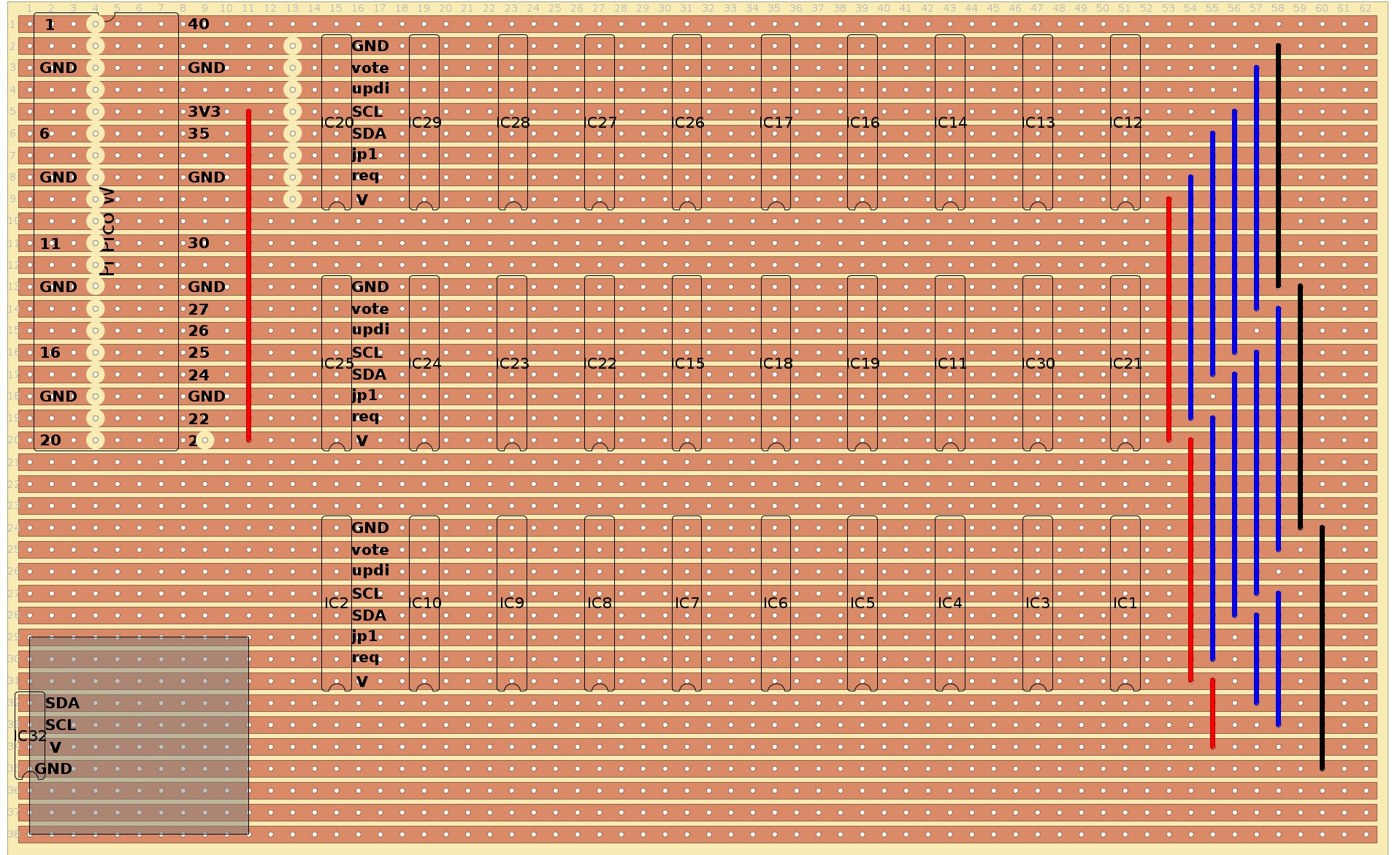
kbsriram built the backplane (build log 5, “The modulus chorus rehearses”) on a 3U Eurocard stripboard, 62 holes along each of 38 copper strips. After trying several layouts in the free stripboard editor DIYLC he settled on three rows of ten slots, the Pico on the left and the OLED in the corner beside it. The Pico’s right-hand column of pins lands on the same strips as the first card slot, so GND, SDA, SCL, VOTE and REQ reach it directly; VCC comes from the Pico’s 3V3 pin by a jumper. The strip-to-signal map is in the header of code/06/rpi/pins.py.
Three practical points from the log:
- Draw it on the top, cut on the bottom. The strips are underneath, so everything is mirrored when the board is turned over. He drew component outlines on the top side first and poked a wire through each hole to confirm a position before cutting.
- Cut first, solder last. Strips are broken by spot-facing a hole — turning a drill bit by hand until the copper ring is gone — and checked with a meter. Because stripboard has no solder mask, solder spreads a hole’s width along the strip from every joint, so breaks are made first, then the wire jumpers while nothing tall is in the way, then the female headers.
- Power budget. Each ATtiny412 draws about 2.7 mA at 10 MHz and each LED about 1 mA, so thirty cards with every LED lit take about 111 mA, plus about 20 mA for the OLED; kbsriram notes the Pico’s regulator is rated for 800 mA.
On first power-up three of his thirty slots did not answer the I²C scan. The LED walk (below) found them at once, and reseating fixed all three: the fault was debris in the female headers, not the solder joints. “The female headers seem to collect lint.” Blow out the headers before fitting cards.
13.11 The Card Firmware
13.11.1 The ring and the vote
code/05/avr/src/task/task_sieve.c holds the card’s state: its modulus, its ring (16 bytes — 128 bits, which caps the modulus at 128), its phase, and whether it is armed. On each REQ rising edge an armed card drives VOTE according to the ring bit for the current phase and advances the phase.
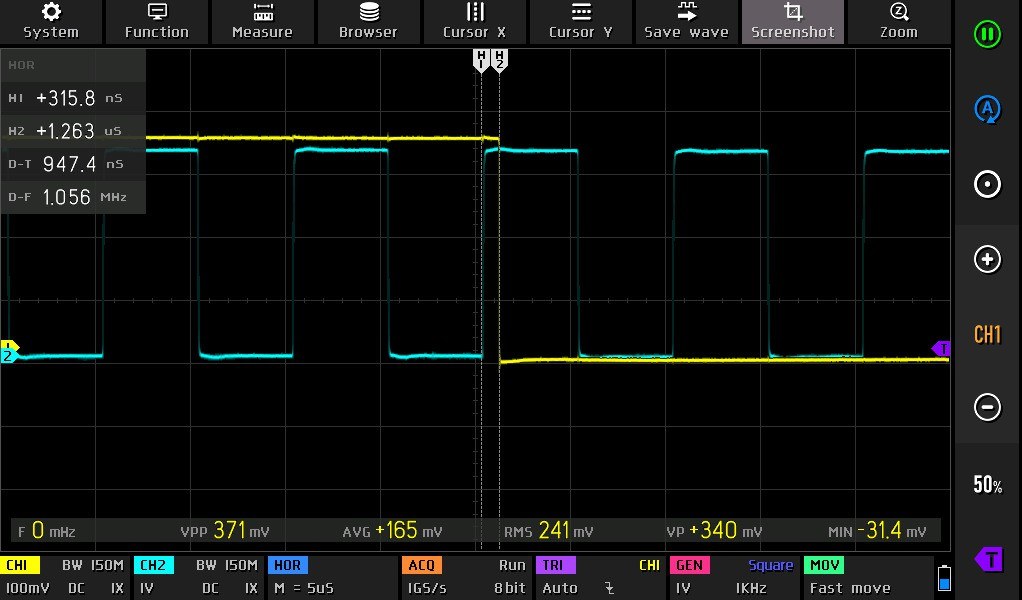
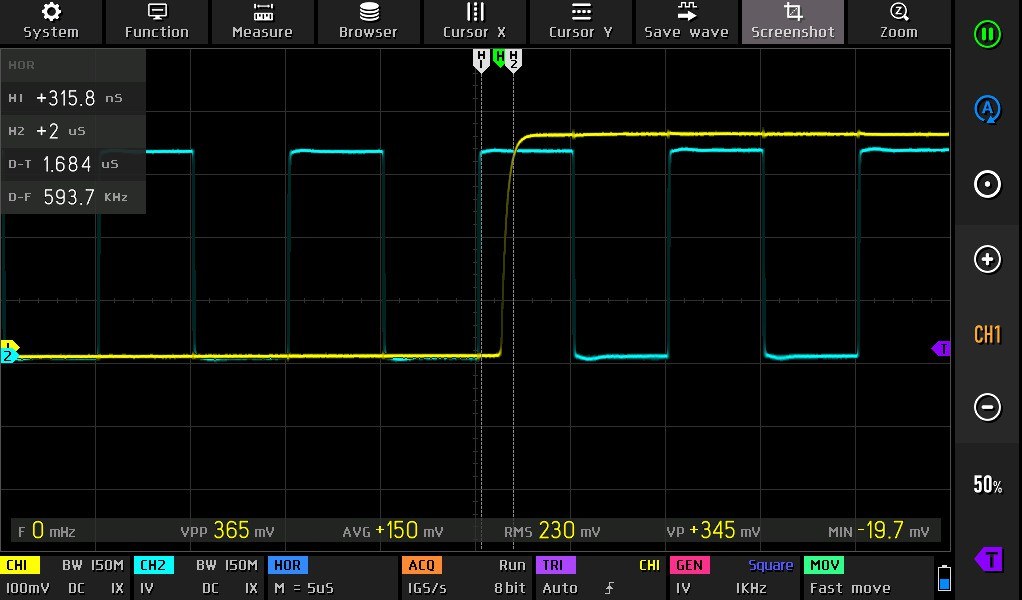
The interesting part is the speed of that edge. In build 02 the chip set a flag in its interrupt and a main loop drove VOTE, taking about 5 µs. In build 05 the vote moved into a hand-written interrupt handler in code/05/avr/src/hal/hal_gpio.c: six assembly instructions, with four registers reserved across the whole build and the next phase’s port-direction byte precomputed, so that “the first instruction executed drives VOTE.” The handler clears the interrupt and computes the next vote before returning. kbsriram measured, with all thirty cards fitted, 947 ns from a REQ rising edge to VOTE low, and 1.684 µs from the same edge to VOTE settled high — one candidate every 1.684 µs, a ceiling of about 600,000 a second. The 700 ns or so of that which is the line charging through 1.2 kΩ is set by the pull-ups and the line’s capacitance; going much faster would need each card to drive its own line into a wide AND gate, as the 1965 delay-line sieve and later machines did.
main.c never sleeps while armed: waking from sleep would cost microseconds. Cards also take no I²C traffic while armed, which is why the Pico holds REQ low for every transaction.
13.11.2 The I²C protocol
code/05/avr/src/task/task_cmd.h defines five commands. Every command ends in a CRC-8 PEC (polynomial 0x07, initial value 0x00) seeded with the card’s write address, and every command is answered with a one-byte response code the host reads back — 0x00 taken, 0xFF failed — so a corrupted command is refused and reported instead of being acted on.
Table 3 — The I²C protocol
| Opcode | Command | Payload | Effect |
|---|---|---|---|
| 0x01 | SET_RING | modulus + 16 ring bytes | load the residue pattern |
| 0x02 | RESET | — | disarm, clear the LED |
| 0x03 | ARM | starting phase | arm the card at a phase |
| 0x04 | LED | one byte, 0 = dark | drive the LED (for the LED walk); refused while armed |
| 0x05 | STATUS | — | read back response, phase, flags, modulus, firmware version, CRC |
The STATUS read’s CRC is seeded with the read address, so a status reply can never be replayed onto the bus as a command. Its flags byte carries the armed bit and a snapshot of the chip’s reset-flag register, which tells the host whether a card has been reset — by a brownout, for instance — part-way through a run.
The card firmware has host-side unit tests that need no hardware: cd code/05/avr/test/host && make test runs task_cmd.c and task_sieve.c against test vectors generated by a Python model, code/05/avr/test/ref/model.py.
13.12 The Pico Firmware
13.12.1 Structure
The run-time code is MicroPython, in code/06/rpi/ (build 01’s Pico code is CircuitPython; every later build is MicroPython, so check each build’s README before copying files to a board). It runs straight from the PC with mpremote mount, with nothing copied to the Pico’s flash.
Table 4 — Structure
| File | Role |
|---|---|
pins.py | GPIO numbers for the backplane, I²C bus settings (I²C1 at 100 kHz, 200 ms timeout for OLED frames) |
scanner.py | the PIO program: REQ generation, VOTE sampling, 64-bit candidate counter, survivor FIFO; 50 Hz to 500 kHz |
card.py | one card: the I²C commands with CRC-8 |
bank.py | all thirty: load rings, arm at a candidate, read phases and reset flags, reload and re-arm |
selftest.py | the pre-run checks |
runner.py | the session: self-test, load, arm, run, check survivors, display, checkpoint, roll back |
panel.py | the SSD1306 display; does nothing if no display is fitted |
run.sh | wrapper: ./run.sh slower.m79 runs runner.hunt(prob_m79) under mpremote |
slower/, faster/ | problem drivers: Lehmer’s 1928 and 1932 problems at historical rates, and the 1970 DLS-127 problems at 500 kHz |
Below 20 Hz the runner under-clocks the RP2040 to 18 MHz so the PIO can step that slowly.
13.12.2 A problem driver
Each problem is a small Python module with a fixed shape:
NAME,START,LAST,DEFAULT_FREQ— the range and the stepping rate;MODULI— the moduli in slot order (19 for the chain-machine problems, 30 for the gear-machine problems);KNOWN_STOP— the published answer, which “every ring must admit”;make_ring(modulus)— the acceptable residues for one modulus;verify(x)— the full test of a survivor, returning the answer if it is one;certain_survivors(n)— survivors expected by construction (for the pseudosquare problems, the perfect squares).
The drivers’ docstrings are the best short account of Lehmer’s problems anywhere: each gives the paper and page, the linear form, the range, the published answer, notes on every modulus that needs special handling, and the errors kbsriram found in the papers. Volume 14 uses them throughout.
13.12.3 Loading a problem over I²C
Loading is the same for every problem:
- Hold REQ low.
- For each slot, call
make_ring(m), pack the acceptable residues into 16 bytes, and send SET_RING; check the response. - Check the rings against the answer. The runner confirms that
KNOWN_STOPpasses every ring before running — a ring that rejects the published answer is a bug in the ring, not a discovery. - ARM every card at phase
START mod m. Cards beyond the problem’s modulus count are RESET, so they never pull VOTE low; their LEDs stay dark. - Start the PIO at the problem’s rate.
kbsriram notes a consequence that shows on the board: on 2⁷⁹ − 1 the moduli 64, 27 and 79 accept every residue, so those three cards never vote and stay dark for the whole run — and on the chain machine’s 9,999,000,099,990,001 problem, chains 64 and 25 would have carried a pin on every link.
13.13 Trusting a Run: Self-Test, Checkpoint, Rollback
One open-drain line driven by thirty cards has no error detection of its own. A card stuck low rejects everything, and a run completes and “claims no solutions exist.” A card that misses one REQ edge votes one step out of phase from then on, silently rejecting the wrong candidates. kbsriram’s answer is to check the machine before it starts and at intervals while it runs.
13.13.1 Before the run
selftest.py runs these checks (run_all_checks), in order:
- Roll call — an I²C scan must find exactly the expected addresses, including the OLED.
- REQ bridge — the scan is repeated with REQ held high and then low; any bridge to REQ makes the two lists differ.
- Idle VOTE — every card disarmed, ten REQ edges: VOTE must stay high throughout.
- LED walk — each card’s LED lit in slot order, one at a time, with the OLED showing the address. Watching the light move along the rows proves every address is in the slot it should be.
- One card at a time — each card armed alone with a test ring and clocked; VOTE must follow the pattern that card’s ring should produce.
- VOTE timing and array survivors — bursts at the run’s own rate, checking that the array as a whole lets through what the rings predict.
13.13.2 During the run
runner.py keeps two independent timers. Every minute it pushes a frame to the OLED (92 ms at 100 kHz) with no card traffic. Every 15 minutes it pauses the PIO and audits every card: it reads each card’s phase and reset flags over I²C and compares the phase with the PIO’s count. A card normally holds the phase of the next REQ edge, so its phase must equal the count plus one (or the count itself, if the PIO paused in the one cycle between its increment and the edge). If every card agrees and none has been reset, the runner records a checkpoint — the candidate count and the number of survivors so far — and resumes.
If any card disagrees, or reports a brownout, the runner rolls back: it resets every card, reloads every ring, re-arms every card at the last good checkpoint, restarts the PIO from that candidate, and restores the survivor count. The run loses at most fifteen minutes, and never continues on a corrupted state. kbsriram’s multi-hour 500 kHz runs of the 1970 problems — up to four and a half hours — completed with every checkpoint passing.
The runner also predicts survivors as it goes: the product over the armed rings of (acceptable residues ÷ modulus), times the candidates covered, plus any certain survivors. Each checkpoint prints the measured and predicted counts side by side — on the L₁₂₇ pseudosquare run, for instance, 49,829 survivors against 50,093.7 predicted at the last checkpoint — which is a running check that the rings are what they are meant to be.
13.13.3 Display and sound
The OLED (SSD1306, 128 × 64, address 0x3C) shows the problem, candidate, rate, survivors and checkpoint status, and the answer when one is found. The final build has no buzzer; build 01’s piezo on the reject line is the one kbsriram used to hear sieving. A piezo across VOTE (driven through a transistor, so it does not load the line) is an easy addition for demonstrations at a few tens of steps a second — slower/prob_demo.py runs thirty random rings at 10 Hz as a “blinkenlights” demonstration, and with a buzzer it becomes the sound of the sieve as well. That is a suggestion, not part of kbsriram’s design.
13.14 Build Sequence
- Breadboard build 01 (three chips, button, buzzer) to learn the toolchain and hear the sieve.
- Order the cards from the repository’s gerbers, BOM and pick-and-place files, with spares.
- Build the jig, solder the headers using the two-header fixture, and run
flash_batch.pyacross all thirty, addresses 0x10–0x2D. - Build the backplane on 3U stripboard: cut, jumper, then headers; fit the Pico and OLED.
- Fit the cards in address order, blow out the headers first, and run the self-test until it passes.
- Run the 2⁷⁹ − 1 problem at 5,000 steps a second (
./run.sh slower.m79). kbsriram’s run solved it at x = 56,523 in 11.31 seconds against Lehmer’s published 12; the reproduction should do the same. - Run the rest of Lehmer’s problems using the protocol in Volume 14.
13.15 What the Build Teaches
The Tiny Sieve makes the logic of Lehmer’s machines visible in a way the originals could not: thirty LEDs show which moduli reject each candidate, the problem drivers state every modulus’s acceptable residues in a few lines of Python, and the self-tests make explicit what Lehmer’s operators checked by eye and by faith. It also shows where the art moved. A modulus that took a bicycle chain in 1927 and a steel gear in 1932 is now sixteen bytes in a two-dollar chip; the hard part is no longer making the residues turn together but proving, every fifteen minutes, that they still are. And the board’s speed — a hundred times the gear machine — is still set by physics Lehmer would have recognised: a wire that takes time to charge, and a checker that is slower than the rejecter.
Next — Volume 14: Running Lehmer’s Problems — Test Protocol and Results. The six problems from the 1928 and 1932 papers, set up on all three builds, with expected stops, run times, and a results sheet to fill in.
Comments (0)