Lorenz and Colossus · Volume 12
Lorenz and Colossus — Volume 12 — Building a Lorenz — The SZ42 Replica, Design
Twelve wheels and 501 cams in electronics: a design brief, a block diagram, a wheel module that can be turned by hand, a front panel in the machine's own order, the firmware that steps the wheels exactly as the SZ42 did, and the parts to build it
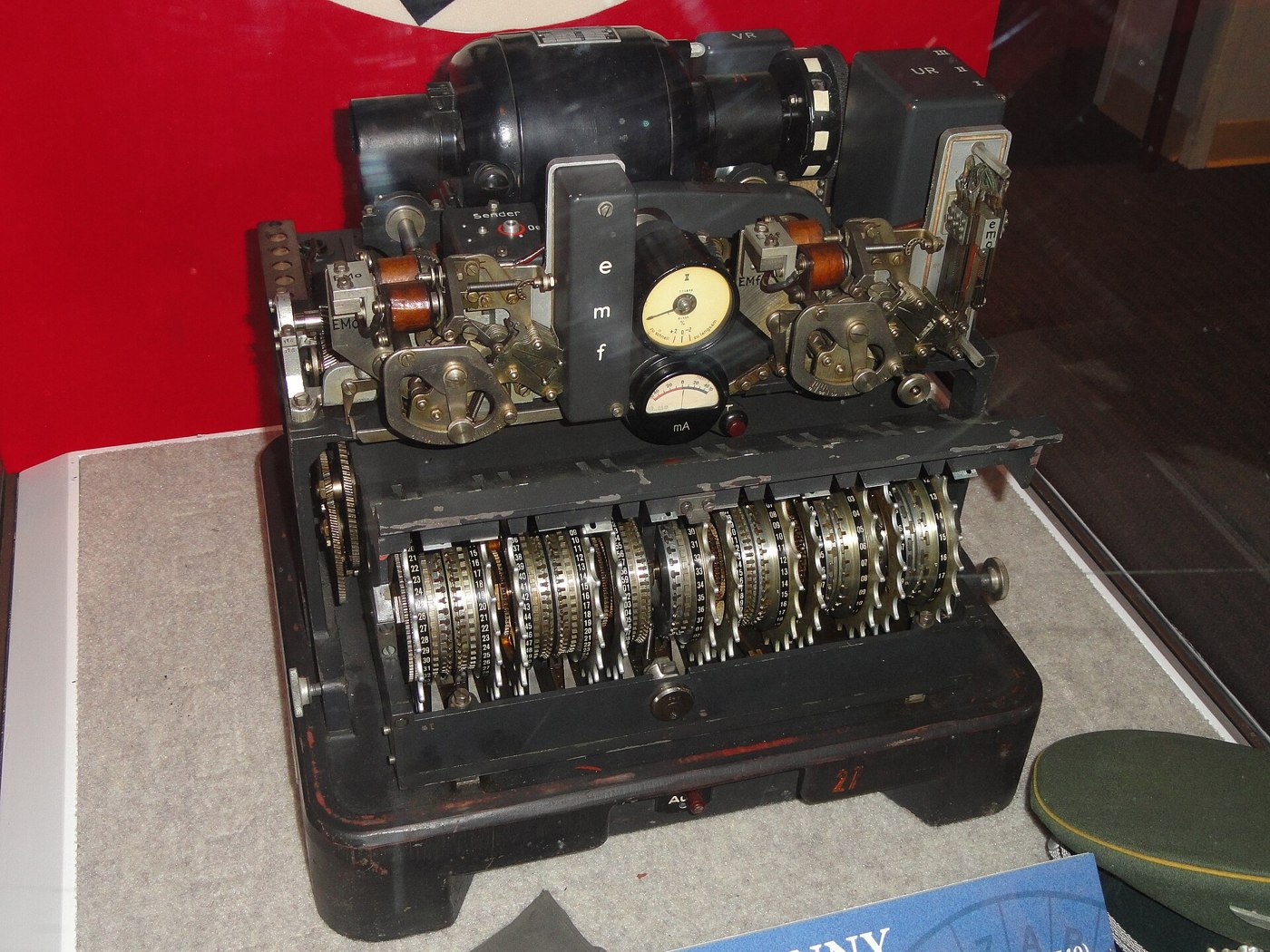
12.1 About This Volume
This is the first of three build volumes. No kit for a Lorenz SZ42 exists, so this one is a design from scratch: an electronic replica of the cipher attachment that sets its 501 cams from a front panel, shows the twelve wheel positions, steps the wheels by the real SZ40, SZ42A and SZ42B rules, and takes in and sends out five-unit teleprinter code — over USB, or on the current loop of a real teleprinter.
Volume 12 is the design: the brief, the choices it forces, the block diagram, the wheel module, the panel, the firmware outline and a bill of materials. Volume 13 is construction — wiring, the teleprinter loop interface, bring-up, the verification procedure, and a message enciphered on the replica and read back. Volume 14 builds the other half of the story, a bench-top Colossus that sets the chi wheels of a message by Tutte’s statistic.
Nothing here has been built yet. Everything is a design and a procedure, and where the account of an actual build will go the text carries a marker.
The design leans on one fixed point. The cipher logic is already written and tested: 03-outputs/tools/lorenz_sim.py, the simulator described at the end of Volume 3, reproduces J. H. Tiltman’s 1961 worked example exactly and deciphers three real SZ42A messages from the 2007 Cipher Event character for character. The replica’s firmware is a port of that one function, and every test in Volume 13 compares the replica with it.
12.2 The Design Brief
The replica must:
- Hold twelve wheels of the right sizes — χ 41, 31, 29, 26, 23; μ 61, 37; ψ 43, 47, 51, 53, 59 — with every one of the 501 cams settable to cross or dot.
- Let each wheel be set by hand, to a numbered start position, the way an operator turned a finger wheel until the right number stood in the window.
- Show the cams, so that a day’s patterns can be entered and checked against a key list such as Tiltman’s Bream patterns of 14 April 1944 (Volume 3).
- Step exactly as the machine did: all chi wheels every letter; μ61 every letter; μ37 after a cross on μ61; the psi wheels together when the total motor is a cross. It must offer the SZ40 rule (no limitation), the SZ42A limitation (χ2 one back), the SZ42B limitation (χ2 + ψ1 one back) and, separately switched, the P5-two-back plain-text function — on the original, the switch marked KT (Cipher Attachment 42, Provisional Descriptions, TICOM T663, CryptoCellar).
- Take five-unit characters in and send them out: over USB as Bletchley letters or as ordinary text, and at 50 baud on a teleprinter current loop.
- Encipher and decipher with one operation, as the original did, and also single-step one letter at a time for teaching.
- Load and save keys in a plain text format that the simulator also reads.
- Test itself at power-up against a published vector.
It deliberately does not copy the mechanism. The original’s 220 V motor, centrifugal governor, cam shafts, mixing relay and 100 V telegraph supply were the means; the twelve wheels and their rules were the end. A faithful mechanical reproduction would mean 501 movable lugs on twelve wheels with contact levers and a blocking-lever shaft — the manual’s drawing N 46153 (Volume 3) shows how much mechanism the motor alone took. That is a machinist’s project of a different order. The replica is faithful to the logic, the wheel sizes, the order of the wheels across the front, and the way an operator handled them.
12.3 Three Ways to Build a Wheel
There are three plausible ways to make a wheel that can be set by hand.
Mechanical. A 3D-printed wheel with 41 (or 61) sliding pins, a microswitch reading the pin at the top, and a stepper or solenoid to advance it. This is the most satisfying to touch and the hardest to build twelve times: the 61-cam wheel needs pins at a pitch of a few millimetres to stay a reasonable size, every pin needs a detent, and twelve stepping mechanisms have to stay in step with each other forever. A missed step on one wheel silently corrupts every character that follows.
LED ring. A ring of addressable LEDs, one per cam, with a rotary encoder to turn it. The rings would show a whole wheel at once, but rings are sold in sizes such as 12, 16, 24 and 60 LEDs, not 23, 26, 29, 31, 37, 41, 43, 47, 51, 53, 59 and 61, so each would be a custom circuit board — twelve different ones.
Encoder and screen. A detented rotary encoder for the hand, and a small screen above it showing the wheel’s number, its position, and a window of cams either side of the reading position. One design serves all twelve wheels; only the software knows how many cams each has. Turning the knob moves the wheel one cam per detent, exactly as turning the finger wheel did; pushing it toggles the cam at the window.
The third is the design adopted here. It keeps the gesture of setting a wheel — a knob turned until a number shows — and it keeps all the state in one place, the microcontroller’s memory, where it cannot slip.
12.4 Architecture
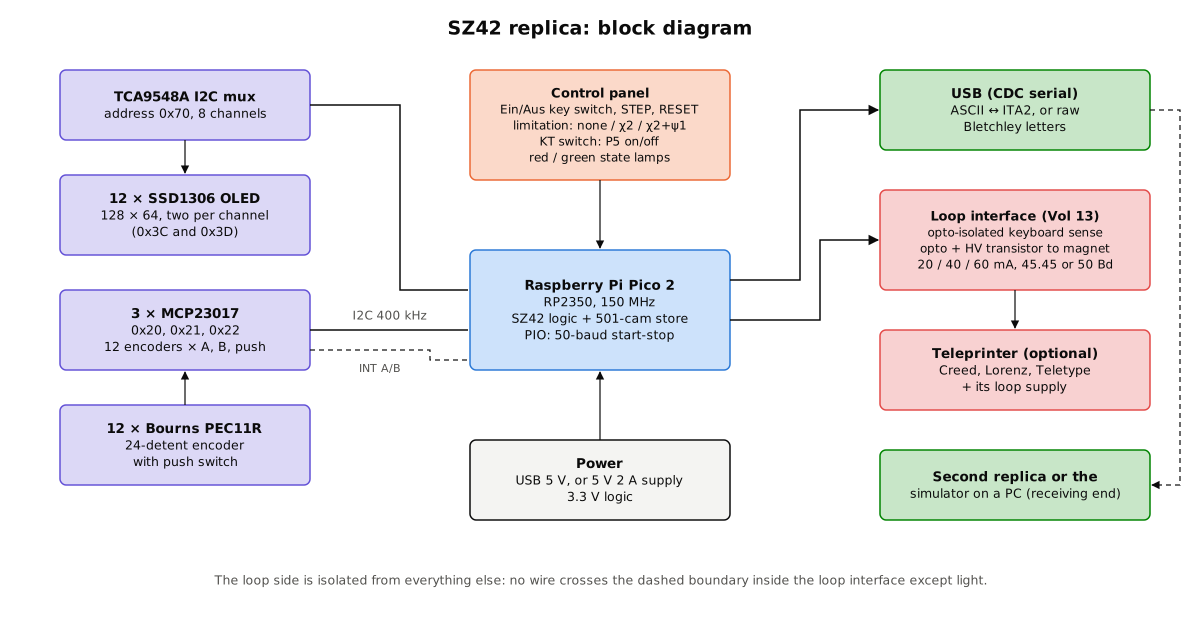
12.4.1 The controller
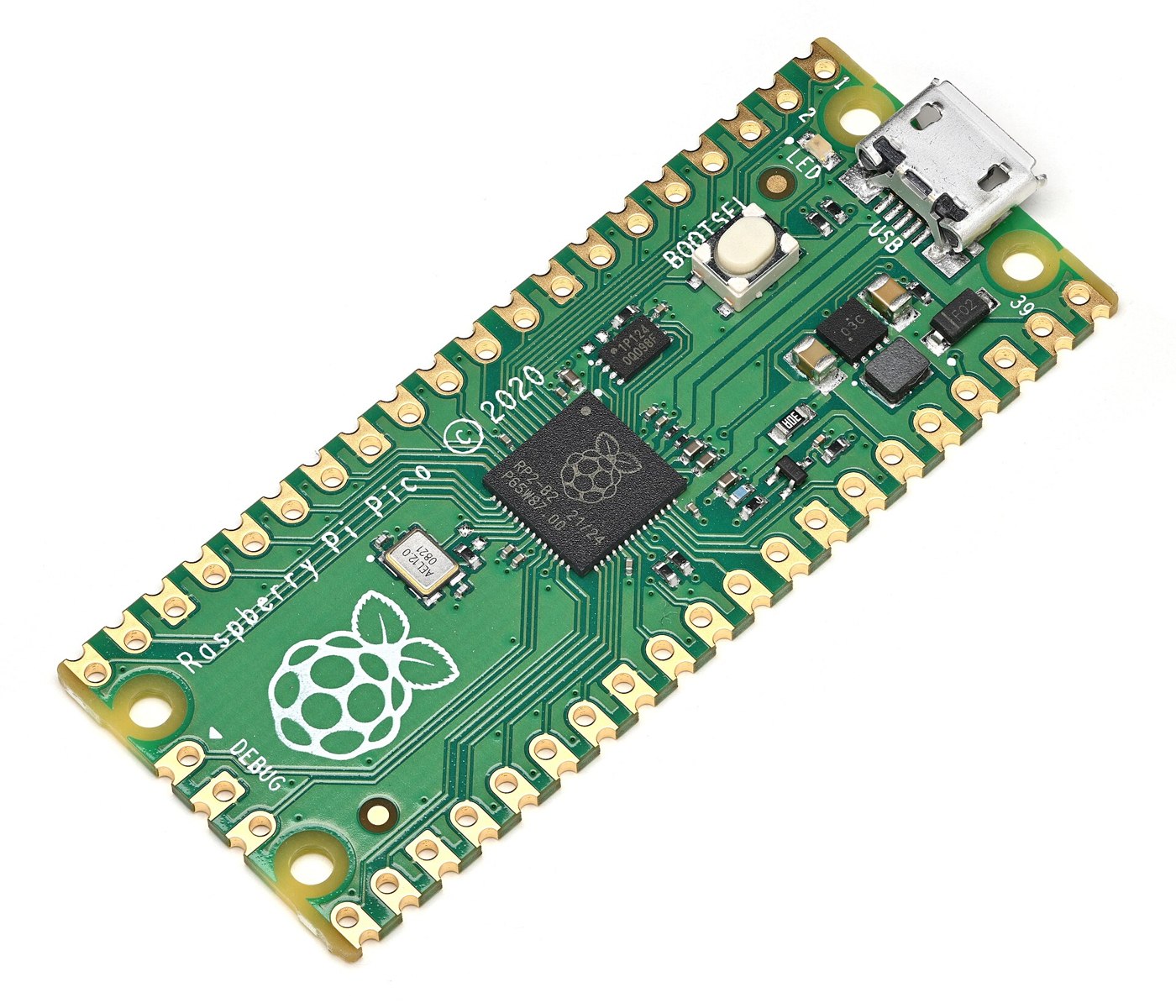
The controller is a Raspberry Pi Pico 2, built round the RP2350 chip: two cores at 150 MHz, 520 KB of on-chip SRAM, 4 MB of flash, and twelve programmable I/O (PIO) state machines, for “from $5” (Raspberry Pi, product page, read October 2026). The cipher itself is trivial for it: 501 bits of cam pattern and twelve position counters, and a step that takes well under a microsecond. What the controller must really do is housekeeping — twelve screens, twelve knobs, a panel of switches, a USB port and a teleprinter line — and the RP2350’s two cores and PIO blocks divide that cleanly:
- Core 0 runs the panel: reading encoders, redrawing screens, handling USB commands.
- Core 1 runs the cipher and the line: it owns the wheel state, steps it once per character, and talks to the PIO state machines.
- PIO generates and receives the teleprinter start-stop signal at 50 baud (or 45.45 baud for American machines) in hardware, so that the timing on the line never depends on what the screens are doing.
The two cores share the wheel state through a lock, and the panel is not allowed to move a wheel while a message is running — the same rule an operator obeyed by not touching the wheels mid-message.
12.4.2 The wheel modules
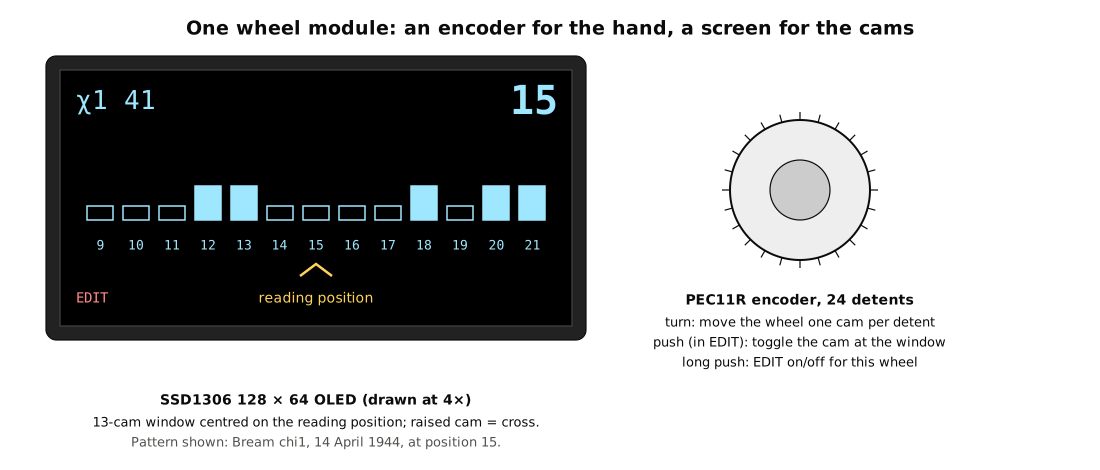
Each of the twelve modules is a 0.96-inch SSD1306 OLED of 128 × 64 pixels and a Bourns PEC11R rotary encoder with 24 detents and a push switch. The screen shows:
- the wheel’s name and size (
χ1 41); - its position in large figures, numbered from 1 as on the wheel’s number band;
- a window of thirteen cams centred on the reading position, raised cams drawn tall;
- an
EDITflag when the wheel is unlocked for editing.
Turning the knob moves the wheel one position per detent, forward or back; the window scrolls. A long push unlocks the wheel for editing, and then a short push toggles the cam at the reading position. Entering a day’s patterns is therefore done the way the original was set, wheel by wheel and cam by cam — slow, deliberate and checkable. For speed, patterns can also be loaded whole over USB.
The SSD1306 has only two I2C addresses, 0x3C and 0x3D, chosen by a jumper on the module, so twelve screens cannot share one bus. An Adafruit TCA9548A multiplexer (product 2717, $6.95 at Adafruit, read October 2026, product page) splits the bus into eight channels; six channels with two screens each carry all twelve.
Redrawing a whole 128 × 64 screen is 1,024 bytes, about 23 ms on a 400 kHz I2C bus; twelve screens take about a third of a second. That is too slow to redraw everything after each character at 50 baud, when a character arrives every 140–150 ms. The firmware therefore redraws only the parts that change — the position figures and the cam window — and only for wheels that moved, which is a few hundred bytes per character. During a long message it may fall behind and catch up afterwards. The cipher never waits for the screens.
12.4.3 Reading twelve knobs
Twelve encoders with two quadrature pins and a push switch each need 36 inputs — more than the Pico has spare. Three MCP23017 I2C I/O expanders, at addresses 0x20, 0x21 and 0x22, give 48. Each expander raises an interrupt line when a pin changes, so the Pico reads only the expander that has something to say. Detented encoders turned by hand produce at most a few hundred transitions a second, which the expanders handle easily; contact bounce is removed in software with the standard quadrature state table, which ignores any transition that skips a state.
12.4.4 The control panel
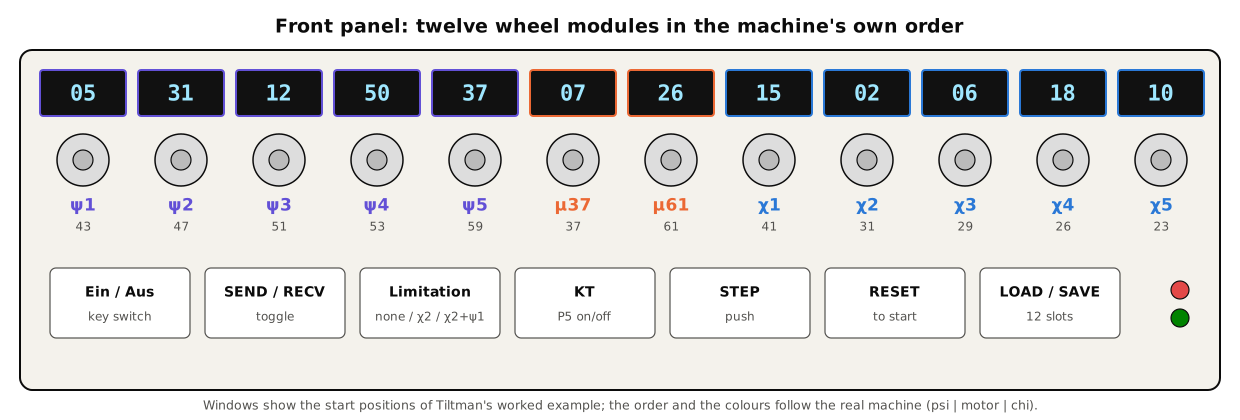
Below the wheels is a row of controls, most of them borrowed from the original:
- Ein/Aus — a key switch, as the German operating switch was. In Aus the wheels can be set and edited; in Ein they are locked and the machine ciphers.
- SEND / RECV — which direction the line runs. Encipher and decipher are the same operation; the switch decides only where characters come from and go to.
- Limitation — a three-position rotary switch: none (SZ40), χ2 (SZ42A), χ2 + ψ1 (SZ42B).
- KT — the plain-text function, P5 two back, on or off. On the original this switch sat under a cover on the side of the machine.
- STEP — advance the wheels by one character without ciphering anything, to watch the motor work.
- RESET — return every wheel to the start position stored when the machine was last switched to Ein.
- LOAD / SAVE — store or recall one of twelve keys in flash.
- Two lamps, red and green. The German manual describes “red and green windows” lit to show the position of the operating switch (Provisional Descriptions, III); the replica uses them the same way.
12.4.5 Characters in and out
USB. The Pico appears to a computer as a serial port. In letters mode it accepts and returns Bletchley letters — /, 9, 3, 4, +, 8 and the alphabet — one per character, so that the replica can be driven by the simulator or by hand, and test vectors can be pasted in. In text mode it accepts ordinary text, converts it to ITA2 with letter and figure shifts inserted, and converts the output back, tracking the shift state, as the simulator’s plain_to_codes and codes_to_plain functions do.
Teleprinter loop. A real teleprinter connects through an isolated current-loop interface, described in Volume 13. The PIO state machine sends and receives each character as a start pulse, five data pulses and a stop pulse. The German manual gives the SZ42’s line speed as 50 baud, “7.14 symbols per second”, which corresponds to a seven-unit character of 140 ms; most 50-baud teleprinters send a stop pulse of one and a half units, 150 ms a character. The receiver must accept either, and the transmitter is set to suit the machine on the line. American Teletype machines run at 45.45 baud, which the PIO handles by changing one clock divider.
12.5 The Logic in Firmware
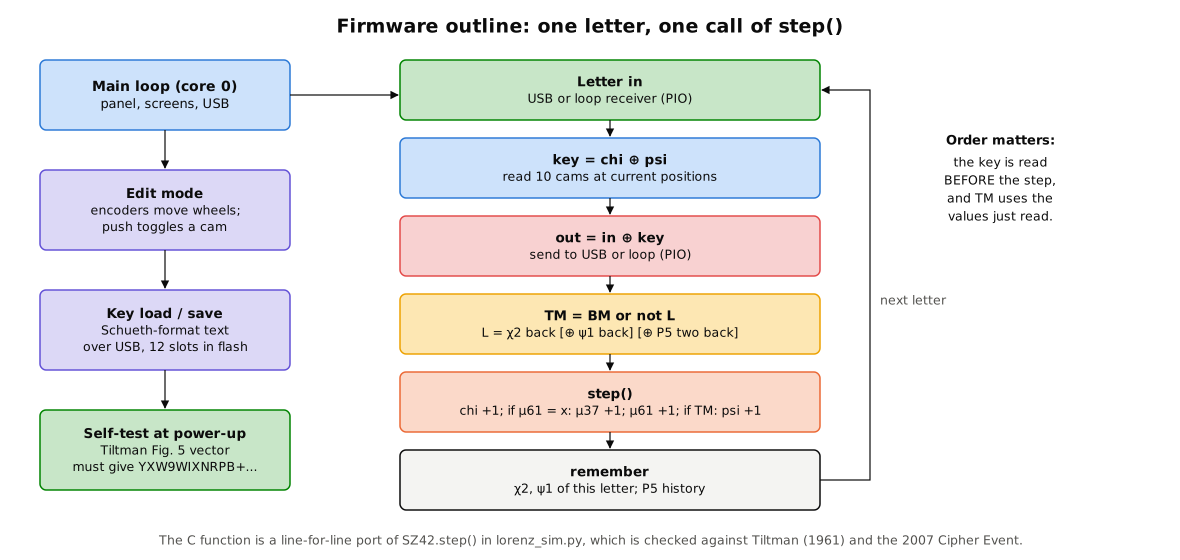
The heart of the firmware is one function, ported line for line from SZ42.step() in the simulator. The order of operations is the part that matters, and it is easy to get wrong: the key for a character is read at the wheels’ current positions, then the wheels step, and the decisions about stepping use the values that were showing when the key was read.
/* One character. cam(w) = 1 if the cam at wheel w's reading position is raised. */
uint8_t sz42_letter(sz42_t *m, uint8_t in, bool decipher)
{
    uint8_t key = chi(m) ^ psi(m);          /* five impulses, impulse 1 = bit 4 */
    uint8_t out = in ^ key;
    uint8_t plain = decipher ? out : in;    /* P5 history needs the plain text   */

    bool bm = cam(m, MU37);                 /* basic motor                        */
    bool tm = bm;
    if (m->lim != LIM_NONE) {               /* limitation: built from one back    */
        bool L = m->chi2_back;
        if (m->lim == LIM_CHI2_PSI1) L ^= m->psi1_back;
        if (m->kt)                   L ^= m->p5_two_back;
        tm = bm || !L;                      /* a dot on L releases the psis       */
    }
    bool mu61 = cam(m, MU61);

    m->chi2_back   = cam(m, CHI2);          /* remember this letter's values      */
    m->psi1_back   = cam(m, PSI1);
    m->p5_two_back = m->p5_one_back;
    m->p5_one_back = plain & 1;

    for (int w = CHI1; w <= CHI5; w++) advance(m, w);
    if (mu61) advance(m, MU37);
    advance(m, MU61);
    if (tm) for (int w = PSI1; w <= PSI5; w++) advance(m, w);
    return out;
}
Four details deserve a note.
- “One back” at the start. Before the first character there is no previous character. The simulator, following Joachim Schüth’s software for the 2007 Cipher Event (schlaupelz.de), takes χ2 one back to be the cam just before χ2’s start position — what the wheel would have shown one step earlier — and the replica does the same. That is the convention with which three real SZ42A messages decipher correctly.
- P5 two back at the start is unknown and is taken as a dot. This, like the SZ42B limitation, is implemented but not validated against a published message.
- Tiltman’s start rule — all twelve wheels step between the first and second letters (Volume 3) — is a menu option, off by default, for the same reason.
- Positions are numbered from 1, as on the wheels’ number bands, Tiltman’s figures and Schüth’s key files. Internally the firmware counts from 0; the conversion happens only at the screens and the key files.
12.5.1 Key files
Keys are stored and exchanged in the plain text format of Schüth’s software, which the simulator reads with read_key(): twelve lines of x and ., one per wheel in the order χ1–χ5, μ61, μ37, ψ1–ψ5, then the twelve start positions and the limitation (LIM_NONE or LIM_CHI2). The replica adds LIM_CHI2_PSI1 and a KT flag. Twelve keys fit easily in a corner of the flash. Loading a key over USB and reading it back gives the same file, byte for byte, which is the first check in Volume 13.
12.5.2 The self-test
At power-up the replica loads Tiltman’s Bream patterns and start positions, enciphers 989UND989EINGESETZTE under the SZ40 rule, and compares the result with YXW9WIXNRPB+CVQN+O83 (Volume 3). A mismatch lights the red lamp and refuses to go to Ein. The test takes a few microseconds and catches the commonest firmware fault, an error in the stepping order.
12.6 Bill of Materials
Prices are approximate and in US dollars, for single units, as of October 2026. The Pico 2 and TCA9548A prices were read from the makers’ pages; the rest are typical catalogue prices (for example, the PEC11R-4220F-S0024 encoder was listed at about $2.73 for one at LCSC) and should be checked when ordering.
Table 1 — Bill of Materials
| Qty | Part | Purpose | Approx. each | Approx. total |
|---|---|---|---|---|
| 1 | Raspberry Pi Pico 2 (RP2350) | controller | $5 | $5 |
| 12 | SSD1306 0.96-inch 128 × 64 I2C OLED module, address-selectable | wheel displays | $3–6 | $36–72 |
| 12 | Bourns PEC11R, 24 detents, push switch, with knob | wheel knobs | $3–5 with knob | $36–60 |
| 1 | Adafruit TCA9548A I2C multiplexer (2717) | screen bus | $6.95 | $7 |
| 3 | MCP23017 I/O expander (DIP or breakout) | encoder inputs | $2–5 | $6–15 |
| 1 | 4-pole key switch | Ein/Aus | $8–15 | $8–15 |
| 1 | 3-position rotary switch | limitation | $3–6 | $3–6 |
| 2 | Toggle switches | SEND/RECV, KT | $2–4 | $4–8 |
| 3 | Push buttons | STEP, RESET, LOAD/SAVE | $1–3 | $3–9 |
| 2 | Panel lamps or LEDs with bezels, red and green | state | $2–4 | $4–8 |
| 1 | Loop interface parts (Volume 13): H11L1 and 4N25 optocouplers, MJE340 transistor, resistors, diodes | teleprinter loop | — | about $10 |
| 1 | Perfboard or a small custom board, headers, ribbon cable, 2.2 kΩ I2C pull-ups | wiring | — | $15–30 |
| 1 | Front panel (laser-cut acrylic or aluminium) and case | enclosure | — | $30–80 |
| 1 | 5 V 2 A USB supply | power | $8–12 | $10 |
| Total | about $180–330 |
A teleprinter and its loop supply are not included. Without one, the replica runs entirely from USB.
12.7 Power and Enclosure
The electronics run from one 5 V USB supply. A Pico 2 draws a few tens of milliamps; each OLED draws roughly 10–25 mA depending on how many pixels are lit; the expanders and multiplexer draw almost nothing. The total is a few hundred milliamps, comfortably inside a 2 A supply, and the Pico’s on-board regulator provides the 3.3 V logic supply for the screens and expanders. The loop interface takes no power from the replica’s side except the few milliamps that light its optocoupler LED; the loop’s own supply belongs to the teleprinter (Volume 13).
The enclosure is laid out like the machine: twelve wheel modules in a single row across the front, in the original’s order, psi at the left, motor in the middle, chi at the right, with a strip beneath them carrying each wheel’s name — as the TNMOC machine in Volume 3’s hero photograph has. With modules on a pitch of about 98 mm the row is about 1.2 m long, which is longer than the original’s 48 cm base; a two-row layout (psi and motor above, chi below) brings it to about 70 cm and is the better choice for a bench. Either way the front panel is a single laser-cut sheet with windows for the screens and holes for the encoder bushings, and the electronics sit on a board behind it.
12.8 Risks and Open Decisions
- Screen refresh during long messages. Redrawing only what changed keeps up at 50 baud in principle; if it does not in practice, a “blind” mode blanks the cam windows while the line is running and shows positions only.
- Encoder feel. A 24-detent encoder turned through 61 positions is two and a half turns, which is acceptable; turning to a far position is faster with a held push-and-turn that moves ten at a time.
- One wheel per encoder versus one shared encoder. A single encoder with a wheel-select switch would save eleven knobs and two expanders. It would also lose the most characteristic thing about setting a Lorenz — reaching for the wheel itself — and is rejected for that reason.
- Pattern rules. The Germans required patterns with about half the cams raised and limited runs of like signs (Volume 3). The replica does not enforce them; the editor shows each wheel’s count of crosses so that the operator can.
- Unvalidated modes. SZ42B, P5 and Tiltman’s start rule are built in but untested against any published message. Volume 13’s verification procedure says so on its test sheet.
Next — Volume 13: Building a Lorenz — Construction and a Message Sent. Wiring the twelve modules, the I2C plan and the Pico pin map; an isolated current-loop interface for a real teleprinter; bring-up wheel by wheel; a verification procedure that checks the replica against Tiltman’s 1961 example and three real SZ42 messages from 2007; and a test message enciphered on the Bream wheels of April 1944, sent, and read back.
Comments (0)