DSKY · Volume 20
DSKY — Volume 20 — The Command Reference
A ring-bound flight plan for a desk-top DSKY: every verb, noun and program, and what each one does in the code
20.1 About This Volume
The Apollo crews did not fly from memory. Every key sequence they entered on the DSKY was written down somewhere in the Flight Data File, the stack of checklists, timelines and cue cards that went aboard with them, and the most important ones were rehearsed in the simulators until they were automatic. The verb-noun language of Volume 9 was compact, but it was not self-explanatory. “V37 E 63 E” means nothing until a page tells you it starts the braking phase of the lunar descent.
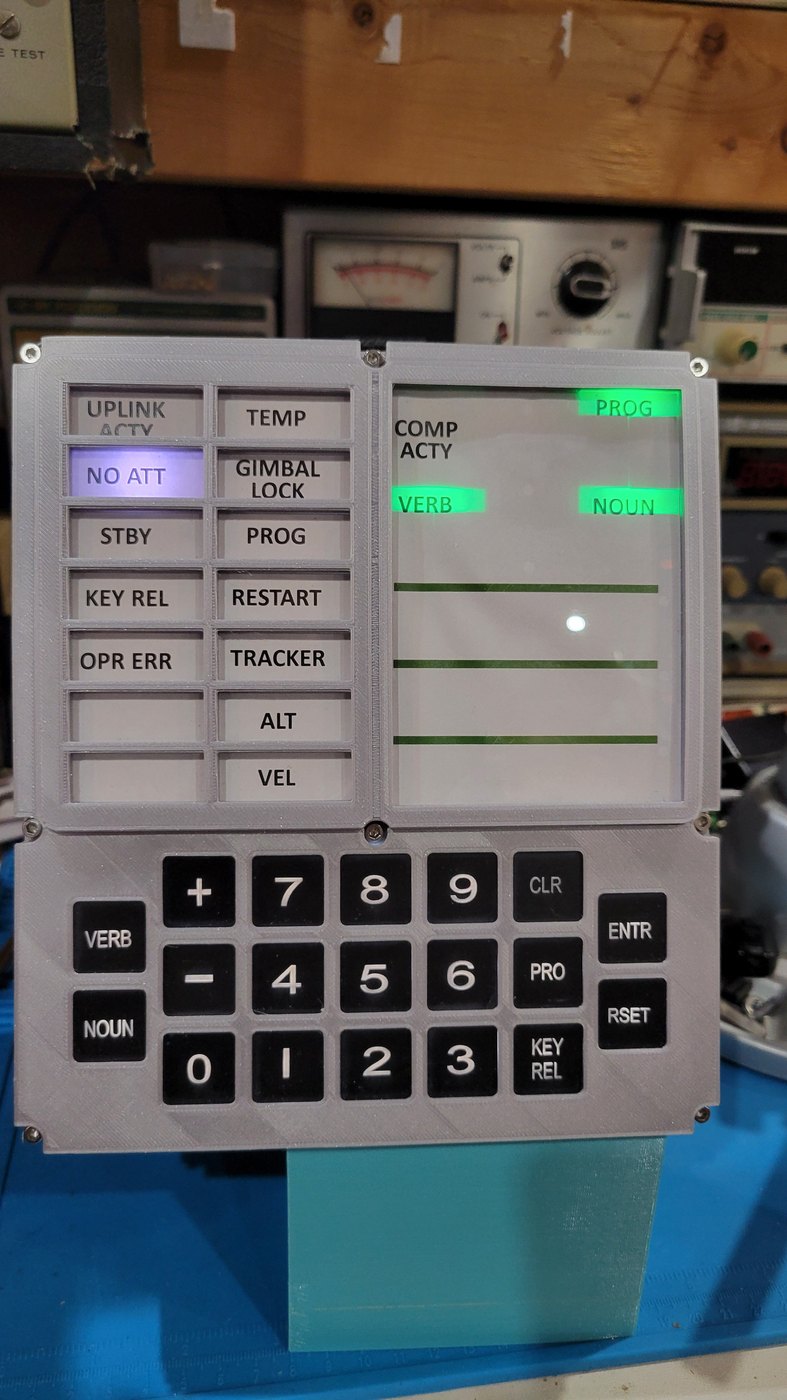
My Open DSKY has the same arrangement on a smaller scale. Beside it on the bench is a printed booklet, bound with two rings, titled Apollo Open DSKY Command Reference. It is the manual for Bill Walker’s firmware, the software that turns the kit’s lamps and digits into a DSKY, and it is what I keyed the launch and landing programs from.
This volume is about that manual: who wrote it and how it came to be in the box, the command set it documents, how each command is handled inside the firmware, and how it compares with the documents the real crews used.
20.2 Who Wrote It
The manual is not S&T GeoTronics’ own. It comes from Bill Walker and the Apollo Education Experience Project, an educational project in Cumming, Georgia, built around an Apollo Command Module replica with Open DSKYs installed in its panel. Walker wrote the custom firmware for those DSKYs (CustomDSKY.ino, © 2019–2021, released under the GNU GPL version 3) and the manual that goes with it.
The two reached Open DSKY owners in two stages:
- August 2019. Donors to the Project’s GoFundMe campaign were offered the software as a pre-programmed Arduino Nano, an SD card of audio clips, and “the software and comprehensive ‘Open DSKY Command Reference’ manual (modeled after the Apollo Flight Plan),” as S&T’s backer update of 28 August 2019 put it: “a custom-printed manual with a cover in your choice of 5 colors.” A later post from the Project calls that version “an exclusive-edition command reference manual.”
- January 2020. S&T began “shipping all of their Open DSKY kits and assembled units with the custom Arduino code and audio clips … along with a printed copy of the command reference manual” (Apollo Experience, 22 January 2020).
So there were at least two printings, the GoFundMe edition and the standard in-box edition. The manual is not sold separately anywhere that could be found, no PDF of it is published, and the README in Walker’s GitHub repository still lists its function table as “(coming soon).” The printed copies are, as far as can be established, the only form it takes. Ken Stauffer, who later wrote his own firmware for the kit, thanked “Bill Walker for an incredible software creation and user manual.”
My copy is printed and bound with two rings, which lets it lie flat beside the panel.
20.3 “Modeled After the Apollo Flight Plan”
The phrase is the best description of the manual’s intent, and it points at a real document. The Apollo Flight Plan was the master timeline for a mission: a long, ground-elapsed-time schedule of every crew activity, from launch to splashdown, with the DSKY entries written inline in a compact notation (a verb, an “E” for ENTR, a noun, another “E”). Alongside it in the Flight Data File went the checklists proper: books for each spacecraft and phase of flight, cue cards for time-critical procedures, and summaries of the programs, verbs and nouns of the guidance software. Many of those books were bound so they would lie open and could be paged through with gloved hands.
A command reference “modeled after” that has two jobs. It is a dictionary of the commands (what V16 N36 does and what the three registers will show) and it is a procedure book for the longer sequences, such as the launch and landing re-enactments, telling the reader what to key and what to expect on the panel as each step runs.
20.4 How the Firmware Hears a Command
The commands in the manual are the ones the firmware accepts, so it helps to know how Walker’s code reads the keypad. The sketch runs one main loop, and in that loop the panel is always in one of a few input modes.
- Mode 0 is the resting state, waiting for a key.
- Pressing VERB moves to mode 1. The green VERB legend flashes, and the next two digit keys are written into the VERB digits.
- Pressing NOUN moves to mode 2 and does the same for the NOUN digits.
- Pressing PRO moves to mode 3 and does the same for the PROG digits. This is Walker’s own shortcut: on the original DSKY, PRO meant “proceed,” and programs were changed only with V37. Here PRO followed by two digits sets the program number directly, which is how the audio programs below are played.
- ENTR closes the entry. The verb, noun or program is checked against the list the firmware recognizes, and if it is not on the list, the OPR ERR lamp lights and the old value is restored, just as an illegal entry did on the original. RSET clears the error. KEY REL abandons an entry and puts the previous digits back.
When a valid verb-noun pair is complete, a single function, validateAct(), looks it up. It is a long chain of tests, one line per command, each of which sets a number called the action. The main loop then calls the handler for that action on every pass, so a “monitor” command such as V16 N36 keeps the clock updating until something else replaces it. A few commands set a mode instead: V35 runs the lamp test, and V36 and V69 run the restart.
Two small details show how carefully the code imitates the original. First, while the launch simulation is running, the verb check narrows to just two verbs, V06 and V82, so the only things that can be keyed during ascent are the displays a crew would actually call up. Second, the familiar Apollo way of changing programs, V37 followed by a program number, is keyed here as VERB 37, NOUN, two digits, ENTR. That looks odd written down, but on the real DSKY the program number was also keyed into the noun position after V37, so the panel shows much the same thing.
20.5 The Complete Command Set
Walker’s own summary is “nearly 50 functions accessible through combinations of 11 verbs, 17 nouns, and 9 progs.” The firmware on GitHub matches those counts exactly. The table below is taken from the dispatch function and the program handlers in CustomDSKY.ino. “Display” (V06) shows a value once; “monitor” (V16) keeps it updating.
Table 1 — The Complete Command Set
| Keys | What the panel does |
|---|---|
| V06 N17 · V16 N17 | IMU gyro rates, X / Y / Z (display once · monitor) |
| V06 N18 · V16 N18 | IMU accelerometer, X / Y / Z |
| V16 N19 | Date, time and temperature (from the clock and the IMU’s thermometer) |
| V06 N31 · V16 N31 | Time since the DSKY was powered on (or since the last V69) |
| V06 N32 · V16 N32 | Time from perigee (after a launch simulation has run) |
| V16 N34 · V25 N34 | Timer counting up from an event: monitor / stop · set / start |
| V16 N35 · V25 N35 | Timer counting down to an event: monitor / stop · set / start |
| V06 N36 · V16 N36 | Clock time |
| V06 N37 · V16 N37 | Clock date |
| V06 N38 · V16 N38 | GPS time |
| V06 N39 · V16 N39 | GPS date |
| V16 N43 | GPS position and altitude |
| V16 N44 · V82 | Orbital parameters (live during the launch simulation) |
| V06 N65 · V16 N65 | Mission Elapsed Time (started by the launch simulation) |
| V16 N68 | Apollo 11 descent and landing simulation, with synchronized audio |
| V16 N87 | IMU accelerometer with random 1202 program alarms and the alarm tone (CLR clears) |
| V16 N98 · V21 N98 · V22 N98 | Play an audio track · choose the track · adjust the track index |
| V25 N36 · V25 N37 | Set clock time · date from the keypad |
| V26 N36 · V26 N37 | Set clock time · date from the GPS (UTC) |
| V35 | Lamp test |
| V36 · V69 | Fresh start · force restart |
| V37 N00 | P00, idle |
| V37 N01 | P01, Apollo 11 launch simulation, with synchronized audio |
| V37 N06 | P06, AGC standby: the power-down and restart sequence from the film Apollo 13 |
| PRO 11 | P11, the default display after an audio program (accelerometer, shown as V16 N33) |
| PRO 61 | Audio: John F. Kennedy, “I believe…” (message to Congress, 1961) |
| PRO 62 | Audio: John F. Kennedy, “We choose to go to the Moon” (Rice University, 1962) |
| PRO 68 | Audio: the Genesis reading from Apollo 8 |
| PRO 69 | Audio: “The Eagle has landed” (Apollo 11) |
| PRO 70 | Audio: “Houston, we’ve had a problem” (Apollo 13) |
Counted up, the verbs are 06, 16, 21, 22, 25, 26, 35, 36, 37, 69 and 82 (eleven); the nouns are 17, 18, 19, 31, 32, 34, 35, 36, 37, 38, 39, 43, 44, 65, 68, 87 and 98 (seventeen); and the programs are 00, 01, 06, 11, 61, 62, 68, 69 and 70 (nine).
20.5.1 Where the numbers come from
Most of Walker’s verb numbers mean on the replica what they meant on the AGC, and that is the single best thing about the command set. V06 was “display decimal” and V16 “monitor decimal.” V21 and V22 loaded the first and second registers, and on the replica V21 N98 edits the first register (the track number) and V22 N98 the second (the track-index adjustment). V25 loaded all three registers, and V25 N36 loads hours, minutes and seconds. V35 was the lamp test, V36 a fresh start, V37 a change of program, and V69 a forced restart. V82 requested the orbit display, and on the replica, as in the real software, it brings up N44: apogee, perigee and time of free fall.
The nouns are a looser fit. Some follow the originals closely: N36 was the AGC’s clock, N43 a latitude-longitude-altitude display, N44 the orbital parameters. Others are borrowed numbers given a new job, since the replica has things the AGC never had (a GPS receiver, a thermometer, a micro-SD card of audio), and N98 is simply a spare number put to work as the jukebox.
The programs follow the same pattern. P00 was the AGC’s idle program (a code comment calls it “Winnie the P00”). P01 and P02 were pre-launch programs, and P11 was the Earth-orbit-insertion monitor that ran through ascent; the launch simulation steps through exactly those three (Volume 21). P06 was the power-down program, and Walker’s version opens with V50 N25 flashing and 00062 in the first register, the request to switch the computer to standby, then waits for PRO to be held, as in the film. The numbers P61 to P70, by contrast, belonged to the entry, landing and abort programs of the real software (Volume 13); on the replica they are an audio menu.
20.6 Commands That Make the Desk DSKY Useful
A handful of entries are there because a DSKY on a desk is also a clock.
- Setting the time. V25 N36 shows the clock’s hours, minutes and seconds in the three registers and lets each be stepped with the + and − keys, one register at a time, with ENTR moving to the next. V26 N36 does the same job automatically, copying UTC from the GPS once it has a fix. V25 N37 and V26 N37 do the date.
- Timers. V25 N34 sets and starts a count-up timer, and V25 N35 a count-down to an event; V16 N34 and V16 N35 watch them. They keep running after P00, so a timer can be left going in the background.
- Mission Elapsed Time. V16 N65 shows MET, which starts at the moment of liftoff in the launch simulation and runs on afterwards. V16 N32 then counts down to the next perigee of the simulated orbit, using an orbital period of 5,286 seconds (about 88 minutes) written into the code.
20.7 The Two Procedures I Have Run
Of everything in the manual, the two long procedures are the ones I have run on my Open DSKY: the Lunar Landing (VERB 16, NOUN 68, ENTR) and the Launch (VERB 37, NOUN 01, ENTR, which starts program P01).
Keyed from the table, each is a single sentence on the keypad. What follows the ENTR is a few minutes of timed display and audio: for the launch, a countdown, a change from P01 to P02 and then to P11 at liftoff, and the registers climbing through velocity and altitude to orbit; for the landing, P64 on the PROG digits, the 1201 and 1202 alarms, the switch to P66, and the altitude running down to zero under the voices of the Apollo 11 crew and Mission Control. Volume 21 takes both apart in the code.
20.8 How It Compares with the Real Thing
Put my ring-bound reference beside a page of the real Flight Data File and the differences are as instructive as the likenesses.
What carries over. The grammar is identical: VERB, two digits, NOUN, two digits, ENTR, with OPR ERR for a mistake and RSET to clear it. The core verbs mean what they meant. The lamp test is still V35, idle is still P00, and a flashing VERB and NOUN still mean the panel is waiting for an answer. The landing is still keyed as V16 N68, the display Aldrin brought up during the descent (Volume 12), and the launch still runs P01, P02 and P11 in that order.
What does not. The real checklists existed because the AGC had dozens of programs, and scores of verbs and nouns between them, each with units, scale factors and sign conventions that a crew had to know cold; the real Flight Plan placed every entry against a clock. The replica’s vocabulary is about forty-five functions, most of them standalone, and nothing in it is tied to a mission timeline. Its “programs” are fixed routines in the firmware, not software a crew could steer: P64 on the replica cannot be redesignated, and the 1202 alarms come at the same seconds every time. The real crews also loaded data constantly (star numbers, state vectors, burn targets), while the replica’s load verbs set a clock, a timer and an audio track.
What the replica adds. The manual documents things no crew had: a GPS readout, the kit’s own IMU and thermometer, and an audio jukebox with the program numbers as its buttons.
The comparison does not diminish the little book. A manual modelled on the Flight Plan for a panel modelled on the DSKY gives anyone at the keyboard the same relationship the crews had with theirs: the panel speaks a terse code, and the book translates it.
20.9 If the Manual Is Missing
Anyone who has the kit and not the book has three places to look. Walker’s firmware is itself readable: the dispatch table in validateAct() lists every command with a one-line comment, and the table above is drawn from it. The demonstration video Walker’s README links (youtu.be/2ct89vLxmSU) runs through the functions on a live panel. And owners who have since moved to other firmware, such as Ken Stauffer’s Kenny’s Open DSKY, carry their own command lists in their READMEs (Volume 21).
Next — Volume 21: Programs I’ve Run — and Rewritten. Inside the launch and landing re-enactments: the timing tables, the display updates and the audio triggers, then the changes I made to the code (reordering the voices and changing the pull of gravity), and how to reflash the Nano with other firmware.
Comments (0)